

Kashoo Review



What is Kashoo?
Kashoo is a cloud-based accounting application for freelancers, small business owners, and independent entrepreneurs. It is an easy-to-use software that provides the simplicity and flexibility required by small business owners to govern their books. The platform empowers users to manage their audits, taxes, and other accounting tasks the way they want anytime, anywhere, on any device.
Kashoo is an online accounting solution used by small businesses owners for invoicing, generating reports, tracking expenses and bills, and more. It provides a bunch of great features that enable users to monitor the financial well-being of their business with ease. Some of its key features include expense tracking, bank reconciliation, billing & invoicing, tax management, account receivable, accounts payable, payroll management, multicurrency, and credit card payments.
Show MoreOverview of Kashoo Benefits
Kashoo is a reliable financial tool that is expertly crafted with an intuitive interface and easy-to-use features that facilitate core accounting functions for small business owners. The software provides custom invoice templates that help you create and send professional invoices. It also allows you to set up recurring invoices which can save you time especially if you serve clients with recurring orders or you run a subscription-based business.
It is easy to track and monitor expenses using Kashoo. The expense tracking feature allows you to capture an image of the receipt, attach any file, and log it into the platform in seconds. Every business purchase is filed in the corresponding expense account and is easily accessible when filing taxes. With the solution, there are no missed expenses which translate to better financial control and more profits.
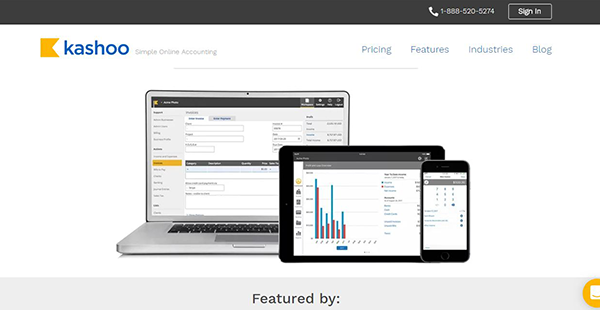
Better still, Kashoo has an intuitively designed dashboard that lets you see the financial health of your business in real-time. The dashboard shows you the income, expenses, profits, and losses made by your business. It allows you to forecast and make informed decisions with instant insights into monthly and annual accounts receivable, accounts payable, expenses, income, and more.
Additionally, there is a bank reconciliation feature that reflects all the transactions and amounts of your business bank accounts. The feature gives you options to import your bank statements by .qfx, ofx, qbo, or leverage the power of the live bank feeds tool. Kashoo spontaneously suggests transaction matches and allows you to reconcile your bank statements in minutes.
Show MoreOverview of Kashoo Features
- Expense tracking
- Create and send invoices
- Credit card payments
- Real-time bank feeds
- Dashboard
- Multicurrency
- Bank reconciliation
- Account receivable
- Accounts payable
- Billing and invoicing
- Payroll management
- CPA Firms
- Project accounting
- Tax management
- Insightful reports
Kashoo Position In Our Categories
Bearing in mind companies have distinct business demands, it is reasonable they abstain from seeking a one-size-fits-all, “perfect” system. Nevertheless, it is almost impossible to chance on such application even among well-known software solutions. The clever thing to do would be to spell out the numerous chief factors that call for a consideration like major features, budget, technical skill levels of the employees, company size, etc. The second step is, you must double down on the product research exhaustively. Read some of these Kashoo review articles and explore the other applications in your list more closely. Such detailed research ascertain you avoid ill-fitting software products and select the system that offers all the features your company requires to be successful.
Position of Kashoo in our main categories:
TOP
200
Kashoo is one of the top 200 Accounting Software products
If you are considering Kashoo it may also be sensible to investigate other subcategories of Accounting Software gathered in our base of B2B software reviews.
It's crucial to realize that almost no software in the Accounting Software category will be a perfect solution able to meet all the needs of different business types, sizes and industries. It may be a good idea to read a few Kashoo Accounting Software reviews first as some services might dominate only in a really small set of applications or be designed with a very specific industry in mind. Others might operate with an idea of being simple and intuitive and consequently lack complicated functions desired by more experienced users. There are also solutions that cater to a wide group of customers and give you a rich feature set, however this usually comes at a higher price of such a service. Be certain that you're aware of your needs so that you buy a software that offers specifically the elements you search for.
How Much Does Kashoo Cost?
Kashoo Pricing Plans:
Free Trial
Accounting software
From @ $16.65/month
What are Kashoo pricing details?
Kashoo Pricing Plans:
Free Trial
Accounting software
From @ $16.65/month
Kashoo offers a straightforward enterprise pricing structure that is optimized for all business owners. Contact the vendor for a customized price quote:
Accounting software from @ $16.65/month
- Web and mobile app
- credit card payments
- Simple reporting
- Square, Freshbooks, and Stripe integrations
- Unlimited access to customer support team
User Satisfaction
Positive Social Media Mentions
49
Negative Social Media Mentions
1
We realize that when you choose to buy a Accounting Software it’s important not only to find out how professionals evaluate it in their reviews, but also to discover if the real users and companies that bought this software are actually happy with the service. That’s why we’ve created our behavior-based Customer Satisfaction Algorithm™ that gathers customer reviews, comments and Kashoo reviews across a broad array of social media sites. The data is then presented in an easy to digest way revealing how many people had positive and negative experience with Kashoo. With that information at hand you will be equipped to make an informed purchasing choice that you won’t regret.
Video
Technical details
Devices Supported
- Windows
- Android
- iPhone/iPad
- Mac
- Web-based
Deployment
- Cloud Hosted
Language Support
- English
- Japanese
- Spanish
- French
Pricing Model
- Monthly payment
- Annual Subscription
Customer Types
- Small Business
- Freelancers
What Support Does This Vendor Offer?
- phone
- live support
- training
- tickets
What integrations are available for Kashoo?
Kashoo integrates with the following business applications:
- NetSuite
- net
- PayPal
- Freshbooks
- MailChimp
- QuickBooks
- Salesforce
- Stripe
- Xero
Kashoo User Reviews
Kashoo average rating:
5/5
Overall impression
5/5
Customer Support
4/5
Value for Money
4/5
Ease of Use
Write your own review of this product
ADD A REVIEWThe most favorable review

PROS: I am very happy with the benefits Kashoo has given us. We can access it anywhere, making work easier for us. We can also use it without much knowledge of bookkeeping as it is very easy to use. To top its use, it has excellent customer service.
CONS: An option where we could turn proposals into invoices would make Kashoo better. I also think that they should fix the syncing issue with iPads.
The least favorable review
PROS: As I am operating a relatively small business, I needed a system that is affordable and provides all the functions I need. Kashoo was able to give me all that. It is very easy to use even if I am not familiar with accounting. It is also the cheapest alternative out there. Furthermore, since I have to deal with clients that have different currencies, Kashoo was able to help me navigate this as they also have the best customer service.
CONS: I really don't have much to dislike about Kashoo. It has met almost all of my needs and their team is also very supportive. They've never let me down whenever I experience any difficulties.
More reviews from 13 actual users:
Sort by:
Latest
- Latest
- Most useful
- Most positive
- Most negative
A bookkeeping application that is easy to use and user-friendly
Read full review >
4/5
Overall impression
4/5
Customer Support
3/5
Value for Money
3/5
Ease of Use
Published on: 07.11.2021
Company Size: 1-10 Employees
Industry: Accounting
PROS: Despite very little knowledge in bookkeeping, I was able to use Kashoo easily. It has all the functions I need for my business including linking to bank accounts; straightforward reconciliation process; and reports for our financial statement.
CONS: Kashoo offers limited functions in terms of filtering transactions and getting details of expenses in specific projects. Creating an income statement is possible but clicking on an expense line item is not. This makes it hard to generate detailed reports. Kashoo also separates "Income & expenses" and "Invoices" and "Bills". This particular divide confuses me and I think it is impractical.
Available online and easy to use
Read full review >
5/5
Overall impression
5/5
Customer Support
5/5
Value for Money
4/5
Ease of Use
Published on: 05.10.2021
Company Size: 1-10 Employees
Industry: N/A
PROS: It is cloud-based so I can access it anywhere. It also has a user-friendly interface that allows easy editing of data. I also saved a lot of money as no software maintenance is needed.
CONS: I hope Kashoo could develop a much more flexible reporting system that allows the creation of financial reports. I also hope that it could support iPadOS safari for easier inputting of data.
No complaints, very good bookkeeping app
Read full review >
5/5
Overall impression
4/5
Customer Support
4/5
Value for Money
4/5
Ease of Use
Published on: 27.09.2021
Company Size: 1-10 Employees
Industry: N/A
PROS: It is by far the best bookkeeping system out there. It is super user-friendly and I love how I can use it anywhere. This makes work very easy for me, especially when I visit clients.
CONS: I have nothing to dislike about Kashoo. My experience with this application is stellar.
Affordable and provides the best service
Read full review >
4/5
Overall impression
4/5
Customer Support
4/5
Value for Money
3/5
Ease of Use
Published on: 22.07.2021
Company Size: 1-10 Employees
Industry: N/A
PROS: As I am operating a relatively small business, I needed a system that is affordable and provides all the functions I need. Kashoo was able to give me all that. It is very easy to use even if I am not familiar with accounting. It is also the cheapest alternative out there. Furthermore, since I have to deal with clients that have different currencies, Kashoo was able to help me navigate this as they also have the best customer service.
CONS: I really don't have much to dislike about Kashoo. It has met almost all of my needs and their team is also very supportive. They've never let me down whenever I experience any difficulties.
Bookkeeping made easy and quick
Read full review >
5/5
Overall impression
4/5
Customer Support
4/5
Value for Money
4/5
Ease of Use
Published on: 18.06.2021
Company Size: 1-10 Employees
Industry: N/A
PROS: I don't need to install anything to use Kashoo. I just need a laptop, a browser and the internet to do invoicing and accounting. This is very convenient because I never had trouble with its access.
CONS: Using Kashoo using the mobile app is quite slow. I hope they can make the application work as fast as when we use it on our laptop. I also hope they can make managing sales tax easier.
It made starting my business easier
Read full review >
4/5
Overall impression
4/5
Customer Support
3/5
Value for Money
3/5
Ease of Use
Published on: 22.04.2021
Company Size: 1-10 Employees
Industry: N/A
PROS: I have been using Kashoo for many years now. From the start, it has been a very convenient system as it does not cost much and is cloud-based. I have 3 personnel who have access to Kashoo and they are all in different locations, so the cloud-based feature of Kashoo is a great help for us. It is also very easy to use so despite not having much background in accounting, I was able to use it without any problem.
CONS: I hope that in time we can change the outgoing email content for the invoices so we can personalize it per client. This way, the message can also reflect our business. There are also times when the bank Recs do not automatically load, so I have to manually add them one by one. This takes me some time so it can be inconvenient.
Kashoo is a very practical application to use
Read full review >
5/5
Overall impression
4/5
Customer Support
4/5
Value for Money
5/5
Ease of Use
Published on: 29.03.2021
Company Size: 1-10 Employees
Industry: N/A
PROS: It is a very practical and simple application. I had no trouble using it because there are plenty of tutorials I can watch online plus Kashoo's customer service is also very accomodating.
CONS: There are times when my bank feed does not load, but this type of problem is resolved immediately by their customer service.
Number one cloud accounting application
Read full review >
5/5
Overall impression
4/5
Customer Support
5/5
Value for Money
5/5
Ease of Use
Published on: 06.03.2021
Company Size: 1-10 Employees
Industry: N/A
PROS: Kashoo is a great application that is easy to use and is quick and efficient. Its user-friendly features like the easy integration with Stripe and Payroll make receiving payments from clients more convenient. Kashoo also has very good customer service. The few times I had to contact them, they were able to solve my problem quickly. I highly recommend Kashoo as it is among the best bookkeeping system out there. I've been using it in four of my businesses and I have no regrets.
CONS: Having multi-currency profiles in the app, much like in the web, will be greatly appreciated. I also hope that there would be a French version of the application so accountants in my region will be able to easily understand the reports. I'd also appreciate it if we can have the data converted into graphs just to lessen the burden of creating one ourselves.
I love everything about Kashoo
Read full review >
4/5
Overall impression
3/5
Customer Support
4/5
Value for Money
4/5
Ease of Use
Published on: 25.02.2020
Company Size: 1-10 Employees
Industry: Broadcast Media
PROS: I can use Kashoo anywhere as I only need my credentials to log-in. I use it to create and send an invoice to my clients via email or by printing it.
CONS: In my opinion, I think Kashoo should allow the creation of invoices after a quotation has been approved. I think that by adding this feature, it will greatly improve an already good application.
It is amazing how I can use it anywhere
Read full review >
5/5
Overall impression
5/5
Customer Support
4/5
Value for Money
5/5
Ease of Use
Published on: 25.02.2020
Company Size: 11-50 Employees
Industry: Professional Training & Coaching
PROS: Kashoo is the first cloud-based accounting software to be made and because of that, it has remained the best in this field. We've been loyal clients since its launch and we can completely say that it is user-friendly and highly functional.
CONS: As Kashoo is not as popular as other software, it has very limited plug-ins. This can be limiting for us as we have to look more for a plug-in that can be integrated into Kashoo.
Kashoo is very easy to use
Read full review >
5/5
Overall impression
4/5
Customer Support
4/5
Value for Money
5/5
Ease of Use
Published on: 03.02.2020
Company Size: 1-10 Employees
Industry: Accounting
PROS: I love everything about Kashoo. It is the only application that contains everything I need to help my business and it is absolutely easy to use.
CONS: I only have two problems with Kashoo. The first one is creating statements using my iPad and the second one is the difficulty in setting up my sales taxes.
I have been using Kashoo for a long time now and I am very satisfied
Read full review >
4/5
Overall impression
4/5
Customer Support
4/5
Value for Money
3/5
Ease of Use
Published on: 28.01.2020
Company Size: 1-10 Employees
Industry: N/A
PROS: Simple to use and is very good for my business. I can run multiple accounts and I can provide stakeholders with how my business is doing.
CONS: Integration with my overseas account is sometimes unavailable.
It is a must-use application for small businesses
Read full review >
5/5
Overall impression
5/5
Customer Support
4/5
Value for Money
4/5
Ease of Use
Published on: 27.01.2020
Company Size: 1-10 Employees
Industry: N/A
PROS: I am very happy with the benefits Kashoo has given us. We can access it anywhere, making work easier for us. We can also use it without much knowledge of bookkeeping as it is very easy to use. To top its use, it has excellent customer service.
CONS: An option where we could turn proposals into invoices would make Kashoo better. I also think that they should fix the syncing issue with iPads.


Join a community of 7,369 SaaS experts
Thank you for the time you take to leave a quick review of this software. Our community and review base is constantly developing because of experts like you, who are willing to share their experience and knowledge with others to help them make more informed buying decisions.
Sign in with LinkedIn
Why we require LinkedIn?
- Show the community that you're an actual user.
- We will only show your name and profile image in your review.
- You can still post your review anonymously.
OR
Sign in with company emailSign in with company email
Popular Kashoo Alternatives




Top Competitors To Kashoo By Price
Product name:
Price:





Trending Accounting Software Reviews




Kashoo Comparisons
Product name:





Kashoo user reviews
A bookkeeping application that is easy to use and user-friendly
Read full review >
4/5
Overall impression
4/5
Customer Support
3/5
Value for Money
3/5
Ease of Use
Published on: 07.11.2021
Company Size: 1-10 Employees
Industry: Accounting
Available online and easy to use
Read full review >
5/5
Overall impression
5/5
Customer Support
5/5
Value for Money
4/5
Ease of Use
Published on: 05.10.2021
Company Size: 1-10 Employees
Industry: N/A
No complaints, very good bookkeeping app
Read full review >
5/5
Overall impression
4/5
Customer Support
4/5
Value for Money
4/5
Ease of Use
Published on: 27.09.2021
Company Size: 1-10 Employees
Industry: N/A
Affordable and provides the best service
Read full review >
4/5
Overall impression
4/5
Customer Support
4/5
Value for Money
3/5
Ease of Use
Published on: 22.07.2021
Company Size: 1-10 Employees
Industry: N/A
Bookkeeping made easy and quick
Read full review >
5/5
Overall impression
4/5
Customer Support
4/5
Value for Money
4/5
Ease of Use
Published on: 18.06.2021
Company Size: 1-10 Employees
Industry: N/A

Page last modified



Did you find this review useful?
Yes
No
Thank you for your feedback
How can we make this page better?
Unsure about this software?
FIND ALTERNATIVES
 Why is FinancesOnline free?