
- Home
- Document Creation Software
- Kernel Office 365 Migration

Kernel Office 365 Migration Review


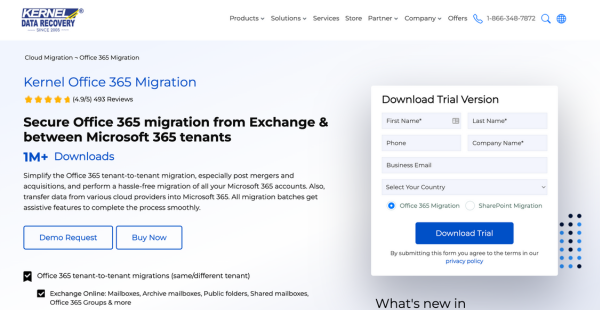

What is Kernel Office 365 Migration?
Kernel Office 365 Migration is a secure and advanced migration solution trusted by over two million satisfied customers globally. This platform offers seamless migration of mailboxes, public folders, archive mailboxes, and shared mailboxes.
Kernel Office 365 Migration users can migrate 10 items per folder for a smooth transition, with automated bulk migration using CSV files. This platform caters to businesses of all sizes seeking hassle-free data migration so no data loss during the process.
Kernel Office 365 Migration offers a secure and efficient migration process backed by 18 years of expertise. Overall, Kernel Office 365 Migration is a reliable choice for businesses worldwide with its free support and updates.
Show MoreOverview of Kernel Office 365 Migration Benefits
Kernel Office 365 Migration leverages advanced filtering options, detailed reporting, and robust security measures to guarantee data integrity and operational continuity. These are the benefits users can expect upon using Kernel Office 365 Migration:
Seamless Tenant-to-Tenant Migration
Kernel Office 365 Migration allows direct mapping between source and destination mailboxes for a straightforward process. This tool is particularly beneficial during mergers, acquisitions, or organizational restructuring. Kernel Office 365 Migration also supports the migration of emails, public folders, shared mailboxes, and groups without data loss or downtime.
Unlimited Mailbox Migration
Kernel Office 365 Migration can handle large datasets efficiently to ensure that all user data is transferred seamlessly. This tool uses CSV files for automated bulk migration to save time and reduce manual effort. With unlimited mailbox migration, this tool maintains productivity and operational continuity.
Data Integrity and Security
Kernel Office 365 Migration preserves the hierarchy and metadata of mailbox items. This way, all emails, contacts, tasks, and journal entries retain their original structure and properties. This attention to detail prevents data corruption and ensures peace of mind during the migration.
Advanced Filtering Options
Kernel Office 365 Migration allows users to migrate specific data based on item type, date range, and folder selection. This tool helps organizations comply with data retention policies and avoid transferring unnecessary data. By skipping previously migrated items and excluding deleted or empty folders, the migration process is efficient and tailored to user needs.
Comprehensive Reporting and Monitoring
Kernel Office 365 Migration provides detailed reports after each migration task. These reports include the status of each folder and item migrated to ensure transparency and accountability. This allows administrators to monitor the migration process in real time. It also helps them troubleshoot issues quickly and make sure that all data has been accurately transferred.
Wide Compatibility
Kernel Office 365 Migration supports all Office 365 plans and subscriptions, including GCC High, GCC, DOD, and standard commercial plans. This wide compatibility ensures that organizations of all sizes and types can use the tool for their migration needs. Kernel Office 365 Migration accommodates all scenarios, be it shifting to a new plan or staying within the same one.
Show MoreOverview of Kernel Office 365 Migration Features
- Tenant-to-Tenant Office 365 migration
- Office 365 Mailboxes Migration
- Source and Destination Mailboxes Direct Mapping
- Public Folders Migration
- Archive Mailboxes Migration
- Shared Mailboxes Migration
- Automated Bulk Migration using CSV Files
- Emails Migration
- Journal Entries Migration
- Appointments Migration
- Contacts Migration
- Attachments Migration
- Tasks Migration
- Migration Task Reports Generation
- Migrated Data Skip Option
- Specific Data Migration Filter Options
Awards & Quality Certificates

Kernel Office 365 Migration Position In Our Categories
Since businesses have unique business needs, it is wise they steer clear of purchasing an all-encompassing, ideal solution. Having said that, it would be futile to try to pinpoint such a software system even among well-known software systems. The right thing to undertake is to shortlist the several essential functions that require examination including important features, budget, technical skill capability of the employees, organizational size, etc. Next, you should perform your research comprehensively. Go over some of these Kernel Office 365 Migration evaluations and look into each of the solutions in your list more closely. Such all-encompassing product research guarantees you keep away from mismatched apps and pay for the one that delivers all the benefits your business requires for success.
Position of Kernel Office 365 Migration in our main categories:
TOP
50
Kernel Office 365 Migration is one of the top 50 Document Creation Software products
If you are considering Kernel Office 365 Migration it may also be a good idea to investigate other subcategories of Document Creation Software gathered in our database of B2B software reviews.
It is essential to keep in mind that hardly any app in the Document Creation Software category is an ideal solution that can fulfill all the goals of different business types, sizes and industries. It may be a good idea to read a few Kernel Office 365 Migration Document Creation Software reviews first as some services might perform well just in a very small group of applications or be created with a very specific type of industry in mind. Others might operate with an idea of being simple and intuitive and as a result lack advanced elements desired by more experienced users. You can also come across apps that focus on a broad group of users and provide a powerful feature set, but that in most cases comes at a higher cost of such a solution. Make sure you're aware of your needs so that you get a software that has specifically the functionalities you search for.
How Much Does Kernel Office 365 Migration Cost?
Kernel Office 365 Migration Pricing Plans:
Free Trial
Office 365 Emails Migration
$249
Office 365 Complete Tenant to Tenant
$999
What are Kernel Office 365 Migration pricing details?
Kernel Office 365 Migration Pricing Plans:
Free Trial
Office 365 Emails Migration
$249
Office 365 Complete Tenant to Tenant
$999
Kernel Office 365 Migration provides a free trial and two one-time payment options. Moreover, users can benefit from a 30-day money-back guarantee.
Office 365 Emails Migration – $249 for 100 mailboxes
- Free Upgrades
- No File Size Limit
- Feature Updates
- Technical Support
Office 365 Complete Tenant to Tenant – $999 for 100 mailboxes
- Everything in Office 365 Emails Migration+
- Transfer All Office 365 Data Between Tenants
User Satisfaction
Positive Social Media Mentions
139
Negative Social Media Mentions
14
We realize that when you make a decision to get a Document Creation Software it’s vital not only to see how professionals score it in their reviews, but also to discover whether the actual users and enterprises that bought it are genuinely content with the product. That’s why we’ve devised our behavior-based Customer Satisfaction Algorithm™ that gathers customer reviews, comments and Kernel Office 365 Migration reviews across a vast array of social media sites. The information is then displayed in a simple to understand form revealing how many clients had positive and negative experience with Kernel Office 365 Migration. With that information available you will be ready to make an informed buying decision that you won’t regret.
Video
Technical details
Devices Supported
- Windows
Deployment
- On Premise
Language Support
- English
Pricing Model
- One-time payment
Customer Types
- Small Business
- Large Enterprises
- Medium Business
- Freelancers
What Support Does This Vendor Offer?
- phone
- live support
- training
- tickets
What integrations are available for Kernel Office 365 Migration?
As of this writing, Kernel Office 365 Migration only integrates with Microsoft Office 365.

Kernel Office 365 Migration
is waiting for
your first review.

Write your own review of this product
ADD A REVIEWMore reviews from 0 actual users:


Join a community of 7,369 SaaS experts
Thank you for the time you take to leave a quick review of this software. Our community and review base is constantly developing because of experts like you, who are willing to share their experience and knowledge with others to help them make more informed buying decisions.
Sign in with LinkedIn
Why we require LinkedIn?
- Show the community that you're an actual user.
- We will only show your name and profile image in your review.
- You can still post your review anonymously.
OR
Sign in with company emailSign in with company email
Popular Kernel Office 365 Migration Alternatives


Top Competitors To Kernel Office 365 Migration By Price
Product name:
Price:



Trending Document Creation Software Reviews



Kernel Office 365 Migration Comparisons
Product name:


Page last modified
Award Winner




Did you find this review useful?
Yes
No
Thank you for your feedback
How can we make this page better?
Unsure about this software?
FIND ALTERNATIVES
 Why is FinancesOnline free?