

MarketMan Review



What is MarketMan?
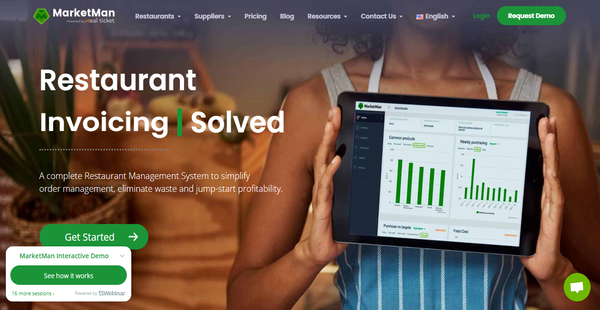
MarketMan is an all-in-one restaurant management system designed specifically for restaurants, bars, cafes, and supply chains. Built for businesses of all scales, the platform offers seven modules to streamline backend and frontend workflows and lower overhead costs. These are restaurant management, inventory management, purchasing and order management, expense tracking, multi-units and chains, recipe management, and payment management.
MarketMan is equipped with tools for recipe costing. The typically cumbersome process is made easy with the software presenting price and ingredient breakdowns for every item on the menu as well as concept dishes that can potentially become part of your restaurant’s offerings. The application enables you to create a digital cookbook, which serves as a food prep guide for your branches.
One of MarketMan’s strong points is its expansive toolset for inventory management. It has an intuitive tracker that lets you monitor not just the movement of inventory items but also waste, theft, and item transfers from one branch to another in real time. In addition, you can scan invoices and have MarketMan automatically update your inventory.
Complementing the inventory module is an automated set of purchase and ordering functionalities. MarketMan automates the process of ordering inventory items from suppliers as it accounts for your budget and delivery deadlines and durations. This removes redundant activities and shortens time-consuming processes. Since full automation may not cover every scenario, the platform lets you set conditions or paths for the automated workflows to follow should a specific event occur. These conditions include purchase limits, budget limits, and PAR levels. Doing so keeps you from overspending during every sourcing run.
Another notable MarketMan solution is its expense management tool. Besides the company updating your inventory upon receiving scanned invoices, the platform automatically tracks credits and price changes, and then regularly sends you updates regarding both. What’s more, the application allows you to automatically pay your vendors using a variety of payment methods, including credit cards, online banking, and ACH. These are automatically entered on a digital ledger, given its seamless integration with QuickBooks.
For large enterprises, MarketMan unifies information in a centralized database for all branches and related businesses and enables you to create an individual database for each. You can set automation rules and permissions regarding purchasing, receiving orders, and settling expenses for each branch. Moreover, you can track inventory movement up to the warehouse level, allowing you to spot inconsistencies and infer instances of pilferage. The app also allows you to manage orders and kitchen workflows and access invoices and order histories from one secure location.
MarketMan integrates with a considerable number of widely used business tools. The integrations include QuickBooks, Dinerware, Sage Intacct, bill.com, Brink POS, Invu, and Touchbistro. These expand the capabilities of the already feature-rich system and offer smooth data sharing and processing among platforms, resulting in fully optimized operations.
Furthermore, MarketMan provides tools for creating and customizing a white-label application for your brand. It carries powerful functionalities for customers and vendors/suppliers. The software also has a back-office management solution for suppliers with which you can apply proper inventory and order management.
MarketMan comes in three pricing plans and a trio of add-ons, namely invoice scans, vendor integrations, and a commissary module. You can request a demo and have the vendor set up the software for you, which comes with a one-time setup fee.
Show MoreOverview of MarketMan Benefits
Convenient recipe costing and management
MarketMan enables chefs and restaurant managers to break down the ingredients of menu items and prospective dishes along with their respective costs. This helps you set proper margins and establish price points that conform with your target market’s preferences and buying power. The recipes can be compiled into digital cookbooks, which can serve as meal prep guides for all your branches and food businesses.
Monitor inventory movement
Food establishments and supply chains will have an easier time tracking the movement of inventory items. MarketMan allows you to monitor branch or location transfers of stock and possibly determine factors like theft and wastage. If you update the inventory, the changes made are reflected on the devices of all other users, which is helpful to restaurants with multiple branches or complex workflows.
Automated orders and payments
MarketMan simplifies the act of ordering goods from suppliers by automating the whole process. This allows your staff to focus on other things. Moreover, the software lets you apply conditions like budget limits, purchase limits, and PAR levels to account for every possible payment scenario, allowing you to stay within your budget for every sourcing run.
Efficient tracking of expenses
MarketMan helps restaurants monitor credits and the price changes of your ingredients, then regularly sends updates regarding both. With it, you can monitor the inventory you bought from each supplier and see your order history. The platform’s expense management tools help you plan out your sourcing runs, allowing you to make adjustments or seek alternatives should the prices of ingredients drastically increase.
Consolidated inventory database
Restaurants with several branches and enterprises with multiple food businesses will have an easier time managing their inventories, thanks to MarketMan’s centralized database. They can monitor, update, and receive updates about the inventory of all their branches within the platform on all connected devices. Moreover, the software tracks the items up to the warehouse level, making it fairly simple to spot errors and the areas in which these occurred.
Automatic input of scanned invoices
MarketMan takes the labor of manually inputting invoice details on the system off your hands. You can have the company’s staff do it for you by sending them scanned copies of invoices. The number of invoices recorded per month ranges from 20 to 300 depending on your plan.
Automatic reminders
MarketMan alerts you to significant developments regarding sales, inventory, orders, and payments by automatically sending notifications to your desktops and mobile devices. As such, you can quickly respond to or make adjustments for specific scenarios.
Powerful integrations
Marketman expands its capabilities by integrating with widely used business tools like accounting, POS, and other restaurant management systems. As a result, processing data from one platform to another is smoother and the occurrence of errors is minimized.
Show MoreOverview of MarketMan Features
- Order Management
- Automated Ordering
- Order via PC or Mobile Device
- Easy Delegation
- User and Permission Management
- Fraud Prevention
- Budget management
- Supplier management
- Food Costing
- Inventory Management
- Alerts and Reports
- Actual vs. theoretical food cost
- Third Party Integrations
- Control Brand
- Product Catalog
What Problems Will MarketMan Solve?
1) Food Costing
- Plan and budget menu items, ingredients and preparations. Know your most and least profitable items
2) Control Inventory
- Know inventory quantity and value in real-time
- Ability to take inventory counts on a mobile device
- Easily track waste and theft
3) Optimize Ordering Processes
- Set PAR levels
- System suggested ordering
- Submit digital purchase orders
4) Alerts & Reports
- Low inventory alerts
- Profitability and usage reports
- Real time dashboard views & notifications
Awards & Quality Certificates

MarketMan Position In Our Categories
Bearing in mind businesses have unique business-related requirements, it is only sensible they steer clear of adopting a one-size-fits-all, ideal software solution. At any rate, it would be almost impossible to try to stumble on such an app even among recognizable software systems. The efficient step to do should be to jot down the several key functions that need scrutiny such as major features, price plans, technical skill capability of staff, company size, etc. Then, you should do the product research comprehensively. Browse over some MarketMan analyses and look over the other software systems in your shortlist in detail. Such comprehensive research guarantees you keep away from mismatched applications and pay for the system that offers all the tools your company requires to realize efficiency.
Position of MarketMan in our main categories:
TOP
20
MarketMan is one of the top 20 Restaurant Management Software products
TOP
50
MarketMan is one of the 50 Sales Tools products
Every enterprise has its own characteristics, and can need a particular type of Restaurant Management Software solution that will be fit for their company size, type of clients and staff and even particular niche they cater to. It's not wise to count on finding an ideal app that is going to work for each company regardless of their background is. It may be a good idea to read a few MarketMan Restaurant Management Software reviews first and even then you should remember what the software is intended to do for your company and your staff. Do you require a simple and straightforward service with only essential features? Will you really use the complex tools needed by pros and large enterprises? Are there any particular tools that are especially beneficial for the industry you operate in? If you ask yourself these questions it is going to be much easier to locate a reliable solution that will match your budget.
How Much Does MarketMan Cost?
MarketMan Pricing Plans:
Free Trial
Operator
$152/month/location
Professional
$211/month/location
Ultimate
$339/month/location
What are MarketMan pricing details?
MarketMan Pricing Plans:
Free Trial
Operator
$152/month/location
Professional
$211/month/location
Ultimate
$339/month/location
MarketMan offers three SMB and enterprise pricing plans for users to choose from. Give the details a look, and select your plan:
Operator – Monthly Plan: $149/month/location; Annual Plan: $152/month/location
- Placing & receiving purchase orders
- Inventory counting and transfers
- Accounts payable management
- POS & accounting software Integrations
- COGs and purchasing reporting
- 20 invoice scans per month
Professional – Monthly Plan: $249/month/location; Annual Plan: $211/month/location
- All features of the Operator Plan
- Supplier order automation & approvals
- Inventory waste tracking
- Recipe costing & digital cookbook
- Advanced profitability reporting
- Actual vs. theoretical reporting
- API access
- 100 invoice scans per month
Ultimate – Monthly Plan: $399/month/location; Annual Plan: $339/month/location
- All features of the Professional Plan
- 2 included vendor integrations
- 300 invoice scans per month
User Satisfaction
Positive Social Media Mentions
7
Negative Social Media Mentions
0
We realize that when you decide to get a Restaurant Management Software it’s vital not only to find out how professionals evaluate it in their reviews, but also to check if the real clients and businesses that use it are actually happy with the product. Because of that need we’ve devised our behavior-based Customer Satisfaction Algorithm™ that aggregates customer reviews, comments and MarketMan reviews across a broad array of social media sites. The data is then displayed in an easy to digest format revealing how many people had positive and negative experience with MarketMan. With that information at your disposal you should be equipped to make an informed buying decision that you won’t regret.
Video
Technical details
Devices Supported
- Windows
- Android
- iPhone/iPad
- Mac
- Web-based
Deployment
- Cloud Hosted
Language Support
- English
- German
- Spanish
- French
Pricing Model
- Monthly payment
- Annual Subscription
Customer Types
- Small Business
- Large Enterprises
- Medium Business
What Support Does This Vendor Offer?
- phone
- live support
- training
- tickets
What integrations are available for MarketMan?
- Quickbooks
- Invu Point of Sale
- Brink POS
- bill.com
- Sage Intacct
- TouchBistro
- Tray
- Dinerware
- Omnivore
- Aloha
- Heartland Xpient
- Clover
- Lavu
- Upserve Breadcrumb POS
- Tabit Dinesmart
- Shopwave
- QU Beyond POS

MarketMan
is waiting for
your first review.

Write your own review of this product
ADD A REVIEWMore reviews from 0 actual users:


Join a community of 7,369 SaaS experts
Thank you for the time you take to leave a quick review of this software. Our community and review base is constantly developing because of experts like you, who are willing to share their experience and knowledge with others to help them make more informed buying decisions.
Sign in with LinkedIn
Why we require LinkedIn?
- Show the community that you're an actual user.
- We will only show your name and profile image in your review.
- You can still post your review anonymously.
OR
Sign in with company emailSign in with company email
Useful MarketMan Resources
Popular MarketMan Alternatives



Top Competitors To MarketMan By Price
Product name:
Price:



Trending Restaurant Management Software Reviews



MarketMan Comparisons
Product name:





Page last modified
 Why is FinancesOnline free?