

Monitask Review


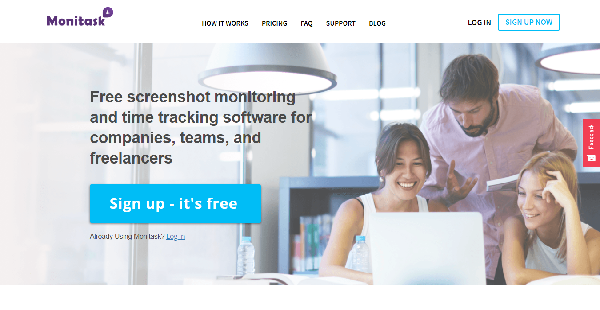

What is Monitask?
Monitask is a time tracking and productivity monitoring solution created for organizations and companies that employ a remote workforce. It has time logging capabilities, random screenshot function, app usage tracker, and robust reporting tools among others, all designed and geared to empower employee productivity and efficiency.
With Monitask, employees can log in and out easily, begin and end their work confident that their working hours are recorded from start to finish down to the last second. Managers can monitor their team members’ performance via screenshots at random times of the day as well as mouse and keyboard activity and app usage.
The software makes it easy for managers to ensure that all workings hours are spent on work while employees are wholly driven to become productive assets of the company knowing that their time and contribution are monitored and valued.
Show MoreOverview of Monitask Benefits
Accurate Time Tracking Means Accurate Billing
Monitask helps you ensure that your employees spend their working hours on their tasks and not waste precious time on unrelated and unproductive activities. Because you are able to monitor their progress with random screenshots, app usage tracker, and keyboard-mouse activity, you get the whole picture of how they spend their time at work.
The software’s time tracking functionality is highly accurate and shows you what your employees are doing at a given hour. This helps you bill your employees accurately, which motivates your employees to spend their working hours on their tasks. Simply put, accurate billing translates to more productive hours which results in more tasks getting done.
Know Apps That Push and Impede Productivity
It is critical in any modern workplace to deploy and use apps that accelerate tasks. With Monitask, you can generate reports to check apps and programs your remote workers use and see if these apps are really helping your employees to work at a productive rate.
You can customize your reports to reveal how many times a program is used and for how long as well as how many employees are using the same app. Monitask shows you which apps are encouraging productivity and efficiency and which ones are bogging down work progress. Basically, Monitask shows you which programs you should go for to get more value from your workers and your money.
Project Management Capabilities
More than just tracking time and motivating employees to be productive, Monitask can also be used to create and manage projects. In a few clicks, you can create projects, assign individuals or teams to specific tasks, and monitor their progress within a single platform.
Show MoreOverview of Monitask Features
- Employee Clock In/Clock Out
- Random Screenshots
- App Usage Tracking
- Keyboard/Mouse Activity Tracking
- Project and Task Management
- Statistics
- Reporting
What Problems Will Monitask Solve?
Low Employee Productivity
Lightweight yet powerful, Monitask offers a productivity analysis feature that monitors employee performance. Users will be able to identify low-performing employees via internet and application tracking. With this information available, managers can find ways to train these underperformers and help them be more motivated with their work to improve productivity.
Inefficient Time Tracking
Time is one of the most valuable resources for agencies, and any amount of time wasted is a lost opportunity for growth. To make sure that every hour is spent productively and efficiently, Monitask comes with automatic time tracking features. These allow managers to utilize automated timesheets for easy logging, making sure work hours are maximized.
Monitoring Remote Teams
A lot of SEO, design, and software businesses have team members based internationally, making it difficult to monitor their activities from the office. Time zone differences also make it all the more challenging for these companies to maximize employee productivity. Monitask can resolve this with its HD screenshots, screen monitoring, and real-time dashboard features.
Awards & Quality Certificates


Monitask Position In Our Categories
Because companies have distinct business-related wants, it is only wise that they steer clear of going for an all-in-one, ideal software product. Regardless, it is futile to come across such application even among widely used software systems. The practical step to do should be to list the several essential functions which need investigation like critical features, pricing, skill competence of staff members, organizational size, etc. After which, you must perform the research through and through. Read some Monitask evaluations and look over the other software systems in your list more closely. Such detailed research ascertain you avoid poorly fit applications and select the one that has all the aspects your company requires to realize efficiency.
Position of Monitask in our main categories:
TOP
10
Monitask is one of the top 10 Computer Monitoring Software products
TOP
20
Monitask Employee Monitoring Software products
There are trendy and widely used applications in each software group. But are they necessarily the best fit for your enterprise’s unique requirements? A trendy software application may have thousands of subscribers, but does it provide what you need? For this reason, do not blindly invest in popular systems. Read at least a few Monitask Employee Monitoring Software reviews and consider the aspects that you desire in the software such as the fees, main features, available integrations etc. Then, select a few apps that fit your requirements. Check out the free trials of these apps, read online opinions, get explanations from the vendor, and do your homework thoroughly. This profound homework is sure to assist you choose the best software platform for your firm’s unique wants.
How Much Does Monitask Cost?
Monitask Pricing Plans:
Free Trial
Professional Version
$2.99/user/month
Hosted Version
Contact vendor
What are Monitask pricing details?
Monitask Pricing Plans:
Free Trial
Professional Version
$2.99/user/month
Hosted Version
Contact vendor
Monitask offers the following basic and enterprise pricing packages:
Professional Version – $2.99/user/month
- Unlimited Employees
- Time Tracking
- Up to 30 Screenshots per Hour
- Activity tracking
- Online Timesheets
- Reporting
Hosted Version – Custom Enterprise Pricing
- All Professional Version features
- Store screenshots and activity on your servers
- Custom look and feel
- Custom Reports
User Satisfaction
Positive Social Media Mentions
74
Negative Social Media Mentions
2
We know that when you choose to buy a Employee Monitoring Software it’s important not only to find out how experts evaluate it in their reviews, but also to check whether the real clients and enterprises that purchased it are indeed happy with the product. Because of that need we’ve created our behavior-based Customer Satisfaction Algorithm™ that gathers customer reviews, comments and Monitask reviews across a wide range of social media sites. The information is then presented in an easy to digest way revealing how many clients had positive and negative experience with Monitask. With that information at hand you will be prepared to make an informed purchasing choice that you won’t regret.
Video
Technical details
Devices Supported
- Windows
- Mac
- Web-based
Deployment
- Cloud Hosted
Language Support
- English
- Russian
Pricing Model
- Monthly payment
- Quote-based
Customer Types
- Small Business
- Large Enterprises
- Medium Business
- Freelancers
What Support Does This Vendor Offer?
- phone
- live support
- training
- tickets
What integrations are available for Monitask?
No integrations are currently offered, but the vendor will soon partner the following platforms:
- Basecamp
- Asana
- Slack
- Freshbooks
- Teamwork
- Keap
Monitask User Reviews
Monitask average rating:
4/5
Overall impression
4/5
Customer Support
3/5
Value for Money
3/5
Ease of Use
Write your own review of this product
ADD A REVIEWThe most favorable review

PROS: We use Monitask for tracking the workflow of our remote employees. It boasts an easy to use UI that only took us a single session to learn. The tool also has cool reporting capabilities as well as efficient help for analytics. This boosts the productivity and efficiency of our freelance employees and helps us think about providing the right bonuses accurately. In addition, Monitask has little to no bugs and flaws. If it happens that we stumble on one, the tech support team easily iron things up for us.
CONS: We’ve stumbled on an issue with running Monitask on Linux OS. It’s not that big of an issue, however, and the tech support has helped us solve such a problem instantly. Then, we’ve got a smooth program for Linux afterward, which is something that is hard to find these days.
The least favorable review
PROS: We use Monitask for tracking the workflow of our remote employees. It boasts an easy to use UI that only took us a single session to learn. The tool also has cool reporting capabilities as well as efficient help for analytics. This boosts the productivity and efficiency of our freelance employees and helps us think about providing the right bonuses accurately. In addition, Monitask has little to no bugs and flaws. If it happens that we stumble on one, the tech support team easily iron things up for us.
CONS: We’ve stumbled on an issue with running Monitask on Linux OS. It’s not that big of an issue, however, and the tech support has helped us solve such a problem instantly. Then, we’ve got a smooth program for Linux afterward, which is something that is hard to find these days.
More reviews from 3 actual users:
Sort by:
Latest
- Latest
- Most useful
- Most positive
- Most negative
Best employee tracker for remote work setup
Read full review >
4/5
Overall impression
3/5
Customer Support
3/5
Value for Money
3/5
Ease of Use
Published on: 18.10.2021
Company Size: 1-10 Employees
Industry: Computer Software
PROS: We use Monitask for tracking the workflow of our remote employees. It boasts an easy to use UI that only took us a single session to learn. The tool also has cool reporting capabilities as well as efficient help for analytics. This boosts the productivity and efficiency of our freelance employees and helps us think about providing the right bonuses accurately. In addition, Monitask has little to no bugs and flaws. If it happens that we stumble on one, the tech support team easily iron things up for us.
CONS: We’ve stumbled on an issue with running Monitask on Linux OS. It’s not that big of an issue, however, and the tech support has helped us solve such a problem instantly. Then, we’ve got a smooth program for Linux afterward, which is something that is hard to find these days.
Streamlines time tracking, reasonable pricing
Read full review >
4/5
Overall impression
4/5
Customer Support
3/5
Value for Money
3/5
Ease of Use
Published on: 20.03.2021
Company Size: 11-50 Employees
Industry: N/A
PROS: Monitask has a convenient screenshot feature for monitoring the workflow of our employees. It helps me analyze their job easily. The principal reporting feature of Monitask is also very helpful. These are all awesome for my management tasks.
CONS: I’m dissatisfied with how Monitask hasn’t included non-billable features or supports. We often end up counting the workhours of supposedly non-billable tasks. It also has insufficient support and plugins for other tools.
Suitable time tracker for small enterprises
Read full review >
4/5
Overall impression
3/5
Customer Support
4/5
Value for Money
3/5
Ease of Use
Published on: 24.08.2020
Company Size: 11-50 Employees
Industry: Marketing and Advertising
PROS: Monitask has great accuracy and ease of use. It also has efficient controls such as allowing users to toggle screenshot notification off, which is great to minimize work distractions. The platform comes with accurate tools and metrics that support efficient performance tracking as well as smooth management. This helps in managing all our developers and helps in tracking the time they use for their job. As a result, their work efficiency has improved greatly since we’ve used Monitask.
CONS: It lacks some important and handy features. First, it doesn’t allow our clients to view and track projects, then see the time our employees are consuming for each task. Second, it doesn’t support the recording of non-billable hours. What I mean is when I only want to show and bill the clients a fraction of the actual entire time we’ve worked for a project, then keep a company record of the hidden and non-billed time we’ve worked for it. Third, it doesn’t sync with other project tracking tools such as Jira and MS Office 360. Fourth, it doesn’t come with screen recording capabilities in video formats. And lastly, it doesn’t sync to our payroll system, that’s why I need to manually export CSV files for it.


Join a community of 7,369 SaaS experts
Thank you for the time you take to leave a quick review of this software. Our community and review base is constantly developing because of experts like you, who are willing to share their experience and knowledge with others to help them make more informed buying decisions.
Sign in with LinkedIn
Why we require LinkedIn?
- Show the community that you're an actual user.
- We will only show your name and profile image in your review.
- You can still post your review anonymously.
OR
Sign in with company emailSign in with company email
Popular Monitask Alternatives




Top Competitors To Monitask By Price
Product name:
Price:

By quote



Trending Employee Monitoring Software Reviews



Monitask Comparisons
Product name:









Monitask user reviews
Best employee tracker for remote work setup
Read full review >
4/5
Overall impression
3/5
Customer Support
3/5
Value for Money
3/5
Ease of Use
Published on: 18.10.2021
Company Size: 1-10 Employees
Industry: Computer Software
Streamlines time tracking, reasonable pricing
Read full review >
4/5
Overall impression
4/5
Customer Support
3/5
Value for Money
3/5
Ease of Use
Published on: 20.03.2021
Company Size: 11-50 Employees
Industry: N/A
Suitable time tracker for small enterprises
Read full review >
4/5
Overall impression
3/5
Customer Support
4/5
Value for Money
3/5
Ease of Use
Published on: 24.08.2020
Company Size: 11-50 Employees
Industry: Marketing and Advertising

Page last modified



Did you find this review useful?
Yes
No
Thank you for your feedback
How can we make this page better?
Unsure about this software?
FIND ALTERNATIVES
 Why is FinancesOnline free?