
- Home
- Office Software
- NeoOffice

NeoOffice Review


What is NeoOffice?
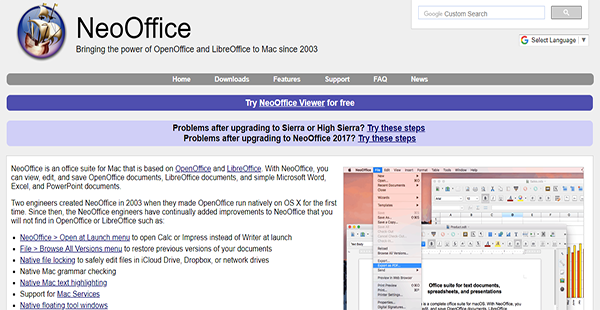
NeoOffice is an office software suite designed specifically for macOS. Its most basic version is free and is capable of viewing and printing PDF files as well as exporting other documents into the format. For entities that require minimal features, the NeoOffice Viewer is the best option.
Meanwhile, those who require more advanced document creation and editing tools have a cost-effective solution the Professional and Mac App Store editions of NeoOffice. Both versions have abilities offered by OpenOffice and LibreOffice, software NeoOffice was patterned after. However, there are improvements like restoring a previous version of a document, file locking for safe editing, grammar checking, and more.
Show MoreOverview of NeoOffice Benefits
Cost-Effective Office Suite
When OpenOffice and LibreOffice were launched, many Mac users also yearned for a more economical solution. That was when two engineers decided to heed the call. Hence, NeoOffice was born. It is inexpensive but it has a wide array of capabilities and tools that are vast improvements on the software it was inspired by.
Configurable Launch
NeoOffice by default open a new Writer document when launched. However, users can customize that to open either Calc or Impress files instead. Other than that, the software can also simply show the Mac menubar where users can choose which kind of file they want to work with at the time.
Version Restore
Unlike other similar software, NeoOffice stores information about previous file versions. This makes it easier to go back to a previous iteration of a document in case users change their mind about the current one or if they need to retrieve data that was embedded in a past version.
Text Highlighting
NeoOffice makes use of some native capabilities of Mac, such as text highlighting. This allows users to focus their own or their reader’s attention to a word, a phrase, or a section in the document.
Safe File Editing
To ensure that documents are not edited by two or more people simultaneously, NeoOffice utilizes a file locking feature. This keeps other users who open a file in Microsoft Office or iCloud Drive to make any changes while somebody else is working on it.
Integrated Grammar Checker
Maintaining professionalism is important even in document content. That is why NeoOffice has an integrated grammar checker. With this tool, users can rest assured that they are using the proper prepositions, word orders, and the like.
Show MoreOverview of NeoOffice Features
- Launch Configuration
- Document Creation & Editing
- PDF Support
- Document Locking
- Grammar Checker
- Text Highlighting
- Mac Services Support
- Floating Toolbars
NeoOffice Position In Our Categories
Keeping in mind companies have unique business demands, it is reasonable they abstain from settling on an all-encompassing, “perfect” business program. Needless to say, it is nearly futile to stumble on such an app even among branded software systems. The reasonable thing to do should be to take note of the different vital aspects that require careful thought like essential features, packages, skill competence of staff, organizational size, etc. Thereafter, you should follow through the product research comprehensively. Read these NeoOffice reviews and check out each of the software solutions in your shortlist more closely. Such detailed product investigation guarantees you take out poorly fit apps and buy the one which offers all the tools your business requires.
Position of NeoOffice in our main categories:
TOP
50
NeoOffice is one of the top 50 Office Software products
If you are considering NeoOffice it might also be a good idea to investigate other subcategories of Office Software listed in our database of SaaS software reviews.
Each enterprise has different requirements and requires a software that can be personalized for their size, kind of workers and buyers, and the specific industry they are in. For these reasons, no system can offer perfect functionality off-the-shelf. When you look for a software app, first be sure what you want it for. Read some NeoOffice Office Software reviews and ask yourself do you need basic functionality or do you want sophisticated functionality? Are there any industry-specific features that you are searching for? Find the answers to these queries to aid your search. There are lots of elements that you need to reflect on and these include your finances, specific business wants, your company size, integration needs etc. Take your time, use a few free trials, and finally choose the system that presents all that you need to boost your firm effectiveness and productivity.
How Much Does NeoOffice Cost?
NeoOffice Pricing Plans:
Free Trial
NeoOffice Viewer
Free
NeoOffice Professional Edition
$15.00/one-time payment
NeoOffice Mac App Store
$29.00/one-time payment
What are NeoOffice pricing details?
NeoOffice Pricing Plans:
Free Trial
NeoOffice Viewer
Free
NeoOffice Professional Edition
$15.00/one-time payment
NeoOffice Mac App Store
$29.00/one-time payment
NeoOffice has two enterprise pricing plans but also offers a free edition with limited capabilities.
NeoOffice Viewer – Free
- View PDF
- Export as PDF
- Print PDF
NeoOffice Professional Edition – $15.00/one-time payment
- All NeoOffice Viewer Features
- Save Documents
- View & Edit OpenOffice Files
- View & Edit LibreOffice Files
NeoOffice Mac App Store – $29.00/one-time payment
- All NeoOffice Viewer Features
- Save Documents
- Free Upgrade to Future Versions
- Mac App Store Security Features
User Satisfaction
Positive Social Media Mentions
30
Negative Social Media Mentions
1
We are aware that when you decide to purchase a Office Software it’s crucial not only to learn how professionals score it in their reviews, but also to check if the actual users and enterprises that purchased these solutions are genuinely content with the service. Because of that need we’ve designer our behavior-based Customer Satisfaction Algorithm™ that collects customer reviews, comments and NeoOffice reviews across a wide range of social media sites. The information is then displayed in an easy to understand form showing how many clients had positive and negative experience with NeoOffice. With that information at your disposal you should be ready to make an informed purchasing choice that you won’t regret.
Technical details
Devices Supported
- Mac
Deployment
- On Premise
Language Support
- English
- Chinese
- German
- Japanese
- Spanish
- French
- Russian
- Italian
- Dutch
- Portugese
- Polish
- Turkish
- Swedish
Pricing Model
- Free
- One-time payment
Customer Types
- Small Business
- Medium Business
- Freelancers
What Support Does This Vendor Offer?
- phone
- live support
- training
- tickets
What integrations are available for NeoOffice?
No information available.

NeoOffice
is waiting for
your first review.

Write your own review of this product
ADD A REVIEWMore reviews from 0 actual users:


Join a community of 7,369 SaaS experts
Thank you for the time you take to leave a quick review of this software. Our community and review base is constantly developing because of experts like you, who are willing to share their experience and knowledge with others to help them make more informed buying decisions.
Sign in with LinkedIn
Why we require LinkedIn?
- Show the community that you're an actual user.
- We will only show your name and profile image in your review.
- You can still post your review anonymously.
OR
Sign in with company emailSign in with company email
Popular NeoOffice Alternatives


Top Competitors To NeoOffice By Price
Product name:
Price:



Trending Office Software Reviews





NeoOffice Comparisons
Product name:





Page last modified



Did you find this review useful?
Yes
No
Thank you for your feedback
How can we make this page better?
Unsure about this software?
FIND ALTERNATIVES
 Why is FinancesOnline free?