
- Home
- Office Software
- PDF Extra

PDF Extra Review



What is PDF Extra?
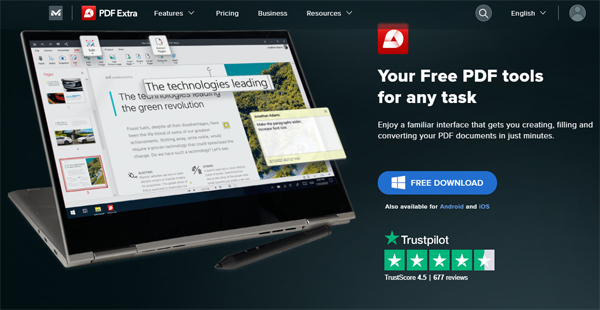
PDF Extra, an easy-to-use document management software, ensures a unified experience across Windows, iOS, and Android devices. Its Office-style interface makes navigating simple, removing the need for complex manuals and making it accessible to all users.
Designed with professionals and enterprises in mind, PDF Extra provides a lifetime license without subscription restrictions, guaranteeing a simple and affordable document management solution. It ensures customers have access to the most recent features and functionality by continually updating throughout the first year.
The platform simplifies document processes to boost corporate efficiency. Its lifetime license and first-year updates provide businesses with a dependable and long-lasting tool for document editing, signing, and administration. As such, PDF Extra is an indispensable asset for sustainable and streamlined business operations.
Show MoreOverview of PDF Extra Benefits
Cross-Platform Consistency
PDF Extra guarantees a consistent experience across various devices. This means users, whether on Windows, iOS, or Android, find the same intuitive interface and features. It allows smooth collaboration and transitions, ensuring that tasks and documents remain consistent regardless of the device used. This uniformity simplifies the user experience, enabling efficient and uninterrupted document management across platforms.
Simplified User Interface
The simplified user interface of PDF Extra ensures an effortless experience. With clear icons and intuitive layouts, users quickly access essential features like document editing and signing without confusion. Complex tasks like adding digital signatures become straightforward, minimizing the learning curve. This simplicity empowers users of all technical levels, making document management smooth and hassle-free.
Lifetime License Option
The lifetime license option means users make a one-time purchase, avoiding recurring subscriptions. This provides perpetual access to all features, including updates for the first year. It’s a cost-effective solution, ensuring users have long-term value without the burden of ongoing subscription fees.
Efficient Document Workflows
Optimal document workflows in PDF Extra simplify editing, signing, and file management tasks. Its user-friendly layout allows easy navigation, enhancing productivity. Complex tasks become straightforward with features like drag-and-drop editing and facilitated digital signatures. Users save time and effort, managing documents seamlessly.
Show MoreOverview of PDF Extra Features
- Updated Title
- PDF Creation
- Text Formatting Options
- PDF Format Conversions
- PDF Navigation
- OCR Technology
- Annotations
- Reading Mode
- Digital Form Filling
- Image Editing and Insertion
- Document Printing Options
- File Compression
- Merge PDFs and Images
- Page Management
- Annotation Locking Feature
- File Security
What Problems Will PDF Extra Solve?
Problem #1: Data Chaos in Filing Cabinets
Solution: Steve, the accountant, simplified the company’s paper-based system into a digital one. He converted scanned papers into a searchable digital database using PDF Extra’s OCR technology, increasing productivity, conserving office space, and improving data security. Steve’s proactive approach brought record-keeping up to date, lowering the risks involved with traditional filing while guaranteeing easy access to crucial data.
Problem #2: Document Signing Challenges While Traveling
Solution: Due to her busy schedule, Sarah needed to sign critical PDFs on the go. PDF Extra offered her simple tools, allowing her to sign documents from her laptop or mobile device. Using its user-friendly layout, Sarah saved time and energy by signing documents quickly at coffee shops and when traveling. PDF Extra made her signature responsibilities easier, allowing her to focus on being her best self without the stress of complicated signing processes.
Problem #3: Confidential Data Vulnerability
Solution: Attorney John used PDF Extra to help him with the daily responsibility of protecting confidential client information. With this approach, he learned to set strong passwords, employ 256-bit encryption, create digital signatures, and customize user access. John could keep his clients’ data secure with these features. The robust security toolbox of PDF Extra became his trusted choice, providing peace of mind while managing confidential documents with maximum privacy and control.
Awards & Quality Certificates

PDF Extra Position In Our Categories
Knowing that companies have distinct business requirements, it is only reasonable they avoid purchasing an all-encompassing, ”best” software solution. Be that as it may, it is difficult to chance on such a software system even among popular software products. The efficient step to do can be to note down the several main functions which call for a deliberation including major features, price terms, technical skill levels of staff members, organizational size, etc. Thereafter, you should do the product research to a full extent. Have a look at some of these PDF Extra evaluations and check out the other software programs in your list more closely. Such detailed product investigation guarantee you weed out unfit software solutions and buy the one which delivers all the benefits your business requires in sustaining growth.
Position of PDF Extra in our main categories:
TOP
50
PDF Extra is one of the top 50 Office Software products
If you are considering PDF Extra it may also be sensible to investigate other subcategories of Office Software gathered in our database of B2B software reviews.
There are popular and widely used systems in each software group. But are they essentially the best fit for your company’s specific requirements? A trendy software application may have thousands of subscribers, but does it offer what you require? For this reason, do not blindly invest in popular systems. Read at least a few PDF Extra Office Software reviews and consider the elements that you wish to have in the software such as the cost, main features, available integrations etc. Then, select a few systems that fit your wants. Try out the free trials of these apps, read online opinions, get explanations from the maker, and do your homework meticulously. This exhaustive research is certain to aid you find the best software solution for your organization’s specific needs.
How Much Does PDF Extra Cost?
PDF Extra Pricing Plans:
Free Trial
Free
$0
PDF Extra Premium
€4.16/month
PDF Extra Ultimate
€6.66/month
PDF Extra 2023
€99.99
PDF Extra Team Premium
€12.49/month
PDF Extra Team Ultimate
€18.33/month
PDF Extra Business
Contact vendor
What are PDF Extra pricing details?
PDF Extra Pricing Plans:
Free Trial
Free
$0
PDF Extra Premium
€4.16/month
PDF Extra Ultimate
€6.66/month
PDF Extra 2023
€99.99
PDF Extra Team Premium
€12.49/month
PDF Extra Team Ultimate
€18.33/month
PDF Extra Business
Contact vendor
PDF Extra provides users with a choice between free, personal, and enterprise pricing packages. Review the details below and choose the best plan for your business needs.
Free
- Form Fill Support
- Insert Stamps
- Annotate
- Timestamps
- Page Mode Changes
- Print Orientation Selection
- Collation for Printing
- Copy Count Selection
- MobiDrive Storage (5GB)
Personal
PDF Extra Premium – €4.16/month/billed annually
- €49.99/year
- One user
- Complete Editing & Signing
- MobiDrive Storage (50GB)
PDF Extra Ultimate – €6.66/month/billed annually
- €79.99/year
- PDF Extra Premium Plan +
- Office Format Conversions
- Android & iOS Mobile Versions
- MobiDrive Storage (100 GB)
PDF Extra 2023 – €99.99 (one-time purchase)
- Lifetime
- One user
- Complete Editing & Signing
- Standard PDF Conversion
- MobiDrive Storage (5GB)
- Annual Maintenance Updates (Free)
Business
PDF Extra Team Premium – €12.49/month/billed annually
- €149.99/year
- Six User Limit
- Complete Editing & Signing
- MobiDrive Storage (50GB)
PDF Extra Team Ultimate – €18.33/month/billed annually
- €219.99/year
- Six User Limit
- Ideal for Small Businesses
- Office Format Conversions
- Android & iOS Mobile Versions
- MobiDrive Storage (100 GB)
PDF Extra Business – By quote
- Over 6 Licenses
User Satisfaction
Positive Social Media Mentions
0
Negative Social Media Mentions
0
We know that when you choose to get a Office Software it’s important not only to see how experts score it in their reviews, but also to check if the actual users and businesses that bought these solutions are indeed happy with the service. That’s why we’ve created our behavior-based Customer Satisfaction Algorithm™ that collects customer reviews, comments and PDF Extra reviews across a wide range of social media sites. The information is then featured in a simple to understand form showing how many people had positive and negative experience with PDF Extra. With that information at your disposal you will be equipped to make an informed buying choice that you won’t regret.
Video
Technical details
Devices Supported
- Windows
- Android
- iPhone/iPad
Deployment
- Cloud Hosted
Language Support
- English
- Chinese
- German
- Hindi
- Japanese
- Spanish
- French
- Russian
- Portugese
- Turkish
- Swedish
Pricing Model
- Free
- One-time payment
- Annual Subscription
- Quote-based
Customer Types
- Small Business
- Medium Business
What Support Does This Vendor Offer?
- phone
- live support
- training
- tickets
What integrations are available for PDF Extra?
PDF Extra integrates with these business applications:
- OneDrive
- Box
- Google Drive
- Dropbox
- MobiDrive Cloud Service

PDF Extra
is waiting for
your first review.

Write your own review of this product
ADD A REVIEWMore reviews from 0 actual users:


Join a community of 7,369 SaaS experts
Thank you for the time you take to leave a quick review of this software. Our community and review base is constantly developing because of experts like you, who are willing to share their experience and knowledge with others to help them make more informed buying decisions.
Sign in with LinkedIn
Why we require LinkedIn?
- Show the community that you're an actual user.
- We will only show your name and profile image in your review.
- You can still post your review anonymously.
OR
Sign in with company emailSign in with company email
Popular PDF Extra Alternatives





Top Competitors To PDF Extra By Price
Product name:
Price:


Trending Office Software Reviews


PDF Extra Comparisons
Product name:






Page last modified
Award Winner



Did you find this review useful?
Yes
No
Thank you for your feedback
How can we make this page better?
Unsure about this software?
FIND ALTERNATIVES
 Why is FinancesOnline free?