
- Home
- Accounting Software
- OfficeBooks

OfficeBooks Review


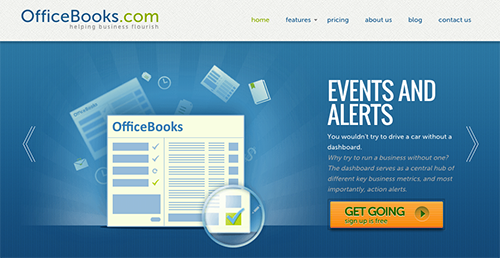

What is OfficeBooks?
OfficeBooks is an ERP platform for small to medium sized businesses that comes with user-friendly interfaces and simple functions that makes many basic accounting functions such as creating work orders and converting quotes to invoice easy with just a few clicks. Controlling inventory, sales, and billing functions is also a breeze as well, even via mobile devices. These functionalities make OfficeBooks an ideal option for field-heavy service or sales companies.
Show MoreOverview of OfficeBooks Benefits
QuickBooks makes things simple for companies, from managing and controlling inventory to delivering products and bolstering sales. Check out how OfficeBooks can benefit your enterprise.
- Reduce and gradually eliminated instances of late deliveries, thanks to OfficeBooks’ well-implemented inventory system.
- As OfficeBooks can be configured to handle various business processes such as quotes and credit card processing, you now have the time to build up on your business. Get to know your clients, attend conventions and networking events, or whip up some killer marketing concepts.
- OfficeBooks improves customer experience and interaction as well as project your brand via standardizing your outward facing documentation (purchase orders, quotations, invoices, etc).
- Empower your team to make better decisions and encourage them to collaborate and share ideas by providing them access to data.
Overview of OfficeBooks Features
- Integrated and automated Inventory Control
- Professional Quotes
- Reduced Data Entry
- Sales Driven Action
- Purchase Orders
- Order Tracing
- Credit Card Payment
- Contact Management
- Flexible and Out-of-the-box Reproting
- Outstanding Support
OfficeBooks Position In Our Categories
Knowing that companies have unique business requirements, it is only prudent they steer clear of subscribing to a one-size-fits-all, “perfect” software product. However, it is hard to discover such a software product even among well-known software systems. The correct thing to undertake can be to write down the numerous main functions that demand investigation such as major features, costing, technical skill competence of the users, business size, etc. The second step is, you should conduct your research comprehensively. Go over some of these OfficeBooks reviews and scrutinize each of the solutions in your shortlist in detail. Such comprehensive product research ascertains you stay away from unfit apps and subscribe to the one which has all the benefits your company requires.
Position of OfficeBooks in our main categories:
TOP
500
OfficeBooks is one of the top 500 Accounting Software products
It is important to realize that almost no app in the Accounting Software category is a perfect solution that can meet all the requirements of various business types, sizes and industries. It may be a good idea to read a few OfficeBooks Accounting Software reviews first as certain software may excel exclusively in a very small set of applications or be designed with a very specific type of industry in mind. Others can operate with an idea of being easy and intuitive and as a result lack complex features needed by more experienced users. You can also come across solutions that support a broad group of users and give you a rich feature set, however this usually comes at a higher price of such a solution. Be certain that you're aware of your requirements so that you get a solution that provides exactly the features you search for.
How Much Does OfficeBooks Cost?
OfficeBooks Pricing Plans:
Free Trial
Free Version
Free
Purchasing
$19/month
Distributor
$79/month
Full Suite
$169/month
What are OfficeBooks pricing details?
OfficeBooks Pricing Plans:
Free Trial
Free Version
Free
Purchasing
$19/month
Distributor
$79/month
Full Suite
$169/month
OfficeBooks offers 3 affordable priced plans plus a free version that will surely meet the needs as well as the budget of all businesses of any shape and size. Whether you require a purchasing pack or a distribution bundle or a combination of both, OfficeBooks has the plan you require. Plus, each edition comes with a free trial offering if you want to check them out before making a purchase.
Free Version
- up to 5 users
- Up to 25 records
- Reports
- Optimized for manufacturing
- All distributor features
- Inventory control
- Credit card processing
- Invoices
- Tax reports
- Work orders
- Work centers
- Workflows
- Bill of Materials
Purchasing – $19/month
- Unlimited users
- Unlimited records
- Reports
- Purchase Orders
Distributor – $79/month
- Unlimited users
- Unlimited records
- Reports
- Sales & Quotes
- All purchasing features
- Inventory control
- Credit card processing
- Invoices
- Tax reports
Full Suite – $169/month
- Unlimited users
- Unlimited records
- Reports
- Optimized for manufacturing
- All distributor features
- Inventory control
- Credit card processing
- Invoices
- Tax reports
- Work orders
- Work centers
- Workflows
- Bill of Materials
User Satisfaction
Positive Social Media Mentions
4
Negative Social Media Mentions
0
We know that when you decide to purchase a Accounting Software it’s vital not only to see how professionals evaluate it in their reviews, but also to discover if the actual people and businesses that use these solutions are actually happy with the service. That’s why we’ve designer our behavior-based Customer Satisfaction Algorithm™ that collects customer reviews, comments and OfficeBooks reviews across a wide range of social media sites. The data is then presented in an easy to understand format indicating how many users had positive and negative experience with OfficeBooks. With that information at hand you should be equipped to make an informed purchasing choice that you won’t regret.
Technical details
Devices Supported
- Windows
- Android
- iPhone/iPad
- Mac
- Web-based
Deployment
- Cloud Hosted
Language Support
- English
Pricing Model
- Monthly payment
Customer Types
- Small Business
- Freelancers
What Support Does This Vendor Offer?
- phone
- live support
- training
- tickets
What integrations are available for OfficeBooks?
OfficeBooks supports integrations with the following business systems and applications:
- QuickBooks Online
- Google Drive
OfficeBooks User Reviews
OfficeBooks average rating:
4/5
Overall impression
5/5
Customer Support
4/5
Value for Money
4/5
Ease of Use
Write your own review of this product
ADD A REVIEWThe most favorable review

PROS: Officebooks is simply designed and easy to use. I can keep my business contacts as well as work orders, purchase orders, and sales orders in one place. I use the app every day to monitor all my current orders.
CONS: The vendor should offer an Android mobile app as I use an Android smartphone. This can help me access the system anytime, anywhere.
The least favorable review
PROS: Our company uses this simple app to pass information through departments. We have been very successful in using the app effectively for our needs.
CONS: I have no complaints at all as there is nothing to dislike about the app.
More reviews from 3 actual users:
Sort by:
Latest
- Latest
- Most useful
- Most positive
- Most negative
Easy to use tool
Read full review >
4/5
Overall impression
4/5
Customer Support
4/5
Value for Money
4/5
Ease of Use
Published on: 15.09.2021
Company Size: More than 100 Employees
Industry: Aviation & Aerospace
PROS: Our company uses this simple app to pass information through departments. We have been very successful in using the app effectively for our needs.
CONS: I have no complaints at all as there is nothing to dislike about the app.
Ideal app for small businesses
Read full review >
5/5
Overall impression
5/5
Customer Support
5/5
Value for Money
5/5
Ease of Use
Published on: 23.05.2021
Company Size: More than 100 Employees
Industry: Construction
PROS: Officebooks is simply designed and easy to use. I can keep my business contacts as well as work orders, purchase orders, and sales orders in one place. I use the app every day to monitor all my current orders.
CONS: The vendor should offer an Android mobile app as I use an Android smartphone. This can help me access the system anytime, anywhere.
Simple business management app
Read full review >
4/5
Overall impression
4/5
Customer Support
4/5
Value for Money
4/5
Ease of Use
Published on: 04.09.2019
Company Size: More than 100 Employees
Industry: Unavailable
PROS: Officebooks is easy to learn and adopt. I use the app for my company work. I share documents and the system is simple and effective. It can be easily used even by those without technical skills.
CONS: It lacks many features that other products offer and is not too user-friendly. As an engineer, it is a bit easier for me, but my colleagues struggle with the system and need help to work with it.


Join a community of 7,369 SaaS experts
Thank you for the time you take to leave a quick review of this software. Our community and review base is constantly developing because of experts like you, who are willing to share their experience and knowledge with others to help them make more informed buying decisions.
Sign in with LinkedIn
Why we require LinkedIn?
- Show the community that you're an actual user.
- We will only show your name and profile image in your review.
- You can still post your review anonymously.
OR
Sign in with company emailSign in with company email
Popular OfficeBooks Alternatives



Top Competitors To OfficeBooks By Price
Product name:
Price:


Trending Accounting Software Reviews




OfficeBooks Comparisons
Product name:






OfficeBooks user reviews
Easy to use tool
Read full review >
4/5
Overall impression
4/5
Customer Support
4/5
Value for Money
4/5
Ease of Use
Published on: 15.09.2021
Company Size: More than 100 Employees
Industry: Aviation & Aerospace
Ideal app for small businesses
Read full review >
5/5
Overall impression
5/5
Customer Support
5/5
Value for Money
5/5
Ease of Use
Published on: 23.05.2021
Company Size: More than 100 Employees
Industry: Construction
Simple business management app
Read full review >
4/5
Overall impression
4/5
Customer Support
4/5
Value for Money
4/5
Ease of Use
Published on: 04.09.2019
Company Size: More than 100 Employees
Industry: Unavailable

Page last modified



Did you find this review useful?
Yes
No
Thank you for your feedback
How can we make this page better?
Unsure about this software?
FIND ALTERNATIVES
 Why is FinancesOnline free?