
- Home
- Document Management Systems
- Qoppa PDF Automation Server

Qoppa PDF Automation Server Review



What is Qoppa PDF Automation Server?
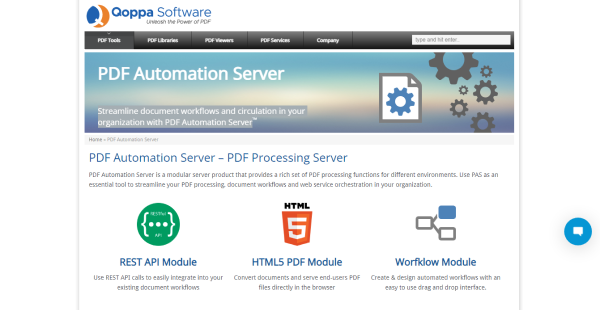
Qoppa PDF Automation Server (PAS) is a modular server product that offers a comprehensive range of PDF processing capabilities for various scenarios. It’s a useful solution for streamlining your company’s document workflow, PDF processing, and web service management. It’s a standalone program that delivers some of the Qoppa Java libraries’ functions in a server context.
This software has REST API, which allows you to easily incorporate the system into your existing document workflows. It also supports PDF to HTML 5 on the fly, so you can convert documents and serve as PDF files to end-users directly in the browser. It also features a Workflow module that allows you to design and build automated workflows with an easy-to-use drag-and-drop interface.
In addition, Qoppa PAS may simultaneously receive documents in different formats from many sources, such as FTP servers, email, and local or network folders. Conversion, encryption, pre-flighting, data merging, assembly, and other functions can be defined independently for each document source.
Show MoreOverview of Qoppa PDF Automation Server Benefits
Seamless Workflow Integration
PDF Automation Server’s REST API module allows any workflow server to easily integrate with the system. Most enterprise software has workflow management modules that may perform REST connections to external services. Therefore, you can easily incorporate PDF functionalities into your document processes. Additionally, specific software solutions, such as ESB and BPM servers, have the sole purpose of running workflows. These servers can use REST APIs to communicate with third-party systems, including Qoppa PAS.
HTML PDF Markup
The PDF Automation Server has a module to mark up PDF documents in your browser. PAS can transform documents to HTML on the fly and feed them to a browser’s HTML/Javascript module. This allows users to explore the PDF and add and modify annotations within it. When you save a document, the markups are sent back to the server to be merged back into the PDF.
Workflow Automation
The PDF Automation Server’s Workflow Module automates the receiving, processing, and forwarding of documents. PAS can receive documents in various formats from a range of sources, such as email, FTP sites, and hot folders, all at the same time. Document flows are defined through an easy to use drag and drop interface. The various workflow nodes offer many document processing and transformation features including PDF conversion, printing, digital signatures, filling interactive forms, PDF watermark, text extraction, exporting comments, importing comments, securing pages with passwords, PDF/A preflight, redaction, optimization, OCR, split page options, file operations, and more.
Show MoreOverview of Qoppa PDF Automation Server Features
- REST API Module
- HTML5 PDF Module
- Workflow Module
- HTML PDF Markup Module
- Workflow Module
- Batch Jobs Module
- Cross-platform Support
- 24/7 Technical Support
Awards & Quality Certificates

Qoppa PDF Automation Server Position In Our Categories
Since businesses have distinct business needs, it is practical they steer clear of selecting a one-size-fits-all, “perfect” software system. Just the same, it is troublesome to try to chance on such a software system even among well-known software products. The best thing to undertake is to write down the varied major aspects that demand inspection like major features, pricing, technical skill capability of staff members, business size, etc. After which, you should do your research fully. Browse through some of these Qoppa PDF Automation Server evaluations and look over each of the software options in your list in detail. Such detailed research can make sure you avoid unsuitable apps and buy the one that offers all the tools your business requires.
Position of Qoppa PDF Automation Server in our main categories:
Since each enterprise has unique business requirements, it is advisable for them to desist from looking for a one-size-fits-all perfect software solution. Needless to say, it would be useless to try to find such an app even among popular software platforms. The clever thing to do would be to list the various vital factors that require consideration such as main features, budget, skill levels of workers, company size etc. Then, you should do your homework thoroughly. Read some Qoppa PDF Automation Server Document Management Systems reviews and look into each of the other apps in your shortlist in detail. Such exhaustive homework can make certain you weed out ill-fitting applications and zero in on the solution that offers all the features you require for business success.
How Much Does Qoppa PDF Automation Server Cost?
Qoppa PDF Automation Server Pricing Plans:
Free Trial
By quote
Contact vendor
What are Qoppa PDF Automation Server pricing details?
Qoppa PDF Automation Server Pricing Plans:
Free Trial
By quote
Contact vendor
Qoppa PDF Automation Server SMB and enterprise pricing details are available only upon request. You can contact the vendor for more information. A demo version is available for download after filling up a form.
They also offer a free trial version with limited features.
User Satisfaction
Positive Social Media Mentions
14
Negative Social Media Mentions
0
We realize that when you make a decision to get a Document Management Systems it’s crucial not only to learn how professionals evaluate it in their reviews, but also to check whether the real people and enterprises that purchased it are actually content with the service. Because of that need we’ve devised our behavior-based Customer Satisfaction Algorithm™ that gathers customer reviews, comments and Qoppa PDF Automation Server reviews across a wide range of social media sites. The information is then presented in a simple to understand form indicating how many people had positive and negative experience with Qoppa PDF Automation Server. With that information at your disposal you will be equipped to make an informed purchasing choice that you won’t regret.
Video
Technical details
Devices Supported
- Windows
- Linux
- Mac
- Web-based
Deployment
- Cloud Hosted
- On Premise
Language Support
- English
- German
- Japanese
- Spanish
- French
- Italian
Pricing Model
- Quote-based
Customer Types
- Small Business
- Large Enterprises
- Medium Business
What Support Does This Vendor Offer?
- phone
- live support
- training
- tickets
What integrations are available for Qoppa PDF Automation Server?
Qoppa PDF Automation Server integrates with the customers’ system through REST API.

Qoppa PDF Automation Server
is waiting for
your first review.

Write your own review of this product
ADD A REVIEWMore reviews from 0 actual users:


Join a community of 7,369 SaaS experts
Thank you for the time you take to leave a quick review of this software. Our community and review base is constantly developing because of experts like you, who are willing to share their experience and knowledge with others to help them make more informed buying decisions.
Sign in with LinkedIn
Why we require LinkedIn?
- Show the community that you're an actual user.
- We will only show your name and profile image in your review.
- You can still post your review anonymously.
OR
Sign in with company emailSign in with company email
Popular Qoppa PDF Automation Server Alternatives





Top Competitors To Qoppa PDF Automation Server By Price
Product name:
Price:


Trending Document Management Systems Reviews




Qoppa PDF Automation Server Comparisons
Product name:



Page last modified



Did you find this review useful?
Yes
No
Thank you for your feedback
How can we make this page better?
Unsure about this software?
FIND ALTERNATIVES
 Why is FinancesOnline free?