
- Home
- Employee Monitoring Software
- Simple In/Out

Simple In/Out Review



What is Simple In/Out?
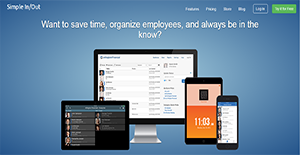
Simple In/Out is an employee tracking solution developed by Simply Made Apps. It is available on multiple devices, including television.
Simple In/Out automatically updates the in/out board when an employee walks in or goes out of the office with their phones. This affords organizations high visibility so they are continuously aware of their presence or absence.
With Simple In/Out, companies are also able to modernize their staff monitoring solution. This application renders obsolete punch clocks and time cards and ensures accurate timekeeping. This not only saves employees time logging in and out, it also assists management in precisely keeping records.
Show MoreOverview of Simple In/Out Benefits
Multi-Platform Availability
Simple In/Out truly simplifies the process of logging in and out of work for staffs. The application can be used in desktops and mobile devices and is accessible from the web, and can even be installed in televisions via Google Play, App Store, and Amazon. This allows employees to effortlessly indicate their presence or absence in the office through the method that is most convenient for them. On top of that, the TV availability of the app makes it easier for management to see who is in or out.
High Organization Visibility
With Simple In/Out, employers and top management gain a bird’s eye view of their organization. The software lets them know which employees come to work on time, who stays in the office beyond working hours, and more. With this, they are able to understand their staff’s work behavior, analyze working trends, and come up with a solution to resolve any issues.
Additionally, Simple In/Out lets businesses keep track of staff in other companies if they belong to a group. If they prefer not to enable this feature, they may also do so. Nevertheless, this function widens their net of visibility so they are fully aware of the goings-on in their organizations.
Automated Status Updates
Simple In/Out notifies the management of the presence or absence of all or of particular employees. They can remain updated even if they are not currently using the application and receive these updates on their preferred devices.
Furthermore, users also have the ability to set when they wish to receive notifications. This is useful especially for those on vacation or for those who do not want to receive updates on weekends and holidays.
Accurate Location Tracking
When Simple In/Out is installed in a user’s mobile device, the app automatically changes their status. When they come into the office, the solution logs them as ‘in’ and when they go out they are updated as ‘out’. The solution enables this through its geofencing feature which works when a device’s GPS capability is turned on. This way, users need not manually change their status every time they walk in or step out of work.
User-Defined Data Viewing
With Simple In/Out, companies are able to pull up and view employee timeline reports. They can set this feature to send them information daily or weekly or not at all. These reports can assist the management in maintaining accurate payroll management and record keeping. This also aids them in fixing errors that may have occurred in the past.
Status Scheduling
Scheduled status updates also make Simple In/Out a more accommodating solution. Users simply set the date and time for a certain status change and the app relays the information to the board automatically.
This feature is also configurable so that administrators only allow this for trusted employees and other users.
Robust Integrations
Simple In/Out seamlessly integrates with Slack and is able to connect with other compatible applications. The solution has an open API and has Web Hooks that developers can use to design synchronizations with solutions their companies utilize. This allows organizations to impeccably integrate the app into their workflow.
Show MoreOverview of Simple In/Out Features
- In/Out Board
- User-Configurable Notifications
- Geofences
- Beacons
- WiFi Status Updates
- Desktop Activity
- Custom Reports
- Scheduled Status Changes
- Linked Companies
- Third-Party Integrations
Simple In/Out Position In Our Categories
Keeping in mind companies have their own business-related wants, it is prudent that they avoid buying a one-size-fits-all, “perfect” software product. Needless to say, it is almost impossible to chance on such application even among popular software systems. The sensible step to undertake should be to spell out the different critical factors which entail examination including essential features, price plans, technical skill aptitude of staff, business size, etc. Thereafter, you should double down on the product research exhaustively. Go over some of these Simple In/Out review articles and scrutinize each of the software options in your shortlist in detail. Such detailed product investigation makes sure you weed out unsuitable apps and buy the one which meets all the benefits your business requires to be successful.
Position of Simple In/Out in our main categories:
TOP
50
Simple In/Out is one of the Employee Monitoring Software products
It's crucial to note that virtually no service in the Employee Monitoring Software category is going to be a perfect solution able to fulfill all the needs of various business types, sizes and industries. It may be a good idea to read a few Simple In/Out Employee Monitoring Software reviews first as specific software can dominate exclusively in a very narrow set of applications or be created with a very specific industry in mind. Others may operate with an idea of being simple and intuitive and consequently lack complex functions needed by more experienced users. There are also services that focus on a large group of users and offer a rich feature set, however that usually comes at a more significant cost of such a solution. Be certain that you're aware of your requirements so that you select a solution that provides specifically the elements you search for.
How Much Does Simple In/Out Cost?
Simple In/Out Pricing Plans:
Free Trial
Basic
$9.99/month
Basic 25
$19.99/month
Pro 10
$14.99/month
Pro 50
$29.99/month
Pro 100
$49.99/month
Pro 250
$79.99/month
Pro 350
$99.99/month
Pro 500
$129.99/month
Pro 750
$169.99/month
Pro 1,000
$199.99/month
What are Simple In/Out pricing details?
Simple In/Out Pricing Plans:
Free Trial
Basic
$9.99/month
Basic 25
$19.99/month
Pro 10
$14.99/month
Pro 50
$29.99/month
Pro 100
$49.99/month
Pro 250
$79.99/month
Pro 350
$99.99/month
Pro 500
$129.99/month
Pro 750
$169.99/month
Pro 1,000
$199.99/month
Simple In/Out offers several SMB and enterprise pricing options for users to choose from. Give the details a look, and choose the best plan for your business:
Basic – $9.99/month or $107.99/year
- Up to 10 Users
- No Notifications
Basic 25 – $19.99/month or $215.99/year
- Up to 25 Users
- No Notifications
Pro 10 – $14.99/month or $161.99/year
- Up to 10 Users
- Followed User Notifications
- Reminder Notifications
- Safety Notifications
Pro 50 – $29.99/month or $323.99/year
- Up to 50 Users
- Followed User Notifications
- Reminder Notifications
- Safety Notifications
Pro 100 – $49.99/month or $539.99/year
- Up to 100 Users
- Followed User Notifications
- Reminder Notifications
- Safety Notifications
Pro 250 – $79.99/month or $863.99/year
- Up to 250 Users
- Followed User Notifications
- Reminder Notifications
- Safety Notifications
Pro 350 – $99.99/month or $1,079.99/year
- Up to 350 Users
- Followed User Notifications
- Reminder Notifications
- Safety Notifications
Pro 500 – $129.99/month or $1,399.99/year
- Up to 500 Users
- Followed User Notifications
- Reminder Notifications
- Safety Notifications
Pro 750 – $169.99/month or $1,829.99/year
- Up to 750 Users
- Followed User Notifications
- Reminder Notifications
- Safety Notifications
Pro 1,000 – $199.99/month or $2,159.99/year
- Up to 750 Users
- Followed User Notifications
- Reminder Notifications
- Safety Notifications
For organizations with more than 1,000 users, contact Simple In/Out for tailored packages and pricing. The app also has a free trial for 45 days.
User Satisfaction
Positive Social Media Mentions
96
Negative Social Media Mentions
1
We know that when you decide to get a Employee Monitoring Software it’s vital not only to find out how professionals score it in their reviews, but also to discover if the actual people and businesses that purchased it are indeed happy with the service. That’s why we’ve designer our behavior-based Customer Satisfaction Algorithm™ that aggregates customer reviews, comments and Simple In/Out reviews across a broad array of social media sites. The data is then displayed in an easy to understand format indicating how many customers had positive and negative experience with Simple In/Out. With that information available you will be ready to make an informed buying decision that you won’t regret.
Video
Technical details
Devices Supported
- Windows
- Android
- iPhone/iPad
- Mac
- Web-based
- Windows Mobile
Deployment
- Cloud Hosted
- On Premise
- Open API
Language Support
- English
Pricing Model
- Monthly payment
- Annual Subscription
Customer Types
- Small Business
- Large Enterprises
- Medium Business
What Support Does This Vendor Offer?
- phone
- live support
- training
- tickets
What integrations are available for Simple In/Out?
Simple In/Out provides integration tools like API and Web Hooks to enable companies to connect the application with other solutions. The software also integrates with Slack.

Simple In/Out
is waiting for
your first review.

Write your own review of this product
ADD A REVIEWMore reviews from 0 actual users:


Join a community of 7,369 SaaS experts
Thank you for the time you take to leave a quick review of this software. Our community and review base is constantly developing because of experts like you, who are willing to share their experience and knowledge with others to help them make more informed buying decisions.
Sign in with LinkedIn
Why we require LinkedIn?
- Show the community that you're an actual user.
- We will only show your name and profile image in your review.
- You can still post your review anonymously.
OR
Sign in with company emailSign in with company email
Popular Simple In/Out Alternatives





Top Competitors To Simple In/Out By Price
Product name:
Price:





Trending Employee Monitoring Software Reviews



Simple In/Out Comparisons
Product name:








Page last modified



 Why is FinancesOnline free?