

7shifts Review



What is 7shifts?
7shifts is a reputed scheduling software solution for restaurants, bars and similar hospitality venues, designed to improve employee attendance, evenly and effectively distribute workload among available workers, and significantly reduce labor costs. Managers love 7shifts as it takes care of their scheduling processes with ease, giving them more time to focus on quality customer service.
Used by thousands of business managers, 7shifts has simplified the way they create schedules, communicate with their employees, bring down labor-related expenses, and almost eliminate the need for overtime. For employees, 7shifts empowers them to perform productively as well as easily submit requests for trade shifts and time offs. The tool also lets them access their schedules easily via their mobile devices.
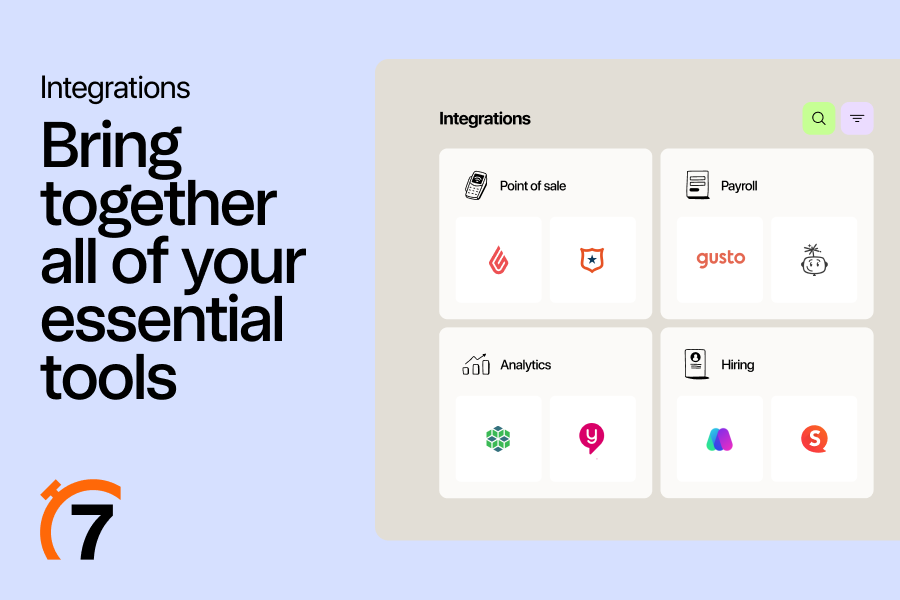
At the same time, 7shifts is a readily-connectable system that blends easily in any software ecosystem, and functions in synergy with tools such as Toast POS, Breadcrumb POS, Heartland Dineware, Micros 3700, Cake, and many more. 7shifts is also well-known for its friendly and knowledgeable support team, which is ready to answer your questions 24/7, via email, phone, or live chat.
Show MoreOverview of 7shifts Benefits
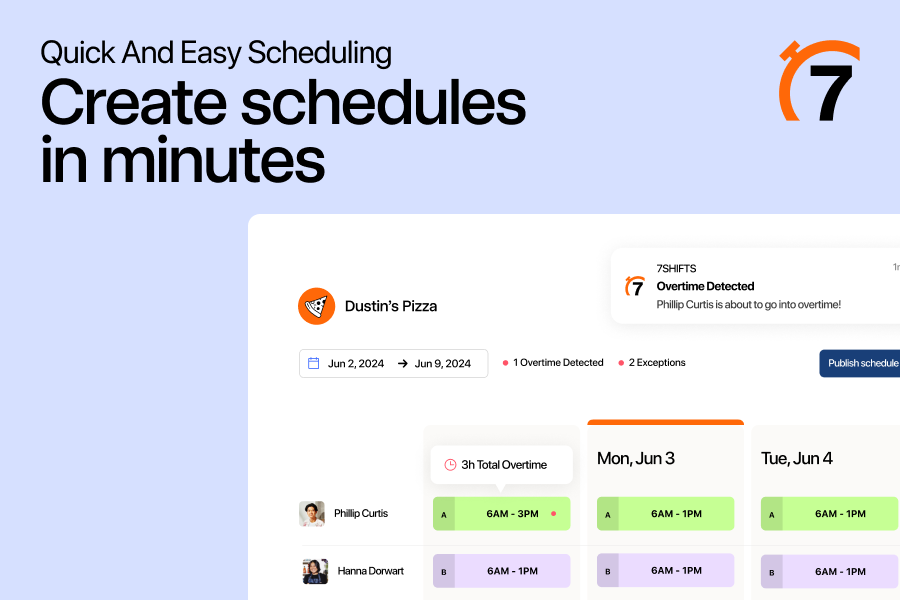
Developed and created for restaurants, bars, and similar establishments, 7shifts offers managers and employees the ultimate scheduling app that does more than create effective schedules. The software is so easy to use that it dramatically reduces the time spent on making employee schedules by up to 80%.
Because 7shifts is a cloud-based platform, creating schedules and implementing them across locations is not a hassle. In fact, it really streamlines employment management and scheduling processes that many restaurant managers agree that the system has helped them bring down their labors costs by significant margins.
Communication between managers and employees is a breeze too as 7Shift comes with instant notifications that lets them know of their shift schedule or if any updates and changes are introduced to their schedules. Also, employees don’t need to send written requests for leave and time off. They can do so within the system and receive notifications instantly if their request is approved or not.
7shifts also incorporates communication tools into their system with in-app chat. Chat allows employees and management to talk one-on-one or within in a group. Plus, management has the ability to send one-way or all-call messages to staff via chat, push notification, or email.
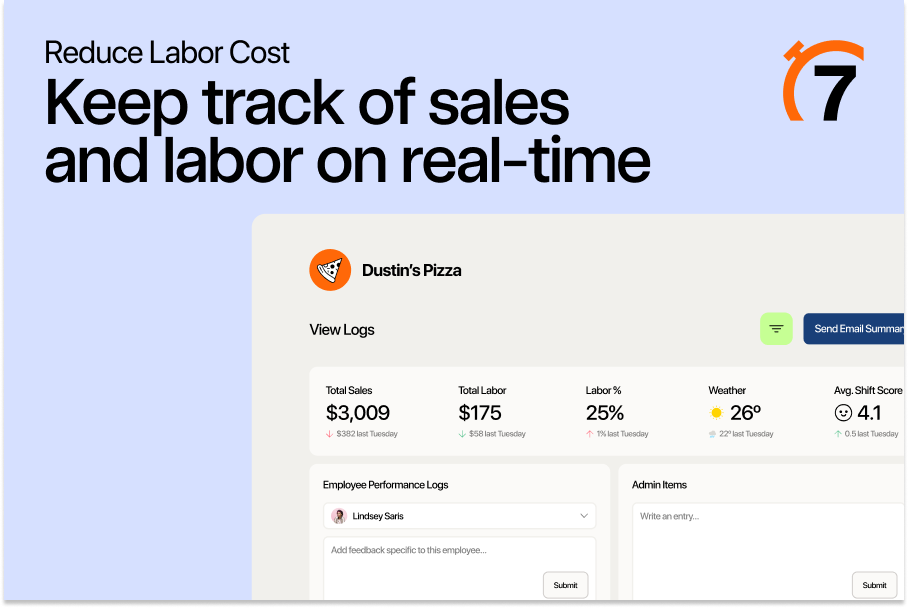
Aside from creating schedules and managing employees, 7shifts also features forecast and budget analysis. These tools helps businesses study and analyze their budgets and projected expenses, helping them operate efficiently while staying on budget.
Show MoreOverview of 7shifts Features
- Scheduler
- Instant notifications
- Request Management
- Set and view labor costs by department
- Instant alerts around overtime
- POS integrations
- Unlimited text notifications
- Multi-location support
- Built-in manager log book
7shifts Position In Our Categories
Since companies have special business wants, it is practical that they avoid purchasing an all-encompassing, ideal software product. Nevertheless, it would be futile to discover such application even among recognizable software products. The practicable step to undertake is to make a list of the numerous major factors that need analysis including crucial features, pricing, skill levels of staff, company size, etc. After which, you must conduct the product research through and through. Go over these 7shifts evaluations and explore the other software products in your list more closely. Such detailed product investigation guarantee you avoid mismatched software products and subscribe to the one that meets all the features your company requires to realize efficiency.
Position of 7shifts in our main categories:
TOP
50
7shifts is one of the top 50 Employee Scheduling Software products
TOP
50
7shifts is one of the 50 Restaurant Management Software products
Every company has different requirements and requires an application that can be personalized for their size, type of employees and buyers, and the particular industry they are in. For these reasons, no software can provide perfect tools out-of-the-box. When you try to find a software app, first be sure what you require it for. Read some 7shifts Employee Scheduling Software reviews and ask yourself do you need basic functionality or do you need sophisticated features? Are there any industry-specific tools that you are seeking? Get the answers to these questions to assist your search. There are lots of elements that you need to reflect on and these include your budget, particular business needs, your company size, integration needs etc. Take your time, use a few free trials, and finally choose the system that offers all that you require to boost your firm efficiency and productivity.
How Much Does 7shifts Cost?
7shifts Pricing Plans:
Free Trial
Comp
free
Entree
$29.99/month/location
The Works
$69.99/month/location
Gourmet
by quote
What are 7shifts pricing details?
7shifts Pricing Plans:
Free Trial
Comp
free
Entree
$29.99/month/location
The Works
$69.99/month/location
Gourmet
by quote
Comp
Free for single locations.
Freatures
- For up to 30 employees
- Scheduling, time off, and availability
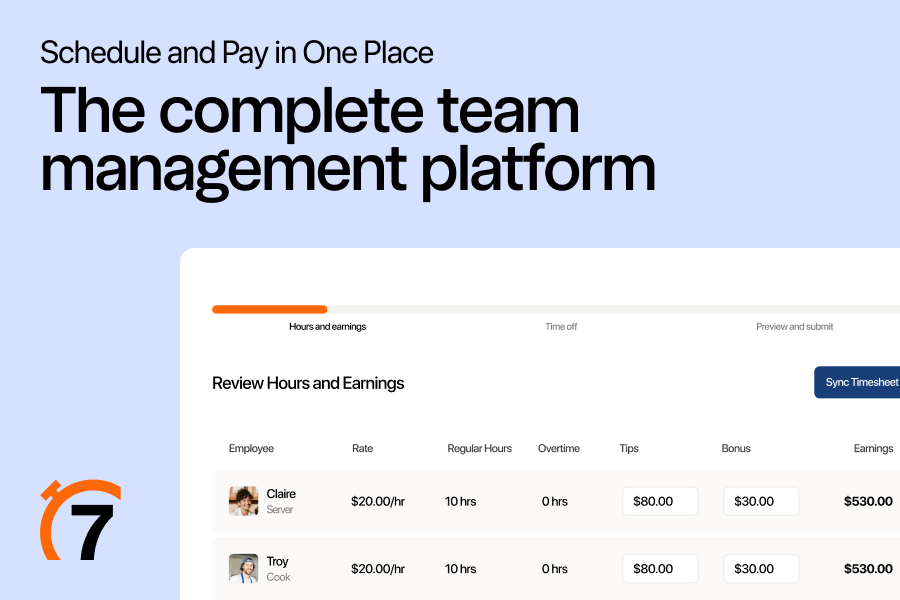
- Time clock & Timesheets
- Team chat and announcements
- Hiring & applicant tracking
- Employee engagement tracking
- POS integration
Entree
$29.99/month per location
All features included in the comp plan, plus:
- Schedule templates
- Unlimited scheduling
- Labor budgeting & sales forecasting
- PTO, break, and overtime tracking
- Sales + Labor Reporting
- Read receipts
The Works
$69.99/month per location
All features included in the comp plan, plus:
- Unlimited employees
- Schedule with weather, stations, and advanced budgeting
- Labor alerts (OT, break, clock-in)
- Manager Log Book
- Payroll integration
- State-based compliance tools
- Advanced Reporting
Gourmet
contact 7shifts for a custom pricing quote for enterprise restaurants and chains.
- All the features included in The Works, plus:
- Enterprise dashboard
- Predictive Scheduler
- Labor compliance tools
- Revenue center-based sales forecasting
- Dedicated account manager (Available for 20+ locations)
- Organization rollout
- Advanced training
- Enterprise security
- Traditional POS integration support
User Satisfaction
Positive Social Media Mentions
0
Negative Social Media Mentions
0
We realize that when you decide to purchase a Employee Scheduling Software it’s vital not only to see how experts evaluate it in their reviews, but also to check whether the actual users and enterprises that use it are actually happy with the product. Because of that need we’ve created our behavior-based Customer Satisfaction Algorithm™ that aggregates customer reviews, comments and 7shifts reviews across a broad array of social media sites. The data is then presented in an easy to digest way indicating how many users had positive and negative experience with 7shifts. With that information at hand you will be prepared to make an informed buying decision that you won’t regret.
Video
Screenshots
Technical details
Devices Supported
- Android
- iPhone/iPad
- Web-based
Deployment
- Cloud Hosted
- Open API
Language Support
- English
- Spanish
- French
Pricing Model
- Annual Subscription
Customer Types
- Small Business
- Large Enterprises
- Medium Business
What Support Does This Vendor Offer?
- phone
- live support
- training
- tickets
What integrations are available for 7shifts?
7shifts integrates with the following business systems and applications:
- TouchBistro
- Toast
- NCR Aloha
- Micros
- Square
- Clover
- Breadcrumb POS by Upserve
- Cake
- POSitouch
- Squirrel
- Dinerware
- Rezku
- Bypass
- Brink
- Koomi
- Lightspeed
- Silverware
- Vexilor by Givex
7shifts User Reviews
7shifts average rating:
4/5
Overall impression
5/5
Customer Support
4/5
Value for Money
4/5
Ease of Use
Write your own review of this product
ADD A REVIEWThe most favorable review

PROS: With 7shifts, you got plenty of features that can make work easier and faster. There’s the ability to make schedule templates that saves a significant amount of time creating schedules, the ability to send reports to my colleagues, the ability to create and publish schedules on my mobile phone, and many more. The platform also offers a Manager’s log which is great because I don’t have to look for and use other tools for it. And whenever the product makes an update, it always sends a notification via email along with a video. The video makes it easier to understand the changes they made.
CONS: I have some issues with the app version of the platform. The employees time off cannot be viewed so it can it is difficult to make a schedule from the app. There are also times when I either receive multiple notifications or nothing at all. Aside from that, we have to double-check whether the roles in our POS match those in our Touch Bistro otherwise it won’t track the labor properly.
The least favorable review
PROS: In general, 7shifts brings a lot of features for us to utilize but presents them in a straightforward manner. We also find that the website, as well as the mobile application, is rich and well-designed. It will send alerts through email or phone every time a shift is being offered. Thanks to this, we no longer have to make rounds in order to inform our personnel that a shift needs to be covered. Another feature that helps us in exchanging shifts is the system's capability to offer particular shifts on specific person/people only. There is also a broad calendar which provides an overview of when you'll be working and who you're working with. This is a helpful function to know beforehand the person who might be able to take shifts from you.
CONS: We faced a few syncing problems with the website and mobile apps. For example, there was a time when a change in a shift on mobile wasn't reflected on the website, hence showing inconsistencies in shifts. Also, we find it better to release a shift to certain people through the mobile app since the web might provide some confusion to workers. That's because on the web version, when a shift is released, it'll be automatically highlighted and there'll be no indication if another button must be clicked in order to offer it to certain people.
More reviews from 12 actual users:
Sort by:
Latest
- Latest
- Most useful
- Most positive
- Most negative
The best tool when it comes to convenience and shift transparency
Read full review >
4/5
Overall impression
3/5
Customer Support
3/5
Value for Money
4/5
Ease of Use
Published on: 30.11.2021
Company Size:
Industry: N/A
PROS: This tool makes staff scheduling feel like a walk in the park. Changing shifts and trading them is so much easier. Gone are the days when a dozen emails and messages still need to be sent to come to an agreement on shift changes. Now, all that has to be done is to leave a note on a specific date and wait for others to bid on them. It is all so convenient.
CONS: You’d need to download its sister app: slack. I understand that this is an app for communicating with the team, but I wish 7shifts would figure out a way to integrate this into the system rather than asking us to download a separate tool.
A real life-saver. Thanks, 7shifts!
Read full review >
5/5
Overall impression
5/5
Customer Support
5/5
Value for Money
4/5
Ease of Use
Published on: 03.11.2021
Company Size:
Industry: N/A
PROS: Finally, I can off-load the daunting task of figuring out the work schedule of my staff. With this tool helping me, changing shifts and re-scheduling them are no longer a big problem. I still oversee it, but most of the work is already being done for me. All this ease comes in a very nice package too. By this, I mean that the layout options are really good.
CONS: Integration with some of my other tools needs to be smoothened out. I have had problems loading some of my data from external sources to 7shifts. Also, if you could find a way to make it easier for managers to just copy and paste the schedule week after week, that would be much appreciated.
Still testing the waters. So far, so good.
Read full review >
4/5
Overall impression
4/5
Customer Support
4/5
Value for Money
3/5
Ease of Use
Published on: 16.10.2021
Company Size:
Industry: Marketing and Advertising
PROS: Its interface is quite easy to work with. Plus, they have a really helpful support team too.
CONS: I need to be able to train the staff on how to fully utilize this tool. However, I can’t seem to find any work instructions on how to use the mobile version of 7shifts. Please create one soon.
7Shifts is an ideal choice for multiple companies
Read full review >
4/5
Overall impression
3/5
Customer Support
4/5
Value for Money
3/5
Ease of Use
Published on: 11.10.2021
Company Size: More than 100 Employees
Industry: Hospitality
PROS: What we like the most about this product is the messaging feature which allows us to effectively communicate any relevant information across all or specific channels. For example, we can easily communicate business updates, change in schedules, and other business-related information.
CONS: The new feature, which allows toggling between companies doesn't function sometimes. I have to log out and then log in to make it work.
Solves communication issues
Read full review >
4/5
Overall impression
4/5
Customer Support
4/5
Value for Money
4/5
Ease of Use
Published on: 10.04.2021
Company Size:
Industry: Food Production
PROS: Coming from a food service standpoint, this tool is a real game-changer. Not only does it help with scheduling, communicating between staff members are so much easier too. The messaging tool does its job well.
CONS: The weekly calendar view is not the best. In fact, it can be downright confusing. I haven’t been able to alter some calendar details when I am on this view.
I now have an improved work-life thanks to 7shifts!
Read full review >
4/5
Overall impression
3/5
Customer Support
3/5
Value for Money
4/5
Ease of Use
Published on: 20.03.2021
Company Size:
Industry: N/A
PROS: Work has been running much more smoothly ever since we implemented the use of 7shifts. There are no “forgotten” shifts anymore because everyone now has access to the scheduling calendar. In fact, one can even view their shift on their mobile devices. This makes the staff more accountable to their own schedule because they no longer have an excuse about how they did not know they were supposed to cover a particular shift.
CONS: It would be nice to be prompted that you are due for a shift 24 hours prior. Also, our staff doesn’t always have access to the internet all the time so an offline mode for this may also be useful.
Amazing features for our employees’ day-to-day activities
Read full review >
4/5
Overall impression
4/5
Customer Support
4/5
Value for Money
3/5
Ease of Use
Published on: 25.02.2021
Company Size:
Industry: N/A
PROS: In general, 7shifts brings a lot of features for us to utilize but presents them in a straightforward manner. We also find that the website, as well as the mobile application, is rich and well-designed. It will send alerts through email or phone every time a shift is being offered. Thanks to this, we no longer have to make rounds in order to inform our personnel that a shift needs to be covered. Another feature that helps us in exchanging shifts is the system's capability to offer particular shifts on specific person/people only. There is also a broad calendar which provides an overview of when you'll be working and who you're working with. This is a helpful function to know beforehand the person who might be able to take shifts from you.
CONS: We faced a few syncing problems with the website and mobile apps. For example, there was a time when a change in a shift on mobile wasn't reflected on the website, hence showing inconsistencies in shifts. Also, we find it better to release a shift to certain people through the mobile app since the web might provide some confusion to workers. That's because on the web version, when a shift is released, it'll be automatically highlighted and there'll be no indication if another button must be clicked in order to offer it to certain people.
Easy to adapt to and provides useful functions
Read full review >
4/5
Overall impression
3/5
Customer Support
4/5
Value for Money
3/5
Ease of Use
Published on: 31.01.2021
Company Size:
Industry: N/A
PROS: We like how it's very easy to adapt to. From Excel, we decided to switch to using the 7shifts app instead and we were able to easily utilize its function effectively, in no time.
CONS: It would be great if the app provides us with more analytical information, such as how often it is utilized, who are the ones that choose to receive push notifications, and how many workers are using the app to its fullest.
A great time-saving tool!
Read full review >
5/5
Overall impression
5/5
Customer Support
5/5
Value for Money
5/5
Ease of Use
Published on: 24.09.2019
Company Size:
Industry: N/A
PROS: I am working as a schedule manager and after using this software, I am able to save so much time when it comes to scheduling. It does perform well as promised. It is also very easy to use.
CONS: I don’t like the app glitches. On the good side, their support team is always responsive. Whenever I encounter errors in the app, the team never fails to fix them. They are also willing to receive feedback and add the suggested features or make the suggested changes when they see them fit.
7Shifts is a straightforward and effective solution for food businesses
Read full review >
5/5
Overall impression
5/5
Customer Support
4/5
Value for Money
5/5
Ease of Use
Published on: 07.09.2019
Company Size: More than 100 Employees
Industry: Food & Beverages
PROS: With 7shifts, you got plenty of features that can make work easier and faster. There’s the ability to make schedule templates that saves a significant amount of time creating schedules, the ability to send reports to my colleagues, the ability to create and publish schedules on my mobile phone, and many more. The platform also offers a Manager’s log which is great because I don’t have to look for and use other tools for it. And whenever the product makes an update, it always sends a notification via email along with a video. The video makes it easier to understand the changes they made.
CONS: I have some issues with the app version of the platform. The employees time off cannot be viewed so it can it is difficult to make a schedule from the app. There are also times when I either receive multiple notifications or nothing at all. Aside from that, we have to double-check whether the roles in our POS match those in our Touch Bistro otherwise it won’t track the labor properly.
Takes the burden off of me. I absolutely love this tool!
Read full review >
4/5
Overall impression
3/5
Customer Support
3/5
Value for Money
3/5
Ease of Use
Published on: 04.09.2019
Company Size:
Industry: Sports
PROS: Navigating this tool is such a joy. It has such a fun yet functional environment. The layout has obviously been thoroughly vetted—from color coding of sections all the way to its menu bars.
CONS: I’m not sure if this is due to the system updates implemented or if these are simply intermittent glitches, but sometimes I lose some of my opened tabs when using this tool. Other than this issue, all is smooth-sailing with 7shifts.
Eliminate schedule-related paperwork and use this versatile tool instead
Read full review >
4/5
Overall impression
4/5
Customer Support
3/5
Value for Money
3/5
Ease of Use
Published on: 24.08.2019
Company Size: 11-50 Employees
Industry: Restaurants
PROS: When you dedicate some time in defining the schedule creation for your company, it will be smooth sailing from there. Because after that, it would then just take one or two clicks or drag-and-drop to create and tweak schedules. Also, every employee is provided with all the information they need to know about their schedule through an intuitive mobile app. Before, the management of shift changes, time off, messaging, and availability of certain employees require lots of paperwork. Now, 7Shifts does all that for us.
CONS: There is nothing I would change or fix about this software because it excellently caters to all my needs.


Join a community of 7,369 SaaS experts
Thank you for the time you take to leave a quick review of this software. Our community and review base is constantly developing because of experts like you, who are willing to share their experience and knowledge with others to help them make more informed buying decisions.
Sign in with LinkedIn
Why we require LinkedIn?
- Show the community that you're an actual user.
- We will only show your name and profile image in your review.
- You can still post your review anonymously.
OR
Sign in with company emailSign in with company email
Popular 7shifts Alternatives



Top Competitors To 7shifts By Price
Product name:
Price:



Trending Employee Scheduling Software Reviews




7shifts Comparisons
Product name:









7shifts user reviews
The best tool when it comes to convenience and shift transparency
Read full review >
4/5
Overall impression
3/5
Customer Support
3/5
Value for Money
4/5
Ease of Use
Published on: 30.11.2021
Company Size:
Industry: N/A
A real life-saver. Thanks, 7shifts!
Read full review >
5/5
Overall impression
5/5
Customer Support
5/5
Value for Money
4/5
Ease of Use
Published on: 03.11.2021
Company Size:
Industry: N/A
Still testing the waters. So far, so good.
Read full review >
4/5
Overall impression
4/5
Customer Support
4/5
Value for Money
3/5
Ease of Use
Published on: 16.10.2021
Company Size:
Industry: Marketing and Advertising
7Shifts is an ideal choice for multiple companies
Read full review >
4/5
Overall impression
3/5
Customer Support
4/5
Value for Money
3/5
Ease of Use
Published on: 11.10.2021
Company Size: More than 100 Employees
Industry: Hospitality
Solves communication issues
Read full review >
4/5
Overall impression
4/5
Customer Support
4/5
Value for Money
4/5
Ease of Use
Published on: 10.04.2021
Company Size:
Industry: Food Production

Page last modified
 Why is FinancesOnline free?