

AnyChart Review



What is AnyChart?
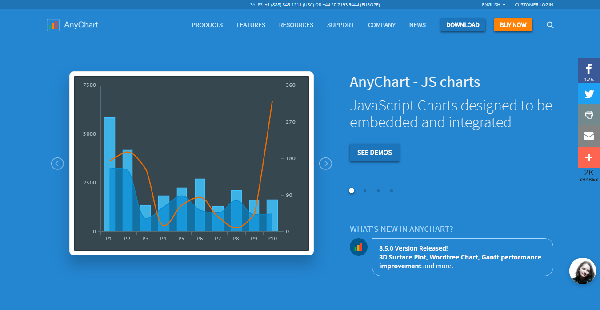
AnyChart is a blazingly fast, comprehensive data visualization tool and JavaScript charting library designed to simplify the integration of beautiful charts into any device, platform, or application. It comes with an awesome API functionality, documentation tools, and enterprise-grade support.
Leverages by both Fortune 500 companies and startups (Microsoft, Lockheed Martin, and Nokia to mention a few), AnyChart enables users to create all sorts of charts based on their needs, preferences, and specifications. They can customize their charts to suit their purpose and deliver data in a visually stunning and comprehensible way that their target audience will clearly appreciate.
Designed by developers for developers, AnyChart is an open-source platform that grants users total freedom and control to configure the system so that it works for them. On top of that, AnyChart comes with thousands of out-of-the-box code samples in integrations, plugins, and playgrounds, roaring and ready to provide users with industry-standard visualizations in just minutes.
Show MoreOverview of AnyChart Benefits
Massive Selection of Chart Types
AnyChart provides you with a wide collection of out-of-the-box chart types (68 to be exact) that you can use to create stunning visualizations of your data. The list includes Bullet Chart, Heat Map Chart, Bar Mekko Chart, Candlestick chart, and Doughnut chart to name some.
Along with the long list of JavaScript chart types available to you, AnyChart also gives you a rich set of features that you can use to build your own chart types. Adjusting the look and feel of your charts is effortless as you have access to a wide variety of color palettes and themes.
Share With Colleagues, Partners, and Anyone
Sharing is also a breeze. Once you are done creating your chart, you can easily send them to your partners, colleagues, and anyone via social network sites such as Pinterest, Twitter, Facebook, and Linkedin. Custom integrations enable you to utilize image sharing capabilities.
You also have the option to save your charts as an image. AnyChart supports multiple image formats including PDF, PNG, JPG, and SVG. Or if you prefer, you can download your chart data into Excel or CSV.
Build Interactive Dashboards
AnyCharts helps you maximize the power of your business intelligence by letting you create interactive BI dashboards. You can configure your dashboards to display figures, metrics, KPIs, performance scores, and other details you need to help you work more efficiently and make data-driven decisions quickly and decisively.
Show MoreOverview of AnyChart Features
- Chart Types
- Big Data
- Chart Design
- Drawing Tools
- Technical Indicators
- Localizations
- Five Resources To Learn AnyChart
- Exporting And Sharing
- Business Solutions And Dashboards
- Samples For Your Stack
What Problems Will AnyChart Solve?
Example #1
Challenge:
- Visualize complex long-range weather forecasts and weather maps for Meteomedia AG, making it possible to compare different weather models at a glance.
- Give users the opportunity to switch quickly between different locations, time ranges, and other parameters.
- Ensure that charts are easily updatable since new forecast data is added daily or even hourly.
Solution:
- AnyChart was used to implement cross-browser and cross-platform animated dashboards visualizing various weather forecasts.
- AnyChart’s interactivity options and ample customization opportunities allowed creating flexible and quickly customizable charts and maps.
- Due to simple XML interface, AnyChart visualizations are very easy to update both manually and via any server-side scripts.
Example #2
Challenge:
- Present the activity of DeviceLock in a clear and visually appealing way.
- Make complex data easy to read and understand so that the situation could be quickly evaluated by the end-user.
Solution:
- AnyChart allowed DeviceLock to create stylish interactive charts and provides excellent rendering performance.
- Due to a wide variety of chart types and flexibility of AnyChart, it was possible to implement user-friendly data visualizations.
Example #3
Challenge:
- Visualize the hh.ru index — the balance between the number of CVs and the number of vacancies submitted at their website over a certain period of time, which is an important index of business and economic activity and requires quality tools. Give end-users the opportunity to customize the chart on-the-fly (e.g. choosing a city and an industry) and access to historical data.
Solution:
- AnyChart Stock and Financial Charts were chosen, is an excellent tool for visualizing time-based data. It allows creating fully customizable interactive charts, displaying long term data sets in a comprehensible form.
Awards & Quality Certificates


AnyChart Position In Our Categories
Knowing that businesses have specific business-related needs, it is only rational that they abstain from subscribing to an all-encompassing, “perfect” software product. However, it is nearly futile to try to stumble on such application even among widely used software solutions. The clever step to do would be to jot down the various essential factors that require deliberation such as major features, packages, technical skill competence of staff, organizational size, etc. Next, you must conduct your product research thoroughly. Have a look at some of these AnyChart evaluations and check out the other software programs in your list in detail. Such all-encompassing product research ensures you stay away from unfit applications and buy the one that provides all the features your company requires in growing the business.
Position of AnyChart in our main categories:
TOP
50
AnyChart is one of the top 50 Data Visualization Software products
If you are interested in AnyChart it might also be a good idea to check out other subcategories of Data Visualization Software collected in our database of B2B software reviews.
Each company has its own characteristics, and can require a particular type of Data Visualization Software solution that will be fit for their company size, type of clients and employees and even individual industry they support. You should not count on getting a perfect app that will work for every business no matter what their history is. It may be a good idea to read a few AnyChart Data Visualization Software reviews first and even then you should pay attention to what the service is supposed to do for your business and your workers. Do you need a simple and straightforward service with only essential features? Will you actually make use of the complex tools required by experts and large enterprises? Are there any specific features that are especially useful for the industry you operate in? If you ask yourself these questions it will be much easier to get a reliable solution that will match your budget.
How Much Does AnyChart Cost?
AnyChart Pricing Plans:
Free Trial
Quote-based Plan
Contact Vendor
What are AnyChart pricing details?
AnyChart Pricing Plans:
Free Trial
Quote-based Plan
Contact Vendor
Contact AnyChart for information on their basic and enterprise pricing packages. You can also submit a demo request to see if the software is a perfect fit for your business.
User Satisfaction
Positive Social Media Mentions
44
Negative Social Media Mentions
0
We know that when you choose to buy a Data Visualization Software it’s crucial not only to learn how professionals evaluate it in their reviews, but also to check whether the actual people and companies that use it are genuinely satisfied with the service. That’s why we’ve designer our behavior-based Customer Satisfaction Algorithm™ that collects customer reviews, comments and AnyChart reviews across a vast range of social media sites. The data is then presented in a simple to digest format revealing how many clients had positive and negative experience with AnyChart. With that information at hand you will be equipped to make an informed buying decision that you won’t regret.
Technical details
Devices Supported
- Windows
- Linux
- Android
- iPhone/iPad
- Mac
- Web-based
- Windows Mobile
Deployment
- Cloud Hosted
- On Premise
- Open API
Language Support
- English
- Chinese
- German
- Hindi
- Japanese
- Spanish
- French
- Russian
- Italian
- Dutch
- Portugese
- Polish
- Turkish
- Swedish
Pricing Model
- Quote-based
Customer Types
- Small Business
- Large Enterprises
- Medium Business
- Freelancers
What Support Does This Vendor Offer?
- phone
- live support
- training
- tickets
What integrations are available for AnyChart?
AnyChart integrates with the following business systems and applications:
- Angular
- jQuery
- Meteor
- React
- Ember
- Node.js
- Qlik Sense
- Oracle APEX
- Android
- anything else
AnyChart User Reviews
AnyChart average rating:
4/5
Overall impression
5/5
Customer Support
4/5
Value for Money
4/5
Ease of Use
Write your own review of this product
ADD A REVIEWThe most favorable review

PROS: I like that the UI is so simple and that I got to configure it without any trouble because it's fast and easy.
CONS: I wish we have proper documentation about angular projects.
The least favorable review
PROS: Data viz is so nice with AnyCharts! It's so easy to implement and even customize in terms of resizing the charts. The UI can also integrate with existing systems I'm already using.
CONS: I wish we could export data from the platform. It would also be great if we can easily determine how much data is needed to create a scatter plot-style format.
More reviews from 11 actual users:
Sort by:
Latest
- Latest
- Most useful
- Most positive
- Most negative
Unique tool for data viz
Read full review >
4/5
Overall impression
3/5
Customer Support
4/5
Value for Money
4/5
Ease of Use
Published on: 23.11.2021
Company Size: More than 100 Employees
Industry: Computer Software
PROS: The library of AnyChart goes with any platform and so very lightweight. It's flexible enough to be customized and suit specific project needs. Its built-in features are helpful, especially during chart implementation. We're also easily able to set the ratio, range, zoom, point limit, and orientation. Rendering graphical data is also a lot faster and responsive, and shows any type of data on the charts. Various plugins and themes are also available and support a lot of types, including Gantt, 3D Bar and Stock charts. We're also able to export chart images in various formats including pdf, CSV, excel and XML, as well as multiple languages.
CONS: None at the moment. AnyChart has a good API and very efficient for us.
Amazing, AnyChart!
Read full review >
4/5
Overall impression
4/5
Customer Support
4/5
Value for Money
3/5
Ease of Use
Published on: 24.10.2021
Company Size: 11-50 Employees
Industry: Computer Software
PROS: I might be biased, but because I love JavaScript, I found AnyChart can very easily help me produce amazing charts and graphs.
CONS: If you're an experienced JavaScript developer, you can actually do it on your own, but I still like AnyChart because it's pretty easy to use. The support can improve a little bit.
AnyChart thoughts
Read full review >
4/5
Overall impression
3/5
Customer Support
3/5
Value for Money
4/5
Ease of Use
Published on: 08.10.2021
Company Size: More than 100 Employees
Industry: N/A
PROS: AnyChart is user-friendly with a lightweight chart library that works across several platforms. Various tech projects are implemented seamlessly. Regardless of size, data rendering is pretty efficient and quick. The quality of the charts is amazing and it features several languages too. It's data viz made easy, where it's easy to distinguish various types of charts including histogram, bar, area, line and pie, on an as-needed basis. The API performs well too.
CONS: No errors were spotted so far. I make charts more easily with AnyChart, and they're well-designed -- even without customized coding.
Charts made easy
Read full review >
5/5
Overall impression
4/5
Customer Support
4/5
Value for Money
4/5
Ease of Use
Published on: 24.07.2021
Company Size: 11-50 Employees
Industry: Civic & Social Organization
PROS: I like that the UI is so simple and that I got to configure it without any trouble because it's fast and easy.
CONS: I wish we have proper documentation about angular projects.
Data viz for non-profit groups
Read full review >
5/5
Overall impression
4/5
Customer Support
5/5
Value for Money
5/5
Ease of Use
Published on: 07.05.2021
Company Size: 11-50 Employees
Industry: N/A
PROS: It's so easy to use and enable its clients on being able to create great charts by themselves with the help of AnyChart.
CONS: It would be great to have more templates for the charts that would be more advanced-looking.
Strong API
Read full review >
4/5
Overall impression
3/5
Customer Support
4/5
Value for Money
4/5
Ease of Use
Published on: 01.05.2021
Company Size: More than 100 Employees
Industry: N/A
PROS: I like that this library works across many browsers and platforms. Graphic scaling of data is as easy as creating other types of graphs in a pie, bar and columnar formats, depending on what's needed in our projects. We are also able to auto-resize according to the window size of the browser. When we render during data transformation of our charts, it's done so much more quickly and it's more responsive. Data representation and visualization in graphic form is so seamless. There's also an efficient animation feature where we can add to charts. We didn't have to write custom codes, we just needed to use tags to implement it. AnyChart also provides an option to save graphs as an image. Being able to add graph details, like captions, labels and tooltips is also a plus.
CONS: AnyChart helps me create advanced interactive charts, so no, I don't have a problem with it at all.
Expansive data visualization capacity
Read full review >
4/5
Overall impression
4/5
Customer Support
3/5
Value for Money
4/5
Ease of Use
Published on: 23.04.2021
Company Size: More than 100 Employees
Industry: Computer Software
PROS: AnyChart is compatible with several browsers and platforms. It's also pretty lightweight. Its built-in features are powerful and help me create beautiful dashboards, charts and reports a lot quicker. It runs smoothly even when rendering data, and can support various languages and data types. Instructional legends can also be added to charts and it's easy to resize them. It's so easy to review multiple layers in a single chart and can be exported in various formats and images. All very organized.
CONS: I wish the price can be more affordable, but still worth what's on offer.
One-stop-shop tool for data viz
Read full review >
5/5
Overall impression
5/5
Customer Support
5/5
Value for Money
5/5
Ease of Use
Published on: 02.02.2021
Company Size: 11-50 Employees
Industry: Computer Software
PROS: AnyChart is a one-stop-shop tool for data visualization. It's fast and its charting library for JavaScript makes it easy for me to integrate well-designed charts with any app, platform and device. Its API is impressive, so are its documentation tools and effective customer support.
CONS: The learning curve seems very steep using AnyChart, so we need as many tutorials and online help documents as much as possible, but only in the beginning.
Seamless integration
Read full review >
4/5
Overall impression
3/5
Customer Support
3/5
Value for Money
4/5
Ease of Use
Published on: 10.08.2020
Company Size: More than 100 Employees
Industry: Management Consulting
PROS: Integrated seamlessly and a lot faster -- just how we needed it to be since it was time-sensitive for us.
CONS: None. They've integrated so well with other apps that I needed.
AnyChart thoughts
Read full review >
4/5
Overall impression
3/5
Customer Support
3/5
Value for Money
4/5
Ease of Use
Published on: 28.07.2020
Company Size: More than 100 Employees
Industry: N/A
PROS: Data viz is so nice with AnyCharts! It's so easy to implement and even customize in terms of resizing the charts. The UI can also integrate with existing systems I'm already using.
CONS: I wish we could export data from the platform. It would also be great if we can easily determine how much data is needed to create a scatter plot-style format.
What I think about AnyChart
Read full review >
4/5
Overall impression
3/5
Customer Support
3/5
Value for Money
4/5
Ease of Use
Published on: 25.07.2020
Company Size: More than 100 Employees
Industry: N/A
PROS: I like that AnyChart's API for its charting library is flexible and that the whole system is user-friendly. It's great for creating interactive charts that we can reintegrate for various tech projects. It's quick to render data, and AnyChart supports several chart formats and languages, including XML and JSON. The quality of the charts is excellent if you zoom in and out. AnyChart's legends and tooltips allow it to reveal more information about the chart too.
CONS: I can't think of anything yet. It's been great so far with AnyChart.


Join a community of 7,369 SaaS experts
Thank you for the time you take to leave a quick review of this software. Our community and review base is constantly developing because of experts like you, who are willing to share their experience and knowledge with others to help them make more informed buying decisions.
Sign in with LinkedIn
Why we require LinkedIn?
- Show the community that you're an actual user.
- We will only show your name and profile image in your review.
- You can still post your review anonymously.
OR
Sign in with company emailSign in with company email
Popular AnyChart Alternatives





Top Competitors To AnyChart By Price
Product name:
Price:



Trending Data Visualization Software Reviews



AnyChart Comparisons
Product name:






AnyChart user reviews
Unique tool for data viz
Read full review >
4/5
Overall impression
3/5
Customer Support
4/5
Value for Money
4/5
Ease of Use
Published on: 23.11.2021
Company Size: More than 100 Employees
Industry: Computer Software
Amazing, AnyChart!
Read full review >
4/5
Overall impression
4/5
Customer Support
4/5
Value for Money
3/5
Ease of Use
Published on: 24.10.2021
Company Size: 11-50 Employees
Industry: Computer Software
AnyChart thoughts
Read full review >
4/5
Overall impression
3/5
Customer Support
3/5
Value for Money
4/5
Ease of Use
Published on: 08.10.2021
Company Size: More than 100 Employees
Industry: N/A
Charts made easy
Read full review >
5/5
Overall impression
4/5
Customer Support
4/5
Value for Money
4/5
Ease of Use
Published on: 24.07.2021
Company Size: 11-50 Employees
Industry: Civic & Social Organization
Data viz for non-profit groups
Read full review >
5/5
Overall impression
4/5
Customer Support
5/5
Value for Money
5/5
Ease of Use
Published on: 07.05.2021
Company Size: 11-50 Employees
Industry: N/A

Page last modified



Did you find this review useful?
Yes
No
Thank you for your feedback
How can we make this page better?
Unsure about this software?
FIND ALTERNATIVES
 Why is FinancesOnline free?