
- Home
- Document Creation Software
- ByteScout PDF SDK

ByteScout PDF SDK Review



What is ByteScout PDF SDK?
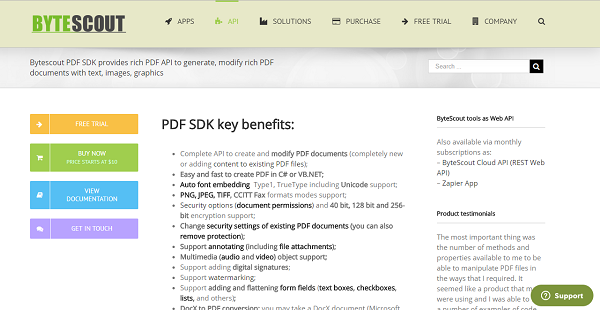
ByteScout PDK SDK is a PDF document generation tool used by developers of any level and experience to create new PDF documents with rich text, images, and graphics or add new content to existing PDF files with ease. PDF generation is a tricky task and ByteScout PDF SDK makes the whole process simple and easy.
With ByteScout PDF SDK, users can create PDF files in C# or VB.NET. The tool supports a variety of formats, including PNG, JPEG, TIFF, and CCITT Fax to name a few. Security options are available, with 40-bit, 128-bit and 256-bit encryption supported. And if need be, users can modify security settings of their PDF files to meet certain requirements. Or they can also deactivate protection settings if they so prefer.
ByteScout PDF SDK supports annotations with file attachments, multimedia elements (audio and video), digital signatures, watermarking, as well as adding and flattening of form fields.
Show MoreOverview of ByteScout PDF SDK Benefits
ByteScout PDK SDK provides you with a document generation and configuration tool that allows you to create PDF documents with ease or enter changes to your existing PDF files without breaking a sweat. Creating or editing files can be quite a challenge if you are not yet proficient with the PDF format and not familiar with PDF systems. But with ByteScout PDF, all this and more becomes a breeze.
For instance, if you work in a retail business where you deal with barcodes on a consistent basis, ByteScout is a perfect solution when it comes to embedding barcodes on your invoices. For those in the logistics industry, ByteScout PDF SDK simplify the creation of standard uniform invoices for better and more efficient inventory management.
ByteScout PDF SDK can also be implemented in the healthcare industry. Medical institutions, hospitals, and organizations can effortlessly produce patient reports and incorporate barcodes, standard text, images, and more in said reports without much trouble.
You can do all of these and more with ByteScout PDF SDK. The best part is that you don’t have to install any third party PDF software such as Adobe Reader to make ByteScout run. You just set it up and then you are good to go.
Show MoreOverview of ByteScout PDF SDK Features
- Complete API to create and modify PDF documents
- Easy and fast to create PDF in C# or VB.NET;
- Auto font embedding Type1, TrueType including Unicode support;
- PNG, JPEG, TIFF, CCITT Fax formats modes support;
- Security options (document permissions) and 40 bit, 128 bit and 256-bit encryption support;
- Change security settings of existing PDF documents (you can also remove protection);
- Support annotating (including file attachments);
- Multimedia (audio and video) object support;
- Support adding digital signatures;
- Support watermarking;
- Support adding and flattening form fields (text boxes, checkboxes, lists, and others);
- DocX to PDF conversion
- HTML To PDF conversion
- ActiveX/COM interface
- Flexible for new updates and changes
- Rich documentation with tutorials
What Problems Will ByteScout PDF SDK Solve?
ByteScout PDF SDK is a perfect document generation platform in the following scenarios:
1) Healthcare where you can create patient reports;
2) Insurance where you can make contracts;
3) Logistics where you can generate invoices.
Awards & Quality Certificates


ByteScout PDF SDK Position In Our Categories
Keeping in mind companies have their own business-related requirements, it is only practical they steer clear of subscribing to an all-encompassing, ideal solution. Nonetheless, it would be difficult to pinpoint such an app even among popular software solutions. The practicable thing to undertake would be to make a list of the various key aspects which merit deliberation such as important features, costing, technical skill capability of staff, business size, etc. After which, you should perform the product research exhaustively. Browse through these ByteScout PDF SDK analyses and look into the other software options in your list in detail. Such well-rounded research ascertain you take out unfit applications and choose the one that provides all the features your business requires.
Position of ByteScout PDF SDK in our main categories:
TOP
100
ByteScout PDF SDK is one of the top 100 Document Creation Software products
If you are considering ByteScout PDF SDK it could also be a good idea to investigate other subcategories of Document Creation Software gathered in our database of SaaS software reviews.
Companies have diverse needs and requirements and no software application can be ideal in such a situation. It is useless to try to find a perfect off-the-shelf software product that fulfills all your business needs. The wise thing to do would be to customize the system for your specific requirements, employee skill levels, budget, and other elements. For these reasons, do not hurry and invest in well-publicized trendy applications. Though these may be widely used, they may not be the ideal fit for your specific wants. Do your groundwork, look into each short-listed platform in detail, read a few ByteScout PDF SDK Document Creation Software reviews, call the maker for clarifications, and finally settle for the product that presents what you require.
How Much Does ByteScout PDF SDK Cost?
ByteScout PDF SDK Pricing Plans:
Free Trial
ByteScout PDF SDK Slow License
$10
ByteScout PDF SDK PRO DESKTOP Developer License
$299.99
ByteScout PDF SDK PRO WEB Developer License
$299.99
ByteScout PDF SDK ENTERPRISE Developer License
$349.99
ByteScout PDF SDK SITE License
$1,399.99
PDF SDK OEM DEVELOPER License
$399.99
ByteScout PDF SDK OEM SITE License
$1,999.99
CLOUDAPI-200
$19.99/month
CLOUDAPI-500
$39.99/month
CLOUDAPI-5000
$299.99/month
What are ByteScout PDF SDK pricing details?
ByteScout PDF SDK Pricing Plans:
Free Trial
ByteScout PDF SDK Slow License
$10
ByteScout PDF SDK PRO DESKTOP Developer License
$299.99
ByteScout PDF SDK PRO WEB Developer License
$299.99
ByteScout PDF SDK ENTERPRISE Developer License
$349.99
ByteScout PDF SDK SITE License
$1,399.99
PDF SDK OEM DEVELOPER License
$399.99
ByteScout PDF SDK OEM SITE License
$1,999.99
CLOUDAPI-200
$19.99/month
CLOUDAPI-500
$39.99/month
CLOUDAPI-5000
$299.99/month
ByteScout offers a variety of basic and enterprise pricing products and licenses. Check them out and see which one is best suited for your business.
On-premise Licenses
- ByteScout PDF SDK Slow License (all functions) – $10
- ByteScout PDF SDK PRO DESKTOP Developer License – $299.99
- ByteScout PDF SDK PRO WEB Developer License – $299.99
- ByteScout PDF SDK ENTERPRISE Developer License – $349.99
- ByteScout PDF SDK SITE License – $1,399.99
- PDF SDK OEM DEVELOPER License – $399.99
- ByteScout PDF SDK OEM SITE License – $1,999.99
Web API
- CLOUDAPI-200 – $19.99/month
- CLOUDAPI-500 – $39.99/month
- CLOUDAPI-5000 – $299.99/month
User Satisfaction
Positive Social Media Mentions
0
Negative Social Media Mentions
0
We know that when you decide to get a Document Creation Software it’s vital not only to see how experts evaluate it in their reviews, but also to discover whether the real users and enterprises that bought these solutions are actually happy with the service. That’s why we’ve created our behavior-based Customer Satisfaction Algorithm™ that aggregates customer reviews, comments and ByteScout PDF SDK reviews across a wide range of social media sites. The information is then featured in an easy to digest format revealing how many people had positive and negative experience with ByteScout PDF SDK. With that information available you should be equipped to make an informed purchasing choice that you won’t regret.
Technical details
Devices Supported
- Windows
- Mac
- Web-based
Deployment
- Cloud Hosted
- On Premise
Language Support
- English
Pricing Model
- Monthly payment
- One-time payment
Customer Types
- Small Business
- Medium Business
What Support Does This Vendor Offer?
- phone
- live support
- training
- tickets
What integrations are available for ByteScout PDF SDK?
Online API version (ByteScout Cloud API) is also available as subscription-based REST API, as well as the online application for Zapier platform. With a Zapier platform, you may quickly integrate to implement a scenario where a new file in DropBox triggers conversion into CSV.

ByteScout PDF SDK
is waiting for
your first review.

Write your own review of this product
ADD A REVIEWMore reviews from 0 actual users:


Join a community of 7,369 SaaS experts
Thank you for the time you take to leave a quick review of this software. Our community and review base is constantly developing because of experts like you, who are willing to share their experience and knowledge with others to help them make more informed buying decisions.
Sign in with LinkedIn
Why we require LinkedIn?
- Show the community that you're an actual user.
- We will only show your name and profile image in your review.
- You can still post your review anonymously.
OR
Sign in with company emailSign in with company email
Popular ByteScout PDF SDK Alternatives




Top Competitors To ByteScout PDF SDK By Price
Product name:
Price:



$208.43

Trending Document Creation Software Reviews


8.0
N/A
ByteScout PDF SDK Comparisons
Product name:


Page last modified



Did you find this review useful?
Yes
No
Thank you for your feedback
How can we make this page better?
Unsure about this software?
FIND ALTERNATIVES
 Why is FinancesOnline free?