

Chartrics Review



What is Chartrics?
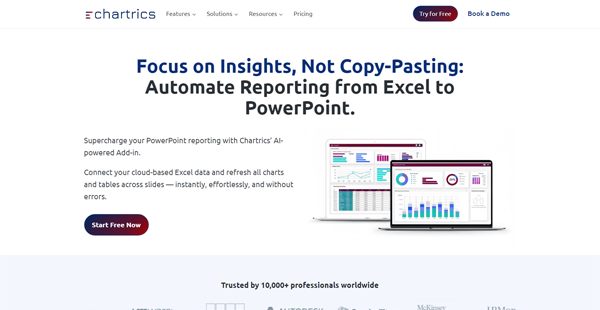
Chartrics is a cloud-based data analysis and visualization automation suite that enables users to measure, analyze, and visualize data from various sources, as well as automate the presentation generation process for improved collaboration, decision-making, and business growth.
As it essentially automates business intelligence workflows related to the appropriate processing, reporting, and presentation of relevant data, Chartrics significantly reduces the time it takes to analyze data and create presentations by as much as 75%.
This platform features a comprehensive suite of systems and tools designed to enhance user productivity, thanks to powerful features such as integrated project management, team and client collaboration, dynamic data authorization, automated slide generation, intelligent data transformation, and more.
Show MoreOverview of Chartrics Benefits
Chartrics provides an integrated suite of smart and intuitive applications built to fully automate your research, data analysis, and visualization tasks and workflows. It is designed to help you maximize your data analysis and add efficiency to your data visualization and presentation through the integration of multiple data formats, centralized data management, advanced data mining tools, and automated, robust data visualizations.
A huge advantage that Chartrics brings to the fore is that you can access all your data from any device. This functionality enables you to quickly view your data and make informed business decisions or take actions instantly based on reliable, recent, and up-to-date information.
With Chartrics, you have a plethora of visualization options, including the very familiar and user-friendly MS PowerPoint. You can create data-bound charts and presentations using native PowerPoint and Excel components, such as dynamic data filtering algorithms, rich sorting and grouping rules, and automatic refresh with new data.
Chartrics is equipped with a powerful analyzer tool to help you get the most potential out of your data. This feature helps you and your team uncover trends, patterns, and regularities by allowing you to use all research data formats for upload and manipulation. Chartrics comes with a range of smart data manipulation tools, as well as Association Mining tools, for comprehensive data exploration and analysis.
Show MoreOverview of Chartrics Features
- Integrated project and file management
- Automated presentation generation
- Interactive authoring and storytelling
- Simplified tracking of longitudinal studies
- Dynamic user access and role management
- Native PowerPoint and Excel components
- Data-bound charts and presentations
- Dynamic data filtering algorithms
- Rich statistical analysis tools
- Robust sorting and grouping rules
- Comprehensive and intuitive interface
- Reveal new patterns and regularities
- Intuitive data manipulation tools
- Smart set of Association Mining tools
- Industry-standard editing and designing functions
What Problems Will Chartrics Solve?
Problem #1: Researchers and analysts find it difficult to work with unstructured data from various sources and in different formats
Solution: Chartrics is a complete solution for cleaning, editing, analyzing, and visualizing data.
Chartrics PowerPoint Add-In has two main working modes:
• Template mode
• Presentation mode
Problem #2. Repetitive reports and manual work with presentations
Solution: Another powerful Chartrics functionality is that it links the charts to cross-tabulations and actual data, rather than binding them to their resulting tables. This allows the users to retain all their manual work while refreshing the values of charts when there’s a change in the dataset. This, in its turn, reduces the time spent on repetitive studies from hours and days to minutes.
Problem #3: Collaboration on the project (team/clients)
Solution: Chartrics Cloud is the primary administration module of Chartrics, used to set up new clients, projects, users, and their associated permissions. Clients in Chartrics Cloud mean a set of projects. While each project represents a separate study with its own set of presentations, templates, and datasets.
Chartrics Position In Our Categories
Because businesses have unique business-related needs, it is rational that they steer clear of selecting an all-encompassing, ”best” software system. Nevertheless, it would be hard to find such an app even among recognizable software products. The clever thing to do can be to list the varied key aspects that require deliberation such as essential features, price plans, technical skill capability of the users, company size, etc. Next, you must conduct the product research fully. Have a look at some of these Chartrics evaluations and look into each of the applications in your list in detail. Such comprehensive product investigation can make sure you drop poorly fit software solutions and select the system which provides all the features your business requires in growing the business.
Position of Chartrics in our main categories:
TOP
500
Chartrics is one of the top 500 Business Intelligence Software products
If you are considering Chartrics it could also be beneficial to analyze other subcategories of Business Intelligence Software gathered in our base of SaaS software reviews.
There are well-liked and widely used systems in each software group. But are they essentially the best fit for your company’s unique requirements? A market-leading software product may have thousands of subscribers, but does it provide what you require? For this reason, do not blindly spend on popular systems. Read at least a few Chartrics Business Intelligence Software reviews and mull over the elements that you desire in the software such as the price, main functionality, available integrations etc. Then, choose a few solutions that fit your wants. Try out the free trials of these platforms, read online reviews, get explanations from the vendor, and do your homework systematically. This exhaustive research is certain to aid you find the most excellent software platform for your company’s unique requirements.
How Much Does Chartrics Cost?
Chartrics Pricing Plans:
Free Trial
Community
$0
Professional
$99/month
Teams
$1,290/month
Enterprise
Contact Vendor
What are Chartrics pricing details?
Chartrics Pricing Plans:
Free Trial
Community
$0
Professional
$99/month
Teams
$1,290/month
Enterprise
Contact Vendor
For Individuals
Community – Free Trial (Up to 60 days)
- Ideal for students, educators, nonprofits, or individuals to explore Chartrics risk-free.
- Hosted on Community Cloud
- Up to 5 active reports
- Data storage limited to 1 GB
- Access to online resources: Help Center, articles, videos
Professional – $99/month ($986/year)
- Hosted on shared Chartrics Cloud
- Up to 20 active reports with total data limit of 5GB
- No limits on software functionalities/features
- Technical Support including onboarding training
For Teams
Teams – $1,290/month ($12,848/year)
- On-premises or dedicated cloud hosting
- Full collaboration reports with role-based security
- No limits on project storage (within hosting limits)
- Dedicated Customer Support
Enterprise – By Quote
- Dedicated instance of software on cloud or on-premises, fully isolated
- Everything from Teams plan and integration with proprietary 3rd-party software
- You own instance of source code with no limits
- Dedicated team of Developers, QA, and Account Manager
User Satisfaction
Positive Social Media Mentions
0
Negative Social Media Mentions
0
We are aware that when you make a decision to buy a Business Intelligence Software it’s crucial not only to find out how experts evaluate it in their reviews, but also to find out if the actual people and companies that purchased this software are indeed satisfied with the service. That’s why we’ve designer our behavior-based Customer Satisfaction Algorithm™ that aggregates customer reviews, comments and Chartrics reviews across a broad range of social media sites. The information is then featured in an easy to understand form indicating how many customers had positive and negative experience with Chartrics. With that information at hand you should be ready to make an informed buying decision that you won’t regret.
Video
Technical details
Devices Supported
- Windows
- Android
- iPhone/iPad
- Web-based
Deployment
- Cloud Hosted
Language Support
- English
Pricing Model
- Monthly payment
- Quote-based
Customer Types
- Large Enterprises
- Medium Business
What Support Does This Vendor Offer?
- phone
- live support
- training
- tickets
What integrations are available for Chartrics?
Chartrics integrates with the following business systems and applications:
- Microsoft Excel
- Microsoft PowerPoint
- UTab
- WinCross

Chartrics
is waiting for
your first review.

Write your own review of this product
ADD A REVIEWMore reviews from 0 actual users:


Join a community of 7,369 SaaS experts
Thank you for the time you take to leave a quick review of this software. Our community and review base is constantly developing because of experts like you, who are willing to share their experience and knowledge with others to help them make more informed buying decisions.
Sign in with LinkedIn
Why we require LinkedIn?
- Show the community that you're an actual user.
- We will only show your name and profile image in your review.
- You can still post your review anonymously.
OR
Sign in with company emailSign in with company email
Popular Chartrics Alternatives




Top Competitors To Chartrics By Price
Product name:
Price:

by quote

by quote



Trending Business Intelligence Software Reviews


Chartrics Comparisons
Product name:





Page last modified



Did you find this review useful?
Yes
No
Thank you for your feedback
How can we make this page better?
Unsure about this software?
FIND ALTERNATIVES
 Why is FinancesOnline free?