

ClientFlow Review



What is ClientFlow?
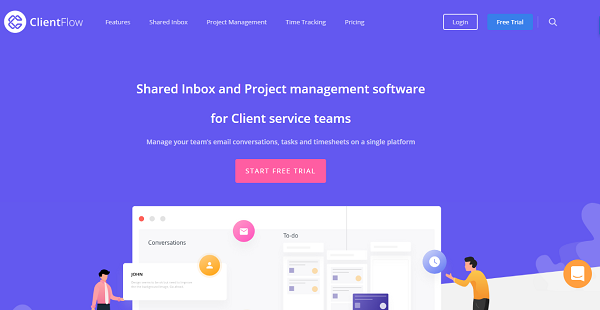
ClientFlow is a project management software with a shared inbox functionality, created specifically for client service teams. The solution helps users stay on top of their email conversations, manage tasks, and control their timesheets within a single, unified environment. With ClientFlow, teams become more efficient in collaborating and communicating with each other while managers simplify the way they create and manage tasks, organize projects, and monitor progress among others.
Communication within teams and with clients are all a breeze as every email is shared and accessible, thanks to ClientFlow’s Shared Inbox feature. Communication, approvals, and responses are standardized, customized, and if need be automated, speeding up the communication process which then results in increased productivity and overall efficiency.
Show MoreOverview of ClientFlow Benefits
Shared Inbox
ClientFlow gives you a robust solution that unifies and streamlines both external and internal communication and collaboration processes with a shared inbox functionality. This feature allows you to put all your client-related emails in a single inbox, making it easy for you to create custom and standard responses, manage and approve requests, and automate repeat conversations.
All emails placed in the Shared Inbox are visible to all team members. You and other people are able to see incoming emails and conversations in their inbox and they don’t have to switch to the group mail account to know who is saying what.
Because communication within the team is centralized, collaboration is much improved. The Shared Inbox functionality eases the facilitation of group conversation, assigning of tasks, and coordination of team members to mention a few.
Comprehensive Project Management
ClientFlow comes with a plethora of tools that help you create projects and organize the details long before you and your team start to work. From assigning tasks to setting due dates and deadlines to providing description per project and task, ClientFlow lets you do all that without any hiccup.
Each person works at a pace of their own. With ClientFlow, you and other team members can personalize your respective dashboards, modifying it to show project details, status, tasks, and schedules that are relevant to your work, allowing you to plan and execute accordingly.
Show MoreOverview of ClientFlow Features
- Client Communication
- Approvals
- Message Templates
- Custom Branding
- Actionable via Email
- Mail Tracking
- Smart Actions
- Team Inbox
- Common Inbox for Clients
- Advanced Filters
- Assign Conversations
- Internal Comments
- Open and Close Threads
- Follow Conversations
- Reminders
- Task Comments
- Task Status
- Time Tracking
- Kanban Board
- Due Dates
- Sub Tasks
- Notifications
- Attachments
- Descriptions
- Bulk Time Clocking
- Time Logs
- Budgeted Time
What Problems Will ClientFlow Solve?
Problem 1: When multiple people are managing group mail accounts such as info@ or contact@, there is no clarity as to who should respond to incoming mail.
In ClientFlow, conversations can be assigned to specific team members. Also, to collaborate internally, users end up forwarding emails to their individual accounts or start conversations with teammates in the same thread. This leads to clustering of inboxes and disorganization of internal and external communication. In ClientFLow, users can simply add comments which are visible only to teammates.
Problem 2: There is a disconnect between conversations of a particular project and the tasks associated with it.
At ClientFlow, Tasks can be created from conversations and all conversation associated with the task can be viewed in the task itself. This enables users to clearly understand the context and work better.
Problem 3: When companies work with multiple clients projects, their inbox becomes cluttered with emails from all projects, There is no organization.
In ClientFlow, users can segregate conversations based on projects and clients.
Awards & Quality Certificates


ClientFlow Position In Our Categories
Keeping in mind companies have particular business-related demands, it is only wise they avoid selecting a one-size-fits-all, ideal software system. Be that as it may, it is troublesome to discover such application even among well-known software solutions. The practicable thing to do should be to narrow down the numerous chief aspects that merit examination such as major features, costing, skill ability of staff, business size, etc. Next, you must double down on your product research through and through. Go over some ClientFlow evaluations and look over each of the software options in your list more closely. Such detailed product investigation makes sure you circumvent ill-fitting software products and choose the one that meets all the tools your business requires for success.
Position of ClientFlow in our main categories:
TOP
500
ClientFlow is one of the top 500 Project Management Software products
Each enterprise has different requirements and requires a software that can be personalized for their size, kind of employees and clients, and the specific industry they are in. For these reasons, no system can offer perfect features off-the-shelf. When you look for a software app, first be sure what you need it for. Read some ClientFlow Professional Services Automation Software - PSA reviews and ask yourself do you want basic tools or do you require advanced tools? Are there any industry-specific features that you are searching for? Get the answers to these queries to assist your search. There are lots of aspects that you need to mull over and these include your finances, particular business wants, your organization size, integration requirements etc. Take your time, try out a few free trials, and finally zero in on the app that offers all that you require to boost your organization effectiveness and productivity.
How Much Does ClientFlow Cost?
ClientFlow Pricing Plans:
Free Trial
ClientFlow Pro
$19/user/month
ClientFlow Enterprise
Contact vendor
What are ClientFlow pricing details?
ClientFlow Pricing Plans:
Free Trial
ClientFlow Pro
$19/user/month
ClientFlow Enterprise
Contact vendor
ClientFlow offers the following basic/enterprise pricing schemes:
ClientFlow Pro – $19/user/month
- Minimum 2 Users
- 24/7 Customer Support
- Unlimited Threads
- Unlimited Approvals
- Unlimited Tasks
- Unlimited Time Entries
- Unlimited Clients
- Unlimited Projects
- Unlimited Client Contacts
ClientFlow Enterprise – Custom Enterprise Pricing
User Satisfaction
Positive Social Media Mentions
0
Negative Social Media Mentions
0
We realize that when you make a decision to buy a Professional Services Automation Software - PSA it’s crucial not only to learn how experts rank it in their reviews, but also to check whether the actual clients and enterprises that use these solutions are actually content with the product. Because of that need we’ve designer our behavior-based Customer Satisfaction Algorithm™ that aggregates customer reviews, comments and ClientFlow reviews across a broad range of social media sites. The data is then featured in an easy to digest way showing how many users had positive and negative experience with ClientFlow. With that information available you will be ready to make an informed business choice that you won’t regret.
Technical details
Devices Supported
- Windows
- Linux
- Android
- iPhone/iPad
- Mac
- Web-based
Deployment
- Cloud Hosted
Language Support
- English
Pricing Model
- Monthly payment
- Quote-based
Customer Types
- Small Business
What Support Does This Vendor Offer?
- phone
- live support
- training
- tickets
What integrations are available for ClientFlow?
ClientFlow integrates with the following applications and more:
- Gmail
- Zapier
- Dropbox
- Google Drive

ClientFlow
is waiting for
your first review.

Write your own review of this product
ADD A REVIEWMore reviews from 0 actual users:


Join a community of 7,369 SaaS experts
Thank you for the time you take to leave a quick review of this software. Our community and review base is constantly developing because of experts like you, who are willing to share their experience and knowledge with others to help them make more informed buying decisions.
Sign in with LinkedIn
Why we require LinkedIn?
- Show the community that you're an actual user.
- We will only show your name and profile image in your review.
- You can still post your review anonymously.
OR
Sign in with company emailSign in with company email
Popular ClientFlow Alternatives





Top Competitors To ClientFlow By Price
Product name:
Price:
$29.95


Trending Professional Services Automation Software - PSA Reviews

7.5
100%
8.6
N/A


8.0
99%

ClientFlow Comparisons
Product name:









Page last modified



Did you find this review useful?
Yes
No
Thank you for your feedback
How can we make this page better?
Unsure about this software?
FIND ALTERNATIVES
 Why is FinancesOnline free?