

GMass Review



What is GMass?
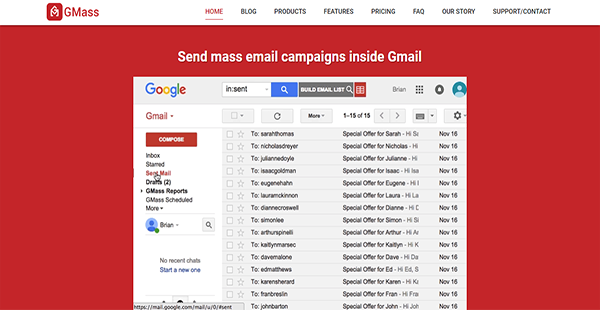
GMass is a mass campaign builder and sender that you can use within Gmail and Google Inbox. This allows you to maximize the email service and enhance it with features that are more powerful and even break its sending limit.
Aside from creating and sending emails, GMass can also help with email lists. The solution can extract email addresses from previous campaigns or conversations within your account, saving you time from adding recipients again. On top of that, you can like GMass with Google Sheets. Because of this, you can send personalized emails and mass campaigns based on your file’s columns.
The best thing about GMass is that you can automatically send follow-ups. The solution continues doing that until you receive a reply. Additionally, you can send messages en masse as replies. This creates the impression that you personalized the content for each individual, giving you a higher chance of receiving a reply.
Show MoreOverview of GMass Benefits
Easy Email Composition
Creating a visually appealing email is not a challenge when you are using GMass. You can compose your message as you would any other and make it more engaging with inline images. You can attach documents and other files as well when you need to. Because of this, you no longer need to tackle more technical email builders. As such, you can work faster since you are working with an interface with which you are familiar.
Accessible Email Lists
GMass can integrate with Google Sheets, which means you can upload your email lists to the solution with ease. This also lets you fill in other required fields automatically, as long as they are available in your file. Other than that, GMass can create email lists based on your previous campaigns. This saves you the trouble and time of having to add recipients to your campaign one by one over again. As such, you can get in touch with your audiences in a more rapid manner.
Automated Follow-ups
When people have not replied to your emails, GMass goes into autopilot mode and sends them follow-up messages. It continues doing so until recipients finally respond to or at least open your email. With this, you can increase your engagement rate with your target market.
Emails as Replies
GMass has an email as reply tool that enables you to send emails in bulk as responses to previous messages and make them look like you wrote them for the recipient especially. This way, you can boost your chances of receiving an answer.
Enhanced Distribution Technology
Gmail limits its mass sending to less than 500 people only. If you need to send your campaign to more than that number, GMass can offer assistance. The solution has an enhanced distribution technology that lets it break the sending limits. It also makes sure not to violate the email service’s rules by sending them in a span of several days.
Show MoreOverview of GMass Features
- Gmail Compose Window
- Test Mode
- Google Sheets Integration
- Scheduling
- Open Tracking
- Click Tracking
- Unsubscribe Link
- Reports
- Email List Builder
- Automatic Follow-up Emails
- Manual Follow-up Campaigns
- Reply Management
- Break Gmail’s Sending Limits
- New Messages vs Replies
- Personalization
GMass Position In Our Categories
Since companies have distinct business wants, it is only prudent they steer clear of subscribing to an all-encompassing, ideal business application. Regardless, it would be almost impossible to discover such an app even among popular software solutions. The clever thing to undertake should be to note down the various main aspects which necessitate careful thought such as major features, plans, skill aptitude of staff, business size, etc. Thereafter, you should double down on the research comprehensively. Have a look at these GMass review articles and scrutinize the other solutions in your shortlist in detail. Such detailed product investigation makes sure you avoid ill-fitting applications and buy the system that provides all the aspects your company requires in sustaining growth.
Position of GMass in our main categories:
TOP
200
GMass is one of the top 200 Marketing Software products
Each company has its own characteristics, and might require a particular type of Email Marketing Software solution that will be adjusted to their business size, type of clients and employees and even particular industry they cater to. It's not wise to count on locating a perfect solution that will be suitable for every company regardless of their background is. It may be a good idea to read a few GMass Email Marketing Software reviews first and even then you should remember what the service is supposed to do for your company and your workers. Do you require an easy and straightforward service with just essential features? Will you actually make use of the advanced functionalities needed by pros and big enterprises? Are there any particular tools that are especially useful for the industry you work in? If you ask yourself these questions it is going to be much easier to get a solid service that will match your budget.
How Much Does GMass Cost?
GMass Pricing Plans:
Free Trial
Minimal (Gmail)
$6.95/month
Standard (Gmail)
$8.95/month
Premium (Gmail)
$12.95/month
Minimal (G Suite)
$8.95/month
Standard (G Suite)
$12.95/month
Premium (G Suite)
$19.95/month
Premium (G Suite - Team)
from $89.95/month
What are GMass pricing details?
GMass Pricing Plans:
Free Trial
Minimal (Gmail)
$6.95/month
Standard (Gmail)
$8.95/month
Premium (Gmail)
$12.95/month
Minimal (G Suite)
$8.95/month
Standard (G Suite)
$12.95/month
Premium (G Suite)
$19.95/month
Premium (G Suite - Team)
from $89.95/month
GMass has different enterprise pricing for Gmail and G Suite but you can opt to pay annually on monthly for either one. There are three packages for each, which are outlined below to help you make a choice.
Gmail
Minimal – $6.95/month or $69.00/year
- Standard Features
- Unlimited Use
Standard – $8.95/month or $89.00/year
- No GMass Footer on Emails
Premium – $12.95/month or $69.00/year
- Auto Follow-ups
G Suite
Individual
Minimal – $8.95/month or $89.00/year
- Standard Features
- Unlimited Use
Standard – $12.95/month or $129.00/year
- No GMass Footer on Emails
Premium – $19.95/month or $199.00/year
- Auto Follow-ups
Team
Premium – from $89.00/month or $897.00/year
- No GMass footer on Emails
- Auto Follow-ups
User Satisfaction
Positive Social Media Mentions
35
Negative Social Media Mentions
1
We are aware that when you choose to buy a Email Marketing Software it’s important not only to learn how experts evaluate it in their reviews, but also to discover whether the real clients and businesses that bought it are genuinely happy with the product. That’s why we’ve designer our behavior-based Customer Satisfaction Algorithm™ that gathers customer reviews, comments and GMass reviews across a broad range of social media sites. The data is then presented in an easy to understand way revealing how many users had positive and negative experience with GMass. With that information at hand you will be equipped to make an informed business decision that you won’t regret.
Video
Technical details
Devices Supported
- Windows
- Mac
- Web-based
Deployment
- Cloud Hosted
Language Support
- English
Pricing Model
- Monthly payment
- Annual Subscription
Customer Types
- Small Business
- Large Enterprises
- Medium Business
What Support Does This Vendor Offer?
- phone
- live support
- training
- tickets
What integrations are available for GMass?
GMass can integrate with Google Sheets.

GMass
is waiting for
your first review.

Write your own review of this product
ADD A REVIEWMore reviews from 0 actual users:


Join a community of 7,369 SaaS experts
Thank you for the time you take to leave a quick review of this software. Our community and review base is constantly developing because of experts like you, who are willing to share their experience and knowledge with others to help them make more informed buying decisions.
Sign in with LinkedIn
Why we require LinkedIn?
- Show the community that you're an actual user.
- We will only show your name and profile image in your review.
- You can still post your review anonymously.
OR
Sign in with company emailSign in with company email
Popular GMass Alternatives


Top Competitors To GMass By Price
Product name:
Price:


Trending Email Marketing Software Reviews




GMass Comparisons
Product name:


Page last modified



Did you find this review useful?
Yes
No
Thank you for your feedback
How can we make this page better?
Unsure about this software?
FIND ALTERNATIVES
 Why is FinancesOnline free?