

Igiko Review



What is Igiko?
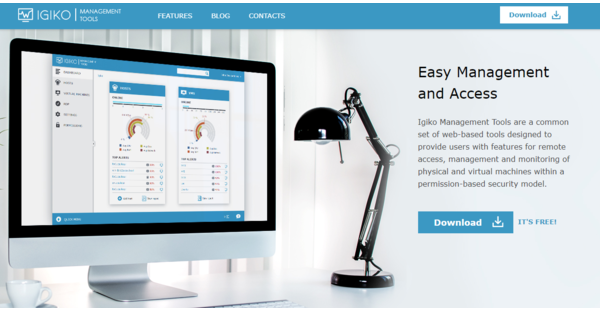
Igiko is a computer management software built for remote access. It is comprised of a set web-based tools enabling users to access, monitor, and manage physical and virtual machines (VMs) in a single web console. It operates under a permission-based security model where users are granted permission to access infrastructure to track performance and perform basic computer operations. They are also notified about any degradation of performance to avoid further damage to operations.
The platform is specially designed for SMEs, IT administrators, QA Engineers and software developers, training centers, and companies with remote servers in various facilities. It comes with special charts and information dashboard for easy navigation. It also has an embedded RDP gateway with HTML5 RDP client control, allowing remote connection with your hosts and VMs from anywhere.
Show MoreOverview of Igiko Benefits
Remote access
Igiko comes with a built-in remote desktop gateway allowing you to connect with any computer or VM in your local network. Its HTML5 RDP client control integrated into the web console enables you to work with remote desktops from anywhere via a web browser.
Comprehensive monitoring
Igiko enables constant performance monitoring of every available object. Valuable data is presented in graphs for easy trend analysis. The platform also alarms you of any performance degradation. These tools make it easy for users to monitor physical and virtual machines and make sure nothing is amiss.
Simple to operate
From starting to shutting down, restarting, pausing, resuming a host or a VM, everything can be done with a single click. You can also choose to perform operations right away or schedule them for a later time. Installing and uninstalling the software remotely is also possible.
Configurable User Permissions
Administrators can set specific permissions for particular objects. This means a user can only see objects and perform only those functions that the administrator has allowed him or her to do so.
Easy to use
Access the web console from anywhere via the internet. To redirect traffic to the machine IP, you only have to configure external ports on your router. It also comes with a very intuitive design.
Easy to install
Igiko only requires a Windows machine with .NET Framework 4.5. Moreover, an agent is not necessary if you wish to add hosts to the console. All you need is a configured WinRM.
Show MoreOverview of Igiko Features
- Web-based console
- Dashboard
- Performance monitoring
- Built-in remote desktop gateway
- SSL traffic encryption
- Extended data collection
- Enterprise-level SQL servers
What Problems Will Igiko Solve?
Problem #1: Time consuming and costly on-site work
When one of the employees needs remote access to the working computer, you need the person who is at the office at that time to go to the right computer, turn it on, install the same application as the employee who needs access. Then they need to enter the code or password in the application for remote access. Using Igiko, you can do all these using the tool remotely. You can monitor and manage your network even when you are not in the office.
Awards & Quality Certificates


Igiko Position In Our Categories
Since companies have particular business-related requirements, it is prudent they steer clear of deciding on an all-encompassing, ideal system. Regardless, it would be hard to pinpoint such an app even among sought-after software systems. The right thing to undertake would be to narrow down the various main functions that demand examination like major features, budget, technical skill competence of staff, business size, etc. After which, you should do the research thoroughly. Browse through some of these Igiko evaluations and scrutinize each of the software programs in your list more closely. Such comprehensive research ascertains you stay away from ill-fitting software solutions and select the one that offers all the benefits your business requires for optimal results.
Position of Igiko in our main categories:
TOP
50
Igiko is one of the top 50 Application Performance Monitoring Software products
TOP
500
Igiko is one of the 500 IT Management Software products
If you are considering Igiko it may also be a good idea to analyze other subcategories of IT Management Software gathered in our database of SaaS software reviews.
Every enterprise has different requirements and requires a system that can be customized for their size, type of staff members and clients, and the particular industry they are in. For these reasons, no platform can offer perfect features out-of-the-box. When you try to find a software system, first be sure what you need it for. Read some Igiko IT Management Software reviews and ask yourself do you want basic functionality or do you require advanced functionality? Are there any industry-specific features that you are searching for? Get the answers to these questions to assist your search. There are multiple elements that you need to mull over and these include your budget, particular business wants, your company size, integration needs etc. Take your time, try out a few free trials, and finally zero in on the platform that offers all that you need to enhance your organization efficiency and productivity.
How Much Does Igiko Cost?
Igiko Pricing Plans:
Free Trial
Free
By quote
Contact vendor
What are Igiko pricing details?
Igiko Pricing Plans:
Free Trial
Free
By quote
Contact vendor
Igiko is free to install. Meanwhile, you can request a quote from the vendor for enterprise pricing if you need more functionality or prefer a customized version.
User Satisfaction
Positive Social Media Mentions
26
Negative Social Media Mentions
0
We realize that when you choose to buy a IT Management Software it’s important not only to find out how experts score it in their reviews, but also to check whether the real users and enterprises that purchased this software are genuinely content with the product. That’s why we’ve designer our behavior-based Customer Satisfaction Algorithm™ that gathers customer reviews, comments and Igiko reviews across a vast array of social media sites. The information is then featured in an easy to digest form showing how many customers had positive and negative experience with Igiko. With that information available you should be prepared to make an informed purchasing decision that you won’t regret.
Technical details
Devices Supported
- Windows
- Web-based
Deployment
- Cloud Hosted
- On Premise
Language Support
- English
Pricing Model
- Free
- Quote-based
Customer Types
- Small Business
- Large Enterprises
- Medium Business
- Freelancers
What Support Does This Vendor Offer?
- phone
- live support
- training
- tickets
What integrations are available for Igiko?
No information available.

Igiko
is waiting for
your first review.

Write your own review of this product
ADD A REVIEWMore reviews from 0 actual users:


Join a community of 7,369 SaaS experts
Thank you for the time you take to leave a quick review of this software. Our community and review base is constantly developing because of experts like you, who are willing to share their experience and knowledge with others to help them make more informed buying decisions.
Sign in with LinkedIn
Why we require LinkedIn?
- Show the community that you're an actual user.
- We will only show your name and profile image in your review.
- You can still post your review anonymously.
OR
Sign in with company emailSign in with company email
Popular Igiko Alternatives




Top Competitors To Igiko By Price
Product name:
Price:

by quote




Trending IT Management Software Reviews




Igiko Comparisons
Product name:


Page last modified


Did you find this review useful?
Yes
No
Thank you for your feedback
How can we make this page better?
Unsure about this software?
FIND ALTERNATIVES
 Why is FinancesOnline free?