
- Home
- Task Management Software
- Microsoft Planner

Microsoft Planner Review



What is Microsoft Planner?
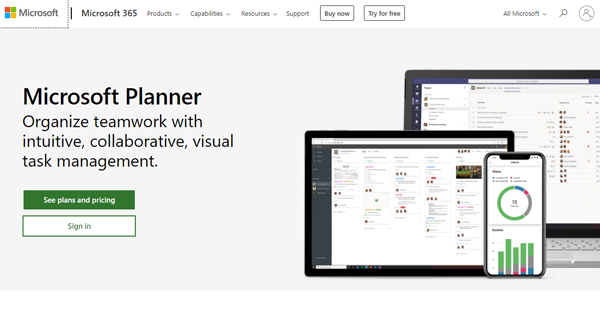
Microsoft Planner is an intuitive task management software designed to foster collaboration between team members with its planner hub and movable task boards. Designed for businesses of all sizes, the platform integrates with all Microsoft 365 products to promote efficiency throughout your entire operation. You can assign tasks to your team, designate multiple members to one task, monitor their progress, and see if they are hitting their KPIs and the ideal service levels.
This platform leverages Kanban boards with which you get to build the team’s workflow, set and assign tasks, and attach mixed media. The boards can be repositioned from one column to another, from one part of a column to the next, therefore, allowing you and your team members to fashion them into interactive to-do lists. You can also post checklists onto the boards so you can keep track of your daily, weekly, and monthly agendas.
To monitor team performance, Microsoft Planner makes use of analytics that populate information onto charts. It tracks various types of data, including project statuses, the productivity level of each member, the projects received by the team per time period, and so on. The data pulled from the charts are particularly useful when you’re planning for future projects or writing progress reports.
In some industries, members of the workforce are required to work in the field, which means they’ll be away from their computers. This situation is addressed through Microsoft Planner’s mobile app. It has all the core functionalities of its web-based counterpart and it allows users to input information in real-time. The application is available for iOS, Android, and Windows Mobile users.
Should you need extra functionalities from the platform, you can take advantage of its integrations with other Microsoft products. You can communicate with your team directly using Microsoft Teams or send emails to your leads through Microsoft Outlook, as you access and manage the said applications in one location. Microsoft Planner is part of the Microsoft 365 bundle. To avail yourself of it, you’ll have to subscribe to Microsoft 365, which affords you not just Planner, but also products like Microsoft Outlook, Microsoft Teams, Microsoft Forms, and Microsoft OneDrive.
Show MoreOverview of Microsoft Planner Benefits
Customizable Task Boards
Microsoft Planner’s foremost feature is its flexible Kanban boards that can be moved and positioned freely by dragging and dropping them on the workspace. You can use them to build a workflow for your team, designate roles to members of the team, and assign tasks. Files and links can be attached to the boards while its labels can be set to reflect actual work procedures. In addition, you can assign multiple team members to one task, which comes in handy for lengthy and complex procedures.
Organized Projects
The platform’s planner hub module carries a team’s projects, each composed of a board set that reflects the team’s workflow and task assignments. You can add new members to each project team or link a project board set to relevant parties like clients and prospective partners. This level of flexibility allows you to optimize both the internal and external procedures of your company.
Powerful Analytics Tools
Microsoft Planner’s analytics tools allow it to visualize tasks and project statuses as pie and bar graphs. This lets you interpret data and find trends with ease. As a result, you won’t have trouble spotting the problem areas of each project as well as writing status reports with all the information at your disposal.
Manage Your Team Remotely
The Microsoft Planner mobile app carries all the major functionalities of the platform’s web-based version. This means location won’t be an issue in handling your team and listed tasks. Moreover, remote workers can update the boards in real-time, enabling the work process to flow smoothly despite them not being in the office. You can even present the workflows of successful projects through your mobile phone in meetings with prospective clients and investors.
Seamless Integration with Microsoft Products
Microsoft Planner is bundled with other Microsoft products, with Microsoft 365 serving as your digital control center. So, if your operations necessitate forms like purchase orders and invoices, you can schedule the task on Planner and then have one of your team members prepare the documents on Microsoft Forms. As for the team communications, you can use Microsoft Teams alongside Microsoft Planner to discuss plans and tasks. The other Microsoft integrations work just as seamlessly as the two aforementioned examples.
Show MoreOverview of Microsoft Planner Features
- Kanban Boards
- Planner Hub
- Task Assignment and Management
- Multiple User Task Assignment
- Reporting and Analytics
- Mobile App
- File Attachment
- File Storage and Management
- Drag and Drop Interface
- Checklists
- Microsoft 365 Integrations
Microsoft Planner Position In Our Categories
Keeping in mind businesses have unique business-related wants, it is sensible that they abstain from purchasing a one-size-fits-all, “perfect” software product. Be that as it may, it is futile to pinpoint such a software solution even among popular software products. The right thing to do can be to set down the different main factors that necessitate research such as major features, costing, technical skill ability of staff members, organizational size, etc. The second step is, you must do your product research fully. Have a look at some Microsoft Planner evaluations and explore the other software options in your list in detail. Such well-rounded research ascertains you drop mismatched apps and subscribe to the one that has all the tools your business requires to be successful.
Position of Microsoft Planner in our main categories:
Organizations have different needs and requirements and no software platform can be perfect in such a situation. It is pointless to try to find an ideal off-the-shelf software system that fulfills all your business wants. The intelligent thing to do would be to modify the application for your specific needs, staff member skill levels, budget, and other elements. For these reasons, do not hurry and pay for well-publicized popular systems. Though these may be widely used, they may not be the perfect fit for your unique needs. Do your research, investigate each short-listed platform in detail, read a few Microsoft Planner Task Management Software reviews, speak to the maker for explanations, and finally choose the app that offers what you require.
How Much Does Microsoft Planner Cost?
Microsoft Planner Pricing Plans:
Free Trial
Microsoft 365 Business Basic
$5/user/month annually
Microsoft 365 Business Standard
$12.50/user/month annually
Microsoft 365 Business Premium
$20/user/month annually
Microsoft 365 F3
$10/user/month annually
Microsoft 365 E3
$32/user/month annually
Microsoft 365 E5
$57/user/month
What are Microsoft Planner pricing details?
Microsoft Planner Pricing Plans:
Free Trial
Microsoft 365 Business Basic
$5/user/month annually
Microsoft 365 Business Standard
$12.50/user/month annually
Microsoft 365 Business Premium
$20/user/month annually
Microsoft 365 F3
$10/user/month annually
Microsoft 365 E3
$32/user/month annually
Microsoft 365 E5
$57/user/month
Microsoft Planner is part of the Microsoft 365 bundle. To obtain it, you’ll have to subscribe to Microsoft 365. Microsoft 365 comes with a month-long free trial. For more information about Microsoft Planner’s pricing plans, be sure to contact the vendor.
Business Pricing Plans
Microsoft 365 Business Basic – $5/user/month annually
- Microsoft Word
- Microsoft Excel
- Microsoft Powerpoint
- Microsoft Outlook
- Secure Cloud Services
- Support
Microsoft 365 Business Standard – $12.50/user/month annually
- Everything in the Basic Package
- Microsoft Access
- Microsoft Publisher
- Microsoft Bookings
- Microsoft MileIQ
Microsoft 365 Business Premium – $20/user/month annually
- Everything in the Standard Package
- Business Protection
- Management Tools
Enterprise Pricing Plans
Microsoft 365 F3 – $10/user/month annually
- Social and Intranet Apps
- Files and Content Apps
- Work Management Apps
- Device and App Management
- Security Management
Microsoft 365 E3 – $32/user/month annually
- Everything in the F3 Package.
- Microsoft 365 Apps
- Email and Calendar Apps
Microsoft 365 E5 – $57/user/month
- Everything in the E3 Package.
- Meetings and Voice Apps
- Advanced Analytics
- Identity and Access Management
- Threat Protection
- Information Protection
- Advanced Compliance
User Satisfaction
Positive Social Media Mentions
99
Negative Social Media Mentions
6
We know that when you decide to purchase a Task Management Software it’s important not only to see how professionals evaluate it in their reviews, but also to check if the actual clients and businesses that purchased this software are actually happy with the service. Because of that need we’ve designer our behavior-based Customer Satisfaction Algorithm™ that aggregates customer reviews, comments and Microsoft Planner reviews across a broad range of social media sites. The data is then presented in a simple to understand format indicating how many clients had positive and negative experience with Microsoft Planner. With that information at hand you will be prepared to make an informed business decision that you won’t regret.
Video
Technical details
Devices Supported
- Android
- iPhone/iPad
- Web-based
- Windows Mobile
Deployment
- Cloud Hosted
Language Support
- English
- Chinese
- German
- Hindi
- Japanese
- Spanish
- French
- Russian
- Italian
- Dutch
- Portugese
- Polish
- Turkish
- Swedish
Pricing Model
- Monthly payment
- Annual Subscription
Customer Types
- Small Business
- Large Enterprises
- Medium Business
- Freelancers
What Support Does This Vendor Offer?
- phone
- live support
- training
- tickets
What integrations are available for Microsoft Planner?
- Microsoft 365
- Microsoft Teams
- Microsoft Flow
- Microsoft OneNote
- Microsoft SharePoint
- Microsoft Forms
- Microsoft Outlook
- Microsoft Word
- Microsoft Excel
- Microsoft Powerpoint
- Microsoft Access
- Microsoft Publisher
- Microsoft Bookings
- Microsoft MileIQ
- Microsoft Exchange

Microsoft Planner
is waiting for
your first review.

Write your own review of this product
ADD A REVIEWMore reviews from 0 actual users:


Join a community of 7,369 SaaS experts
Thank you for the time you take to leave a quick review of this software. Our community and review base is constantly developing because of experts like you, who are willing to share their experience and knowledge with others to help them make more informed buying decisions.
Sign in with LinkedIn
Why we require LinkedIn?
- Show the community that you're an actual user.
- We will only show your name and profile image in your review.
- You can still post your review anonymously.
OR
Sign in with company emailSign in with company email
Popular Microsoft Planner Alternatives



Top Competitors To Microsoft Planner By Price
Product name:
Price:




Trending Task Management Software Reviews

8.0
98%


8.0
100%
Microsoft Planner Comparisons
Product name:










Page last modified



Did you find this review useful?
Yes
No
Thank you for your feedback
How can we make this page better?
Unsure about this software?
FIND ALTERNATIVES
 Why is FinancesOnline free?