
- Home
- Network Management Software
- Naverisk Remote Monitoring and Management (RMM)

Naverisk Remote Monitoring and Management (RMM) Review



What is Naverisk Remote Monitoring and Management (RMM)?
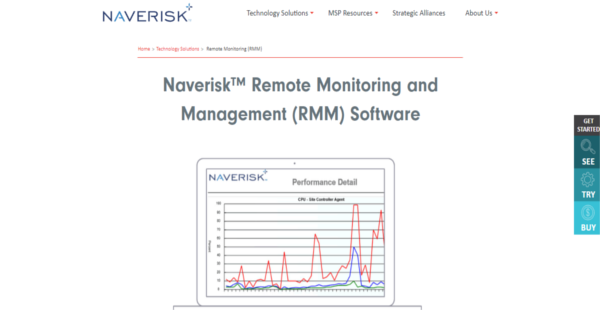
Naverisk RMN is a comprehensive remote monitoring and management software that provides MSPs (managed services providers) with a 100% web-based platform that functions excellently on desktops, laptops, and mobile devices alike. Network administrators can easily monitor, manage, and maintain networks and devices from the palm of their hands with Naverisk RMN, as the software simplifies the workflows and processes of support and maintenance teams.
From a single, comprehensive RMM solution, network administrators, IT engineers, and other network professionals can deliver high-quality services to their clients, from networking monitoring, auditing, alerting, ticketing, scripting, workflow automation, and patching among others. Naverisk RMM is designed to support OS servers, workstations, laptops and mobile devices powered by Windows, Linux, and Mac operating systems.
Show MoreOverview of Naverisk Remote Monitoring and Management (RMM) Benefits
Naverisk RMN gives you a complete, robust remote monitoring and management solution that allows you to graduate from traditional and outdated methods of networking monitoring and IT maintenance and support. Gone are the days where you toiled with Excel spreadsheets for billing, MS Outlook for ticketing, and a myriad of remote control and device monitoring solutions to manage your IT and services. Naverisk RMN delivers a single platform that simplifies, streamlines, and accelerates MSP workflows and processes, improving your efficiencies, effectiveness, and productivity without breaking the bank.
This RMM software has all the tools and capabilities you and your fellow network administrators and IT professionals look for to help you with their your tasks sans the bloatware. On top of that, you are able to deliver high-quality service and support anytime, from anywhere, regardless of your location or that of the device or network.
Back when MSPs use traditional means to manage, maintain and support their clients’ network, IT infrastructure, and applications, most network administrators, and IT professionals can only provide support within the typical 9 to 5 working hour model. But what happens when a serious ticket pops up after hours? Prolonged downtime causes a lot of damage and harms your reputation as an MSP.
With Naverisk RMM, you can quickly address issues anytime and anywhere. A quick look at your mobile device and you are made fully aware of the situation right then and there. This enables you to make quick intelligent decisions and respond immediately with appropriate action. Simply put, Naverisk RMM minimizes downtime significantly, ensuring that network operations of your clients remain smooth and unhindered.
Show MoreOverview of Naverisk Remote Monitoring and Management (RMM) Features
- Monitoring operating system event logs
- Network scanning and IP monitoring
- SNMP discovery and monitoring
- Automating Windows patching and updates
- Deploying individual and device-level patching
- Scheduling reboots, maintenance windows, and system scans
- Monitoring Microsoft Exchange, small business, and SQL server configurations
- Executing batch, PowerShell™ and DOS commands remotely
- Implementing scripts and software deployment across multiple devices
- Installing, monitoring and updating antivirus and antimalware
- Managing backup and disaster recovery solutions
Naverisk Remote Monitoring and Management (RMM) Position In Our Categories
Because companies have specific business-related needs, it is rational they avoid deciding on a one-size-fits-all, ideal software solution. Nonetheless, it would be hard to try to come across such a software product even among branded software solutions. The clever step to do would be to take note of the several main factors that call for a investigation including critical features, price plans, technical skill competence of the employees, company size, etc. After which, you must conduct the product research systematically. Browse over some of these Naverisk Remote Monitoring and Management (RMM) evaluations and scrutinize each of the software systems in your list more closely. Such well-rounded research can make sure you steer clear of unsuitable software products and buy the system that meets all the aspects your business requires in sustaining growth.
Position of Naverisk Remote Monitoring and Management (RMM) in our main categories:
TOP
50
Naverisk Remote Monitoring and Management (RMM) is one of the top 50 Network Management Software products
If you are interested in Naverisk Remote Monitoring and Management (RMM) it may also be a good idea to analyze other subcategories of Network Management Software collected in our base of B2B software reviews.
It's important to keep in mind that almost no app in the Network Management Software category is an ideal solution that can fulfill all the goals of all business types, sizes and industries. It may be a good idea to read a few Naverisk Remote Monitoring and Management (RMM) Network Management Software reviews first as certain services can dominate just in a really narrow group of applications or be created with a very specific industry in mind. Others may work with an intention of being easy and intuitive and consequently lack complicated functions desired by more experienced users. You can also come across solutions that focus on a large group of users and offer a rich feature set, however this usually comes at a more significant price of such a service. Ensure you're aware of your requirements so that you buy a solution that has all the features you look for.
How Much Does Naverisk Remote Monitoring and Management (RMM) Cost?
Naverisk Remote Monitoring and Management (RMM) Pricing Plans:
Free Trial
Quote-based Plan
Contact vendor
What are Naverisk Remote Monitoring and Management (RMM) pricing details?
Naverisk Remote Monitoring and Management (RMM) Pricing Plans:
Free Trial
Quote-based Plan
Contact vendor
Contact Naverisk for enterprise pricing information and other product details on Naverisk Remote Monitoring and Management (RMM) Solution. You can also submit a request for a free trial or demo to see if the software is a perfect fit for your business.
User Satisfaction
Positive Social Media Mentions
0
Negative Social Media Mentions
0
We realize that when you make a decision to purchase a Network Management Software it’s important not only to see how experts evaluate it in their reviews, but also to check if the actual people and enterprises that purchased these solutions are genuinely content with the product. That’s why we’ve designer our behavior-based Customer Satisfaction Algorithm™ that aggregates customer reviews, comments and Naverisk Remote Monitoring and Management (RMM) reviews across a wide array of social media sites. The data is then presented in an easy to understand form showing how many clients had positive and negative experience with Naverisk Remote Monitoring and Management (RMM). With that information available you will be prepared to make an informed purchasing choice that you won’t regret.
Video
Technical details
Devices Supported
- Windows
- Mac
- Web-based
Deployment
- Cloud Hosted
Language Support
- English
Pricing Model
- Quote-based
Customer Types
- Small Business
- Large Enterprises
- Medium Business
What Support Does This Vendor Offer?
- phone
- live support
- training
- tickets
What integrations are available for Naverisk Remote Monitoring and Management (RMM)?
No information available.

Naverisk Remote Monitoring and Management (RMM)
is waiting for
your first review.

Write your own review of this product
ADD A REVIEWMore reviews from 0 actual users:


Join a community of 7,369 SaaS experts
Thank you for the time you take to leave a quick review of this software. Our community and review base is constantly developing because of experts like you, who are willing to share their experience and knowledge with others to help them make more informed buying decisions.
Sign in with LinkedIn
Why we require LinkedIn?
- Show the community that you're an actual user.
- We will only show your name and profile image in your review.
- You can still post your review anonymously.
OR
Sign in with company emailSign in with company email
Popular Naverisk Remote Monitoring and Management (RMM) Alternatives




Top Competitors To Naverisk Remote Monitoring and Management (RMM) By Price
Product name:
Price:

By quote


$2,000


Trending Network Management Software Reviews


Naverisk Remote Monitoring and Management (RMM) Comparisons
Product name:


Page last modified


Did you find this review useful?
Yes
No
Thank you for your feedback
How can we make this page better?
Unsure about this software?
FIND ALTERNATIVES
 Why is FinancesOnline free?