

Scapple Review



What is Scapple?
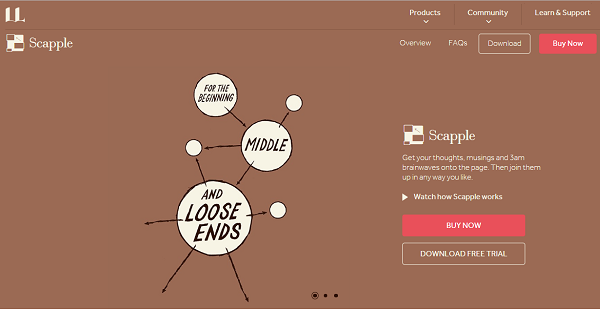
Scapple is a mind mapping tool that provides users with a digital canvas on which they can write their ideas and notes and then come back later to make the connection.
It is designed primarily for writers, authors, essayists, songwriters, and other professionals in the literary field, enabling them to jot down their ideas for plots, characters, topics for their essays, whatever that pops to mind. They can then check their ideas later, see which one would work, bridge one idea to another to create a plot or a background until they make the connections that comprise a compelling story or the next big bestseller.
While Scapple is aimed at literary professionals, it can also be utilized for project planning, making to-do lists, and other activities that require serious mind mapping capability.
Show MoreOverview of Scapple Benefits
Scapple delivers a simple and very user-friendly mind mapping solution that lets you scribble your thoughts on a virtual notepad whenever you have your musings at three in the morning. It’s like having an epiphany for a character origin story while having a cup of coffee and then writing down your ideas on a sheet of paper, except with Scapple, you jot them down on a digital canvas.
With Scapple, you can write down your thoughts and musings and come back at a later time to see how you can bridge one idea to another and make progress. You can organize your thoughts easily and effortlessly, thanks to Scapple’s drag and drop user interface. You have the freedom to work with your ideas and find the links and angles and the approaches that would turn your idea into that award-winning essay or the next chart topper or the future New York Time’s bestselling novel.
The best part of Scapple is that you don’t have to worry about losing your ideas. Back in the old days, authors and writers wrote down their thoughts and ideas on a piece of paper that they could lose any time. With Scapple, whenever that figurative lamp lights up above your head, you are able to save that thought and not worry about losing it forever.
Show MoreOverview of Scapple Features
- Write Notes
- Connect Notes via Drag and Drop
- Completely Free Form
- Stack and Organize notes of related ideas
- Group Notes based on background and shapes
- Custom Notes
- Drag notes into Scrivener
Scapple Position In Our Categories
Since businesses have specific business demands, it is prudent that they abstain from paying for an all-in-one, ”best” system. Just the same, it would be difficult to discover such an app even among branded software products. The clever thing to do can be to spell out the various main factors that merit inspection including critical features, pricing, skill ability of staff members, business size, etc. The second step is, you should follow through your product research exhaustively. Browse over some Scapple evaluations and explore each of the applications in your list in detail. Such comprehensive product research can make sure you weed out mismatched applications and choose the one which offers all the tools your company requires in sustaining growth.
Position of Scapple in our main categories:
TOP
20
Scapple is one of the top 20 Mind Mapping Software products
If you are interested in Scapple it may also be sensible to analyze other subcategories of Mind Mapping Software gathered in our base of SaaS software reviews.
There are popular and widely used solutions in each software category. But are they essentially the best fit for your organization’s special wants? A popular software solution may have thousands of customers, but does it present what you require? For this reason, do not blindly spend on popular systems. Read at least a few Scapple Mind Mapping Software reviews and consider the elements that you desire in the software such as the price, main features, available integrations etc. Then, shortlist a few solutions that fit your requirements. Check out the free trials of these products, read online reviews, get clarifications from the vendor, and do your research thoroughly. This in-depth research is certain to help you find the most excellent software application for your firm’s special requirements.
How Much Does Scapple Cost?
Scapple Pricing Plans:
Free Trial
macOS Scapple Standard
$14.99
macOS Scapple Educational
$12
Windows Scapple Standard
$14.99
Windows Scapple Educational
$12
What are Scapple pricing details?
Scapple Pricing Plans:
Free Trial
macOS Scapple Standard
$14.99
macOS Scapple Educational
$12
Windows Scapple Standard
$14.99
Windows Scapple Educational
$12
Check out Scapple’s basic and enterprise pricing license packages and see which one suits your business best.
- macOS Scapple Standard – $14.99
- macOS Scapple Educational – $12
- Windows Scapple Standard – $14.99
- Windows Scapple Educational – $12
User Satisfaction
Positive Social Media Mentions
32
Negative Social Media Mentions
1
We realize that when you decide to get a Mind Mapping Software it’s important not only to see how professionals rank it in their reviews, but also to find out whether the real people and companies that use this software are indeed content with the service. Because of that need we’ve created our behavior-based Customer Satisfaction Algorithm™ that aggregates customer reviews, comments and Scapple reviews across a broad range of social media sites. The information is then displayed in an easy to digest form revealing how many users had positive and negative experience with Scapple. With that information at hand you should be ready to make an informed purchasing choice that you won’t regret.
Video
Technical details
Devices Supported
- Windows
- Mac
Deployment
- On Premise
Language Support
- English
Pricing Model
- One-time payment
Customer Types
- Small Business
- Medium Business
- Freelancers
What Support Does This Vendor Offer?
- phone
- live support
- training
- tickets
What integrations are available for Scapple?
No information available.
Scapple User Reviews
Scapple average rating:
5/5
Overall impression
5/5
Customer Support
5/5
Value for Money
5/5
Ease of Use
Write your own review of this product
ADD A REVIEWMore reviews from 1 actual users:
Sort by:
Latest
- Latest
- Most useful
- Most positive
- Most negative
Highly recommended!
Read full review >
5/5
Overall impression
5/5
Customer Support
4/5
Value for Money
5/5
Ease of Use
Published on: 10.03.2021
Company Size: 11-50 Employees
Industry: Information Technology and Services
PROS: This app is clean, lightweight, and user-friendly. Any user can use it right away with ease regardless if you're a beginner or not. It's compatible with both Windows and Mac. It gets the job done, like creating labels, in just a snap. It's a pretty amazing app.
CONS: The free version is only available for 30 days.


Join a community of 7,369 SaaS experts
Thank you for the time you take to leave a quick review of this software. Our community and review base is constantly developing because of experts like you, who are willing to share their experience and knowledge with others to help them make more informed buying decisions.
Sign in with LinkedIn
Why we require LinkedIn?
- Show the community that you're an actual user.
- We will only show your name and profile image in your review.
- You can still post your review anonymously.
OR
Sign in with company emailSign in with company email
Popular Scapple Alternatives



Top Competitors To Scapple By Price
Product name:
Price:




Trending Mind Mapping Software Reviews


Scapple Comparisons
Product name:


Scapple user reviews
Highly recommended!
Read full review >
5/5
Overall impression
5/5
Customer Support
4/5
Value for Money
5/5
Ease of Use
Published on: 10.03.2021
Company Size: 11-50 Employees
Industry: Information Technology and Services

Page last modified



Did you find this review useful?
Yes
No
Thank you for your feedback
How can we make this page better?
Unsure about this software?
FIND ALTERNATIVES
 Why is FinancesOnline free?