

SyncTools Review


What is SyncTools?
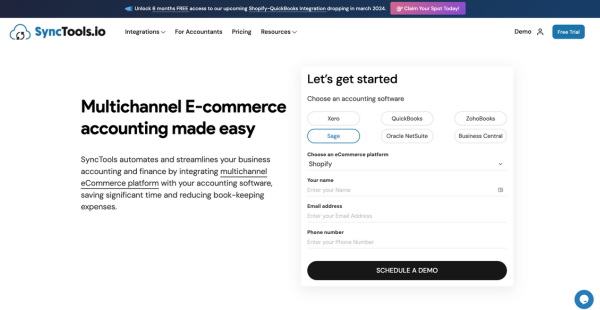
SyncTools is a multi-channel eCommerce accounting tool designed to automate and streamline business processes. This platform is specifically tailored for businesses that leverage platforms like Linnworks, QuickBooks, Xero, and Sage, among others.
SyncTools has a user-friendly interface that simplifies invoicing, automates data entry, syncs payroll management, tracks COGS, and more. With this platform, accounting planning is made more accurate and efficient.
SyncTools users can generate real-time financial reports, perform accurate inventory tracking, and streamline payment processing. SyncTools is trusted by over 70 great businesses to help them stay ahead of the competition by focusing on growth rather than tedious bookkeeping tasks. Furthermore, SyncTools streamlines financial management, frees businesses from manual tasks, ensures accuracy, and enables growth.
Show MoreOverview of SyncTools Benefits
SyncTools is a solution for seamless integration between your multichannel eCommerce platform and leading accounting software. These are some of the benefits of using SyncTool.
Effortless Data Synchronization
SyncTools facilitates seamless integration between your multichannel eCommerce platform and accounting software like QuickBooks, Xero, and NetSuite. This ensures that your financial data remains up-to-date across all platforms without manual intervention.
High Configurability
With SyncTools, you have complete control over how your data is mapped and synchronized. Whether it’s configuring payment methods, taxes, or discounts, you can tailor the synchronization process to meet your specific business needs.
Order Filtering
SyncTools removes cluttered data streams. This platform allows you to filter unwanted orders, ensuring that only relevant transactions from selected channels are synced with your accounting software. This enhances data accuracy and reduces processing time.
Invoice Consolidation
For businesses handling high volumes of orders, SyncTools offers the option to consolidate daily transactions into grouped invoices. This feature streamlines accounting processes by reducing the number of individual transactions, making reconciliation more efficient.
Sales Channel Tracking
Gain valuable insights into the performance of your sales channels. SyncTools enables you to track sales data by channel, providing a clear understanding of revenue, profits, and ROI for each platform. This helps in making informed business decisions and optimizing resource allocation.
User-Friendly Dashboard
SyncTools keeps users informed with a comprehensive dashboard. SyncTools provides an intuitive dashboard where you can analyze synchronization metrics, track order sync status, and monitor data flow between platforms. This helps empower users with actionable insights.
Show MoreOverview of SyncTools Features
- Fully configurable features
- Filter unwanted orders
- Individual/grouped invoices
- Tracking category or location mapping
- Built-in reporting tools
- Real-time data synchronization
- Advanced tax-setting rules
- Multiple accounting software connection
- Customizable Dashboard
What Problems Will SyncTools Solve?
Problem #1: Lack of Financial Visibility Across Sales Channels
Solution: SyncTools resolves the challenge of insufficient financial insight across various sales channels. This platform automatically logs sales revenue into respective accounts within accounting software like QuickBooks, Xero, and Zoho Books. Through this, SyncTools creates a unified perspective on financial data.
Problem #2: Accounting Errors and Inefficiencies
Solution: SyncTools tackles accounting errors and inefficiencies resulting from manual transaction entries. To fix this, SyncTools automates transaction recording into accounting software like QuickBooks and Xero. This way, SyncTools enhances efficiency and accuracy while minimizing errors.
Problem #3: Non-compliance with Live Bookkeeping Regulations
Solution: SyncTools ensures compliance with live bookkeeping regulations, which is vital for tax and accounting adherence. This platform seamlessly imports data into accounting software upon order processing. This way, SyncTools guarantees real-time availability, enabling effortless compliance regardless of location.
Awards & Quality Certificates

SyncTools Position In Our Categories
Since companies have distinctive business-related needs, it is reasonable that they avoid preferring a one-size-fits-all, ”best” system. At any rate, it would be futile to discover such application even among well-known software solutions. The practical thing to undertake would be to write the various chief functions that demand analysis including essential features, price plans, technical skill ability of staff, company size, etc. Then, you must follow through the research systematically. Have a look at some SyncTools evaluations and scrutinize each of the software products in your shortlist in detail. Such comprehensive research guarantees you weed out ill-fitting applications and subscribe to the system which has all the tools your company requires.
Position of SyncTools in our main categories:
TOP
200
SyncTools is one of the top 200 Accounting Software products
If you are considering SyncTools it could also be sensible to examine other subcategories of Accounting Software listed in our base of SaaS software reviews.
There are popular and widely used systems in each software category. But are they necessarily the best fit for your enterprise’s unique needs? A trendy software product may have thousands of subscribers, but does it offer what you require? For this reason, do not blindly invest in popular systems. Read at least a few SyncTools Accounting Software reviews and think about the aspects that you desire in the software such as the cost, main tools, available integrations etc. Then, choose a few apps that fit your needs. Check out the free trials of these products, read online opinions, get information from the seller, and do your research systematically. This in-depth homework is sure to assist you find the finest software solution for your organization’s special needs.
How Much Does SyncTools Cost?
SyncTools Pricing Plans:
Free Trial
Shopify
$19
WooCommerce
$30
Magento
$30
BigCommerce
$30
Linnworks
$69
What are SyncTools pricing details?
SyncTools Pricing Plans:
Free Trial
Shopify
$19
WooCommerce
$30
Magento
$30
BigCommerce
$30
Linnworks
$69
Businesses can get familiar with the power of SyncTools through a free trial. This enables users to find the ideal plan for their eCommerce operations. Interested SyncTools users can then explore various monthly payment options. The vendor offers five plans to choose from as of this writing:
Shopify – Starts at $19/month
- Integrate Shopify with your favorite Accounting Software- QuickBooks, Xero, Sage, NetSuite, Dynamic 365 Business Central, or Zoho Books
Linnworks – Starts at $69/month
- Integrate Linnworks with accounting Software- QuickBooks, Xero, NetSuite, or Zoho Books
WooCommerce – Starts at $30/month
- Integrate WooCommerce with your favorite accounting software- QuickBooks, Xero, Sage, NetSuite, or Dynamic 365 Business Central
Magento – Starts at $30/month
- Integrate Magento with your favorite accounting software- QuickBooks, Xero, Sage, NetSuite, Dynamic 365 Business Central, or Zoho Books
BigCommerce – Starts at $30/month
- Integrate BigCommerce with your favorite accounting software- QuickBooks, Xero, Sage, NetSuite, or Dynamic 365 Business Central
User Satisfaction
Positive Social Media Mentions
17
Negative Social Media Mentions
3
We know that when you decide to purchase a Accounting Software it’s important not only to see how experts rank it in their reviews, but also to find out if the actual clients and businesses that bought it are actually happy with the service. Because of that need we’ve devised our behavior-based Customer Satisfaction Algorithm™ that gathers customer reviews, comments and SyncTools reviews across a wide array of social media sites. The data is then presented in a simple to digest form indicating how many clients had positive and negative experience with SyncTools. With that information at your disposal you will be ready to make an informed buying decision that you won’t regret.
Video
Technical details
Devices Supported
- Windows
- Android
Deployment
- Cloud Hosted
Language Support
- English
Pricing Model
- Monthly payment
Customer Types
- Small Business
- Medium Business
What Support Does This Vendor Offer?
- phone
- live support
- training
- tickets
What integrations are available for SyncTools?
SyncTools connects e-commerce platforms with different accounting software. Below are the integrations SyncTools users can expect:
- Shopify
- QuickBooks
- XERO
- Sage
- Netsuite
- ZohoBooks
- Business Central
- WooCommerce
- Linnworks

SyncTools
is waiting for
your first review.

Write your own review of this product
ADD A REVIEWMore reviews from 0 actual users:


Join a community of 7,369 SaaS experts
Thank you for the time you take to leave a quick review of this software. Our community and review base is constantly developing because of experts like you, who are willing to share their experience and knowledge with others to help them make more informed buying decisions.
Sign in with LinkedIn
Why we require LinkedIn?
- Show the community that you're an actual user.
- We will only show your name and profile image in your review.
- You can still post your review anonymously.
OR
Sign in with company emailSign in with company email
Popular SyncTools Alternatives





Top Competitors To SyncTools By Price
Product name:
Price:


by quote



Trending Accounting Software Reviews




SyncTools Comparisons
Product name:









Page last modified
Award Winner




Did you find this review useful?
Yes
No
Thank you for your feedback
How can we make this page better?
Unsure about this software?
FIND ALTERNATIVES
 Why is FinancesOnline free?