

Trackabi Review



What is Trackabi?
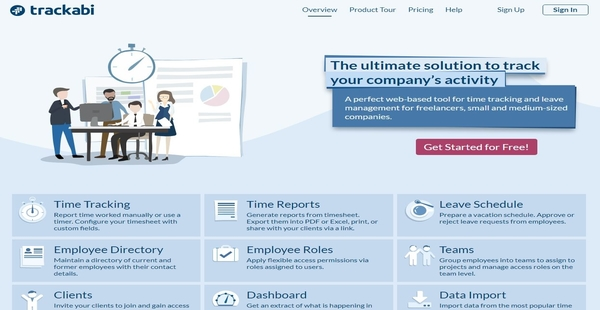
Trackabi is a web-based time tracking solution that provides small and medium-sized companies, consultants, and freelancers with an efficient way to monitor their work activities. Its features include time tracking and reporting, leave management, project and team management, and directory building.
Trackabi allows users to record and track the time you spend on projects, activities, or tasks using a timer or through manual logging. You can also generate time reports from configurable timesheets and export them to PDF or Excel. The solution, furthermore, simplifies the process of requesting and approving different types of leaves.
Another feature offered by Trackabi is the ability to create employee and client directories. These directories provide important information such as the contact details of former and current employees and summaries for clients’ projects.
Show MoreOverview of Trackabi Benefits
Time Tracking & Reporting
Trackabi enables users to easily track and report the time they spend on various company or business activities like projects and tasks. The solution lets you record and track hours worked using a timer or by logging time manually. To simplify time reporting, Trackabi allows you to generate reports based on timesheets.
These timesheets are configurable and editable. Users can add different time types and set up their own timesheet data fields. Moreover, it offers multiple ways of sharing time reports such as exporting them to PDF or Excel, printing them directly within the solution, or generating a shareable link.
Leave Management
Leave management is one of the main features built within Trackabi. This feature permits employees to prepare their own leave schedules and create leave requests. Managers and supervisors, in turn, can quickly review leave requests from employees and approve or reject them.
Project Management
Trackabi also makes the process of managing projects a breeze. Users will be able to create various teams and assign them to specific projects. Additionally, you can set up roles and define access privileges at the team or project level to ensure that only authorized employees can view or edit project-related information. Furthermore, Trackabi is built with the company and private dashboards where they can view project summaries and details. Project summaries by the client can be accessed from a client directory as well.
Show MoreOverview of Trackabi Features
- Time Tracking
- Time Reports
- Leave Management
- Employee Directory
- Client Directory
- Project Management
- Company & Private Dashboards
Awards & Quality Certificates


Trackabi Position In Our Categories
Knowing that businesses have distinctive business-related needs, it is reasonable that they avoid selecting a one-size-fits-all, ”best” solution. At any rate, it is troublesome to come across such application even among widely used software systems. The reasonable step to do should be to narrow down the various essential functions that necessitate consideration including crucial features, costing, technical skill capability of staff members, company size, etc. The second step is, you must conduct your product research comprehensively. Have a look at these Trackabi reviews and check out the other solutions in your list in detail. Such comprehensive product investigation guarantees you circumvent unsuitable software solutions and buy the one which delivers all the benefits your business requires.
Position of Trackabi in our main categories:
It's essential to realize that almost no app in the Time Tracking Software category is a perfect solution that can meet all the needs of various business types, sizes and industries. It may be a good idea to read a few Trackabi Time Tracking Software reviews first as specific solutions can perform well exclusively in a very small group of applications or be prepared with a very specific industry in mind. Others might operate with a goal of being simple and intuitive and as a result lack advanced functionalities needed by more experienced users. You can also come across software that cater to a broad group of users and offer a powerful feature toolbox, but that usually comes at a higher cost of such a service. Make sure you're aware of your requirements so that you get a service that offers specifically the elements you search for.
How Much Does Trackabi Cost?
Trackabi Pricing Plans:
Free Trial
Free
Free
Business Plan
$16/5 users/month
Business Plus Plan
$20/5 users/month
What are Trackabi pricing details?
Trackabi Pricing Plans:
Free Trial
Free
Free
Business Plan
$16/5 users/month
Business Plus Plan
$20/5 users/month
Trackabi provides two SMB plans for users to choose from. The pricing of these plans varies based on the number of users in your company or team. Aside from enterprise pricing plans, it also offers a free plan that allows up to 5 users to utilize the features of the software without paying anything. Here are the details:
Starter Plan – $0
- For 5 users
- Time Tracking
- Leave Planning
- Company & Personal Dashboards
- Time Reports
- HR Directory
- Configurable User Roles
- Team Management
- Client Directory
- One company per account
- Up to 30 active projects
- Up to 10 active clients
- Up to 3 user roles
- Up to 3 teams
Business Plan – Starts at $16/5 users/month or $192/5 users/year
- All Starter Plan Features, Plus:
- Unlimited companies
- Up to 150 active projects
- Up to 50 active clients
- Up to 5 user roles
- Up to 10 teams
Business Plus Plan – Starts at $20/5 users/month or $240/5 users/year
- All Business Plan Features, Plus:
- Up to 100 users/employees
- Up to 300 active projects
- Up to 30 active clients
- Up to 10 user roles
- Up to 20 teams
User Satisfaction
Positive Social Media Mentions
20
Negative Social Media Mentions
1
We are aware that when you decide to buy a Time Tracking Software it’s crucial not only to see how professionals rank it in their reviews, but also to find out whether the real users and companies that purchased these solutions are actually satisfied with the service. Because of that need we’ve designer our behavior-based Customer Satisfaction Algorithm™ that collects customer reviews, comments and Trackabi reviews across a broad array of social media sites. The data is then presented in a simple to digest way indicating how many customers had positive and negative experience with Trackabi. With that information available you will be prepared to make an informed business decision that you won’t regret.
Video
Technical details
Devices Supported
- Web-based
Deployment
- Cloud Hosted
Language Support
- English
Pricing Model
- Free
- Monthly payment
- Annual Subscription
Customer Types
- Small Business
- Medium Business
- Freelancers
What Support Does This Vendor Offer?
- phone
- live support
- training
- tickets
What integrations are available for Trackabi?
Trackabi integrates with:
- Harvest
- GitHub
- GitLab
- Toggl
- Bitbucket
Trackabi User Reviews
Trackabi average rating:
5/5
Overall impression
5/5
Customer Support
5/5
Value for Money
5/5
Ease of Use
Write your own review of this product
ADD A REVIEWThe most favorable review

PROS: Nice UI/UX, built in timer, many settings (e.g. ability to choose what fields should be available in the timesheet or even to add custom fields), leave management, import from Git, project estimates.
CONS: Not sure, I like what I user, perhaps other business would need some specific extras
The least favorable review
PROS: Nice UI/UX, built in timer, many settings (e.g. ability to choose what fields should be available in the timesheet or even to add custom fields), leave management, import from Git, project estimates.
CONS: Not sure, I like what I user, perhaps other business would need some specific extras
More reviews from 3 actual users:
Sort by:
Latest
- Latest
- Most useful
- Most positive
- Most negative
Trackabi makes you more efficient
Read full review >
5/5
Overall impression
5/5
Customer Support
5/5
Value for Money
5/5
Ease of Use
Published on: 11.07.2021
Company Size: N/A
Industry: N/A
PROS: First of all, it's a great web app that very features-rich. With the ability to track your work activity, to make reports for each completed task, to import your commit history(it is very useful for developers), with great request-approval leave schedules, and much more. Second, it is a very helpful desktop app in addition to its web app. The desktop app has the ability to track your computer activity in order to accurately calculate your work hours. And what also important, that it is cross-platform available on Linux, Windows, and macOS.
CONS: I don't see any pitfalls in Trackabi for now. It is a tremendously well-designed work-tracking software.
Great time tracker with monitoring of users activity
Read full review >
5/5
Overall impression
5/5
Customer Support
5/5
Value for Money
5/5
Ease of Use
Published on: 19.03.2021
Company Size: N/A
Industry: N/A
PROS: The web application is extremely user-friendly and intuitive. There is also a desktop cross-platform version of the system.A functionality to plan vacations, sick-leaves etc. with request-approval feature makes it possible create company leave schedules. Private and team visual dashboards allow users to see personal and team workflows and take actions if necessary. The killer feature of the solution is a desktop app that tracks all the running apps, browsers tabs, parces opened websites. This tracker is paused when there is no activity on the screen or the screen is locked.
CONS: There is no integration with trello dashboards.
Great time tracker with leave management and a lot of useful features
Read full review >
5/5
Overall impression
5/5
Customer Support
5/5
Value for Money
5/5
Ease of Use
Published on: 21.02.2020
Company Size: 1-10 Employees
Industry: Animation
PROS: Nice UI/UX, built in timer, many settings (e.g. ability to choose what fields should be available in the timesheet or even to add custom fields), leave management, import from Git, project estimates.
CONS: Not sure, I like what I user, perhaps other business would need some specific extras


Join a community of 7,369 SaaS experts
Thank you for the time you take to leave a quick review of this software. Our community and review base is constantly developing because of experts like you, who are willing to share their experience and knowledge with others to help them make more informed buying decisions.
Sign in with LinkedIn
Why we require LinkedIn?
- Show the community that you're an actual user.
- We will only show your name and profile image in your review.
- You can still post your review anonymously.
OR
Sign in with company emailSign in with company email
Popular Trackabi Alternatives


Top Competitors To Trackabi By Price
Product name:
Price:

by quote


Trending Time Tracking Software Reviews





Trackabi Comparisons
Product name:





Trackabi user reviews
Trackabi makes you more efficient
Read full review >
5/5
Overall impression
5/5
Customer Support
5/5
Value for Money
5/5
Ease of Use
Published on: 11.07.2021
Company Size: N/A
Industry: N/A
Great time tracker with monitoring of users activity
Read full review >
5/5
Overall impression
5/5
Customer Support
5/5
Value for Money
5/5
Ease of Use
Published on: 19.03.2021
Company Size: N/A
Industry: N/A
Great time tracker with leave management and a lot of useful features
Read full review >
5/5
Overall impression
5/5
Customer Support
5/5
Value for Money
5/5
Ease of Use
Published on: 21.02.2020
Company Size: 1-10 Employees
Industry: Animation

Page last modified



Did you find this review useful?
Yes
No
Thank you for your feedback
How can we make this page better?
Unsure about this software?
FIND ALTERNATIVES
 Why is FinancesOnline free?