

Whatspot Review



What is Whatspot?
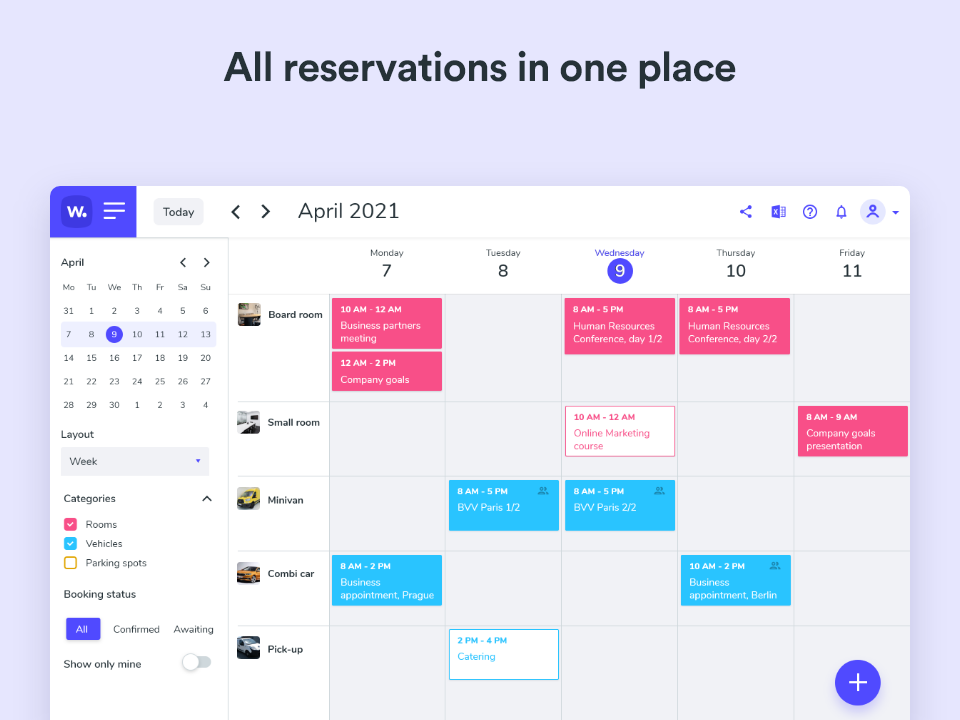
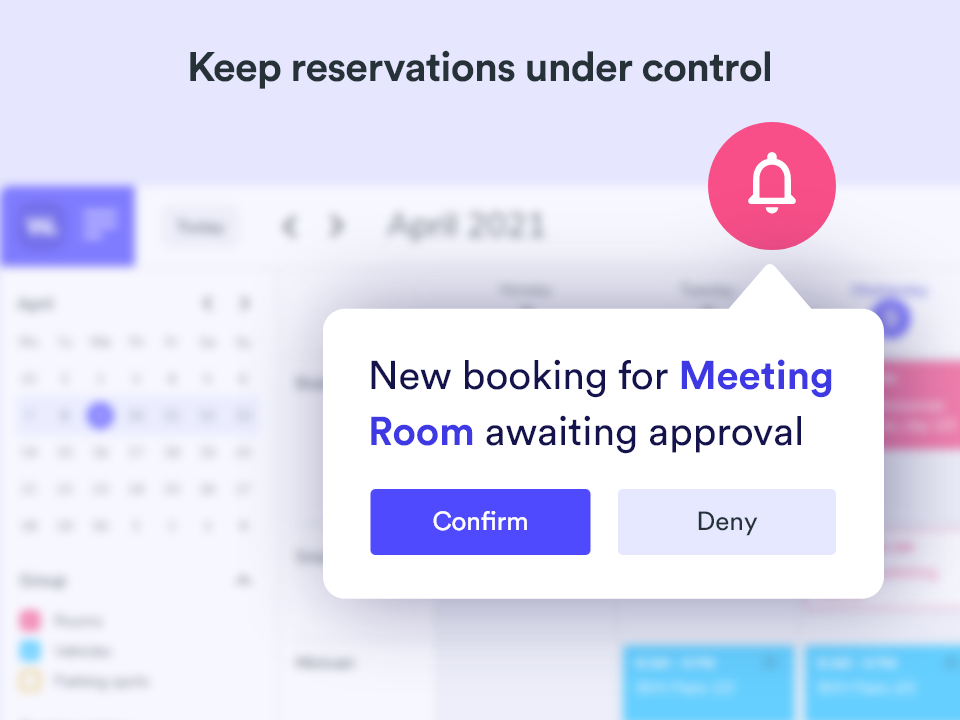
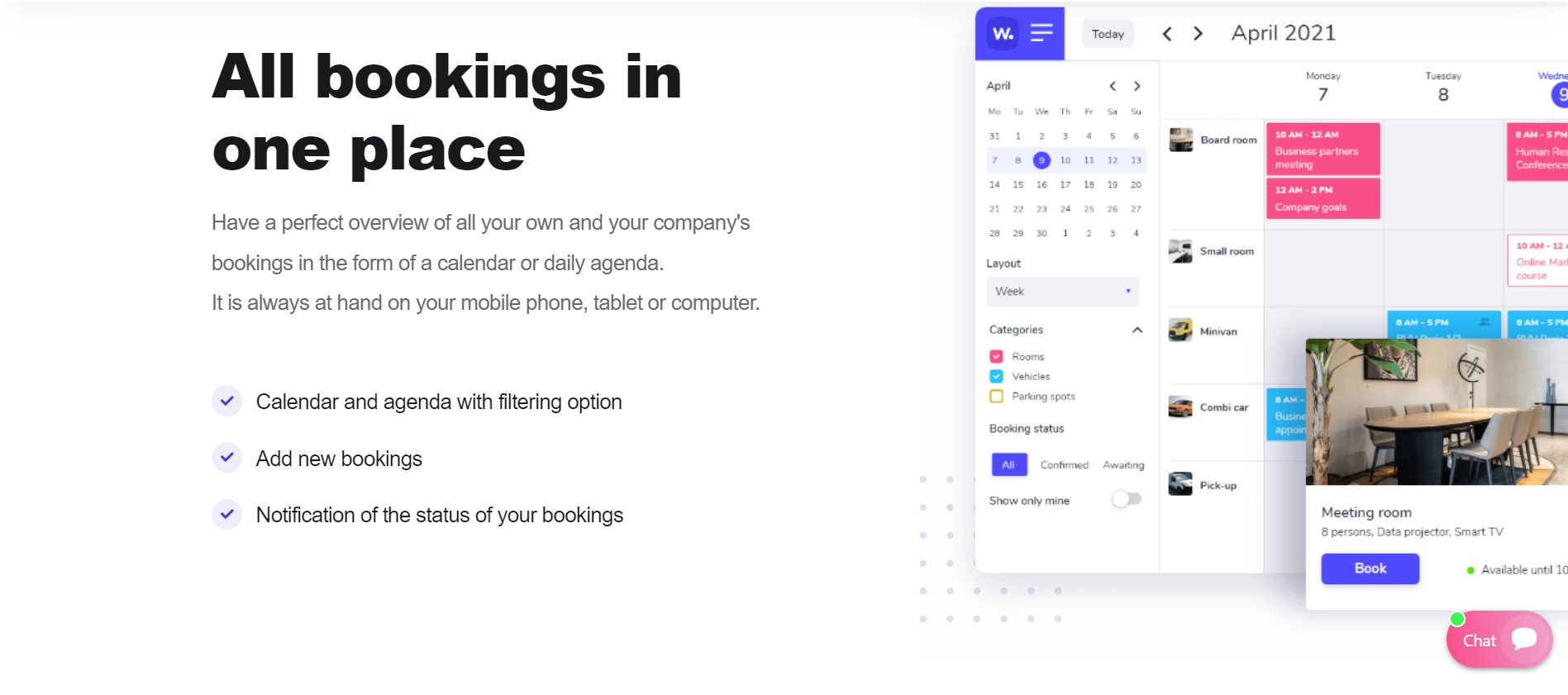
Whatspot is an online booking platform for booking meeting rooms, company cars, and parking spaces. It facilitates the easy search for availability from any web-enabled device, including mobile, tablet, or computer. Using the Whatspot app, you can quickly find meeting venues or company transport options, among others. It instantly displays all the free dates, and the calendar also shows an overview of all the bookings created by you and your colleagues. It even sends out notifications of new bookings and provides status alerts for booked rooms.
This platform is also ideal for organizations that want to develop more efficient meeting scheduling to increase productivity. It eliminates instances of reserving a meeting room or company car only to find out at the last minute that a colleague has made prior reservations. Whatspot also reduces time-wasting incidents by organizing activities in such a way that resources are optimized. Aside from optimizing resources and increasing productivity levels, the efficient scheduling delivered by Whatspot provides organizations with key insights on how to improve overall efficiency. Users can choose to export these statistics to XLSX for easier record keeping.
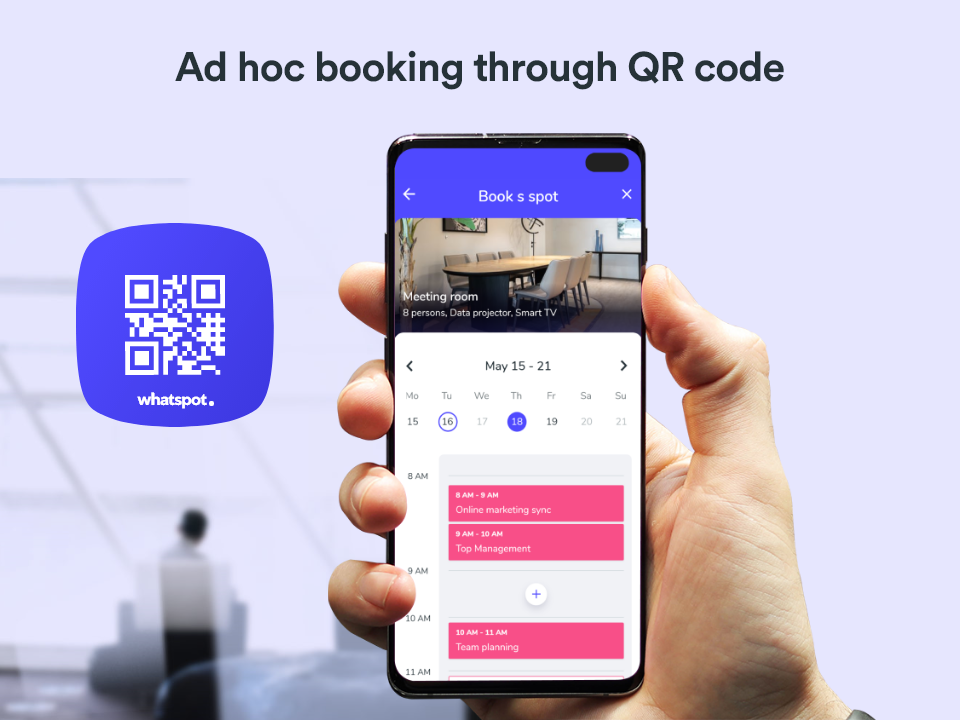
By simply scanning a QR code, you can get real-time information on when a meeting room or company car is available. The calendar function provides an overview of all bookings, plus you can also assign specific roles to employees in relation to the creation and approval of bookings. Whatspot offers freemium pricing for up to three spots and one admin, while the Premium plan starts at €15 per month for 10 users.
Show MoreOverview of Whatspot Benefits
Optimizes company resources
With Whatspot, you can organize your bookings and keep schedules under control. The assigned admin has all the tools to oversee all booking details. You can streamline the use of meeting rooms, company cars, and parking spaces by assessing the booking data. The usage of resources will be optimized as a result.
Efficient scheduling
The approval process as well as the booking notifications ensure that all bookings are updated in real-time. Using a calendar, a daily agenda, and other filtering tools, you can view your own bookings, including the rest of the bookings made by your colleagues. This contributes to increased productivity as teams can plan activities and tasks ahead of time while minimizing schedule modifications.
Simple and easy-to-use app
Whatspot is one reliable tool for quickly finding suitable dates. Simply choose the resource that you want to book, use your mobile phone to scan the corresponding QR code, and the app will instantly display the available dates. The calendar provides an overview of all bookings, keeping everyone in the organization synced at all times.
Promotes collaboration
The Whatspot platform allows teams to invite external users to the app and make bookings. This flexibility helps in project collaborations as every member of the team, whether from an external party or not, can access the platform and set meetings as needed in projects and other collaborations.
Provides free software updates
By listening to user suggestions and feedback, Whatspot is able to continually improve and add new features to the application. It provides free software updates to all users, and even accommodates additional feature requests upon careful evaluation by the developers.
Flexible subscription
The Premium Plan of Whatspot comes with 10 spots, which may be a combination of meeting rooms, company cars, and parking spaces. You have to pay €5 for every additional five spots. During an ongoing subscription, you are allowed to buy additional spots.
Overview of Whatspot Features
- Custom booking approval process
- Spot categorization and management
- Public bookings
- Recurrent event booking option
- Spot images
- Statistic export
- Book via QR code
- Calendar and agenda with filtering options
- Role-based access
- Book from any device
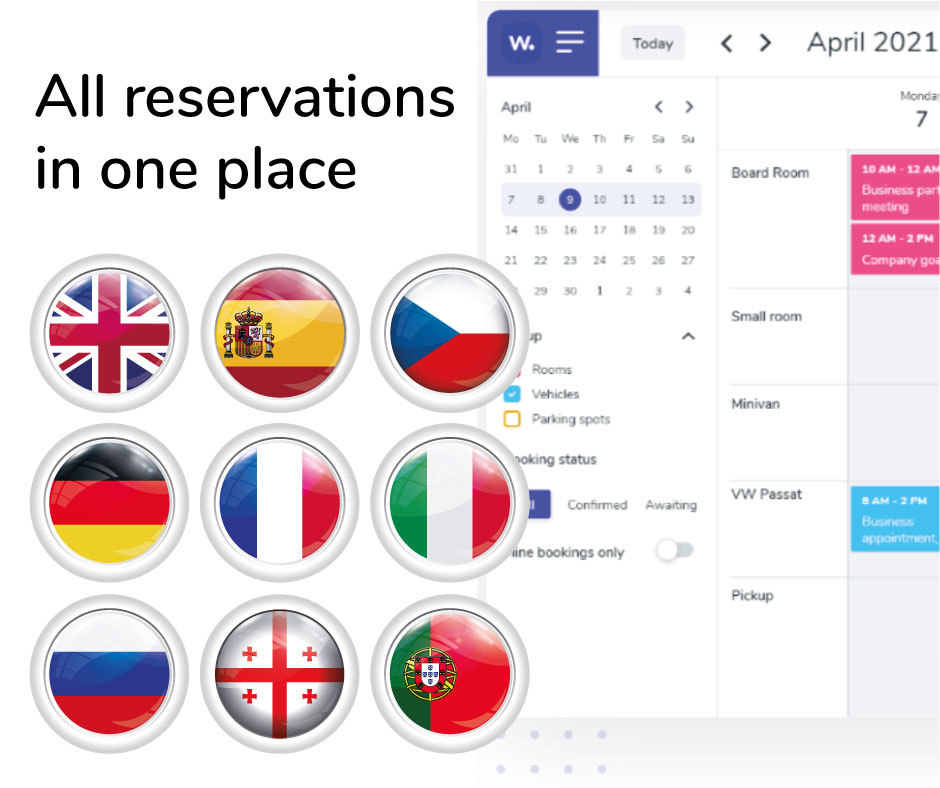
- Available in nine languages
- Booking status notifications
- New booking alert
What Problems Will Whatspot Solve?
Problem #1: Complicated room booking procedures
Solution: Whatspot comes with a QR code generation feature and public reservation mode that simplifies lengthy paper-based room booking procedures. With this, employees who need to use a meeting room, function hall, or other office spaces need not manually book them or process complicated paperwork just to reserve them. All they will need to do is pull out their phone, scan the QR code for the space they intend to use, and select the date and time they will need it for.
Problem #2: Booking rooms while out of office is not possible
Solution: Thanks to Whatspot’s native mobile applications, employees can access it from anywhere and at any time they please. Meaning, whether they are at home or out of town, they can easily book the meeting room they require. This comes especially in handy for times when they forget to reserve a space for a Monday meeting and remember it only during the weekend.
Problem #3: No real-time access to meeting room schedules
Solution: No matter how efficiently you schedule and prepare for meetings, plans can still change. This is where Whatspot’s one-click checkout and mobile device accessibility come in handy. This allows employees to check out of meeting rooms they have reserved in cases when meetings end early or are unexpectedly canceled. This way, other employees are notified of the room’s availability.
Awards & Quality Certificates

Whatspot Position In Our Categories
Because companies have unique business-related wants, it is only reasonable they steer clear of going for an all-in-one, ideal system. Nevertheless, it is hard to stumble on such a software product even among popular software solutions. The reasonable thing to undertake should be to write down the different chief functions that entail analysis like essential features, pricing, technical skill ability of the employees, company size, etc. Thereafter, you should follow through the product research comprehensively. Have a look at some of these Whatspot evaluations and explore each of the software systems in your list more closely. Such detailed product investigation guarantee you steer clear of ill-fitting apps and subscribe to the one which meets all the benefits your business requires.
Position of Whatspot in our main categories:
TOP
50
Whatspot is one of the top 50 Appointment Scheduling Software products
TOP
50
Whatspot is one of the 50 Online Booking Systems products
Organizations have diverse wants and requirements and no software solution can be just right in such a situation. It is futile to try to find an ideal out-of-the-box software app that fulfills all your business needs. The wise thing to do would be to customize the solution for your specific wants, worker skill levels, finances, and other aspects. For these reasons, do not hasten and invest in well-publicized leading solutions. Though these may be widely used, they may not be the best fit for your specific needs. Do your groundwork, check out each short-listed system in detail, read a few Whatspot Online Booking Systems reviews, speak to the maker for explanations, and finally choose the app that provides what you need.
How Much Does Whatspot Cost?
Whatspot Pricing Plans:
Free Trial
Freemium
€0
Premium
€23/month
What are Whatspot pricing details?
Whatspot Pricing Plans:
Free Trial
Freemium
€0
Premium
€23/month
Whatspot provides two enterprise pricing plans for users to choose from. It has a freemium option for small teams that only require basic online booking features. The vendor also offers a paid plan that allows you to set up unlimited users and administrators, accept and handle unlimited bookings, create more company spots, and access all the features of the online booking app. Here are the details:
Freemium Plan – €0
- 3 spots
- 1 admin
- 20 users
- unlimited number of bookings
Premium Plan – €15/month (billed annually) or €23/month (billed monthly)
- 10 spots
- Unlimited admin
- Unlimited users
- Unlimited number of bookings
- Custom approval process
- Public bookings
- Spot categorization
- Recurring event
- Spot images
- Statistic export
- Priority support
User Satisfaction
Positive Social Media Mentions
21
Negative Social Media Mentions
0
We know that when you decide to buy a Online Booking Systems it’s crucial not only to see how professionals rank it in their reviews, but also to discover if the actual people and companies that purchased it are actually content with the product. Because of that need we’ve designer our behavior-based Customer Satisfaction Algorithm™ that aggregates customer reviews, comments and Whatspot reviews across a wide array of social media sites. The data is then presented in a simple to understand format indicating how many customers had positive and negative experience with Whatspot. With that information available you will be prepared to make an informed purchasing decision that you won’t regret.
Video
Screenshots

Technical details
Devices Supported
- Web-based
Deployment
- Cloud Hosted
Language Support
- English
- German
- Spanish
- French
- Italian
- Dutch
- Portugese
Pricing Model
- Free
- Monthly payment
- Annual Subscription
Customer Types
- Small Business
- Large Enterprises
- Medium Business
- Freelancers
What Support Does This Vendor Offer?
- phone
- live support
- training
- tickets
What integrations are available for Whatspot?
Whatspot can integrate with business solutions such as Google Calendar and Outlook.
Whatspot User Reviews
Whatspot average rating:
5/5
Overall impression
5/5
Customer Support
5/5
Value for Money
5/5
Ease of Use
Write your own review of this product
ADD A REVIEWMore reviews from 1 actual users:
Sort by:
Latest
- Latest
- Most useful
- Most positive
- Most negative
Effective applications for managing corporate resources
Read full review >
5/5
Overall impression
5/5
Customer Support
5/5
Value for Money
5/5
Ease of Use
Published on: 20.09.2022
Company Size: 1-10 Employees
Industry: Marketing and Advertising
PROS: The app offers a sophisticated design, interesting features such as public bookings, spot images and approval process. Very friendly support with fast response times. The overall impression is highly positive.
CONS: I didn't notice anything that was bad. The app works, I use it daily.


Join a community of 7,369 SaaS experts
Thank you for the time you take to leave a quick review of this software. Our community and review base is constantly developing because of experts like you, who are willing to share their experience and knowledge with others to help them make more informed buying decisions.
Sign in with LinkedIn
Why we require LinkedIn?
- Show the community that you're an actual user.
- We will only show your name and profile image in your review.
- You can still post your review anonymously.
OR
Sign in with company emailSign in with company email
Popular Whatspot Alternatives


Top Competitors To Whatspot By Price
Product name:
Price:


Trending Online Booking Systems Reviews


Whatspot Comparisons
Product name:


Whatspot user reviews
Effective applications for managing corporate resources
Read full review >
5/5
Overall impression
5/5
Customer Support
5/5
Value for Money
5/5
Ease of Use
Published on: 20.09.2022
Company Size: 1-10 Employees
Industry: Marketing and Advertising

Page last modified



Did you find this review useful?
Yes
No
Thank you for your feedback
How can we make this page better?
Unsure about this software?
FIND ALTERNATIVES
 Why is FinancesOnline free?