
- Home
- Office Software
- WPS Office

WPS Office Review



What is WPS Office?
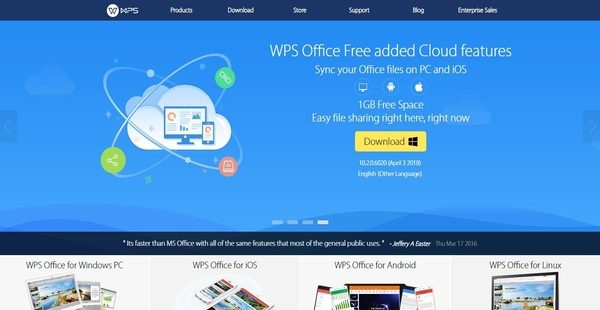
WPS Office is a high performing and affordable suite office software solutions developed by a subsidiary of Kingsoft Corp, a software and Internet services company based in California, USA. WPS Office has established a reputation in the market for being an alternative to Microsoft Office, empowering businesses, educational institutions, and professionals to painlessly handle their office tasks.
The office software solution provides a set of efficient and light applications that can run on Windows and Linux PCs as well as on iOS and Android devices, making it a cross-platform office suite. WPS Office helps users perform various tasks and fulfill their document needs such as the ability create and modify word or text documents, produce spreadsheets and presentations, convert PDF files to editable document formats, and even retrieve files and documents that they have accidentally deleted.
In addition, the office suite is available in various editions including a free version that provides users with basic tools: word processor, spreadsheet application, and presentation tool.
Show MoreOverview of WPS Office Benefits
Word-Class Text Editing Tool That Goes Beyond Text
WPS Office has a world-class text editing application called Writer which is fully compatible with Microsoft Word. As a result, users will be able to directly open and edit Microsoft Word documents and save them within the application. The application doesn’t only provide users with the capability to create and edit texts, but it also permits them to work on images and other objects. Thus, they can add images, custom charts, and tables to their documents and modify them, enabling them to produce amazing documents.
Tabbed View Feature
The text editing application also delivers a tabbed view feature. With this feature, multiple documents can be viewed and managed from a single screen or window. As a result, users can edit multiple documents at the same time.
Save To PDF
Writer is equipped with a built-in tool that converts documents to PDF files. This way, documents are saved into smaller sizes so users can easily share them with their colleagues. At the same, this feature ensures that documents and files are securely accessed.
Paragraph Layout Tool
In addition, the word processor has a very interesting feature which permits users to conveniently and naturally adjust the location, indentation, and spacing of paragraphs. This feature is a drag- and- drop paragraph layout tool that allows them to control paragraph spacing, line spacing, and indentation by simply moving the mouse.
Analyze Complex Data With Built-In Formulas And Functions
WPS Office offers a spreadsheet application that utilizes hundreds of built-in formulas and functions that are commonly used. These formulas and functions are organized in different categories. Because of this, complex data can be analyzed much easier.
Advanced Table Formatting Tools
The spreadsheet application ensures that users are able to organize their data in a systematic way and that it appears nice. Through the aid of its advanced formatting tools, they can customize the layouts of tables and cells.
Customizable Charts And Charts
Aside from its formulas, functions, and formatting tools, the tool also comes with charts and graphs that users can customize. These include column, line, pie, bar, and scatter.
Create Amazing Presentations
Another world-class application present in WPS Office is its presentation tool. This tool permits the creation of amazing and stunning presentations from pre-made templates. To enhance their presentations, users can take advantage of its formatting tools, enabling them to apply font styles and colors, as well as columns, shapes, and other objects to their presentations. They can also insert different types of multimedia files such as videos, images, audio files, and Flash.
Collaborate On Presentations
The presentation tool provides team members with the capability to collaborate on their presentations. Thus, as documents and materials are being created and shown, users can share their ideas and add comments. This feature, however, is only available in WPS Office Business Edition.
Mobile Office Solution
Because WPS Office is a multi-platform office software solution, it can also work on mobile devices. It has a mobile office app which is designed for Android and iOS devices. As a result, users will be able to access and edit their documents that are stored in the cloud from their mobile phones and tablets.
From their mobile devices, they can even show their presentations on WiFi cable TVs, projectors, or any devices where WPS Office is installed and enabled.
Document collaboration is also made possible using the WPS Office mobile app. This means users will be able to perform spell checks and track changes and comments wherever they are and at any time.
Convert PDF Files To Word
WPS Office has a fast, easy-to-use, and high-quality PDF converter which enables users to quickly convert PDF files to DOC or DOCX files. Also, this PDF is an accurate tool so users are ensured that their fonts, styles, and layouts will remain intact as they convert their files and documents to Microsoft Word formats. In addition, before they convert the PDF files, the tool lets them either split the files into multiple PDF pages or merge multiple PDF pages together.
Recover Deleted And Lost Files
There is a unique office solution included in WPS Office which helps users easily recover their encrypted files and documents. Named as WPS Data Recovery Master, this solution permits them to find their files and get them back, whether they accidentally removed them from the recycle bin, the files got lost in external devices such as USB flash disk or removable hard disk, or they were deleted because of hard disk formatting. Additionally, the solution can perform deep data recovery through in-depth scans.
Show MoreOverview of WPS Office Features
- Complete Office Suite
- 100% Compatible with Microsoft Office Suite
- Word-Class Text Editor
- Much More Than Text
- View Multiple Documents
- Save To PDF
- Collaboration Tools
- Password Protection
- Mail Merge
- Advanced Spreadsheets
- Formulas and Functions
- Table Formatting
- Built-In Charts
- Pivot Tables
- Advanced Modeling
- 1 Million Rows
- Amazing Presentations
- Lots of Extras
- Advanced Animation
- Extended Desktop Support
- User Comments
- Mobile Office Suite
- PDF To Word Converter
- Data Recovery
WPS Office Position In Our Categories
Since businesses have particular business-related requirements, it is prudent that they abstain from adopting a one-size-fits-all, “perfect” solution. However, it is troublesome to try to discover such a software product even among branded software products. The right step to undertake can be to make a list of the different vital aspects that necessitate careful thought including major features, pricing, skill capability of the employees, organizational size, etc. The second step is, you should double down on the research through and through. Browse through these WPS Office evaluations and look over the other solutions in your shortlist more closely. Such comprehensive product research ascertain you steer clear of mismatched applications and buy the one that meets all the function your business requires for success.
Position of WPS Office in our main categories:
TOP
5
WPS Office is one of the top 5 Document Creation Software products
TOP
10
WPS Office is one of the 10 Office Software products
Since each enterprise has specific business wants, it is prudent for them to desist from searching for a one-size-fits-all perfect software system. Needless to say, it would be pointless to try to find such a system even among popular software solutions. The smart thing to do would be to jot down the various essential elements that need consideration such as key features, finances, skill levels of staff members, company size etc. Then, you should do your groundwork thoroughly. Read some WPS Office Office Software reviews and investigate each of the other apps in your shortlist in detail. Such comprehensive research can make sure you weed out ill-fitting systems and choose the system that offers all the elements you need for business success.
How Much Does WPS Office Cost?
WPS Office Pricing Plans:
Free Trial
WPS Office Free
Free For Windows
WPS Offie Premium
$29.99/yr.
WPS Office Professional
$44.99/1 PC/yr.
WPS Office For Education
$19.99/3 Years
WPS PDF To Word Converter
$29.95
WPS Data Recovery Master
$49.95
WPS Office For Android Devices
$3.99/mo.
WPS Office For iOS Devices
Free
What are WPS Office pricing details?
WPS Office Pricing Plans:
Free Trial
WPS Office Free
Free For Windows
WPS Offie Premium
$29.99/yr.
WPS Office Professional
$44.99/1 PC/yr.
WPS Office For Education
$19.99/3 Years
WPS PDF To Word Converter
$29.95
WPS Data Recovery Master
$49.95
WPS Office For Android Devices
$3.99/mo.
WPS Office For iOS Devices
Free
Aside from its free edition, WPS Office offers several SMB and enterprise pricing plans for all users to choose from. The pricing of the plans varies depending on the edition or version you’re going to purchase. You can also buy its PDF converter and data recovery tool. Give the details a look, and choose the best plan that suits your needs:
WPS Office Free
- Free For Windows
- The smallest size office suite consisting of Writer, Presentation, and Spreadsheets, plus PDF tools to fulfill all of your document needs.
- Drag-and-Drop Tool
- Docer Templates
- Section Navigation
- Multiple Document Tabs
WPS Offie Premium
- $29.99/yr. – Billed Annually
- For Personal, Home, and Small Businesses
- Easy, Light, and Compatible
- Advanced Writer, Presentation, Spreadsheets
- Free Extensive Online Templates
- Free PDF To Word Converter
- Free WPS Cloud Storage
- Connect Up To 9 Devices—PC & Android
- No ADs On All Devices
WPS Office Professional
- $44.99/1 PC/yr. – Billed Annually (Subcription)
- $79.99/1 PC – (Life Time License)
- Business Edition
- Faster, Lighter, And More Efficient
- Complete Office Suite
- 100% Compatible
- Lots Of Extras
- Document Collaboration
- Amazing Presentations
- Advanced Spreadsheets
- Document Encryption
- PDF Support
- Language Support
- Tier-One Support
WPS Office For Education
- $19.99/3 Years
- For Students And Teachers
- The Most Compatible Office Suite -Light, Fast, Low Cost
- Latest Writer, Presentation and Spreadsheets
- It includes innovative features such as file roaming, paragraph layout and drag-and-drop table editing tools, as well as most common features you are familiar with. View, edit and create almost any document type-all fully compatible with Microsoft Office and Google Docs. This office suite is robust and efficient enough to be trusted with even your most complicated office tasks.
- Free Extensive Online Templates
- Free PDF To Word Converter
- Free WPS Cloud Storage
- Connect Up To 9 Devices—PC & Android
- No ADs On All Devices
WPS PDF To Word Converter
- $29.95
- Easily Convert PDF To Editable DOC/DOCX files
- Superfast, Easy and High-Quality PDF Converter
- Split-Merge PDF Pages You Need
- Support Bulk Outputting And More Text Formats
WPS Data Recovery Master
- $49.95
- WPS Data Recovery Will Get Your Encrypted Files Back
- Accidentally Deleted File Recovery
- External Device Recovery
- Formatted File Recovery
- Deep Data Recovery
WPS Office For Android Devices
- $3.99/mo.
- $29.99/yr.
- View, Edit & Create – Office Documents Anywhere
- Highly Compatible
- Free PDF Converter And PDF Reader
- All-In-One Free Office Suite App
- Connect To Your Cloud
- Document Collaboration
- Wireless Printing
- Present Anywhere
- Document Security
- Language Support
WPS Office For iOS Devices
- Free
- World’ Most Advanced Mobile Office Suite
- Designed For iPhone, iPad and iPad Touch
- PDF For iOS
- 100% Compatible
- Connect To Your Cloud
- Document Collaboration
- Wireless Printing
- Present Anywhere
- Document Security
- One Small App Does It All
User Satisfaction
Positive Social Media Mentions
33
Negative Social Media Mentions
0
We realize that when you decide to buy a Office Software it’s vital not only to learn how professionals evaluate it in their reviews, but also to discover whether the real clients and enterprises that purchased this software are genuinely content with the service. That’s why we’ve devised our behavior-based Customer Satisfaction Algorithm™ that gathers customer reviews, comments and WPS Office reviews across a broad range of social media sites. The information is then presented in an easy to digest form revealing how many clients had positive and negative experience with WPS Office. With that information at hand you will be ready to make an informed business choice that you won’t regret.
Video
Technical details
Devices Supported
- Windows
- Linux
- Android
- iPhone/iPad
- Mac
- Web-based
Deployment
- Cloud Hosted
- Open API
Language Support
- English
- German
- Spanish
- French
- Russian
- Portugese
- Polish
Pricing Model
- Free
- Monthly payment
- One-time payment
- Annual Subscription
Customer Types
- Small Business
- Large Enterprises
- Medium Business
- Freelancers
What Support Does This Vendor Offer?
- phone
- live support
- training
- tickets
What integrations are available for WPS Office?
WPS Office integrates with the hardware and software products from its OEM, software vendor, and managed service provider partners.
WPS Office User Reviews
WPS Office average rating:
5/5
Overall impression
5/5
Customer Support
4/5
Value for Money
4/5
Ease of Use
Write your own review of this product
ADD A REVIEWThe most favorable review

PROS: A convenient option for accessing different document types. And it's easier to edit files.
CONS: None. It's accessible and user-friendly.
The least favorable review
PROS: It is a helpful app that allows formatting and organizing files easier. It keeps reports, regardless of the type, more structured and organized.
CONS: The performance could sometimes be slow because of the high storage being used.
More reviews from 14 actual users:
Sort by:
Latest
- Latest
- Most useful
- Most positive
- Most negative
Smart choice for different users
Read full review >
4/5
Overall impression
3/5
Customer Support
3/5
Value for Money
3/5
Ease of Use
Published on: 22.11.2021
Company Size: 1-10 Employees
Industry: Computer & Network Security
PROS: Its functionality is competitive to other editing apps. It's also easily compatible with other apps; thus, switching from one to the other is more effortless.
CONS: The translation is still not widely available. It would be good to have translations in another language.
An essential document viewer
Read full review >
5/5
Overall impression
5/5
Customer Support
5/5
Value for Money
4/5
Ease of Use
Published on: 16.11.2021
Company Size: More than 100 Employees
Industry: Research
PROS: It can easily be used, and I'm able to access documents on Android devices.
CONS: Many features require payment.
Useful app at work
Read full review >
5/5
Overall impression
5/5
Customer Support
5/5
Value for Money
5/5
Ease of Use
Published on: 11.09.2021
Company Size: 11-50 Employees
Industry: N/A
PROS: It helped me to be more productive with my line of work. It's accessible and very user-friendly. I'm able to handle a lot of files and reports. The translation is also helpful. It's quick and convenient.
CONS: It's perfect! No downsides as it's convenient and efficient.
A complete package to manage documents
Read full review >
4/5
Overall impression
4/5
Customer Support
3/5
Value for Money
4/5
Ease of Use
Published on: 23.08.2021
Company Size: More than 100 Employees
Industry: Information Technology & Services
PROS: File management and sharing made easier. It's user-friendly and convenient. It allows me to be more effective, making my jobs easy. The best of all office tools with great functionalities.
CONS: It doesn't have some key characteristics and would sometimes mess up with the files.
Integrated tool for office documents
Read full review >
5/5
Overall impression
4/5
Customer Support
5/5
Value for Money
4/5
Ease of Use
Published on: 24.06.2021
Company Size: 11-50 Employees
Industry: Construction
PROS: It helps me to multi-task and manage the files easily using mobile devices.
CONS: The ads are continually appearing while editing.
Useful App
Read full review >
4/5
Overall impression
3/5
Customer Support
3/5
Value for Money
3/5
Ease of Use
Published on: 17.02.2021
Company Size: More than 100 Employees
Industry: Telecommunications
PROS: I like that I can simply download the app on mobile devices, plus it needs less storage capacity and device memory. It also helped me with my presentations as I'm able to access MS files anytime, anywhere.
CONS: Saving the file would frequently recognize it as damaged. It has to be opened straight from the original location.
Manage tasks at a time
Read full review >
4/5
Overall impression
4/5
Customer Support
3/5
Value for Money
4/5
Ease of Use
Published on: 20.01.2021
Company Size: 11-50 Employees
Industry: Hospital & Health Care
PROS: It's efficient as I'm able to manage the files simultaneously.
CONS: There are a lot of unnecessary ads.
All-rounder platform for document types
Read full review >
4/5
Overall impression
3/5
Customer Support
4/5
Value for Money
4/5
Ease of Use
Published on: 08.01.2021
Company Size: 11-50 Employees
Industry: N/A
PROS: It is a helpful app that allows formatting and organizing files easier. It keeps reports, regardless of the type, more structured and organized.
CONS: The performance could sometimes be slow because of the high storage being used.
An Excellent platform to organize and manage files
Read full review >
5/5
Overall impression
5/5
Customer Support
4/5
Value for Money
5/5
Ease of Use
Published on: 02.01.2021
Company Size: More than 100 Employees
Industry: Staffing and Recruiting
PROS: Helped me in doing reports on various files using its great functionalities. Very easy to create and edit files anywhere. Very accessible and user-friendly.
CONS: There are ads while editing files, which often is troublesome.
An all-around app for file-share management
Read full review >
5/5
Overall impression
4/5
Customer Support
5/5
Value for Money
5/5
Ease of Use
Published on: 01.01.2021
Company Size: 11-50 Employees
Industry: N/A
PROS: It's excellent for managing various file formats in one location. I liked how files can easily be handled and be shared altogether. The files can also be recovered from the database.
CONS: It would be advantageous if the database storage can be expanded.
A great report management platform
Read full review >
4/5
Overall impression
4/5
Customer Support
3/5
Value for Money
3/5
Ease of Use
Published on: 08.12.2020
Company Size: 11-50 Employees
Industry: N/A
PROS: It's user-friendly and I liked how it offers edit functionalities to different MS documents, which helped a lot in accomplishing all tas
CONS: The app can often be slower on Android devices and cause reports not to be correctly saved.
A good integration tool
Read full review >
5/5
Overall impression
4/5
Customer Support
4/5
Value for Money
5/5
Ease of Use
Published on: 11.11.2020
Company Size: 11-50 Employees
Industry: Music
PROS: It offers comprehensive file space that allows to quickly and easily manage documents. I am able to consolidate and manage all files using different gadgets automatically.
CONS: No issue at all. Everything is great!
Effective MS option
Read full review >
4/5
Overall impression
4/5
Customer Support
3/5
Value for Money
3/5
Ease of Use
Published on: 08.11.2020
Company Size: More than 100 Employees
Industry: Mechanical or Industrial Engineering
PROS: A one-stop-shop program for different file types. Very efficient.
CONS: Some functions are unavailable, and there are unnecessary advertisements.
Single tool for file management
Read full review >
5/5
Overall impression
5/5
Customer Support
4/5
Value for Money
5/5
Ease of Use
Published on: 31.10.2020
Company Size: More than 100 Employees
Industry: Information Technology & Services
PROS: A convenient option for accessing different document types. And it's easier to edit files.
CONS: None. It's accessible and user-friendly.


Join a community of 7,369 SaaS experts
Thank you for the time you take to leave a quick review of this software. Our community and review base is constantly developing because of experts like you, who are willing to share their experience and knowledge with others to help them make more informed buying decisions.
Sign in with LinkedIn
Why we require LinkedIn?
- Show the community that you're an actual user.
- We will only show your name and profile image in your review.
- You can still post your review anonymously.
OR
Sign in with company emailSign in with company email
Popular WPS Office Alternatives





Top Competitors To WPS Office By Price
Product name:
Price:



Trending Office Software Reviews


WPS Office Comparisons
Product name:




WPS Office user reviews
Smart choice for different users
Read full review >
4/5
Overall impression
3/5
Customer Support
3/5
Value for Money
3/5
Ease of Use
Published on: 22.11.2021
Company Size: 1-10 Employees
Industry: Computer & Network Security
An essential document viewer
Read full review >
5/5
Overall impression
5/5
Customer Support
5/5
Value for Money
4/5
Ease of Use
Published on: 16.11.2021
Company Size: More than 100 Employees
Industry: Research
Useful app at work
Read full review >
5/5
Overall impression
5/5
Customer Support
5/5
Value for Money
5/5
Ease of Use
Published on: 11.09.2021
Company Size: 11-50 Employees
Industry: N/A
A complete package to manage documents
Read full review >
4/5
Overall impression
4/5
Customer Support
3/5
Value for Money
4/5
Ease of Use
Published on: 23.08.2021
Company Size: More than 100 Employees
Industry: Information Technology & Services
Integrated tool for office documents
Read full review >
5/5
Overall impression
4/5
Customer Support
5/5
Value for Money
4/5
Ease of Use
Published on: 24.06.2021
Company Size: 11-50 Employees
Industry: Construction

Page last modified



Did you find this review useful?
Yes
No
Thank you for your feedback
How can we make this page better?
Unsure about this software?
FIND ALTERNATIVES
 Why is FinancesOnline free?