

Zig Review



What is Zig?
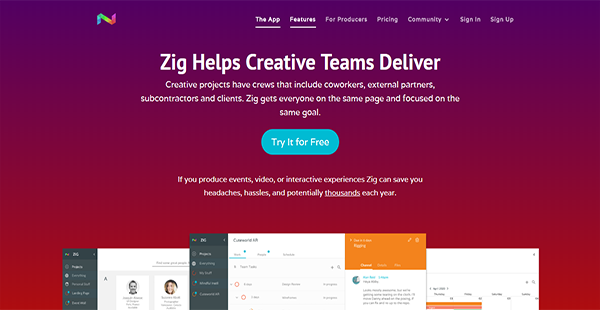
Zig is a collaboration platform designed for creative teams that incorporate social elements. Because of that unique feature, producers and managers can create a new list of members for each project. Apart from internal collaboration, Zig even allows you to work with ease with external partners like subcontractors and even with clients.
When it comes to arranging tasks, Zig makes it easy for you with its filtering and prioritization tools. These enable you and your team to see only the information that is relevant to you while ensuring that everyone knows their obligations.
Additionally, if you are working with subcontractors and external partners, Zig makes it possible for you to get them on board. However, you can rest assured that they only see their own tasks and progress and not the internal information related to the project.
Show MoreOverview of Zig Benefits
Custom Teams & Projects
With Zig, you can create different teams for every project. Because of this, you can be certain that everyone who needs to be aware receives timely updates. This also helps you see people’s availability and get them on board only for projects where their skills are required. This also extends to outside collaborators such as subcontractors.
Easy Task Finding
If your teams have a long list of tasks, it can be difficult to find the item that needs to be completed. Zig changes that by allowing you and other users to filter tasks and sort them by priority. As a result, you can get things done faster and keep every stakeholder happy.
Project Information Security
Despite having clients, subcontractors, and partners on the same interface as your internal teams, your confidential information remains secure. That is because Zig separates internal data while making sure that shared tasks are visible to external collaborators.
Real-time Communications
Staying on top of things is made seamless by Zig with its real-time chat channels. You can access these in tasks and projects and even leverage it when communicating with individuals. Apart from supporting texts, Zig’s chat channels can also take rich media, embedded tasks, markdown formatting, and drag-and-drop file sharing.
Show MoreOverview of Zig Features
- Project Scheduling
- Task Management
- Progress Tracking
- List Filtering
- Security
What Problems Will Zig Solve?
Multiple Projects
Creative team members are usually involved in multiple projects simultaneously, making it a challenge to keep up with tasks for each. Zig helps by displaying them in a single window together with their deadlines.
Shared Workspaces
Zig makes it possible for freelancers and other shops to utilize the same workspace as your internal team. It does this without the need for additional accounts. The solution’s capability for unique teams for every project also helps. Despite the visibility it offers, the platform helps you in securing your confidential company information.
Freelancer Talent Pool
If you work with freelancers frequently, Zig lets you create a talent pool of your connections. This is where you can see their skills, rates, and portfolios as well as their availabilities. With this, you can leverage external talents together with your workers’.
Awards & Quality Certificates


Zig Position In Our Categories
Because companies have distinct business-related demands, it is sensible that they steer clear of going for a one-size-fits-all, ”best” software system. Nonetheless, it would be difficult to discover such an app even among popular software products. The best thing to undertake can be to take note of the numerous important factors which require research such as critical features, packages, skill levels of staff, company size, etc. Then, you should perform the product research fully. Browse through some of these Zig evaluations and check out the other software programs in your list in detail. Such detailed product research ensure you take out ill-fitting applications and buy the system that includes all the function your business requires.
Position of Zig in our main categories:
TOP
200
Zig is one of the top 200 Collaboration Software products
Since each organization has specific business wants, it is sensible for them to refrain from looking for a one-size-fits-all ideal software application. Needless to say, it would be pointless to try to find such an app even among widely used software applications. The intelligent thing to do would be to list the various essential factors that need consideration such as main features, finances, skill levels of workers, company size etc. Then, you should do your groundwork thoroughly. Read some Zig Collaboration Tools reviews and investigate each of the other apps in your shortlist in detail. Such exhaustive homework can make certain you reject ill-fitting platforms and choose the app that provides all the aspects you need for business success.
How Much Does Zig Cost?
Zig Pricing Plans:
Free Trial
Zig Start Free
$0
Zig
$2/user/project/month
What are Zig pricing details?
Zig Pricing Plans:
Free Trial
Zig Start Free
$0
Zig
$2/user/project/month
Zig is a cost-efficient alternative to most project management and collaboration tools in the market. Its enterprise pricing starts at $2 per user in every project each month. You can also start free and scale up as you grow.
Zig Start Free – $0
- Unlimited Personal Projects
- Unlimited Connections
- Private & Group Messaging
- Projects, Schedules, Tasks
- Additional Collaborator for $2/month
Zig – $2/user/project/month
- All Free Features
- Directory & Roster
- Member Profiles & Availability
- Project Scheduling
- Real-time Messaging
- Rich Markdown Formatting
- File Sharing
User Satisfaction
Positive Social Media Mentions
0
Negative Social Media Mentions
0
We realize that when you choose to get a Collaboration Tools it’s crucial not only to see how professionals evaluate it in their reviews, but also to find out if the actual users and enterprises that purchased this software are genuinely happy with the product. That’s why we’ve devised our behavior-based Customer Satisfaction Algorithm™ that collects customer reviews, comments and Zig reviews across a vast range of social media sites. The data is then featured in a simple to understand form revealing how many users had positive and negative experience with Zig. With that information at your disposal you should be ready to make an informed purchasing choice that you won’t regret.
Video
Technical details
Devices Supported
- Windows
- Android
- iPhone/iPad
- Mac
- Web-based
Deployment
- Cloud Hosted
Language Support
- English
Pricing Model
- Free
- Monthly payment
Customer Types
- Small Business
- Medium Business
- Freelancers
What Support Does This Vendor Offer?
- phone
- live support
- training
- tickets
What integrations are available for Zig?
Zig can integrate with various kinds of platforms such as:
- Dribble
- ArtStation
- IMDB
- Adobe
- Autodesk
Zig User Reviews
Zig average rating:
5/5
Overall impression
5/5
Customer Support
5/5
Value for Money
5/5
Ease of Use
Write your own review of this product
ADD A REVIEWMore reviews from 1 actual users:
Sort by:
Latest
- Latest
- Most useful
- Most positive
- Most negative
Finally a project tool designed for flexible remote teams
Read full review >
5/5
Overall impression
5/5
Customer Support
5/5
Value for Money
5/5
Ease of Use
Published on: 06.03.2021
Company Size: 1-10 Employees
Industry: Marketing and Advertising
PROS: I love how we can bring in freelancers and clients into projects, and create custom teams.
CONS: Since it's a newer tool many of our team aren't current members. Thankfully the platform is easy to use so it doesn't take long for them to get up to speed.


Join a community of 7,369 SaaS experts
Thank you for the time you take to leave a quick review of this software. Our community and review base is constantly developing because of experts like you, who are willing to share their experience and knowledge with others to help them make more informed buying decisions.
Sign in with LinkedIn
Why we require LinkedIn?
- Show the community that you're an actual user.
- We will only show your name and profile image in your review.
- You can still post your review anonymously.
OR
Sign in with company emailSign in with company email
Popular Zig Alternatives





Top Competitors To Zig By Price
Product name:
Price:


Trending Collaboration Tools Reviews
Zig Comparisons
Product name:





Zig user reviews
Finally a project tool designed for flexible remote teams
Read full review >
5/5
Overall impression
5/5
Customer Support
5/5
Value for Money
5/5
Ease of Use
Published on: 06.03.2021
Company Size: 1-10 Employees
Industry: Marketing and Advertising

Page last modified



Did you find this review useful?
Yes
No
Thank you for your feedback
How can we make this page better?
Unsure about this software?
FIND ALTERNATIVES
 Why is FinancesOnline free?