

AtTrack Review


What is AtTrack?
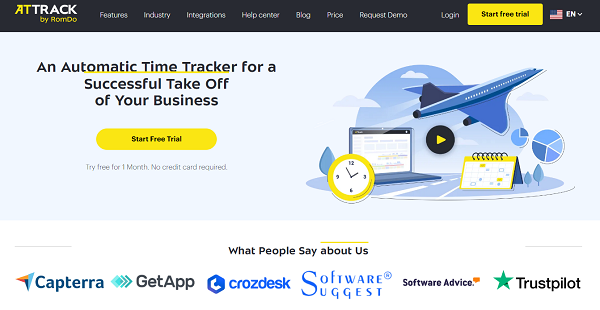
AtTrack is a robust time tracking platform that provides businesses with a set of tools to keep tabs on their employees’ productivity, performance, and activities. The software aims to remedy the problems caused by misuse of time by their workforce during office hours such as missed deadlines, client complaints, etc.
Through effective time tracking, the tool provides an accurate and detailed measurement of each employee’s working time. Reports are also generated automatically and contain the workload of teams, allowing the management to equally distribute tasks to each member.
Moreover, AtTrack offers useful auxiliary features that make the work of your staff predictable and transparent. This includes screen capture, URL tracker, and app tracker which could also be used as evidence for clients who ask for documentation of the work done.
Show MoreOverview of AtTrack Benefits
Effective Time Tracking
With a time tracking tool that monitors employee activity in real-time, work hours become transparent. You will know how much of your employees’ time is spent on particular parts of the project and they’re more likely to be motivated to work more productively. The system also automatically generates a report that shows the workload of the team so that you can efficiently distribute them among each member. AtTrack can also serve as an offline time tracker for keeping tabs on the work done outside the main computer such as attending meetings or picking up work calls.
Modular System
AtTrack can be built around your business’ exact specs and requirements. It uses a modular approach that lets you add/remove features that you need or don’t use. The platform offers a marketplace where advanced features such as application tracking, screenshots, activity level checker, etc. can be added to your system.
Employee Computer Usage
While the time is ticking in AtTrack, the software will continually monitor various aspects of your employees’ activities such as the apps used, websites opened, mouse movements, and activity level. It keeps track of the open tabs in their browsers as well as the used applications in their system. You can categorize them as productive, neutral, or unproductive and customize which apps and URL belong to which category.
Show MoreOverview of AtTrack Features
- Online/Offline Time Tracking
- Active Window Autofill
- Team Performance Management
- Screenshots
- App and URL Tracking
- Reports & Invoicing
- Jira and Trello Integration
- Modular Solution
What Problems Will AtTrack Solve?
Problem #1: The team goes remote due to various circumstances
The software allows to track the time against projects and tasks, measures activity at the computer, provides the info on what applications employees use, and takes random screenshots so the manager or employer can match the gathered data against the visual evidence of work.
Problem #2: Clients sometimes challenges the billing rates when working with remote teams
Freelancers, agencies, and business owners can justify their bills by providing customers with detailed reports on how much time was spent on their projects well supported by the evidence gathered by AtTrack.
Problem #3: Cost of project-based contracts are harder to assess
AtTrack helps to estimate the costs of future projects by gathering historic data about similar previous projects. For instance, their length and labor expenses.
Awards & Quality Certificates


AtTrack Position In Our Categories
Since companies have special business-related demands, it is only sensible that they avoid going for a one-size-fits-all, “perfect” business program. Just the same, it is nearly futile to try to find such application even among widely used software solutions. The clever thing to do can be to set down the varied essential functions that necessitate examination including critical features, budget, skill capability of staff members, business size, etc. Then, you should conduct your research comprehensively. Have a look at these AtTrack reviews and explore the other software solutions in your shortlist in detail. Such well-rounded product research can make sure you keep away from poorly fit apps and buy the system which meets all the aspects your company requires in sustaining growth.
Position of AtTrack in our main categories:
TOP
50
AtTrack is one of the top 50 Computer Monitoring Software products
TOP
100
AtTrack Employee Monitoring Software systems
Companies have different needs and requirements and no software solution can be perfect in such a condition. It is futile to try to find an ideal out-of-the-box software system that fulfills all your business needs. The smart thing to do would be to customize the solution for your special wants, staff member skill levels, budget, and other elements. For these reasons, do not hasten and pay for well-publicized trendy applications. Though these may be widely used, they may not be the best fit for your particular wants. Do your groundwork, look into each short-listed platform in detail, read a few AtTrack Employee Monitoring Software reviews, speak to the seller for clarifications, and finally select the application that offers what you require.
How Much Does AtTrack Cost?
AtTrack Pricing Plans:
Free Trial
Basic
Free
Pro
$3/user/month
Business
$5/user/month
What are AtTrack pricing details?
AtTrack Pricing Plans:
Free Trial
Basic
Free
Pro
$3/user/month
Business
$5/user/month
AtTrack offers three enterprise pricing plans as well as additional modules that can be purchased separately.
Basic – Free
- Unlimited number of projects and users
- Time tracking for projects
- Offline time tracking
- Tracked time editing
- Auto creation of tasks
- Detailed projects/task reports
- 3 months of data storage
- 3 months of screenshot storage
Pro – $3/user/month
- All basic features
- Workday statistic dashboard
- Activity levels for employees
- Activity level report
- 1 year of data storage
- 6 month of screenshot storage
Business – $5/user/month
- All pro features
- Timesheets and attendance
- Individual effectiveness settings
- Application usage report
- Effectiveness levels for employees
- Client access to data
- 2 years of data storage
- 6 months of screenshot storage
User Satisfaction
Positive Social Media Mentions
48
Negative Social Media Mentions
2
We know that when you make a decision to get a Employee Monitoring Software it’s crucial not only to learn how experts evaluate it in their reviews, but also to discover whether the actual people and businesses that bought it are indeed happy with the service. That’s why we’ve created our behavior-based Customer Satisfaction Algorithm™ that gathers customer reviews, comments and AtTrack reviews across a vast range of social media sites. The information is then displayed in a simple to digest format showing how many users had positive and negative experience with AtTrack. With that information at your disposal you will be equipped to make an informed business choice that you won’t regret.
Video
Technical details
Devices Supported
- Windows
- Mac
- Web-based
Deployment
- Cloud Hosted
Language Support
- English
- Russian
Pricing Model
- Free
- Monthly payment
Customer Types
- Small Business
- Medium Business
- Freelancers
What Support Does This Vendor Offer?
- phone
- live support
- training
- tickets
What integrations are available for AtTrack?
AtTrack integrates with two of the most popular project management systems in the market today:
- Trello
- Jira

AtTrack
is waiting for
your first review.

Write your own review of this product
ADD A REVIEWMore reviews from 0 actual users:


Join a community of 7,369 SaaS experts
Thank you for the time you take to leave a quick review of this software. Our community and review base is constantly developing because of experts like you, who are willing to share their experience and knowledge with others to help them make more informed buying decisions.
Sign in with LinkedIn
Why we require LinkedIn?
- Show the community that you're an actual user.
- We will only show your name and profile image in your review.
- You can still post your review anonymously.
OR
Sign in with company emailSign in with company email
Popular AtTrack Alternatives




Top Competitors To AtTrack By Price
Product name:
Price:

by quote

Trending Employee Monitoring Software Reviews

6.9
100%
8.0
100%


8.5
100%

AtTrack Comparisons
Product name:




Page last modified



Did you find this review useful?
Yes
No
Thank you for your feedback
How can we make this page better?
Unsure about this software?
FIND ALTERNATIVES
 Why is FinancesOnline free?