

dash Review



What is dash?
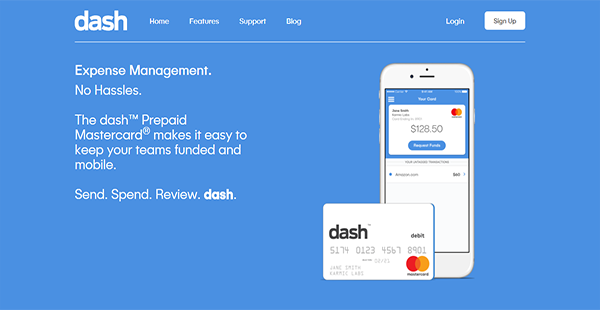
dash is a revolutionary expense management solution for businesses with its digital and physical prepaid Mastercard. This flagship product of Karmic Labs allows you to control your employees’ use of company funds, even when either you or your employees are abroad.
With this flexible and modern solution, you can eschew traditional methods and cards for payments and expense management. dash simplifies the allocation and requisition of funds, as well as the approval of requests for additional currency.
Moreover, dash is free to use. You and your personnel can download mobile-native applications in your preferred Android and iOS devices and begin setting it up without shelling a single cent. This makes the solution cost-friendly, especially for small- and mid-sized businesses.
Show MoreOverview of dash Benefits
Innovative Solution
Traditionally, companies provide credit cards to employees with limitations, offer them cash, or promise to reimburse their expenditures. However, those are inefficient solutions. With dash, you can revolutionize funds allocation and expense management. You can do both, and more, in the cloud in simple interfaces and straightforward processes.
Debit Mastercard
Your employees can use the dash prepaid debit Mastercard anywhere in the world where they are accepted. This prevents situations where personnel have to spend their own cash on company expenses and request for remunerations afterward.
Requests & Approvals
Once allocated funds have been consumed, employees can make requests for additional money from the dash application. You and authorized approvers can see those requests and choose to approve them manually each time or automate approvals instead. Either way, you can be assured that every flow of money is transparent and recorded.
Expenditure Review
Any time a member of your team makes a purchase, details are logged in the dash app. This way, you can ensure that your employees are using company funds only for approved purposes. Furthermore, employees can categorize their transactions to make it easier for the accounting unit and for the audit group to review and reconcile expenditures.
User Suspension
In case of suspicious activities, you can easily suspend a user’s account. You can do this in dash with ease and choose to put that in effect as long as you need.
Show MoreOverview of dash Features
- Team Management
- User Suspension
- On-Demand Funds Requests
- Remote Approvals
- Automatic Approvals
- Fund Removal
- Purchase Categorization
- Automatic Fund Reloading
- Paperless Receipts
- Data Exports
What Problems Will dash Solve?
1) Time-Saving Solution
Every year, businesses lose as much as $2,000.00 per employee due to inefficient expense management practices. This is largely due to countless hours lost on reviewing paper trails such as receipts and expense reports. dash can help companies take back the lost hours and money with its easy on-the-spot receipt capture. With this, there is no need for expense reports and for keeping physical copies of receipts for faster reviews.
2) Limber Funds
Because dash cards are prepaid, there is no need for businesses to arrange credit checks for every user. The solution only needs IDs for verification, as the company has stringent control over how much employees, new and old alike, get to spend. Additionally, this lets recent hires get productive immediately, especially if they need to be on the go.
3) Card Protection
In case of theft or loss, a user can simply suspend their card from the app to avoid unauthorized expenses. This feature is also helpful to companies who have seasonal employees. Administrators can pause accounts during the time those personnel end their working period. Any remaining funds are then sent back to the company vault. Once they return, they can be reactivated to receive funds again without a hitch.
Awards & Quality Certificates


dash Position In Our Categories
Keeping in mind companies have special business requirements, it is sensible they abstain from preferring a one-size-fits-all, ideal solution. Still, it is almost impossible to chance on such an app even among widely used software solutions. The rational thing to undertake should be to write the different essential aspects which necessitate consideration like key features, plans, technical skill competence of staff, business size, etc. The second step is, you should follow through the product research systematically. Go over some dash analyses and explore each of the software products in your list more closely. Such all-encompassing product research ascertain you take out unfit software products and subscribe to the system that provides all the aspects your business requires.
Position of dash in our main categories:
Each company has different wants and requires a system that can be personalized for their size, kind of staff members and buyers, and the particular industry they are in. For these reasons, no system can offer perfect tools out-of-the-box. When you try to find a software app, first be sure what you need it for. Read some dash Expense Management Software reviews and ask yourself do you need basic functionality or do you want advanced tools? Are there any industry-specific functionalities that you are seeking? Get the answers to these questions to help your search. There are multiple aspects that you need to mull over and these include your finances, specific business requirements, your company size, integration requirements etc. Take your time, check out a few free trials, and finally choose the platform that presents all that you want to improve your firm competence and productivity.
How Much Does dash Cost?
dash Pricing Plans:
Free Trial
dash
Free
What are dash pricing details?
dash Pricing Plans:
Free Trial
dash
Free
The use of the application itself is free thus there is no enterprise pricing, though transactions such as expedited shipping of cards, paper statements, and paper check issuances are for a fee. Foreign transactions are also charged.
User Satisfaction
Positive Social Media Mentions
360
Negative Social Media Mentions
9
We are aware that when you decide to buy a Expense Management Software it’s crucial not only to find out how experts evaluate it in their reviews, but also to discover whether the real clients and enterprises that purchased these solutions are genuinely satisfied with the service. That’s why we’ve devised our behavior-based Customer Satisfaction Algorithm™ that collects customer reviews, comments and dash reviews across a broad range of social media sites. The information is then presented in an easy to understand way showing how many people had positive and negative experience with dash. With that information available you should be prepared to make an informed purchasing decision that you won’t regret.
Technical details
Devices Supported
- Windows
- Android
- iPhone/iPad
- Mac
- Web-based
Deployment
- Cloud Hosted
Language Support
- English
Pricing Model
- Free
Customer Types
- Small Business
- Large Enterprises
- Medium Business
- Freelancers
What Support Does This Vendor Offer?
- phone
- live support
- training
- tickets
What integrations are available for dash?
Dash is compatible with popular accounting systems as it can export transaction data into CSV, QuickBooks format, and Excel file.

dash
is waiting for
your first review.

Write your own review of this product
ADD A REVIEWMore reviews from 0 actual users:


Join a community of 7,369 SaaS experts
Thank you for the time you take to leave a quick review of this software. Our community and review base is constantly developing because of experts like you, who are willing to share their experience and knowledge with others to help them make more informed buying decisions.
Sign in with LinkedIn
Why we require LinkedIn?
- Show the community that you're an actual user.
- We will only show your name and profile image in your review.
- You can still post your review anonymously.
OR
Sign in with company emailSign in with company email
Popular dash Alternatives




Top Competitors To dash By Price
Product name:
Price:



Trending Expense Management Software Reviews


dash Comparisons
Product name:






Page last modified



Did you find this review useful?
Yes
No
Thank you for your feedback
How can we make this page better?
Unsure about this software?
FIND ALTERNATIVES
 Why is FinancesOnline free?