

iLobby Review



What is iLobby?
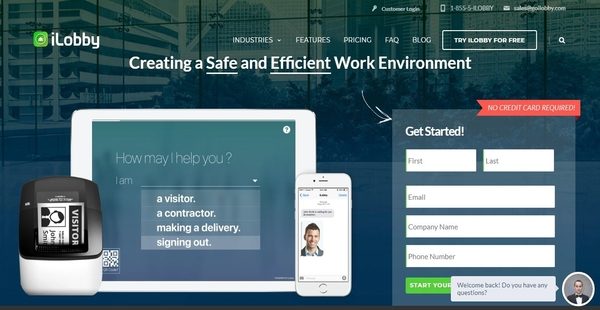
iLobby is a very flexible visitor management system which allows manufacturing companies, business offices, educational institutions, and government organizations to maximize their front desk’s efficiency, automate visitor sign-in process, and enhance the safety and security of their work environment and facility.
iLobby enables companies and their employees to save time as they perform day-to-day visitor-related tasks, making their front desk as one of the most efficient points and areas in their organization. The system offers multilingual capabilities, letting visitors register using the language they prefer. It has a flexible and responsive framework which can work on any type of device and environment.
While visitors check in, iLobby permits users to present legal documents and questionnaires to them such as non-disclosure agreements and health questionnaires which they need to sign, accomplish, or fill out before they enter the building or facility. To easily spot and track visitors, the visitor management system produces visitor badges.
Show MoreOverview of iLobby Benefits
Automatic Visitor Notifications
One of the core features built on iLobby is that it automates the visitor management process, making all the tasks related to such process efficient. This feature is implemented on its capability to send automatic visitor notifications to hosts. Thus, when guests or visitors arrive, the host will be alerted through SMS, email, or voice messaging. The host will also be notified about the location where a particular visitor should be picked up from.
Custom Visitor Badges
iLobby permits users to create and print customized visitor badges that store important information about their visitors such as visitors’ credentials, clearance levels, and visit durations. With these badges, they will be able to easily recognize their visitors as well as monitor them while they are within their building or facility.
QR Code Scanning
The visitor management system also has a QR code scanning capability. Thus, QR codes can be assigned to visitors and embedded on their badges so that they can re-use their badges for future visits and register quickly.
Capture And Store Images
Another efficient feature offered by iLobby is the ability to automatically take pictures of visitors. After it captures images of visitors, these images are stored on an existing customer portal where users can easily retrieve them.
Visitor Check-In Made Easy
iLobby allows users to set up self-service kiosks where visitors can conveniently and quickly register even without having to seek assistance from employees. In addition, the system enables hosts to pre-register visitors. Thus, before visitors arrive, they can have the visitors go through a pre-registration process online wherein location and meeting details, as well as QR codes are sent to them.
Third-Party Watchlist Integration
For tighter security measures, iLobby can be integrated with third-party systems that generate watchlists. Because of this, users will be able to check if their visitors have criminal records, sexual offense cases, or backgrounds that qualify them as threats to the security and safety of the work environment they are entering.
Evacuation Mode
iLobby also has an evacuation mode feature. With this feature, notifications are automatically sent to employees during emergency situations wherein they need to evacuate the building or the facility.
Legal Documents And Compliance
The visitor management system makes it easy for visitors to send or accomplish legal documents digitally. All the legal documents they need are stored in a central location where they can efficiently search for them for their subsequent transactions or meetings. Questionnaires can also be answered by visitors. Employees are notified when visitors pass or fail specific questions included in the questionnaires.
Run Daily, Weekly, Or Monthly Visitation Reports
Summing it up, iLobby has the capability to generate visitation reports on a daily, weekly, or monthly basis. These reports can also be customized by permitting users to specify the data points that are most important to them. The reports can be exported in multiple ways as well.
Show MoreOverview of iLobby Features
- Host Notifications
- Visitor Badges
- Visitor Image Capture
- QR Codes
- Self-Service Kiosks For Quick Visitor Check-In
- Smart Pre-Registrations
- 3rd Party Watchlists
- Black and White Lists
- Access Control
- Temporary Staff Tracking
- Evacuation Mode
- Visitation Reports
- Multilingual Ready
iLobby Position In Our Categories
Bearing in mind businesses have special business-related needs, it is prudent they avoid getting an all-encompassing, ”best” software solution. Needless to say, it is almost impossible to chance on such a software solution even among well-known software products. The reasonable thing to do would be to tabulate the several significant factors that demand deliberation like major features, plans, skill aptitude of staff members, company size, etc. Thereafter, you should conduct the product research to a full extent. Browse over some of these iLobby evaluations and explore the other software options in your shortlist more closely. Such detailed research makes sure you steer clear of ill-fitting software products and select the system that has all the aspects your company requires to achieve growth.
Position of iLobby in our main categories:
TOP
20
iLobby is one of the top 20 Visitor Management Software products
If you are interested in iLobby it may also be beneficial to check out other subcategories of Visitor Management Software gathered in our database of SaaS software reviews.
There are trendy and widely used systems in each software category. But are they necessarily the best fit for your organization’s special wants? A trendy software solution may have thousands of customers, but does it present what you need? For this reason, do not blindly shell out for popular systems. Read at least a few iLobby Visitor Management Software reviews and consider the factors that you wish to have in the software such as the fees, main features, available integrations etc. Then, select a few solutions that fit your requirements. Check out the free trials of these products, read online opinions, get clarifications from the seller, and do your investigation systematically. This exhaustive groundwork is certain to aid you find the finest software solution for your company’s special requirements.
How Much Does iLobby Cost?
iLobby Pricing Plans:
Free Trial
Free
Free
Corporate
$199.99/mo.
Enterprise
Contact vendor
What are iLobby pricing details?
iLobby Pricing Plans:
Free Trial
Free
Free
Corporate
$199.99/mo.
Enterprise
Contact vendor
Alongside its free plan for small offices, iLobby offers two enterprise pricing plans dedicated to multi-site businesses and large companies. Give the details a look, and select the best plan for your organization:
Free
- $0
- Perfect to get a taste of what iLobby can do for a small office with one site.
- Email Support
- Single Site Only
- 1 User
Corporate
- $199.99/mo. – billed monthly
- Designed to meet the efficiency & security needs of multi-site businesses.
- 10″ iPad
- Cellular Connection
- Email & Phone Support
- SMS & Voice Notifications
- Multi-Site Available
- Unlimited Users
- API Integrations
- Visitor Image Capture
- Custom Logos and Branding
- Evacuation Notifications
- Legal Documents
- Support for Additional Languages
Enterprise
- A custom-made solution tailored to the needs and conditions of your enterprise.
- Includes all hardware.
- 13″ iPad
- Cellular Connection
- Color Badge Printer
- Dedicated Account Rep
- SMS & Voice Notifications
- Multi-Site Available
- Unlimited Users
- API Integrations
- Visitor Image Capture
- Custom Logos and Branding
- Evacuation Notifications
- Legal Documents
- Support for Additional Languages
For more details on iLobby’s enterprise pricing plan, please contact the company and request for a quote.
User Satisfaction
Positive Social Media Mentions
21
Negative Social Media Mentions
0
We realize that when you make a decision to get a Visitor Management Software it’s important not only to learn how experts rank it in their reviews, but also to find out if the real users and businesses that purchased these solutions are indeed content with the service. That’s why we’ve created our behavior-based Customer Satisfaction Algorithm™ that aggregates customer reviews, comments and iLobby reviews across a wide range of social media sites. The data is then presented in a simple to understand format showing how many users had positive and negative experience with iLobby. With that information available you should be prepared to make an informed purchasing choice that you won’t regret.
Video
Technical details
Devices Supported
- Windows
- Linux
- iPhone/iPad
- Mac
- Web-based
Deployment
- Cloud Hosted
- Open API
Language Support
- English
- German
- Hindi
- Japanese
- Spanish
- French
- Russian
- Italian
- Dutch
- Portugese
- Polish
- Turkish
- Swedish
Pricing Model
- Free
- Monthly payment
- Quote-based
Customer Types
- Small Business
- Large Enterprises
- Medium Business
What Support Does This Vendor Offer?
- phone
- live support
- training
- tickets
What integrations are available for iLobby?
iLobby supports integration with third-party systems to give users the capability to check their visitors against watchlists.

iLobby
is waiting for
your first review.

Write your own review of this product
ADD A REVIEWMore reviews from 0 actual users:


Join a community of 7,369 SaaS experts
Thank you for the time you take to leave a quick review of this software. Our community and review base is constantly developing because of experts like you, who are willing to share their experience and knowledge with others to help them make more informed buying decisions.
Sign in with LinkedIn
Why we require LinkedIn?
- Show the community that you're an actual user.
- We will only show your name and profile image in your review.
- You can still post your review anonymously.
OR
Sign in with company emailSign in with company email
Popular iLobby Alternatives





Top Competitors To iLobby By Price
Product name:
Price:





Trending Visitor Management Software Reviews

7.4
100%


iLobby Comparisons
Product name:









Page last modified



Did you find this review useful?
Yes
No
Thank you for your feedback
How can we make this page better?
Unsure about this software?
FIND ALTERNATIVES
 Why is FinancesOnline free?