
- Home
- Knowledge Management Software
- Lighthouse Desktop

Lighthouse Desktop Review



What is Lighthouse Desktop?
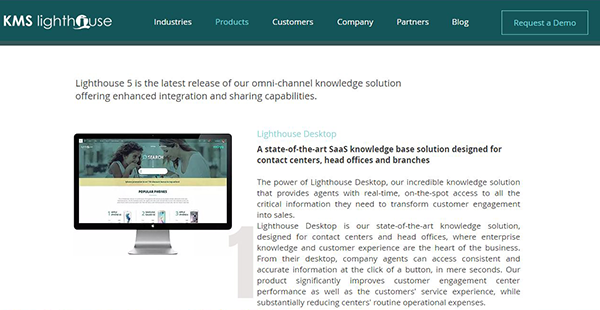
Lighthouse Desktop is a robust cloud-based knowledge base software for contact centers, head offices, and branches of business operating in the banking, hospitality & travel, retail, automotive, logistics, insurance, healthcare, government, and telecom industries. It is a state-of-the-art, digital knowledge management solution that enables small and medium-sized businesses to offer accurate and consistent knowledge to both employees and customers. The application permits real-time and on-the-spot access to relevant information that helps customer support staffs to handle customer calls more efficiently.
KMS Lighthouse Desktop is an omnichannel knowledge platform that functions as the spine of organizations where customer experience and enterprise knowledge are the heartbeats. It significantly improves the performance of customer engagement centers and boosts customer service experience while decreasing the operational expenses. Some of its salient features include feedback, customizations, collaboration, comparison, omnichannel integrations, template wizard, and scenario.
Show MoreOverview of Lighthouse Desktop Benefits
Lighthouse Desktop is an innovative knowledge management software that utilizes knowledge to inspire enhanced customer experience. One of its noteworthy features is the Lighthouse self-service portal. The self-service portal provides a suite of efficient tools that make it easy to publish and manage customer support websites. The tools allow you to publish content directly to your customers thereby diverting traffic to your website.
Another feature worth mentioning is the Lighthouse knowledge bot module. This module allows you to come up with personalized knowledge-based bots without any programming or coding skill. It gives you the freedom to run a standalone bot or enrich your existing bot using the built-in integration with any chat and messaging platform. The knowledge bot can be applied to your knowledge articles as AskDon’t Search options or based on a guided step-by-step scenario which can reveal multi-faceted scripts using the prepare decision trees.
In addition, Lighthouse Desktop comes with a knowledge database that can easily be accessed by customer support staffs while they are processing customer queries. The system leverages robust language search technologies that help support staffs search queries and promptly find answers in a language of their liking. Better still, it allows the comparison of your products with those of your competitors thereby allowing customers to rigorously analyze the product or service they require.
Show MoreOverview of Lighthouse Desktop Features
- GetAnswer
- Customization
- Feedback
- Template wizard
- Scenario
- Collaboration
- Omni-channel integration
- Comparison
Lighthouse Desktop Position In Our Categories
Because companies have special business-related demands, it is sensible that they steer clear of settling on an all-encompassing, “perfect” software solution. At any rate, it would be almost impossible to find such an app even among recognizable software solutions. The efficient step to undertake should be to write the different main factors that need analysis including critical features, price plans, technical skill aptitude of staff, business size, etc. Then, you must double down on your product research to a full extent. Go over some of these Lighthouse Desktop review articles and check out each of the software solutions in your list in detail. Such detailed product research can make sure you weed out poorly fit apps and buy the system that delivers all the aspects your company requires in growing the business.
Position of Lighthouse Desktop in our main categories:
TOP
100
Lighthouse Desktop is one of the top 100 Knowledge Management Software products
If you are considering Lighthouse Desktop it could also be sensible to analyze other subcategories of Knowledge Management Software collected in our base of B2B software reviews.
Every business has its own characteristics, and may call for a specific Knowledge Management Software solution that will be adjusted to their company size, type of customers and employees and even particular industry they cater to. You should not count on finding an ideal app that is going to be suitable for every company no matter what their background is. It may be a good idea to read a few Lighthouse Desktop Knowledge Management Software reviews first and even then you should pay attention to what the software is supposed to do for your company and your employees. Do you need a simple and intuitive service with just elementary functions? Will you actually use the advanced tools needed by experts and large enterprises? Are there any specific tools that are especially beneficial for the industry you work in? If you ask yourself these questions it will be much easier to find a reliable solution that will fit your budget.
How Much Does Lighthouse Desktop Cost?
Lighthouse Desktop Pricing Plans:
Free Trial
Quote-based Plan
Contact vendor
What are Lighthouse Desktop pricing details?
Lighthouse Desktop Pricing Plans:
Free Trial
Quote-based Plan
Contact vendor
Lighthouse Desktop doesn’t publish its enterprise pricing details. Contact the vendor for a custom pricing quote.
User Satisfaction
Positive Social Media Mentions
213
Negative Social Media Mentions
5
We realize that when you make a decision to purchase a Knowledge Management Software it’s crucial not only to see how professionals score it in their reviews, but also to check whether the actual people and companies that bought it are actually content with the product. That’s why we’ve designer our behavior-based Customer Satisfaction Algorithm™ that aggregates customer reviews, comments and Lighthouse Desktop reviews across a broad array of social media sites. The information is then displayed in an easy to digest form indicating how many users had positive and negative experience with Lighthouse Desktop. With that information at hand you should be ready to make an informed purchasing choice that you won’t regret.
Video
Technical details
Devices Supported
- Windows
- Linux
- Mac
- Web-based
Deployment
- Cloud Hosted
- Open API
Language Support
- English
Pricing Model
- Quote-based
Customer Types
- Small Business
- Large Enterprises
- Medium Business
What Support Does This Vendor Offer?
- phone
- live support
- training
- tickets
What integrations are available for Lighthouse Desktop?
Lighthouse Desktop integrates with the following applications:
- LivePerson
- Facebook Messenger
- Alexa

Lighthouse Desktop
is waiting for
your first review.

Write your own review of this product
ADD A REVIEWMore reviews from 0 actual users:


Join a community of 7,369 SaaS experts
Thank you for the time you take to leave a quick review of this software. Our community and review base is constantly developing because of experts like you, who are willing to share their experience and knowledge with others to help them make more informed buying decisions.
Sign in with LinkedIn
Why we require LinkedIn?
- Show the community that you're an actual user.
- We will only show your name and profile image in your review.
- You can still post your review anonymously.
OR
Sign in with company emailSign in with company email
Popular Lighthouse Desktop Alternatives


Top Competitors To Lighthouse Desktop By Price
Product name:
Price:


By quote

€1,000

Trending Knowledge Management Software Reviews


Lighthouse Desktop Comparisons
Product name:




Page last modified


Did you find this review useful?
Yes
No
Thank you for your feedback
How can we make this page better?
Unsure about this software?
FIND ALTERNATIVES
 Why is FinancesOnline free?