

Pastel Review



What is Pastel?
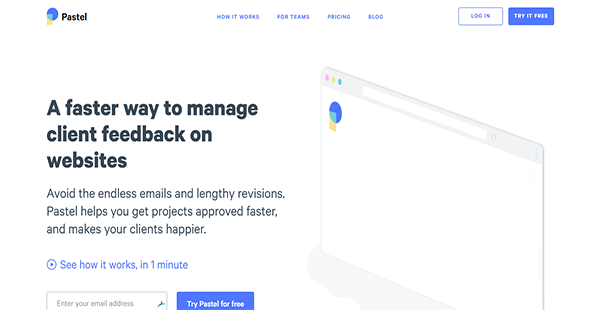
Pastel is a website feedback management and collaboration for designers and developers. It helps your team learn what your clients think of your design and establish rapport with them through in-context Q&A sessions.
No additional software or hardware is required to utilize Pastel. All you need to do is create a canvas of the website you are working on and send the link for it to your clients and team members.
Your employees can then collaborate seamlessly, as they know exactly what clients want to be done. Additionally, Pastel lets you export comments to other platforms where you communicate with your workforce and where you delegate tasks. This way, you can streamline revisions and mark projects as completed faster.
Show MoreOverview of Pastel Benefits
Fast Feedback Gathering
Knowing what your clients think of the website you are building for them is easier with Pastel. Instead of asking them to install software or to log in to applications, you only need to send them a link to your website’s canvas. When they open it, they can see what you are working on and add comments immediately.
Contextualized Discussions
Revisions on designs can be slow because of iterative and non-contextualized comments. Pastel transforms that with its visual feedback feature right inside the web browser. This ensures that you know what your clients and team members are talking about without having convoluted discussions. Thus, you can save time and complete jobs rapidly.
Web-Based Collaboration
With Pastel, there is no need to put your comments elsewhere as you can write them on your canvas. This promotes real-time collaboration with everyone on the team, thereby letting you avoid redundant feedback and revisions.
Automatic Link Sharing
When you create a canvas on Pastel, the solution automatically informs your teammates and sends them a link. This way, you can save time from manual tasks. This also makes sure that everyone is on board the project as well as accountable for their parts.
Desktop and Mobile Toggling
Since many users are viewing websites on mobile devices these days, it is imperative that you offer them a seamless experience regardless of their preferred screen sizes. Pastel enables you toggle between desktop and mobile views. As a result, you can experience firsthand what your target users will be interacting with and push changes that can enhance their engagement.
Show MoreOverview of Pastel Features
- Context Capture
- Automatic Team Invitation
- Real-Time Collaboration
- Integrations
Pastel Position In Our Categories
Because companies have specific business-related needs, it is only logical they steer clear of getting a one-size-fits-all, “perfect” solution. Just the same, it would be futile to discover such an app even among recognizable software systems. The best step to do would be to list the several key factors which necessitate analysis such as major features, pricing, skill aptitude of staff, organizational size, etc. Thereafter, you should follow through your research through and through. Have a look at some Pastel analyses and explore the other software systems in your shortlist in detail. Such all-encompassing research ascertain you drop unfit software solutions and pay for the one which has all the tools your company requires in growing the business.
Position of Pastel in our main categories:
TOP
500
Pastel is one of the top 500 Collaboration Software products
If you are interested in Pastel it might also be beneficial to check out other subcategories of Collaboration Software collected in our database of B2B software reviews.
There are well-liked and widely used solutions in each software category. But are they necessarily the best fit for your company’s specific needs? A market-leading software solution may have thousands of subscribers, but does it present what you require? For this reason, do not blindly shell out for popular systems. Read at least a few Pastel Collaboration Software reviews and consider the aspects that you desire in the software such as the fees, main tools, available integrations etc. Then, select a few solutions that fit your needs. Check out the free trials of these platforms, read online opinions, get clarifications from the maker, and do your research systematically. This exhaustive homework is certain to assist you select the most excellent software solution for your firm’s specific needs.
How Much Does Pastel Cost?
Pastel Pricing Plans:
Free Trial
Freelancer
$25/month
Studio
$99/month
Agency
$249/month
Enterprise
Contact vendor
What are Pastel pricing details?
Pastel Pricing Plans:
Free Trial
Freelancer
$25/month
Studio
$99/month
Agency
$249/month
Enterprise
Contact vendor
Pastel has four options for enterprise pricing. You can pay for your selected plan on a monthly or annual basis. The details for these are outlined below to help you come to a decision.
Freelancer – $25.00/month or $21.00/month/annual billing
- 1 User
- Unlimited Canvases
- Unlimited Clients
- Export to Trello
Studio – $99.00/month or $83.00/month/annual billing
- All Freelancer Features
- 5 Users
- Search & Filter
- User Mentions
- Export to Asana, Monday & Jira
Agency – $249.00/month or $208.00/month/annual billing
- All Studio Features
- 15 Users
- White-labeled Canvases
- Export to CSV & API
Enterprise – request pricing information
- All Agency Features
- 15+ Users
- VPN Access
- Premium Support
User Satisfaction
Positive Social Media Mentions
0
Negative Social Media Mentions
0
We realize that when you choose to get a Collaboration Software it’s crucial not only to see how professionals rank it in their reviews, but also to find out if the real users and companies that purchased it are genuinely content with the product. That’s why we’ve devised our behavior-based Customer Satisfaction Algorithm™ that collects customer reviews, comments and Pastel reviews across a wide range of social media sites. The information is then displayed in a simple to digest format showing how many people had positive and negative experience with Pastel. With that information available you should be prepared to make an informed buying choice that you won’t regret.
Technical details
Devices Supported
- Web-based
Deployment
- Cloud Hosted
Language Support
- English
Pricing Model
- Monthly payment
- Annual Subscription
- Quote-based
Customer Types
- Small Business
- Large Enterprises
- Medium Business
- Freelancers
What Support Does This Vendor Offer?
- phone
- live support
- training
- tickets
What integrations are available for Pastel?
Pastel can connect with the following applications:
- Trello
- Asana
- Jira Software

Pastel
is waiting for
your first review.

Write your own review of this product
ADD A REVIEWMore reviews from 0 actual users:


Join a community of 7,369 SaaS experts
Thank you for the time you take to leave a quick review of this software. Our community and review base is constantly developing because of experts like you, who are willing to share their experience and knowledge with others to help them make more informed buying decisions.
Sign in with LinkedIn
Why we require LinkedIn?
- Show the community that you're an actual user.
- We will only show your name and profile image in your review.
- You can still post your review anonymously.
OR
Sign in with company emailSign in with company email
Popular Pastel Alternatives




Top Competitors To Pastel By Price
Product name:
Price:


Trending Collaboration Software Reviews

8.0
100%

8.5
97%

8.0
N/A

8.0
92%

Pastel Comparisons
Product name:




Page last modified



Did you find this review useful?
Yes
No
Thank you for your feedback
How can we make this page better?
Unsure about this software?
FIND ALTERNATIVES
 Why is FinancesOnline free?