
- Home
- Email Marketing Software
- Salesforce Email Studio

Salesforce Email Studio Review



What is Salesforce Email Studio?
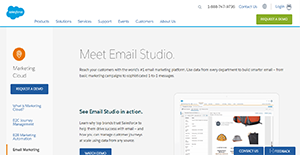
Salesforce Email Studio is a cloud-based, scalable, and powerful email marketing platform that is a component of the company’s popular Marketing Cloud. It is a leading solution that assists companies in making smarter email campaigns by using data from all departments.
With Email Studio, businesses can send emails in bulk, or send them to targeted individuals, or even create one-to-one conversations. This lets companies customize their interactions with their customer base and also lets them personalize their email communications.
Additionally, Email Studio provides automation tools that make email send outs, report deliveries, and many other processes less arduous. This enables marketing managers and other professionals more focused on creating and managing campaigns.
Show MoreOverview of Salesforce Email Studio Benefits
Salesforce Email Studio helps users create a smarter email from one-to-one messages and marketing campaigns to reach your customers more effectively. Here are the product’s key benefits:
Targeted Campaigns
With Email Studio, businesses are able to segment emails and organize them according to certain characteristics. This lets them create more targeted email campaigns and also saves them time during the send-out process, especially when they have to deal with thousands to millions of emails per campaign.
Dynamic Emails
Email Studio comes with a plethora of mobile-responsive email templates that businesses can customize according to their needs. This also enables companies to take advantage of various tools for them to create dynamic messages, such as the use of HTML codes and custom scripts.
Furthermore, Email Studio assists business organizations in making their customer journeys more engaging. The application offers them the means to interact with their potential customers and long-standing clients at every stage so they can maintain strong relationships.
Automation Functions
For businesses to increase their success, they need to send their emails at the right time. That is something Salesforce understands, which is why Email Studio is equipped with automation functions. This lets marketing managers schedule the email send out in advance so that campaigns reach their intended recipients when it is most optimal.
Moreover, Email Studio also automates data imports and reports distribution. This enables everyone on the team to save time in transferring data from one system to the other. On top of that, automated reports distribution keeps everyone involved aware of their campaigns’ performances.
Email Optimization
In order to aid companies in figuring out which tactic works best with their audiences, Email Studio supports A/B testing. This enables marketing teams to send emails to different segments that sport varying approaches.
Show MoreOverview of Salesforce Email Studio Features
- Drag-and-Drop Segmentation Tools
- Profile Data Filters
- Mobile-Optimized Emails
- Customizable Email Templates
- Email Scheduling
- A/B Testing
- Automation Functions
- 1-to-1 Relationships
- Segmentation
- Subscriber List
- Message Scheduling
- Custom Reports Distribution
- Data Import from any source
- First-party Email Data
- Responsive Email Design
- Dynamic Messages
- HTML Code
- Personalized Scripting Language
- Real-Time ContentContent Blocks
- Customer Lifecycle
- Email Guardrails
- Email Delivery Schedule
- Performance Report
Salesforce Email Studio Position In Our Categories
Knowing that companies have distinctive business wants, it is only rational they avoid going for a one-size-fits-all, “perfect” business application. Having said that, it is troublesome to discover such an app even among recognizable software systems. The correct step to do should be to list the various vital factors that merit inspection such as key features, packages, skill capability of the users, organizational size, etc. The second step is, you must follow through the product research to a full extent. Go over some Salesforce Email Studio evaluations and explore the other software solutions in your shortlist in detail. Such well-rounded research ascertains you take out mismatched apps and subscribe to the one which meets all the function your business requires.
Position of Salesforce Email Studio in our main categories:
TOP
100
Salesforce Email Studio is one of the top 100 Marketing Software products
It is essential to realize that almost no app in the Email Marketing Software category is going to be a perfect solution able to fulfill all the requirements of all company types, sizes and industries. It may be a good idea to read a few Salesforce Email Studio Email Marketing Software reviews first as specific solutions can excel only in a really small set of applications or be prepared with a very specific type of industry in mind. Others may operate with an idea of being simple and intuitive and consequently lack advanced functionalities needed by more experienced users. You can also come across software that cater to a large group of customers and provide a rich feature toolbox, however that in most cases comes at a higher price of such a service. Make sure you're aware of your requirements so that you buy a service that provides specifically the elements you look for.
How Much Does Salesforce Email Studio Cost?
Salesforce Email Studio Pricing Plans:
Free Trial
Quote-based Plan
Contact vendor
What are Salesforce Email Studio pricing details?
Salesforce Email Studio Pricing Plans:
Free Trial
Quote-based Plan
Contact vendor
Salesforce Email Studio’s SMB and enterprise pricing details can be obtained by contacting the vendor.
User Satisfaction
Positive Social Media Mentions
206
Negative Social Media Mentions
1
We know that when you decide to purchase a Email Marketing Software it’s crucial not only to learn how professionals rank it in their reviews, but also to check if the actual users and enterprises that bought these solutions are indeed content with the service. That’s why we’ve devised our behavior-based Customer Satisfaction Algorithm™ that collects customer reviews, comments and Salesforce Email Studio reviews across a wide array of social media sites. The data is then displayed in an easy to understand format indicating how many users had positive and negative experience with Salesforce Email Studio. With that information at hand you will be equipped to make an informed purchasing choice that you won’t regret.
Video
Technical details
Devices Supported
- Windows
- Linux
- Android
- iPhone/iPad
- Mac
- Web-based
Deployment
- Cloud Hosted
- Open API
Language Support
- English
- Spanish
- French
- Italian
- Dutch
- Portugese
- Swedish
Pricing Model
- Quote-based
Customer Types
- Small Business
- Large Enterprises
- Medium Business
What Support Does This Vendor Offer?
- phone
- live support
- training
- tickets
What integrations are available for Salesforce Email Studio?
Salesforce Marketing Cloud offers two kinds of APIs. Both offer different kinds of connectivity with other apps. For more information, visit the dedicated API page or contact support.
Salesforce Email Studio User Reviews
Salesforce Email Studio average rating:
4/5
Overall impression
5/5
Customer Support
4/5
Value for Money
4/5
Ease of Use
Write your own review of this product
ADD A REVIEWThe most favorable review

PROS: This software allowed us to get our messages across our 4 locations. During this pandemic, we mainly use it to send out emails about COVID updates, store policies, and office schedules. It's really convenient.
CONS: This is a very rich software, but you have to spend a lot of time learning it for you to have the full good user experience.
The least favorable review
PROS: Salesforce comes with free support and training which really helps users like me to get a good experience in using the software. The training covers tons of things including custom creations, message optimizations, message delivery systems, etc.
CONS: I think the transfer quality must be improved since there are some instances when the appearance of the email changes after sending.
More reviews from 14 actual users:
Sort by:
Latest
- Latest
- Most useful
- Most positive
- Most negative
I love the versatility!
Read full review >
4/5
Overall impression
4/5
Customer Support
4/5
Value for Money
4/5
Ease of Use
Published on: 19.10.2021
Company Size: 11-50 Employees
Industry: Financial Services
PROS: The best part of this software is its contact filtering feature! It can filter your contacts and organize them into lists.
CONS: I think the user interface is a bit clunky and needs to improve to make it more optimized. I also find the reporting time-consuming.
Their email marketing program is the best!
Read full review >
4/5
Overall impression
4/5
Customer Support
3/5
Value for Money
3/5
Ease of Use
Published on: 09.10.2021
Company Size: More than 100 Employees
Industry: N/A
PROS: Salesforce Email Studio does its job perfectly well! It's a reliable tool and their customer support is pretty amazing and helpful!
CONS: I honestly think this software is overpriced. I wish they could reduce their rates to accommodate startups.
Exactly what we needed!
Read full review >
5/5
Overall impression
5/5
Customer Support
5/5
Value for Money
5/5
Ease of Use
Published on: 06.10.2021
Company Size: More than 100 Employees
Industry: N/A
PROS: This software allowed us to get our messages across our 4 locations. During this pandemic, we mainly use it to send out emails about COVID updates, store policies, and office schedules. It's really convenient.
CONS: This is a very rich software, but you have to spend a lot of time learning it for you to have the full good user experience.
Good addition to our system!
Read full review >
4/5
Overall impression
3/5
Customer Support
3/5
Value for Money
4/5
Ease of Use
Published on: 25.09.2021
Company Size: 11-50 Employees
Industry: Information Technology and Services
PROS: I love the range of functionality this software has! It is an effective marketing tool and it has a great interface that is crucial to its user-friendliness. Everything is awesome -- from synchronizations, automation to customer connectivity! All covered by Salesforce.
CONS: We are experiencing some problems with its email filtering system since it sometimes puts important emails into the spam mail.
Top-notch, high-quality software
Read full review >
4/5
Overall impression
3/5
Customer Support
4/5
Value for Money
3/5
Ease of Use
Published on: 28.08.2021
Company Size: 11-50 Employees
Industry: N/A
PROS: It simplified the way we do email marketing -- from contact setup to tracking!
CONS: They sometimes take time to respond to our concerns which causes a delay with our operations.
Definitely the best!
Read full review >
5/5
Overall impression
5/5
Customer Support
5/5
Value for Money
5/5
Ease of Use
Published on: 19.06.2021
Company Size: More than 100 Employees
Industry: N/A
PROS: This is probably the best software to use to improve the effectiveness of our marketing campaigns. It allows us to personalize the emails based on our leads' characteristics.
CONS: This is the best email marketing software that I've ever used. I have no complaints at all.
Best email/campaign management tool!
Read full review >
5/5
Overall impression
5/5
Customer Support
4/5
Value for Money
4/5
Ease of Use
Published on: 07.06.2021
Company Size: 11-50 Employees
Industry: N/A
PROS: My favorite thing about Salesforce is that it allows you to customize the designs of your emails. It's also pretty easy to navigate!
CONS: I hope they would reduce the steps of sending out an email to our database.
Great experience with Salesforce Studio!
Read full review >
5/5
Overall impression
4/5
Customer Support
4/5
Value for Money
4/5
Ease of Use
Published on: 07.05.2021
Company Size: More than 100 Employees
Industry: Computer Software
PROS: Salesforce has so many great features that I love. These are: (1) its automation functions; (2) targeted campaigning; and (3) dynamic email creation. These functions optimized our mails and improved our whole email marketing and campaign process.
CONS: Sharing email reports with other units are not that smooth. There are some glitches. I also find it hard to organize user permission levels.
What you see is what you get!
Read full review >
4/5
Overall impression
4/5
Customer Support
4/5
Value for Money
4/5
Ease of Use
Published on: 25.04.2021
Company Size: 11-50 Employees
Industry: Higher Education
PROS: It allows users to design marketing campaigns in a convenient way. The tool is so simple and straightforward.
CONS: The page sometimes takes time to load. I also experience some issues with the content block templates. There seemed to be an incompatibility with Outlook and the CSS of some emails.
Thank you, Salesforce!
Read full review >
4/5
Overall impression
4/5
Customer Support
3/5
Value for Money
3/5
Ease of Use
Published on: 14.04.2021
Company Size: 1-10 Employees
Industry: Computer Software
PROS: Execution of campaigns was made easier with Salesforce. It's a flexible tool so you can personalize/customize the marketing email you send out based on the demographics and behavior of your targets. It's super easy to use. The drag-and-drop feature is amazing.
CONS: Debugging codes and campaigns can be challenging especially if you don't have technical experience. I also observed that it might not fit all companies, so you have to try and check if it fits your company's needs.
I highly recommend Salesforce!
Read full review >
4/5
Overall impression
4/5
Customer Support
4/5
Value for Money
3/5
Ease of Use
Published on: 18.10.2020
Company Size: More than 100 Employees
Industry: N/A
PROS: Salesforce is a pretty straightforward tool that is really helpful when it comes to sales reporting and lead generation. It's also super user-friendly!
CONS: I think the menu bar needs a bit of improvement! It currently has too many elements on it that can be overwhelming.
A must-have for marketing teams!
Read full review >
4/5
Overall impression
4/5
Customer Support
3/5
Value for Money
4/5
Ease of Use
Published on: 28.09.2020
Company Size: 11-50 Employees
Industry: N/A
PROS: I love how it can be integrated with our other tools. It significantly improved our marketing strategy by being able to easily reach out to our mailing list.
CONS: It's a bit overwhelming at first, but the experience gets better once you understand the functions of all the available tools.
Love the training!
Read full review >
4/5
Overall impression
3/5
Customer Support
4/5
Value for Money
4/5
Ease of Use
Published on: 22.09.2020
Company Size: 11-50 Employees
Industry: Insurance
PROS: Salesforce comes with free support and training which really helps users like me to get a good experience in using the software. The training covers tons of things including custom creations, message optimizations, message delivery systems, etc.
CONS: I think the transfer quality must be improved since there are some instances when the appearance of the email changes after sending.
This is the best!
Read full review >
5/5
Overall impression
4/5
Customer Support
5/5
Value for Money
4/5
Ease of Use
Published on: 15.09.2020
Company Size: 11-50 Employees
Industry: Outsourcing/Offshoring
PROS: Automations are the best! It automates email sending, data importing, and reporting distribution! It saves us tons of time. It also helps in keeping every team member informed about the status of the campaigns.
CONS: I love everything about this app!


Join a community of 7,369 SaaS experts
Thank you for the time you take to leave a quick review of this software. Our community and review base is constantly developing because of experts like you, who are willing to share their experience and knowledge with others to help them make more informed buying decisions.
Sign in with LinkedIn
Why we require LinkedIn?
- Show the community that you're an actual user.
- We will only show your name and profile image in your review.
- You can still post your review anonymously.
OR
Sign in with company emailSign in with company email
Popular Salesforce Email Studio Alternatives


Top Competitors To Salesforce Email Studio By Price
Product name:
Price:

by quote


Trending Email Marketing Software Reviews


Salesforce Email Studio Comparisons
Product name:


Salesforce Email Studio user reviews
I love the versatility!
Read full review >
4/5
Overall impression
4/5
Customer Support
4/5
Value for Money
4/5
Ease of Use
Published on: 19.10.2021
Company Size: 11-50 Employees
Industry: Financial Services
Their email marketing program is the best!
Read full review >
4/5
Overall impression
4/5
Customer Support
3/5
Value for Money
3/5
Ease of Use
Published on: 09.10.2021
Company Size: More than 100 Employees
Industry: N/A
Exactly what we needed!
Read full review >
5/5
Overall impression
5/5
Customer Support
5/5
Value for Money
5/5
Ease of Use
Published on: 06.10.2021
Company Size: More than 100 Employees
Industry: N/A
Good addition to our system!
Read full review >
4/5
Overall impression
3/5
Customer Support
3/5
Value for Money
4/5
Ease of Use
Published on: 25.09.2021
Company Size: 11-50 Employees
Industry: Information Technology and Services
Top-notch, high-quality software
Read full review >
4/5
Overall impression
3/5
Customer Support
4/5
Value for Money
3/5
Ease of Use
Published on: 28.08.2021
Company Size: 11-50 Employees
Industry: N/A

Page last modified



Did you find this review useful?
Yes
No
Thank you for your feedback
How can we make this page better?
Unsure about this software?
FIND ALTERNATIVES
 Why is FinancesOnline free?