
- Home
- Project Management Software
- Spreadsheet.com

Spreadsheet.com Review



What is Spreadsheet.com?
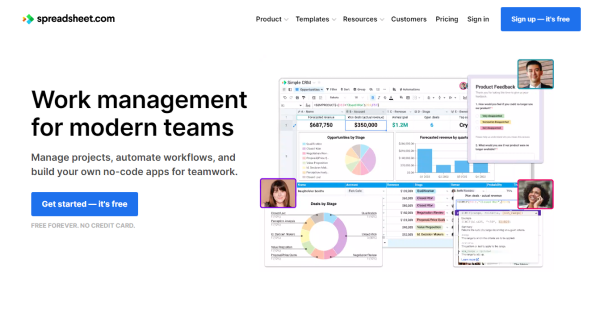
Spreadsheet.com is a complete work management platform similar to the popular spreadsheet, but with the added advanced capabilities of the database, codeless automation, project management, integrations, real-time updates, and more. You can use it to create no-code solutions for your teams, automate various operations, and manage projects.
Spreadsheet.com provides you with fresh ways to work that are seamlessly integrated into your spreadsheets, including traditional Sheet views, Kanban boards, Gantt charts, embeddable forms, and calendars. Utilize more than 25 unique data types to go beyond conventional spreadsheets. This includes select, multi-option dropdown menus, users, attachments stored inside cells, users, and icon sets.
Use the same familiar features, functions, and syntax you already know from Excel and Google Sheets to build flexible and powerful solutions; you also don’t have to start from scratch since there are over 150 templates available for content planning, applicant tracking, and more.
Show MoreOverview of Spreadsheet.com Benefits
Advanced Sheet Views
With Spreadsheet.com, you can construct anything from simple free-form spreadsheets to relational database tables. You may select from more than 25 different data types, including multi-select, email, rating, phone, and more, and then sort, filter, and group your data to build customized views of it. Drag and drop files into Attachment cells with interactive thumbnails and document previews to manage documents directly in your spreadsheets.
No-code Automation
Spreadsheet.com Automation allows you to visually build workflows without writing any code to automate tedious tasks and connect to other business applications. To get started right away, choose from more than 100 automation recipes that are ready to use, or create your own from scratch. Every automation begins with a trigger and can carry out a wide range of operations, such as sending emails, adding or changing rows, sending personalized MS Teams or Slack messages, or even calling a webhook.
Real-time Collaboration
Every modification is instantly synced with everyone and automatically saved. Message channels facilitate efficient and enjoyable teamwork. To collaborate seamlessly across platforms, users can employ the native mobile apps available or integrate Spreadsheet.com with other communication systems. You may also check the version history to see who made each modification and when. You can quickly browse and restore an earlier version, or you can just copy and paste old data.
Show MoreOverview of Spreadsheet.com Features
- Sheet Views
- Automation
- Calendar Views
- Gantt Chart Views
- Kanban Views
- Related Rows
- Form Views
- Integrations
Awards & Quality Certificates

Spreadsheet.com Position In Our Categories
Since companies have specific business needs, it is only rational they avoid settling on an all-in-one, ”best” software product. Regardless, it is futile to try to discover such application even among recognizable software solutions. The practical thing to do would be to set down the different key functions that necessitate inspection like key features, packages, technical skill competence of staff members, organizational size, etc. Then, you should follow through your product research fully. Have a look at some of these Spreadsheet.com evaluations and check out each of the software solutions in your shortlist in detail. Such comprehensive product research guarantees you keep away from ill-fitting applications and select the system which provides all the features your company requires.
Position of Spreadsheet.com in our main categories:
TOP
100
Spreadsheet.com is one of the top 100 Project Management Software products
If you are considering Spreadsheet.com it could also be a good idea to investigate other subcategories of Project Management Software listed in our database of SaaS software reviews.
Since each company has particular business needs, it is sensible for them to abstain from searching for a one-size-fits-all ideal software solution. Needless to say, it would be futile to try to find such a system even among popular software applications. The clever thing to do would be to jot down the various essential elements that require consideration such as required features, budget, skill levels of workers, company size etc. Then, you should do your homework thoroughly. Read some Spreadsheet.com Project Management Software reviews and look into each of the other systems in your shortlist in detail. Such in-depth homework can make sure you reject ill-fitting systems and select the system that offers all the features you need for business success.
How Much Does Spreadsheet.com Cost?
Spreadsheet.com Pricing Plans:
Free Trial
Free Forever
Free
Standard
$9/creator/month
Premium
$22/creator/month
Enterprise
Contact vendor
What are Spreadsheet.com pricing details?
Spreadsheet.com Pricing Plans:
Free Trial
Free Forever
Free
Standard
$9/creator/month
Premium
$22/creator/month
Enterprise
Contact vendor
Spreadsheet.com is available on various enterprise pricing plans, from Free Forever to a custom Enterprise solution. For premium versions, the vendor only charges for users who can create spreadsheets.
Free Forever
- Unlimited workbooks
- 2,000 rows per workbook
- 3 GB of attachment storage space per workbook
- Sheet, Kanban, Calendar, and Form views
- Visual automation editor with conditional logic
- 200 automation actions per month
Standard – $9 per creator/month
- Includes all of Free +
- 10,000 rows per workbook
- 6 GB of attachment storage space per workbook
- 1 year of version history
- Gantt views with dependencies
- Advanced calendar features
- 10,000 automation actions per month
Premium – $22 per creator/month
- Includes all of Standard +
- 100,000 rows per workbook
- 30 GB of attachment storage space per workbook
- 2 years of version history
- Private and locked views
- Custom branded forms
- 100,000 automation actions per month
- Domain-restricted sharing
Enterprise – By quote
- Includes all of Premium, plus
- 200,000+ rows per workbook
- Unlimited attachment storage space per workbook
- Unlimited version history
- Unlimited automation
- Unlimited workspaces
- Dedicated customer success manager
User Satisfaction
Positive Social Media Mentions
44
Negative Social Media Mentions
8
We realize that when you choose to buy a Project Management Software it’s crucial not only to find out how professionals rank it in their reviews, but also to find out if the real clients and companies that bought this software are genuinely content with the product. That’s why we’ve designer our behavior-based Customer Satisfaction Algorithm™ that aggregates customer reviews, comments and Spreadsheet.com reviews across a broad array of social media sites. The information is then displayed in an easy to understand way indicating how many people had positive and negative experience with Spreadsheet.com. With that information available you should be ready to make an informed purchasing choice that you won’t regret.
Video
Technical details
Devices Supported
- Web-based
Deployment
- Cloud Hosted
Language Support
- English
Pricing Model
- Free
- Monthly payment
- Quote-based
Customer Types
- Small Business
- Large Enterprises
- Medium Business
- Freelancers
What Support Does This Vendor Offer?
- phone
- live support
- training
- tickets
What integrations are available for Spreadsheet.com?
Spreadsheet.com features built-in automation that lets you seamlessly integrate the platform with the other tools you use, such as:
- Slack
- MS Teams
- Gmail
- Google Calendar
- Gogle Sheets
- Google Forms
- Salesforce
- QuickBooks
- Coda
- Notion
- Jira Software
- Zendesk
- twilio
- Evernotes
- Mailchimp

Spreadsheet.com
is waiting for
your first review.

Write your own review of this product
ADD A REVIEWMore reviews from 0 actual users:


Join a community of 7,369 SaaS experts
Thank you for the time you take to leave a quick review of this software. Our community and review base is constantly developing because of experts like you, who are willing to share their experience and knowledge with others to help them make more informed buying decisions.
Sign in with LinkedIn
Why we require LinkedIn?
- Show the community that you're an actual user.
- We will only show your name and profile image in your review.
- You can still post your review anonymously.
OR
Sign in with company emailSign in with company email
Popular Spreadsheet.com Alternatives



Top Competitors To Spreadsheet.com By Price
Product name:
Price:




Trending Project Management Software Reviews



8.6
100%

8.0
100%
Spreadsheet.com Comparisons
Product name:








Page last modified



Did you find this review useful?
Yes
No
Thank you for your feedback
How can we make this page better?
Unsure about this software?
FIND ALTERNATIVES
 Why is FinancesOnline free?