
- Home
- Time Tracking Software
- WebWork Time Tracker

WebWork Time Tracker Review


What is WebWork Time Tracker?
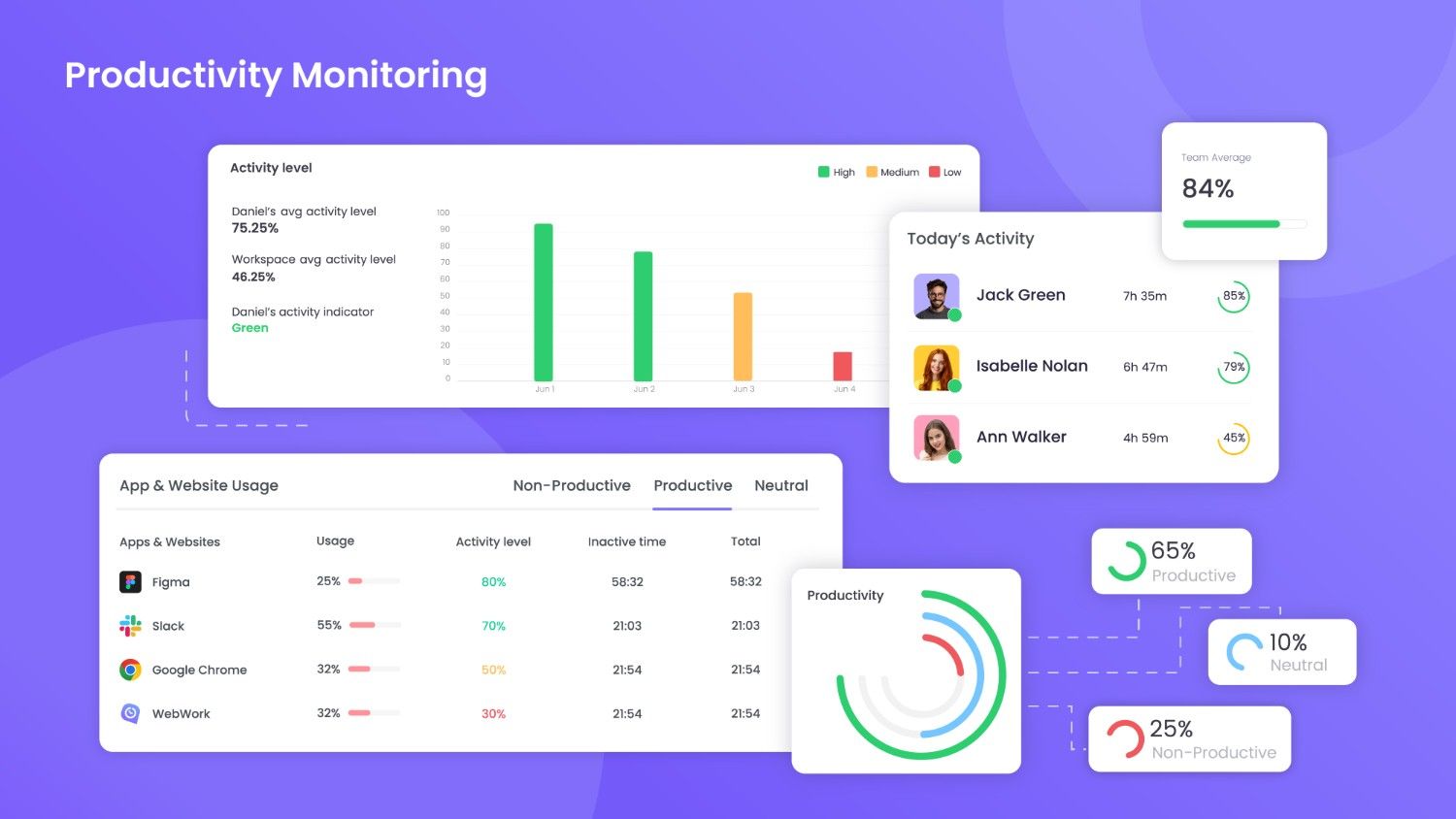
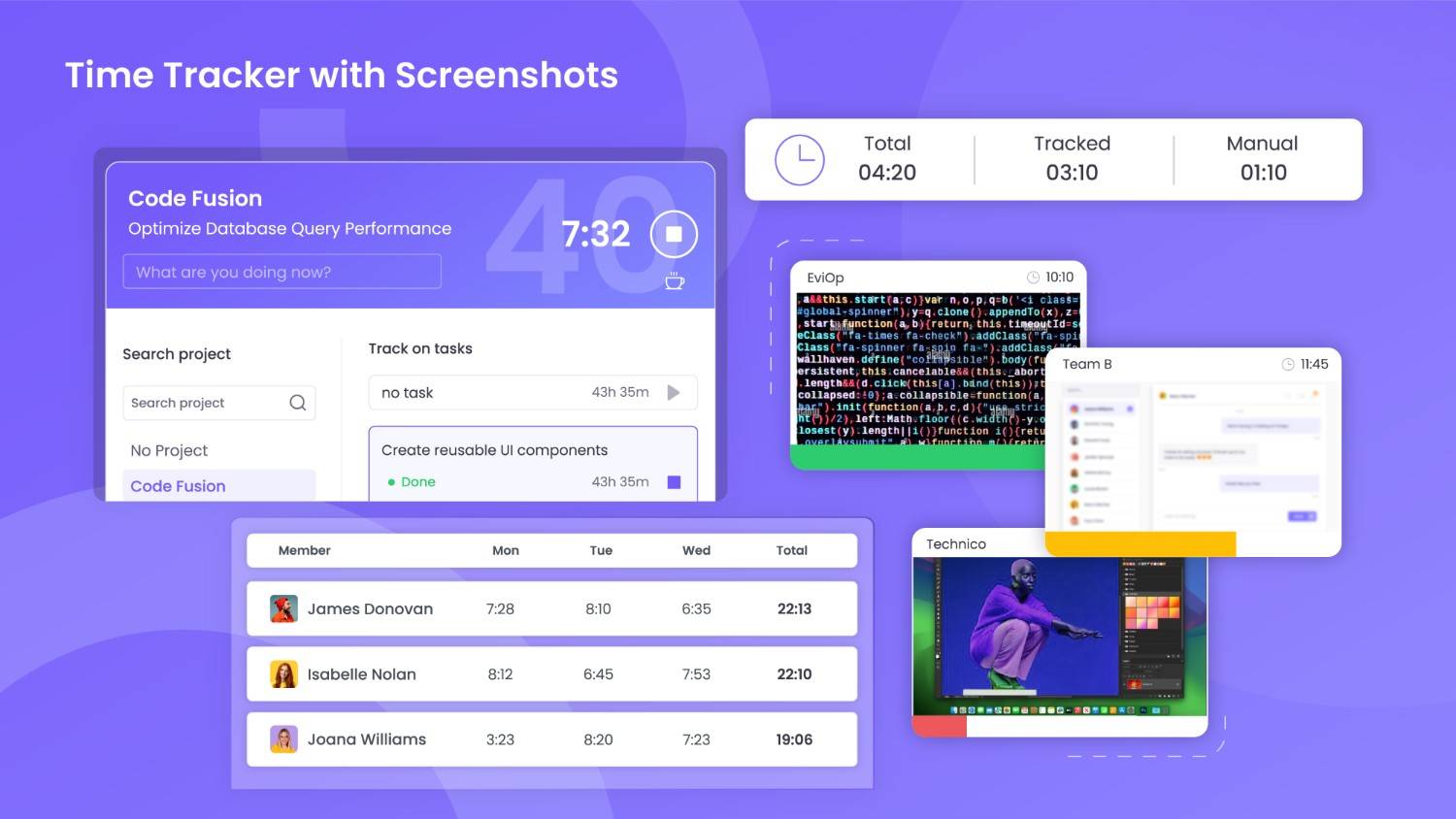
WebWork Time Tracker is an AI-powered time tracking and workforce management software designed to optimize productivity, monitor performance, and streamline operations for teams of all sizes. Ideal for remote, hybrid, and office-based teams, WebWork provides accurate time tracking, app and web usage monitoring, and real-time productivity insights. All tracked data is compiled into detailed reports to help businesses analyze performance, improve efficiency, and enhance accountability.
Beyond tracking, WebWork offers a full suite of workforce management features, including payroll automation, timesheets, time-off tracking, built-in chat and video meetings, work-life balance monitoring, and more. The tool is available as a desktop and mobile app, web tracker, and Chrome extension for seamless tracking across all devices.
Show MoreOverview of WebWork Time Tracker Benefits
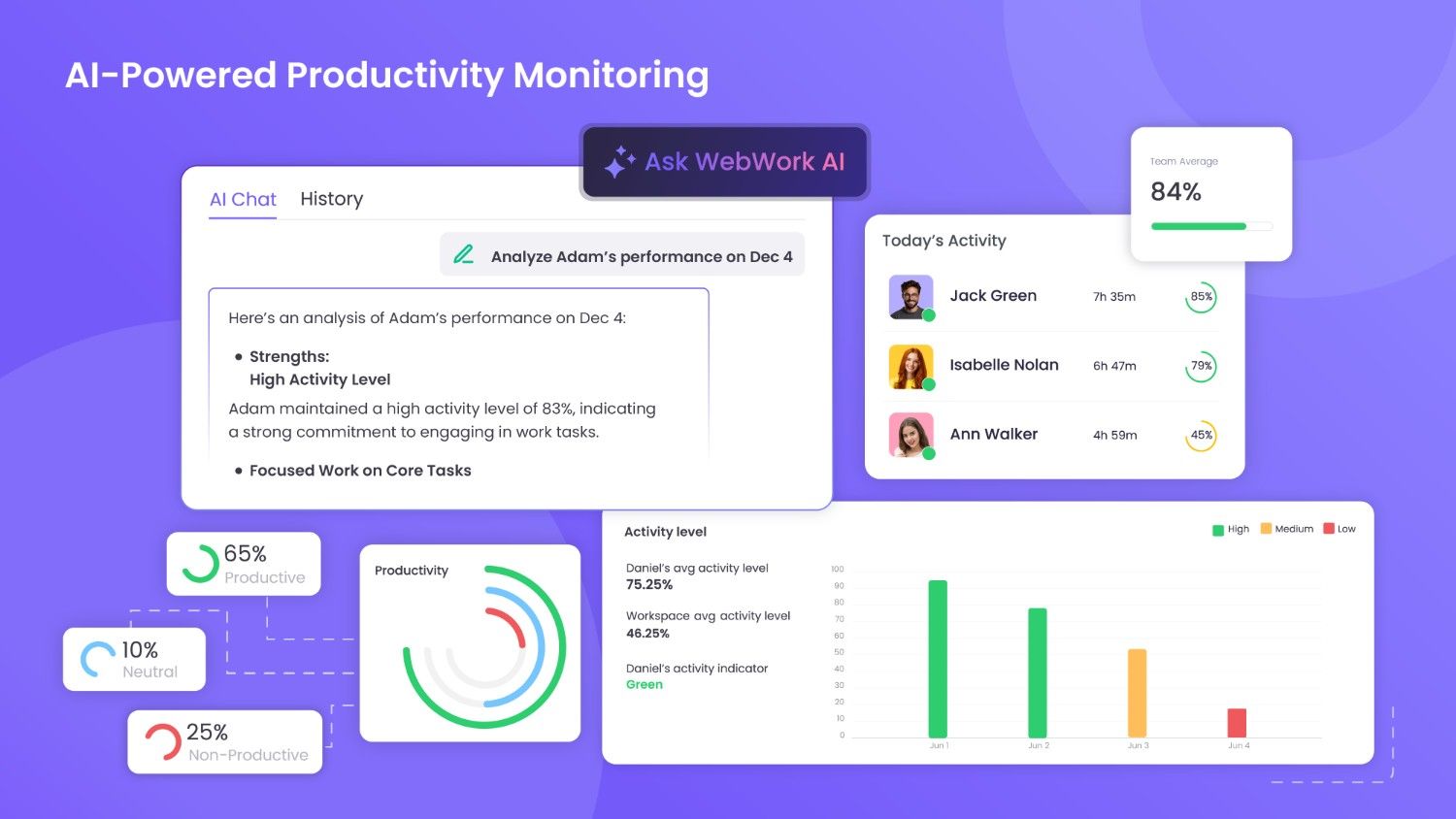
WebWork Time Tracker is an AI-powered workforce management solution that helps businesses optimize productivity, monitor remote teams, and streamline operations effortlessly.
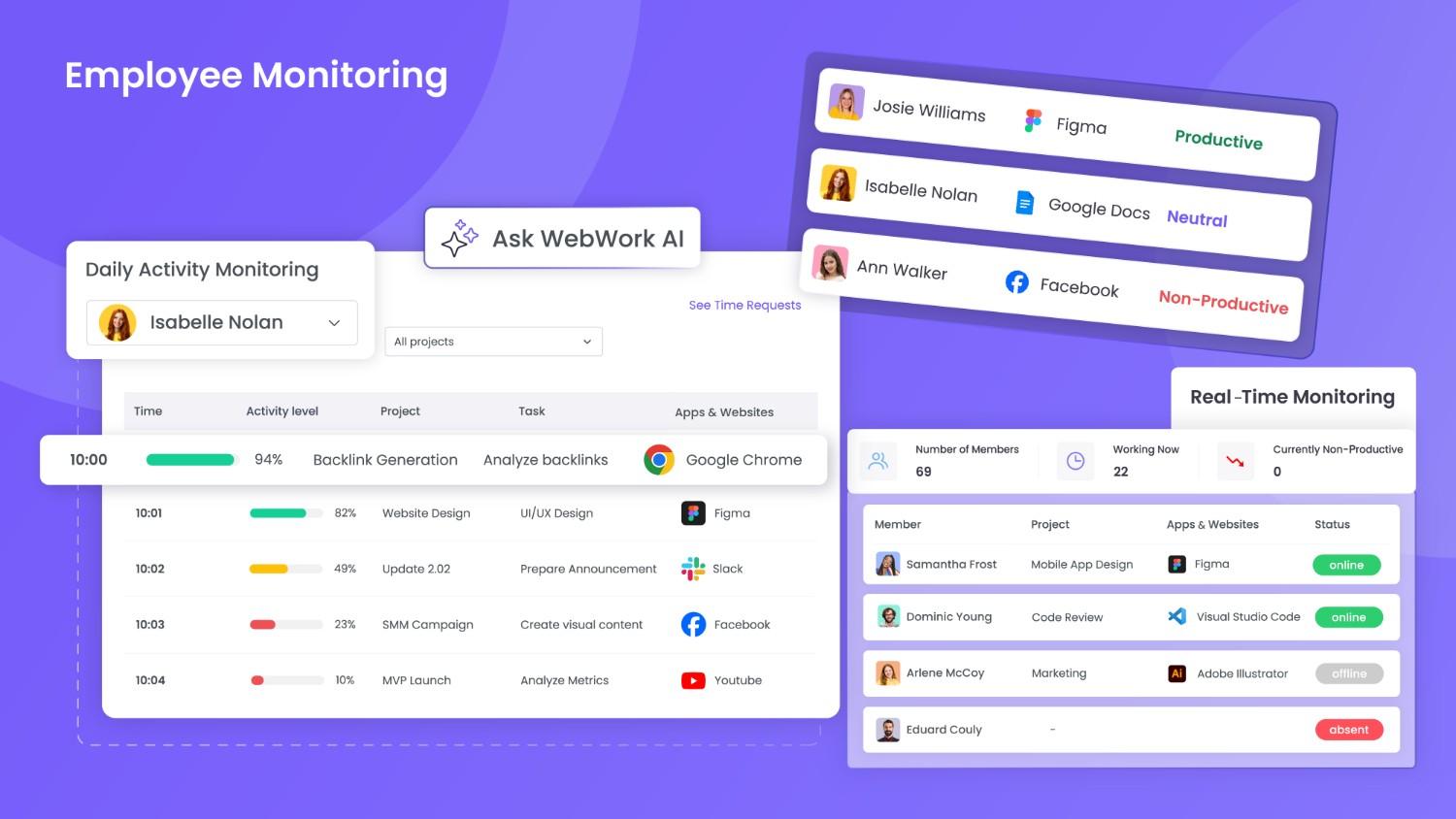
With automated time tracking and AI-driven insights, employers gain detailed visibility into employees’ work hours, app and web usage, and productivity levels. In a world where teams work across time zones, ensuring that time paid is time spent productively is crucial.
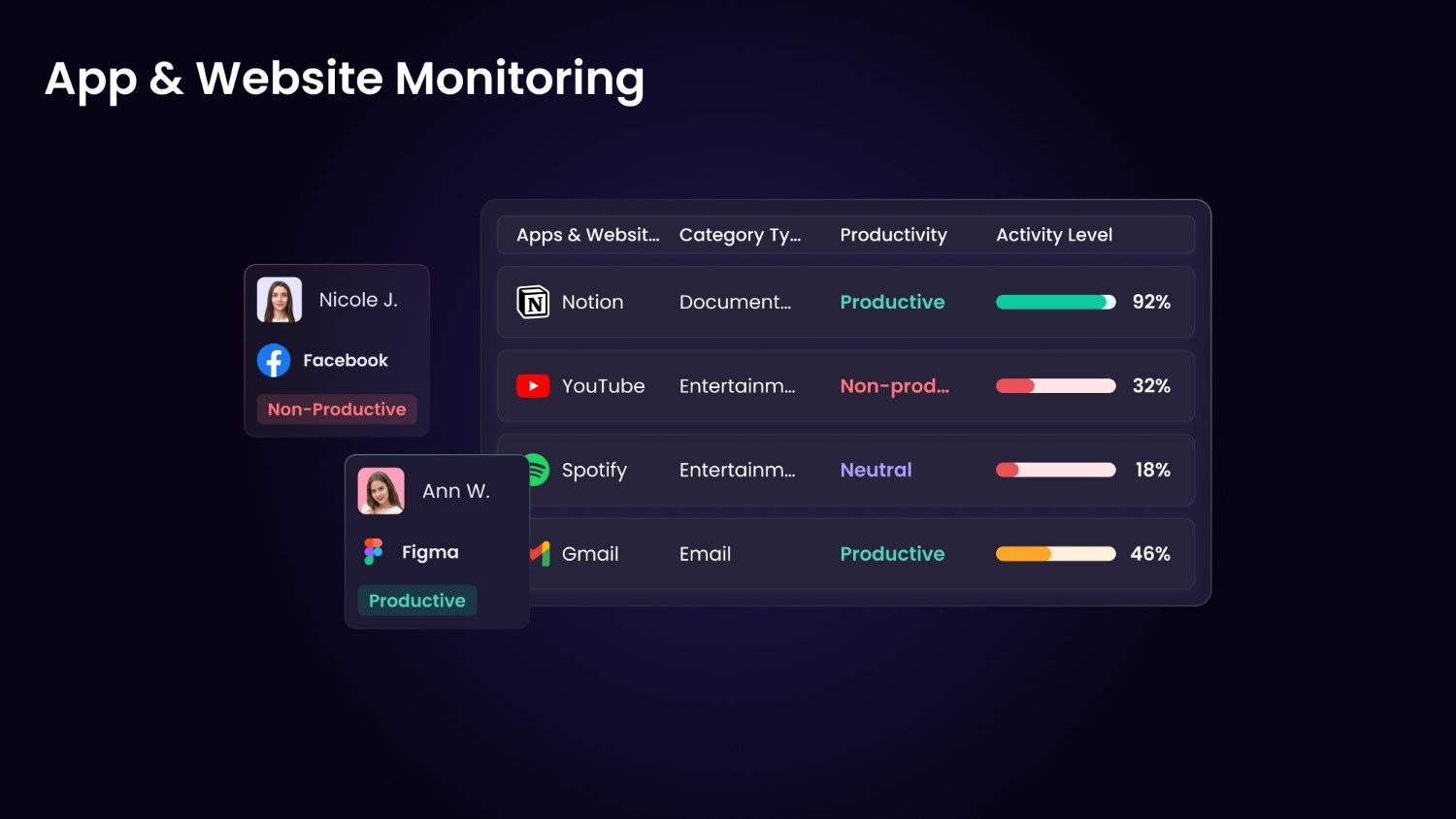
Designed with remote and hybrid teams in mind, WebWork enables seamless collaboration and efficient time management, regardless of location. Activity monitoring provides real-time tracking of platform usage, mouse clicks, keystrokes, and scrolls—allowing managers to assess performance instantly.
At the same time, WebWork empowers employees by helping them understand and refine their own time management habits, fostering better work efficiency and accountability.
From time tracking and productivity monitoring to payroll automation, task management, and built-in communication tools, WebWork offers a comprehensive solution for businesses looking to maximize efficiency, reduce time waste, and enhance workforce performance.
Show MoreOverview of WebWork Time Tracker Features
- Time Tracking
- Timesheets
- Productivity Metrics
- Work-Life Balance
- Employee Activity Tracking
- Screenshot Modes
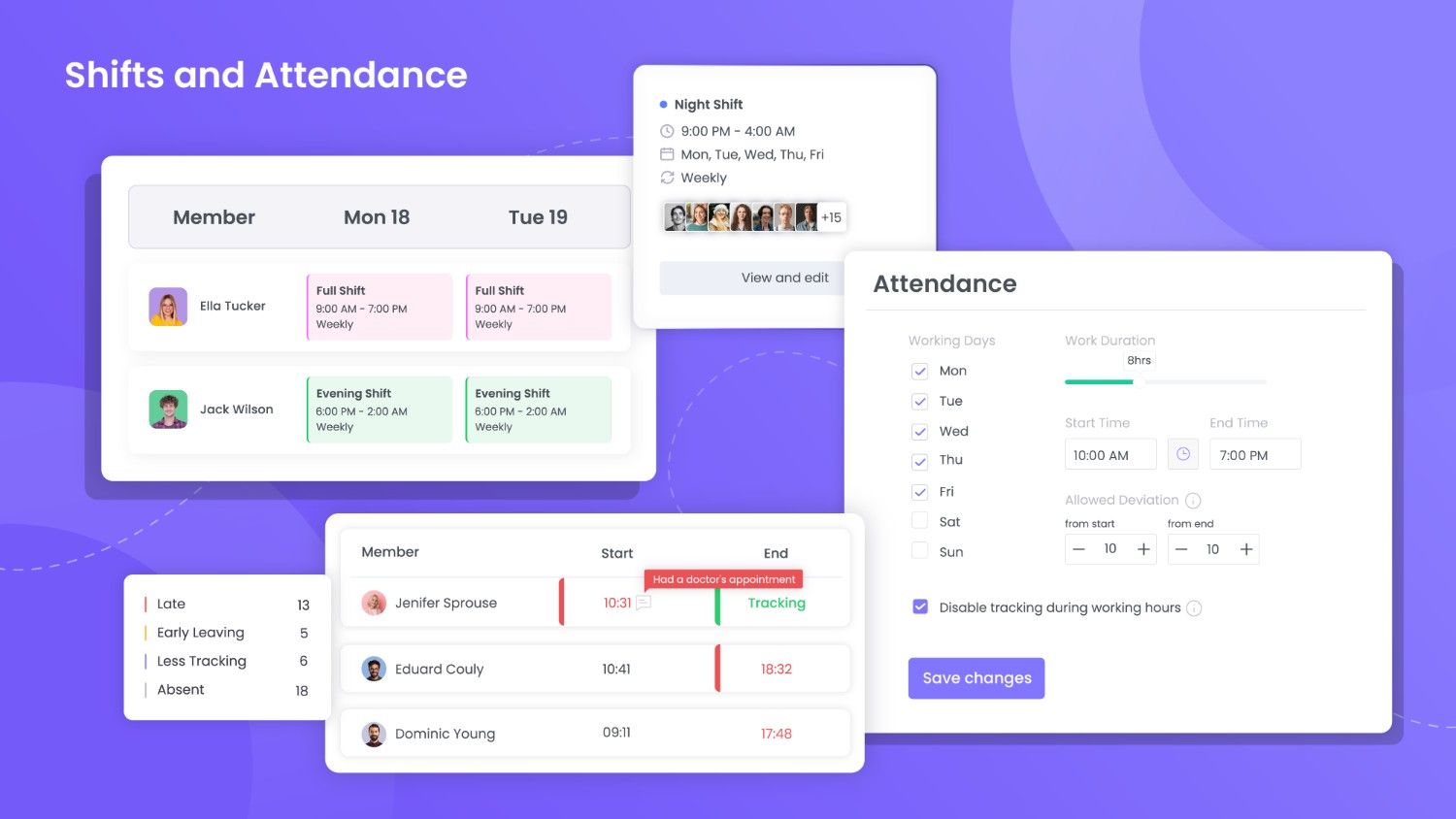
- Attendance Management
- Payroll
- Billable Hours
- Invoicing
- Reporting & Analytics
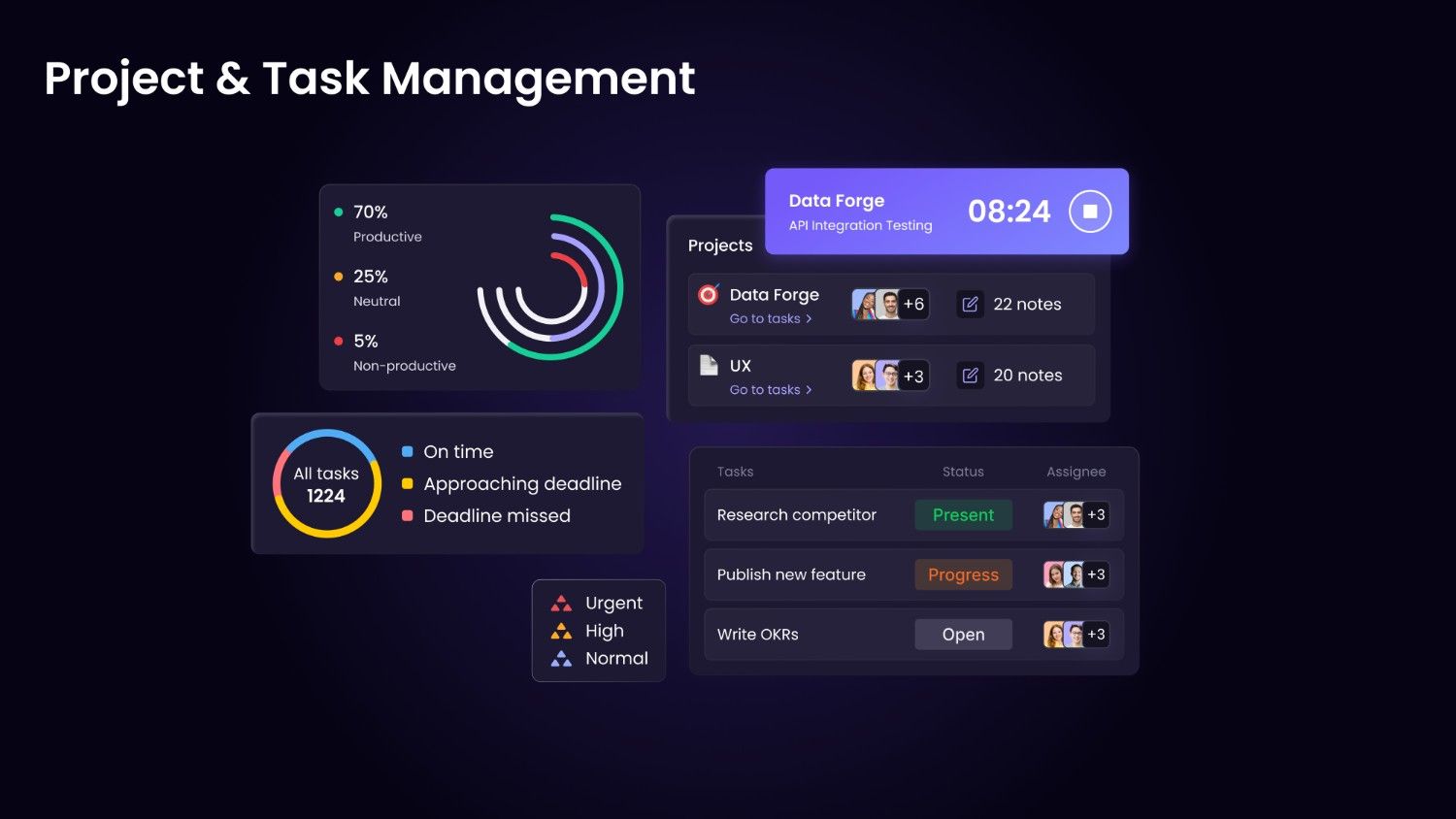
- Task Management
- Time Off
- Video Meetings
- Chat
- Employee GPS Tracking
WebWork Time Tracker Position In Our Categories
Because companies have specific business-related demands, it is only wise they avoid purchasing a one-size-fits-all, ideal software system. Needless to say, it is futile to chance on such a software product even among well-known software products. The correct step to do can be to shortlist the several key functions which need inspection such as key features, budget, skill ability of staff, business size, etc. Next, you must follow through the research exhaustively. Go over these WebWork Time Tracker evaluations and scrutinize the other software systems in your shortlist more closely. Such all-encompassing research makes sure you drop poorly fit apps and pay for the one that has all the benefits your company requires for success.
Position of WebWork Time Tracker in our main categories:
Each company has different needs and requires a system that can be customized for their size, type of workers and buyers, and the specific industry they are in. For these reasons, no software can provide perfect tools out-of-the-box. When you look for a software system, first be sure what you require it for. Read some WebWork Time Tracker Time Tracking Software reviews and ask yourself do you need basic functionality or do you want complex features? Are there any industry-specific tools that you are searching for? Get the answers to these questions to aid your search. There are multiple elements that you need to mull over and these include your finances, specific business requirements, your organization size, integration needs etc. Take your time, use a few free trials, and finally select the system that provides all that you want to enhance your organization competence and productivity.
How Much Does WebWork Time Tracker Cost?
WebWork Time Tracker Pricing Plans:
Free Trial
Pro
$3.99/user/month
Plus
$6.39/user/month
Premium
$7.19/user/month
What are WebWork Time Tracker pricing details?
WebWork Time Tracker Pricing Plans:
Free Trial
Pro
$3.99/user/month
Plus
$6.39/user/month
Premium
$7.19/user/month
WebWork Time Tracker offers various enterprise pricing options, including a 14-day free trial to see if the software meets your business requirements.
Pro – $3.99 per user/month
-
Unlimited time tracking
-
Unlimited projects and tasks
-
Unlimited members and teams
-
Timesheets
-
Real-time monitoring
-
Productivity metrics
-
WebWork AI assistant
-
Screenshot modes
-
App and website usage
-
Activity level tracking
-
Attendance monitoring
-
Silent tracker
-
Break tracking
-
Leave and holidays
-
10+ exportable reports
-
Create and share invoices
-
Chat
-
Geolocation tracking
-
1 Integration
Plus – $6.39 per user/month
-
Everything in Pro
-
Timesheet approvals
-
Advanced app and website report
-
Video meetings
-
Payroll
-
Project budgeting
-
Expense tracking
-
Payable invoices
-
Send payment
-
Shift scheduling
-
Video/live screenshots
-
Schedule and share reports
-
Benchmarking
-
Leaderboards
-
All integration
-
Unlimited chat and file history
-
Advanced work-life balance metrics
-
Priority support
Premium – $7.19 per user/month
-
Everything in Plus
-
Unusual activity detection
-
AI-powered time categorization
-
Automatic time classification
-
White label
-
HIPAA compliance
-
Single sign-on (SSO)
-
Automatic user provisioning
-
Premium support
We can also discuss custom pricing specific to your company’s needs.
User Satisfaction
Positive Social Media Mentions
32
Negative Social Media Mentions
3
We realize that when you choose to get a Time Tracking Software it’s crucial not only to find out how experts rank it in their reviews, but also to discover if the real users and businesses that bought this software are genuinely happy with the service. That’s why we’ve devised our behavior-based Customer Satisfaction Algorithm™ that collects customer reviews, comments and WebWork Time Tracker reviews across a broad range of social media sites. The information is then presented in an easy to digest form indicating how many customers had positive and negative experience with WebWork Time Tracker. With that information at hand you should be ready to make an informed business decision that you won’t regret.
Video
Screenshots
Technical details
Devices Supported
- Windows
- Linux
- Android
- iPhone/iPad
- Mac
- Web-based
Deployment
- Open API
Language Support
- English
- German
- Spanish
- French
- Russian
- Portugese
Pricing Model
- Monthly payment
Customer Types
- Small Business
- Large Enterprises
- Medium Business
What Support Does This Vendor Offer?
- phone
- live support
- training
- tickets
What integrations are available for WebWork Time Tracker?
-
Asana
-
Bitbucket
-
Azure DevOps
-
Bitrix24
-
Bitwage
-
ClickUp
-
Deel
-
Remote
-
GitHub
-
Google Workspace
-
Gusto
-
Jira
-
Payoneer WFM
-
PayPal
-
Slack
-
Teamwork
-
Todoist
-
Stripe
-
Trello
-
Wrike
-
Xero
-
Zoho Projects
-
Zapier
-
Make
WebWork Time Tracker User Reviews
WebWork Time Tracker average rating:
5/5
Overall impression
5/5
Customer Support
4/5
Value for Money
4/5
Ease of Use
Write your own review of this product
ADD A REVIEWThe most favorable review

PROS: We have nothing but great user experience with WebWork Time Tracker. It has many helpful features that strengthen the collaboration among team members. That’s by helping in tracking the workflow among all staff, as well as it gears our productivity to the next level.
CONS: WebWork Time Tracker doesn’t cause us any headache. It is a useful and great performing platform.
The least favorable review
PROS: WebWork Time Tracker doesn’t give us any difficulties because it is super easy and smooth to use in our team. We primarily use it for tracking our staff and their work activities, and the platform has everything we need for accurate monitoring.
CONS: We are now paying a few dollars from the previously free package. However, it is still more affordable than other similar tools, considering that it works great.
More reviews from 13 actual users:
Sort by:
Latest
- Latest
- Most useful
- Most positive
- Most negative
Helpful and user friendly tracking tool
Read full review >
5/5
Overall impression
4/5
Customer Support
5/5
Value for Money
5/5
Ease of Use
Published on: 24.10.2025
Company Size: 51-100 Employees
Industry: Information Technology and Services
PROS: Webwork Time tracker's best tools are the way it tracks every minute of your employee's day without disturbing the performance of the employee. It is very helpful to review and assess your employees work, even your employees can evaluate themselves.
CONS: It would be nice if they worked more on the tasks section as it is very promising.
Great platform to use
Read full review >
4/5
Overall impression
4/5
Customer Support
4/5
Value for Money
3/5
Ease of Use
Published on: 03.12.2021
Company Size: 11-50 Employees
Industry: N/A
PROS: WebWork Time Tracker has geared us away from many unnecessary problems throughout our operations. This is a big help for recording the time that our remote employees use for the projects. It is also helping us in supervising their actual job through report features. Thus, we continuously make the most out of each project for the best results.
CONS: WebWork Time Tracker doesn’t have plugins that can modify its features and functions. That could have been useful in shaping the tool to better fit our company.
Affordable, efficient screenshot feature
Read full review >
4/5
Overall impression
4/5
Customer Support
3/5
Value for Money
3/5
Ease of Use
Published on: 04.11.2021
Company Size: More than 100 Employees
Industry: Information Technology and Services
PROS: WebWork Time Tracker is an affordable tool for its features. It has efficient time tracking features that include many activities on a device, such as simple keyboard and mouse scroll and click, as well as time spent on using apps and sites. It can do a screenshot efficiently too.
CONS: I hope its user panel displays more details in one window. One that I can personalize would be helpful too, so I can easily tweak it depending on my demands.
Brilliant in all versions depending on a price deal
Read full review >
5/5
Overall impression
5/5
Customer Support
5/5
Value for Money
5/5
Ease of Use
Published on: 21.08.2021
Company Size: 1-10 Employees
Industry: Outsourcing/Offshoring
PROS: This is a brilliant tool with accurate time tracking features. It solidly tracks all time used in great detail, such as for browsing online and for every single click. You only need to invite all team members so you can track them, but you must pay for each account in a team. Thing is, its free version is already fantastic because it allows you to make screenshots for all activities on a device.
CONS: WebWork Time Tracker is a brilliant tool that has no errors, problems or insufficiencies. It works efficiently for me according to its purposes and functions.
Super helpful and functional tool
Read full review >
4/5
Overall impression
3/5
Customer Support
3/5
Value for Money
4/5
Ease of Use
Published on: 30.07.2021
Company Size: More than 100 Employees
Industry: Telecommunications
PROS: WebWork Time Tracker is a phenomenal software that helps in increasing our productivity, especially that it smoothly runs on any device we use. This tool helps track consumed time for each assignment, and for computing overall working hours in our projects. Then, it lets us generate convenient reports that we can view depending on our needs, such as through a graphical presentation or a table of data. And we can have such reports on an online screen, or be sent into our accounts. WebWork Time Tracker is also a dependable invoice manager because it lets us easily send such documents to customers.
CONS: I do not like that its tracker automatically stops after only 10 minutes of inactivity on a device. A user needs to keep some movements to keep some activities that the tool can trace, the like of mouse movement, and so forth.
Proficient tool for monitoring time
Read full review >
4/5
Overall impression
3/5
Customer Support
3/5
Value for Money
3/5
Ease of Use
Published on: 22.04.2021
Company Size: More than 100 Employees
Industry: N/A
PROS: User experience is great on WebWork Time Tracker. It is also super easy to customize and make it suit our needs. Moreover, I’d like to highlight its capacity to assign and monitor projects all in one hub. The tool is great for creating highly accurate reports, as well as for managing invoices. And it only uses minimum resources when running.
CONS: I do not have any big complaints about using WebWork Time Tracker. It meets all my demands, and it has a great team of support that always helps.
Suitable for contractors or freelancers
Read full review >
5/5
Overall impression
5/5
Customer Support
4/5
Value for Money
4/5
Ease of Use
Published on: 21.02.2021
Company Size: 11-50 Employees
Industry: Computer Software
PROS: This is a perfect tool that freelancers should use, especially when you work on an hourly basis. You can add clients to the projects, so they can monitor the time you consume. This is great for improving transparency between you and the clients. WebWork Time Tracker is also great for sorting out all my projects in a week, which is important since I handle tons of tasks regularly. It helps in knowing which among my projects require immediate attention, and determine my improvements along the way.
CONS: Its UI needs some improvement for better looks and efficiency. I do not have any other problem with WebWork Time Tracker.
Suitable for managing a team and its productivity
Read full review >
5/5
Overall impression
5/5
Customer Support
4/5
Value for Money
4/5
Ease of Use
Published on: 24.01.2021
Company Size: 1-10 Employees
Industry: N/A
PROS: The screenshot feature is very handy. And it is a complete tool for supervising workflow in our team.
CONS: WebWork Time Tracker is helping me a lot since I’ve begun using it. I can’t name any bad point about this great product.
WebWork Time Tracker is an amazing tool
Read full review >
4/5
Overall impression
3/5
Customer Support
4/5
Value for Money
3/5
Ease of Use
Published on: 18.01.2021
Company Size: 1-10 Employees
Industry: Higher Education
PROS: WebWork Time Tracker doesn’t give us any difficulties because it is super easy and smooth to use in our team. We primarily use it for tracking our staff and their work activities, and the platform has everything we need for accurate monitoring.
CONS: We are now paying a few dollars from the previously free package. However, it is still more affordable than other similar tools, considering that it works great.
Project tracker that is superior among others
Read full review >
5/5
Overall impression
4/5
Customer Support
4/5
Value for Money
4/5
Ease of Use
Published on: 25.07.2020
Company Size: 11-50 Employees
Industry: N/A
PROS: Using WebWork Time Tracker is very easy. It helps me manage all my employees and monitor their workflow, which is essential in completing all our projects.
CONS: We still have some stuff to learn about using this tool. But it works well once we have understood using some features.
Stellar time tracker like no other
Read full review >
5/5
Overall impression
4/5
Customer Support
4/5
Value for Money
5/5
Ease of Use
Published on: 24.07.2020
Company Size: 11-50 Employees
Industry: Leisure, Travel & Tourism
PROS: We have nothing but great user experience with WebWork Time Tracker. It has many helpful features that strengthen the collaboration among team members. That’s by helping in tracking the workflow among all staff, as well as it gears our productivity to the next level.
CONS: WebWork Time Tracker doesn’t cause us any headache. It is a useful and great performing platform.
Perfect tracker for telecommuting workers
Read full review >
5/5
Overall impression
5/5
Customer Support
4/5
Value for Money
5/5
Ease of Use
Published on: 15.07.2020
Company Size: 1-10 Employees
Industry: Computer Games
PROS: WebWork Time Tracker is an affordable but complete tool for our team. It is easy to collect proof of time we spend on work using this platform. So, clients can easily pay depending on how much time we take in completing projects.
CONS: We have QuickBooks Online as an accounting platform. However, WebWork Time Tracker doesn’t sync with it for a more automated workflow.
WebWork Time Tracker With Screenshots and Timesheet Reports
Read full review >
5/5
Overall impression
5/5
Customer Support
5/5
Value for Money
5/5
Ease of Use
Published on: 31.07.2018
Company Size: 1-10 Employees
Industry: Marketing and Advertising
PROS: You can track time, add projects, you can choose to work with Screenshot mode on or off. Also, they have a Task Management system in the Beta version, I guess they will launch a new version soon and I loved the Kanban board for task management.
CONS: The tracker doesn't have any integrations, but it's not a big problem. Instead, it has a myriad of benefits.


Join a community of 7,369 SaaS experts
Thank you for the time you take to leave a quick review of this software. Our community and review base is constantly developing because of experts like you, who are willing to share their experience and knowledge with others to help them make more informed buying decisions.
Sign in with LinkedIn
Why we require LinkedIn?
- Show the community that you're an actual user.
- We will only show your name and profile image in your review.
- You can still post your review anonymously.
OR
Sign in with company emailSign in with company email
Popular WebWork Time Tracker Alternatives


Top Competitors To WebWork Time Tracker By Price
Product name:
Price:

By quote

by quote



Trending Time Tracking Software Reviews




WebWork Time Tracker Comparisons
Product name:





WebWork Time Tracker user reviews
Helpful and user friendly tracking tool
Read full review >
5/5
Overall impression
4/5
Customer Support
5/5
Value for Money
5/5
Ease of Use
Published on: 24.10.2025
Company Size: 51-100 Employees
Industry: Information Technology and Services
Great platform to use
Read full review >
4/5
Overall impression
4/5
Customer Support
4/5
Value for Money
3/5
Ease of Use
Published on: 03.12.2021
Company Size: 11-50 Employees
Industry: N/A
Affordable, efficient screenshot feature
Read full review >
4/5
Overall impression
4/5
Customer Support
3/5
Value for Money
3/5
Ease of Use
Published on: 04.11.2021
Company Size: More than 100 Employees
Industry: Information Technology and Services
Brilliant in all versions depending on a price deal
Read full review >
5/5
Overall impression
5/5
Customer Support
5/5
Value for Money
5/5
Ease of Use
Published on: 21.08.2021
Company Size: 1-10 Employees
Industry: Outsourcing/Offshoring
Super helpful and functional tool
Read full review >
4/5
Overall impression
3/5
Customer Support
3/5
Value for Money
4/5
Ease of Use
Published on: 30.07.2021
Company Size: More than 100 Employees
Industry: Telecommunications

Page last modified



Did you find this review useful?
Yes
No
Thank you for your feedback
How can we make this page better?
Unsure about this software?
FIND ALTERNATIVES
 Why is FinancesOnline free?