

CVS Review



What is CVS?
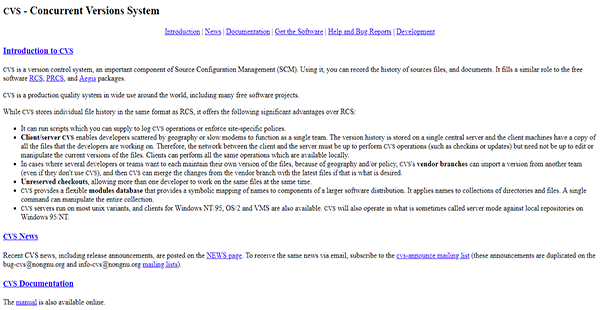
CVS, short for Concurrent Versions System, is an open-source version control system that records source files and documents’ histories. It enables even a geographically distributed team to function as one. That is because it stores version histories on a central server that stores copies of all files the developers are working on. Thus, the solution serves as a cost-effective collaboration platform as well.
Apart from allowing concurrent work on the same files, CVS allows developers or teams to keep their own versions of data as well. The software’s vendor branches enable this, as it can import a file version from one team and merge it with the latest iteration of the same file. This way, developers can experiment on data without affecting the overall project.
Show MoreOverview of CVS Benefits
Site-Specific Policies
If you have multiple teams, you may want to enforce standard and specific policies. CVS helps you do this with its support for scripts so you can be flexible with your team management.
Team Function
In case your developers are scattered throughout the globe, have slow modems, or both, you can still function as a single team. That is because CVS stores files’ version histories on a single server that saves copies of all files the developers are occupied with. This allows them to pick up where their colleagues left off or to collaborate simultaneously.
Real-Time Collaboration
CVS has an unreserved checkout function that enables more than one developer to open and edit the same file concurrently. This lets them work on different parts and assist each other in modifying the data. Thus, they can complete the project at a more rapid pace.
Owned Files
Sometimes, developers and teams may wish to keep and maintain their own versions of files. CVS makes this possible with its vendor branches feature. This imports a version from one team even if they are not using the program. The software then merges changes made in the vendor branch with the latest files, if you want.
Flexible Modules Database
CVS has a flexible modules database that enables you to manipulate a whole collection of directories and files. With this, you can save time mapping names to software components.
Show MoreOverview of CVS Features
- Source Files History
- Documents History Record
- CVS Operations Logging
- Site-Specific Policies Enforcement
- Collaboration
- Vendor Branches
- Unreserved Checkouts
- Modules Database
CVS Position In Our Categories
Because businesses have distinctive business demands, it is sensible that they avoid buying a one-size-fits-all, ”best” software. Having said that, it would be futile to discover such a software solution even among popular software products. The efficient step to undertake can be to shortlist the varied major aspects which need investigation like major features, plans, skill ability of staff, business size, etc. Thereafter, you should do your product research comprehensively. Have a look at these CVS evaluations and check out each of the software options in your list in detail. Such comprehensive product research guarantee you take out mismatched software solutions and subscribe to the one that includes all the features your company requires to realize efficiency.
Position of CVS in our main categories:
TOP
20
CVS is one of the top 20 Version Control Systems products
If you are considering CVS it could also be beneficial to examine other subcategories of Version Control Systems collected in our base of SaaS software reviews.
Each company has different requirements and needs a system that can be customized for their size, type of staff members and customers, and the specific industry they are in. For these reasons, no platform can provide perfect features off-the-shelf. When you try to find a software system, first be sure what you want it for. Read some CVS Version Control Systems reviews and ask yourself do you want basic functionality or do you require advanced functionality? Are there any industry-specific functionalities that you are looking for? Obtain the answers to these questions to assist your search. There are plenty of elements that you need to consider and these include your budget, specific business requirements, your company size, integration requirements etc. Take your time, use a few free trials, and finally zero in on the app that presents all that you need to improve your firm efficiency and productivity.
How Much Does CVS Cost?
CVS Pricing Plans:
Free Trial
CVS
Free
What are CVS pricing details?
CVS Pricing Plans:
Free Trial
CVS
Free
CVS is released under the GNU Public License, making it a free software. Thus, it has no enterprise pricing.
User Satisfaction
Positive Social Media Mentions
307
Negative Social Media Mentions
2
We know that when you choose to buy a Version Control Systems it’s important not only to find out how experts evaluate it in their reviews, but also to check whether the real users and businesses that purchased these solutions are genuinely content with the service. That’s why we’ve designer our behavior-based Customer Satisfaction Algorithm™ that aggregates customer reviews, comments and CVS reviews across a broad range of social media sites. The data is then presented in a simple to understand form showing how many people had positive and negative experience with CVS. With that information at your disposal you will be ready to make an informed business choice that you won’t regret.
Technical details
Devices Supported
- Windows
- Linux
Deployment
- On Premise
Language Support
- English
Pricing Model
- Free
Customer Types
- Small Business
- Large Enterprises
- Medium Business
- Freelancers
What Support Does This Vendor Offer?
- phone
- live support
- training
- tickets
What integrations are available for CVS?
No information available.
CVS User Reviews
CVS average rating:
5/5
Overall impression
5/5
Customer Support
4/5
Value for Money
4/5
Ease of Use
Write your own review of this product
ADD A REVIEWThe most favorable review

PROS: I like how the app makes picking up prescriptions at the app easy to do. I also appreciate the automatic downloading of coupons every week.
CONS: I wish that paying through the app was a quicker process. I also don't like receiving so many notifications on my phone when the coupons arrive.
The least favorable review
PROS: I really think this is an admirable version control system, thanks to its simplicity and sophistication.
CONS: I acknowledge how useful this is, but I do wish that the price was lower. This is pricier when you compare it to other similar software.
More reviews from 4 actual users:
Sort by:
Latest
- Latest
- Most useful
- Most positive
- Most negative
User-friendly
Read full review >
5/5
Overall impression
5/5
Customer Support
4/5
Value for Money
4/5
Ease of Use
Published on: 09.12.2021
Company Size: More than 100 Employees
Industry: Financial Services
PROS: I like how the app makes picking up prescriptions at the app easy to do. I also appreciate the automatic downloading of coupons every week.
CONS: I wish that paying through the app was a quicker process. I also don't like receiving so many notifications on my phone when the coupons arrive.
A system that is both simple and sophisticated
Read full review >
4/5
Overall impression
3/5
Customer Support
3/5
Value for Money
3/5
Ease of Use
Published on: 11.01.2021
Company Size: More than 100 Employees
Industry: Information Technology and Services
PROS: I really think this is an admirable version control system, thanks to its simplicity and sophistication.
CONS: I acknowledge how useful this is, but I do wish that the price was lower. This is pricier when you compare it to other similar software.
Admirable flexibility
Read full review >
5/5
Overall impression
5/5
Customer Support
4/5
Value for Money
4/5
Ease of Use
Published on: 16.09.2019
Company Size: More than 100 Employees
Industry: Banking
PROS: The things that I really appreciate about this is its flexibility when it comes to projects, as well as its open source nature.
CONS: I think it is a bit of a hassle when I have to merge numerous commits coming from different users.
Happy with this product
Read full review >
4/5
Overall impression
4/5
Customer Support
3/5
Value for Money
3/5
Ease of Use
Published on: 03.09.2019
Company Size:
Industry: N/A
PROS: A lot of my coworkers use this program and all of them seem really satisifed with it.
CONS: While the user interface is effective, it can be a little difficult to navigate. Maybe future versions can make it more intuitive.


Join a community of 7,369 SaaS experts
Thank you for the time you take to leave a quick review of this software. Our community and review base is constantly developing because of experts like you, who are willing to share their experience and knowledge with others to help them make more informed buying decisions.
Sign in with LinkedIn
Why we require LinkedIn?
- Show the community that you're an actual user.
- We will only show your name and profile image in your review.
- You can still post your review anonymously.
OR
Sign in with company emailSign in with company email
Popular CVS Alternatives





Top Competitors To CVS By Price
Product name:
Price:




Trending Version Control Systems Reviews



CVS Comparisons
Product name:





CVS user reviews
User-friendly
Read full review >
5/5
Overall impression
5/5
Customer Support
4/5
Value for Money
4/5
Ease of Use
Published on: 09.12.2021
Company Size: More than 100 Employees
Industry: Financial Services
A system that is both simple and sophisticated
Read full review >
4/5
Overall impression
3/5
Customer Support
3/5
Value for Money
3/5
Ease of Use
Published on: 11.01.2021
Company Size: More than 100 Employees
Industry: Information Technology and Services
Admirable flexibility
Read full review >
5/5
Overall impression
5/5
Customer Support
4/5
Value for Money
4/5
Ease of Use
Published on: 16.09.2019
Company Size: More than 100 Employees
Industry: Banking
Happy with this product
Read full review >
4/5
Overall impression
4/5
Customer Support
3/5
Value for Money
3/5
Ease of Use
Published on: 03.09.2019
Company Size:
Industry: N/A

Page last modified



Did you find this review useful?
Yes
No
Thank you for your feedback
How can we make this page better?
Unsure about this software?
FIND ALTERNATIVES
 Why is FinancesOnline free?