
- Home
- Expense Management Software
- ExpensePoint

ExpensePoint Review



What is ExpensePoint?
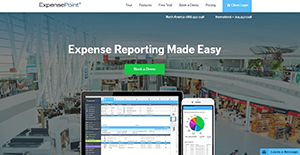
ExpensePoint is a cloud-based, mobile expense management software designed to streamline your employee expense reporting processes. The solution allows employees to generate, submit, approve and finalize expense reports anytime, anywhere in the world. It’s a reliable program that is intended to help organizations to reach their ultimate goal of automating their expense processes.
The platform has a robust set of features which include; multi-device access, receipt imaging system, credit card integration, multi-currency system, data integration, analyze spending data, employee reimbursement, and security and compliance.
Expense point is a well-crafted platform that servers businesses of any size. Although it lacks some of the advanced expense report process features (like the optical character recognition), the software is a force to reckon with in automated expense management.
Show MoreOverview of ExpensePoint Benefits
One notable benefit accorded by ExpensePoint is the multi-devices access. The software is designed to provide convenience and effectiveness with multiple ways to process your expense anywhere in the world. It’s easily accessible on laptop or desktops via the Windows desktop app. The app also provides offline access (perfect while on the go) and is capable of syncing the data with the ExpensPoint cloud later. In addition, there is a reliable Mobile application which makes it easier to capture images of your receipts, create or approve expense reports, and monitor credit card transactions.
Another great feature is the multi-currency support. The platform gives you the freedom to manage expenses in a number of currencies on each expense report. What’s more; the multi-currency system has a real-time currency converter that automatically converts into your home currency.
The reports imaging system is a robust functionality for digitizing your expenses lifecycle. The feature links all your receipts to their respective expense item once an image of the receipt is taken from a mobile device. You can also effortlessly link scanned receipt images or those sent via fax to their individual expenses.
Moreover, with ExpensePoint it’s easy to analyze your spending. The platform provides over 36 onscreen analysis reports and has over 60 reporting filters. The feature is designed to help you to monitor every department, employee, and the entire organization in a flash. The reports are presented in multiple formats including; XML, CSV, PDF, and Excel.
Show MoreOverview of ExpensePoint Features
- Export report features
- Program features
- Accounting features
- Management features
- Administrative features
- Support and resources
ExpensePoint Position In Our Categories
Knowing that companies have unique business-related demands, it is only reasonable that they steer clear of selecting a one-size-fits-all, ideal software product. Having said that, it would be hard to try to chance on such a software system even among widely used software solutions. The clever step to do is to take note of the various essential factors which need deliberation such as major features, costing, skill levels of staff, organizational size, etc. Then, you must do the research exhaustively. Browse through some ExpensePoint evaluations and look into the other software programs in your list more closely. Such well-rounded research guarantees you take out unsuitable apps and buy the one which offers all the tools your business requires to realize efficiency.
Position of ExpensePoint in our main categories:
TOP
500
ExpensePoint is one of the top 500 Accounting Software products
There are trendy and widely used systems in each software group. But are they necessarily the best fit for your company’s special wants? A trendy software solution may have thousands of users, but does it present what you need? For this reason, do not blindly spend on popular systems. Read at least a few ExpensePoint Expense Management Software reviews and mull over the factors that you desire in the software such as the fees, main features, available integrations etc. Then, choose a few systems that fit your requirements. Try out the free trials of these apps, read online reviews, get clarifications from the seller, and do your research systematically. This profound homework is certain to aid you select the finest software solution for your firm’s specific needs.
How Much Does ExpensePoint Cost?
ExpensePoint Pricing Plans:
Free Trial
Monthly subscription
$7.50
What are ExpensePoint pricing details?
ExpensePoint Pricing Plans:
Free Trial
Monthly subscription
$7.50
ExpensePoint offers a single enterprise pricing plan for all users. Here are the detials:
Monthly subscription – $7.50
- Unlimited monthly expense reports
- Credit card data importing
- Analysis report system
- Receipt imaging system
- Full approval workflow
- Policy manager
- Multi-currency system
- Automated currency conversion
- Email notification system
- Backup system
- Full site management
- Free system setup
- Free training
- Free live support
User Satisfaction
Positive Social Media Mentions
1
Negative Social Media Mentions
0
We are aware that when you make a decision to get a Expense Management Software it’s important not only to see how experts score it in their reviews, but also to check whether the actual users and businesses that purchased this software are indeed happy with the service. That’s why we’ve designer our behavior-based Customer Satisfaction Algorithm™ that gathers customer reviews, comments and ExpensePoint reviews across a broad range of social media sites. The information is then presented in an easy to understand form showing how many clients had positive and negative experience with ExpensePoint. With that information at your disposal you will be ready to make an informed buying decision that you won’t regret.
Video
Technical details
Devices Supported
- Android
- iPhone/iPad
- Web-based
Deployment
- Cloud Hosted
Language Support
- English
Pricing Model
- Monthly payment
Customer Types
- Small Business
- Large Enterprises
- Medium Business
What Support Does This Vendor Offer?
- phone
- live support
- training
- tickets
What integrations are available for ExpensePoint?
ExpensePoint supports the following integration options:
- MasterCard
- Sage
- QuickBooks

ExpensePoint
is waiting for
your first review.

Write your own review of this product
ADD A REVIEWMore reviews from 0 actual users:


Join a community of 7,369 SaaS experts
Thank you for the time you take to leave a quick review of this software. Our community and review base is constantly developing because of experts like you, who are willing to share their experience and knowledge with others to help them make more informed buying decisions.
Sign in with LinkedIn
Why we require LinkedIn?
- Show the community that you're an actual user.
- We will only show your name and profile image in your review.
- You can still post your review anonymously.
OR
Sign in with company emailSign in with company email
Popular ExpensePoint Alternatives




Top Competitors To ExpensePoint By Price
Product name:
Price:



Trending Expense Management Software Reviews


ExpensePoint Comparisons
Product name:





Page last modified



Did you find this review useful?
Yes
No
Thank you for your feedback
How can we make this page better?
Unsure about this software?
FIND ALTERNATIVES
 Why is FinancesOnline free?