

MyDesk Review



What is MyDesk?
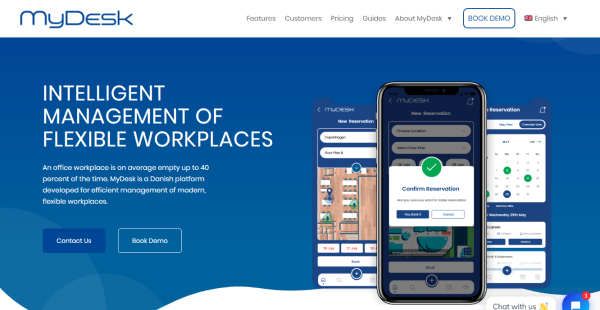
MyDesk is a platform developed to streamline the management process of modern, flexible hybrid workplaces. It is an application suited for larger companies looking for ways to optimize and better manage their home and office workspaces, meeting rooms, parking, and cleaning.
Your employees can log in through their smartphones, laptops, or their Outlook account. They can register whether they are working in the office or remotely and use the app to order lunch and reserve parking as well. Your staff can also choose a workstation with equipment, team, area, location, meeting room, catering, and other activities. Furthermore, you will have access to data dashboards that display insight into the daily use of offices, meeting rooms, parking, and other facilities.
MyDesk is a cloud-based solution hosted by Azure, which guarantees the system’s reliability and security. It does not store confidential information about your company or employees. Azure also handles all logins and authentication processes.
Show MoreOverview of MyDesk Benefits
Employee Self-Service
MyDesk offers a variety of self-service features for your employees, such as reservation of office desks, parking, meeting rooms, and others right from their devices. It also provides tools for internal communication within the company. Moreover, you can integrate the platform with Outlook, allowing your staff to announce whether they will work from the office or home directly from their inbox. The information is automatically saved in the calendar.
Cross-Platform
MyDesk is a web-based solution that you can access through any device – iOS, Android, laptops, desktop, etc. This means that the system has full compatibility with any platform, so employees can easily use it to quickly and easily book a space, parking, and lunch regardless of where they are. Aside from the information syncing in real-time across all devices, the interface is also similar on the web, mobile, or inside the MS Outlook calendar.
Easy Setup
The platform does not require any complicated setup or configurations; you simply have to register the MyDesk will create an account for you. There is no IT installation or user creation needed for an individual employee. The system will also take care of uploading and optimizing your floor plans and setting up your digital office environments. Moreover, the platform is set up for Single Sign-on, meaning the user will only have to log in once, promoting smoother workflow.
Show MoreOverview of MyDesk Features
- Desk/Room Reservation
- Lunch/Parking Ordering
- Microsoft Outlook Integration
- Android and iOS Apps
- Cross-Platform
- Single Sign-on (SSO)
- Built-in Reports
- Hosted in Azure
Awards & Quality Certificates


MyDesk Position In Our Categories
Knowing that companies have special business-related wants, it is wise that they steer clear of choosing an all-encompassing, “perfect” business application. However, it is futile to chance on such application even among sought-after software products. The clever step to undertake can be to take note of the varied essential aspects that need investigation such as essential features, price terms, skill ability of staff members, company size, etc. The second step is, you should double down on the research fully. Have a look at these MyDesk evaluations and check out each of the software programs in your list in detail. Such well-rounded product investigation guarantee you avoid poorly fit apps and pay for the one that has all the tools your business requires.
Position of MyDesk in our main categories:
TOP
50
MyDesk is one of the top 50 Facility Management Software products
TOP
500
MyDesk is one of the 500 Project Management Software products
If you are interested in MyDesk it might also be beneficial to check out other subcategories of Project Management Software collected in our database of B2B software reviews.
Every company has different requirements and needs an application that can be personalized for their size, kind of employees and customers, and the particular industry they are in. For these reasons, no software can provide perfect functionality out-of-the-box. When you look for a software system, first be sure what you need it for. Read some MyDesk Project Management Software reviews and ask yourself do you desire basic features or do you want complex features? Are there any industry-specific features that you are seeking? Get the answers to these questions to help your search. There are lots of elements that you need to reflect on and these include your budget, particular business needs, your organization size, integration needs etc. Take your time, check out a few free trials, and finally zero in on the app that provides all that you need to enhance your firm competence and productivity.
How Much Does MyDesk Cost?
MyDesk Pricing Plans:
Free Trial
Price pr. Desk
$845/month
Per Desk
$2/desk
Price pr. Location
$1,300/month (first location)
Additional locations
$690
What are MyDesk pricing details?
MyDesk Pricing Plans:
Free Trial
Price pr. Desk
$845/month
Per Desk
$2/desk
Price pr. Location
$1,300/month (first location)
Additional locations
$690
MyDesk offers two main enterprising pricing packages for small to mid-sized businesses and larger corporations.
Price pr. Desk – $845/month + $2 per desk
- Mobile, web, Outlook, and Teams app included
- Desk, meeting room, parking, and canteen booking
- English support and teaching
- We set up the entire solution for you
Price pr. Location – First location $1,300/month, other locations $690 each
- Mobile, web, Outlook, and Teams app included
- Desk, meeting room, parking, and canteen booking
- English support and teaching
- We set up the entire solution for you
User Satisfaction
Positive Social Media Mentions
7
Negative Social Media Mentions
0
We are aware that when you choose to purchase a Project Management Software it’s vital not only to learn how professionals rank it in their reviews, but also to discover if the actual people and enterprises that use it are actually satisfied with the service. That’s why we’ve created our behavior-based Customer Satisfaction Algorithm™ that gathers customer reviews, comments and MyDesk reviews across a vast range of social media sites. The data is then featured in an easy to digest way indicating how many users had positive and negative experience with MyDesk. With that information at hand you should be equipped to make an informed business choice that you won’t regret.
Video
Technical details
Devices Supported
- Android
- iPhone/iPad
- Web-based
Deployment
- Cloud Hosted
Language Support
- English
Pricing Model
- Monthly payment
Customer Types
- Small Business
- Large Enterprises
- Medium Business
What Support Does This Vendor Offer?
- phone
- live support
- training
- tickets
What integrations are available for MyDesk?
MyDesk integrates with Outlook.

MyDesk
is waiting for
your first review.

Write your own review of this product
ADD A REVIEWMore reviews from 0 actual users:


Join a community of 7,369 SaaS experts
Thank you for the time you take to leave a quick review of this software. Our community and review base is constantly developing because of experts like you, who are willing to share their experience and knowledge with others to help them make more informed buying decisions.
Sign in with LinkedIn
Why we require LinkedIn?
- Show the community that you're an actual user.
- We will only show your name and profile image in your review.
- You can still post your review anonymously.
OR
Sign in with company emailSign in with company email
Popular MyDesk Alternatives





Top Competitors To MyDesk By Price
Product name:
Price:





Trending Project Management Software Reviews




MyDesk Comparisons
Product name:



Page last modified



Did you find this review useful?
Yes
No
Thank you for your feedback
How can we make this page better?
Unsure about this software?
FIND ALTERNATIVES
 Why is FinancesOnline free?