

Trackplan Review



What is Trackplan?
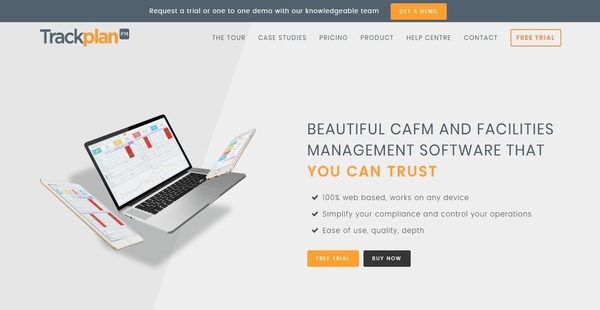
Trackplan is a highly-configurable, mobile-friendly, and easy-to-use facilities management software aimed at streamlining the management and maintenance of sites, estates, campuses, retail chains, manufacturing outlets, and facilities. This multi-channel and world-class maintenance management solution can benefit various organizations and professionals which include facilities, estates, and maintenance managers; facilities management service providers, project teams, site surveyors, and financial departments.
Furthermore, Trackplan offers job management and control features such as the ability to easily create jobs from any mobile device, set schedules for those jobs, and monitor all information related to the jobs. Trackplan is ideal for organizations and companies who are handling multiple sites, estates, or facilities. Indeed, they can set up all of them within the software. Also, Trackplan allows users to create instant alerts and reminders so that team members, employees, and contractors will be aware of the important activities happening throughout the software, helping them keep track of their tasks and access up-to-date information.
Trackplan comes with a budget and costing feature which enables facilities managers to prepare budgets for all the jobs they set up and check whether the actual costs of the jobs comply with the budgets they allocated. Trackplan also provides other great features such as document management, facility inspection, GPS tracking, asset management, and photo capturing.
Show MoreOverview of Trackplan Benefits
Create Jobs Quickly
Job management and control is one of the main features offered by Trackplan. The facilities management software permits users to create jobs from any device in just a few seconds. All the jobs they set up are organized in one place so in case other authorized users have also created jobs, they will be able to easily track them.
Job Assignment And Scheduling
As part of its job management and control features, Trackplan is built with a scheduler which makes it easy for managers to distribute workload across their teams. The scheduler lets them assign jobs to team members and prepare schedules for those jobs. By dragging and dropping data onto a calendar, they will be able to simplify job assigning and scheduling.
Access All Job-Related Information In One Place And Control Jobs
With Trackplan, facilities managers can conveniently monitor and control the jobs they assigned to their team members. This is because all job-related information and documentation are organized in one place. Thus, they can verify which types of jobs their employees are performing, how much money is involved with those jobs, and what documents the employees need to produce when they’re done with their jobs.
Easy Way To Request Maintenance Work
Job requesting is another feature included in Trackplan. With this feature, any user can send requests for maintenance works. As they raise job requests, they will be able to indicate the specific issues in the facility, site, or estate that the maintenance team needs to address and solve.
Generate And Send Inspection Checklists
Facilities managers can also generate and send their own inspection checklists. Maintenance team members and contractors can receive these checklists from their mobile devices, a feature that helps them eliminate paperwork and save time.
Image Capturing
Trackplan delivers an innovative feature which allows users to capture images when they are conducting site or facility inspections, sending job requests, or creating jobs. Whatever images they captured can be stored in the system and directly linked to a particular job. In addition, users can markup the images, letting them draw over them so they can pinpoint areas or issues that require special attention.
Break Projects And Tasks Into Smaller Pieces
Trackplan has a flexible project and task management capability which allows the creation of sub-projects or sub-tasks. In other words, users can divide a large project or task into smaller pieces so they can work more systematically and concentrate more on every component of a project or task.
Outstanding Budget Planning And Costing Tool
The facilities management software is indeed an outstanding budget planning and costing tool. This is because it enables users to quickly prepare budgets for the jobs they created within the software. They can create budgets on a per period or job basis. Meanwhile, as a costing tool, Trackplan enables them to instantly input all costs related to the jobs. After they are done entering all the costs, they can then compare the costs against the budget they prepared.
Contractor Management
Trackplan is equipped with contractor management features, and one of them is the capability to assign jobs to contractors and monitor contractors as they perform their jobs. After the contractors completed the jobs assigned to them; they can login into the software, enter the necessary information, attach the required documentation, and update the jobs.
GPS Tracking Capability
The software, furthermore, utilizes the GPS technology, giving users the ability monitor the locations of contractors and team members deployed on-site. They can define geo-location or map coordinates and verify if contractors and team members are currently in the areas where they are supposed to work.
Document Manager
Trackplan delivers a document manager that assist users in centrally storing and managing all the important documents they need. Whether the documents are related to jobs, assets, sites, or facilities; they can keep all of them in one place. They can even organize and manage them in such a way that documents can be uploaded and assigned to specific jobs, assets, sites, or facilities
Achieve Compliance Through Asset Tracking And Asset Job Scheduling
Summing it up, the facilities management solution offers asset management features. From the software, users will be able to set up assets for each site, facility, or location. They can also assign and schedule jobs for their assets. Such asset-related jobs can be done on a daily or irregular basis. This way, they can intelligently decide whether they need to repair an asset or dispose and replace it, and at the same time, ensure that their assets are complying with laws and regulations.
Show MoreOverview of Trackplan Features
- Job Management and Control
- Quick Job Creation
- Scheduler
- Automatically Set Up Recurring Work for Planned Jobs
- All Job-Related Information and Documentation in One Place
- Maintenace Requests
- Inspection Checklists
- Image Capturing
- Projects and Tasks
- Budgets and Costing
- Sites and Locations
- Email Notifications
- Contractor Management
- GPS Location Stamps
- Document Managers
- Asset Management
Trackplan Position In Our Categories
Because companies have specific business-related needs, it is only practical they abstain from choosing a one-size-fits-all, “perfect” software. Nevertheless, it would be difficult to try to pinpoint such a software solution even among widely used software solutions. The sensible thing to undertake should be to spell out the varied major aspects that require inspection including important features, pricing, skill aptitude of staff members, company size, etc. Thereafter, you should double down on the product research systematically. Have a look at these Trackplan evaluations and look over the other solutions in your list more closely. Such well-rounded research ascertains you drop poorly fit applications and choose the system that includes all the function your company requires to achieve growth.
Position of Trackplan in our main categories:
TOP
100
Trackplan is one of the top 100 Facility Management Software products
If you are interested in Trackplan it might also be a good idea to investigate other subcategories of Facility Management Software collected in our database of SaaS software reviews.
Enterprises have diverse wants and requirements and no software platform can be just right in such a situation. It is futile to try to find an ideal off-the-shelf software app that meets all your business wants. The wise thing to do would be to customize the system for your unique requirements, staff member skill levels, budget, and other elements. For these reasons, do not hasten and pay for well-publicized leading systems. Though these may be widely used, they may not be the best fit for your particular needs. Do your homework, look into each short-listed application in detail, read a few Trackplan Facility Management Software reviews, contact the seller for explanations, and finally settle for the product that provides what you want.
How Much Does Trackplan Cost?
Trackplan Pricing Plans:
Free Trial
Entry
€160/mo.
Standard
€350/mo.
Premium
€600/mo.
Ultimate
€815/mo.
For Enterprises
To €7,000 Per Month
What are Trackplan pricing details?
Trackplan Pricing Plans:
Free Trial
Entry
€160/mo.
Standard
€350/mo.
Premium
€600/mo.
Ultimate
€815/mo.
For Enterprises
To €7,000 Per Month
Trackplan offers several SMB and enterprise pricing plans for all users to choose from. The plans can be availed through a monthly subscription, and the pricing varies depending on whether you need the software for professional or enterprise use, and the number of jobs and sites you need to manage. Give the details a look, and select the best plan for your organization:
Pricing Plans For SMEs
- Premium CAFM Software for SMEs
- Easy To Use with Many Levels
Entry
- €160/mo. – billed monthly
- 70 Jobs Per Month, 1 Site
- Helpdesk
- Planned Preventative Maintenance
- Property, Asset, and Document Management
- Resource Scheduling
- Online Portal for Engineers – Unlimited
- 1 Android/iPhone App License for Engineers
- 20 euros pcm for each additional license
- Bonus: 1 Hour Free Training/Consultancy
Standard
- €350/mo. – billed monthly
- 170 Jobs Per Month, 3 Sites
- Helpdesk
- Planned Preventative Maintenance
- Property, Asset, and Document Management
- Resource Scheduling
- Online Portal for Engineers – Unlimited
- 2 Android/iPhone App License for Engineers
- 20 euros pcm for each additional license
- Forms, Inspections, Risk Assessments etc.
- Multi-Channels/Multi-Operations
- Advanced Contractor Management
- Bonus: 3 Hours Free Training/Consultancy
Premium
- €600/mo. – billed monthly
- 390 Jobs Per Month, 10 Sites
- Helpdesk
- Planned Preventative Maintenance
- Property, Asset, and Document Management
- Resource Scheduling
- Online Portal for Engineers – Unlimited
- 3 Android/iPhone App License for Engineers
- 20 euros pcm for each additional license
- Forms, Inspections, Risk Assessments etc.
- Multi-Channels/Multi-Operations
- Advanced Contractor Management
- Upload Center
- Bonus: 6 Hours Free Training/Consultancy
Ultimate
- €815/mo. – billed monthly
- 700 Jobs Per Month, 25 Sites
- Helpdesk
- Planned Preventative Maintenance
- Property, Asset, and Document Management
- Resource Scheduling
- Online Portal for Engineers – Unlimited
- 5 Android/iPhone App License for Engineers
- 20 euros pcm for each additional license
- Forms, Inspections, Risk Assessments etc.
- Multi-Channels/Multi-Operations
- Advanced Contractor Management
- Upload Center
- Bonus: 10 Hours Free Training/Consultancy
For Enterprises
- To €7,000 Per Month
- Powerful CAFM Software Across Core Areas
- Unlimited Sites, Users, and Assets
- Cross Border and Time Zones
Please contact the vendor for more details on Trackplan’s enterprise pricing plan, and request for an exact quote.
User Satisfaction
Positive Social Media Mentions
222
Negative Social Media Mentions
4
We know that when you decide to purchase a Facility Management Software it’s vital not only to find out how experts rank it in their reviews, but also to check if the actual clients and businesses that use it are genuinely happy with the product. That’s why we’ve created our behavior-based Customer Satisfaction Algorithm™ that collects customer reviews, comments and Trackplan reviews across a broad range of social media sites. The information is then presented in a simple to digest form revealing how many customers had positive and negative experience with Trackplan. With that information at your disposal you will be equipped to make an informed purchasing choice that you won’t regret.
Video
Technical details
Devices Supported
- Windows
- Linux
- Android
- iPhone/iPad
- Mac
- Web-based
Deployment
- Cloud Hosted
Language Support
- English
Pricing Model
- Monthly payment
- Quote-based
Customer Types
- Small Business
- Large Enterprises
- Medium Business
What Support Does This Vendor Offer?
- phone
- live support
- training
- tickets
What integrations are available for Trackplan?
Trackplan supports integration with the following business applications:
- Xero
- Quickbooks
- Sage
- Microsoft Outlook

Trackplan
is waiting for
your first review.

Write your own review of this product
ADD A REVIEWMore reviews from 0 actual users:


Join a community of 7,369 SaaS experts
Thank you for the time you take to leave a quick review of this software. Our community and review base is constantly developing because of experts like you, who are willing to share their experience and knowledge with others to help them make more informed buying decisions.
Sign in with LinkedIn
Why we require LinkedIn?
- Show the community that you're an actual user.
- We will only show your name and profile image in your review.
- You can still post your review anonymously.
OR
Sign in with company emailSign in with company email
Popular Trackplan Alternatives




Top Competitors To Trackplan By Price
Product name:
Price:


Trending Facility Management Software Reviews


Trackplan Comparisons
Product name:





Page last modified


Did you find this review useful?
Yes
No
Thank you for your feedback
How can we make this page better?
Unsure about this software?
FIND ALTERNATIVES
 Why is FinancesOnline free?