
- Home
- Survey Tools
- Zonka Feedback

Zonka Feedback Review



What is Zonka Feedback?
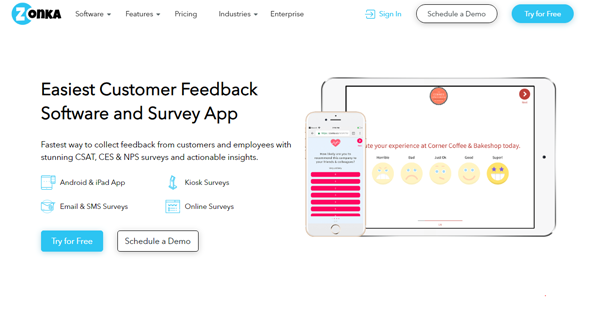
Zonka Feedback is a survey application that enables you to create white-labeled surveys and collect actionable feedback and insights from customers or employees through various channels, including mobile devices, self-service kiosks, email, SMS, and your own website. This easy-to-use and comprehensive tool aims to help you improve customer/employee satisfaction and experience by providing you with a fast and effective way to build, track, and manage online surveys.
Zonka Feedback comes with features that permit you to create professional-looking and engaging surveys tailored to the specific needs and requirements of your organization or business. It has a survey builder where you can access a wide collection of pre-built feedback forms and survey templates designed for all types of industries. You can also customize these templates with complete flexibility, like selecting the appropriate types of survey questions you need, enabling skip logic in your surveys, adding your own company logo, and modifying the colors, background images, and text fonts.
Through the survey app’s feedback reporting capabilities, you’ll be able to track feedback, responses, and insights from customers or employees in real-time and act on them immediately. You and your team members can view customer/employee feedback taken across multiple channels from a single inbox. Moreover, Zonka Feedback lets you turn feedback and responses into tasks that you can assign to team members, allowing them to quickly identify and resolve issues raised by customers or employees.
Show MoreOverview of Zonka Feedback Benefits
Multi-Channel Feedback Collection
Zonka Feedback gives you the ability to take actionable feedback and insights from customers or employees in real-time using different channels. This means you can set up whatever types of online surveys you want and allow your customers or employees to access and answer them via mobile devices, your company’s website, email, or SMS.
For instance, Zonka Feedback has a mobile app designed for Android and iOS devices. With this mobile app, you’ll be able to transform any iPad, iPhone, Android tablet, or Android smartphone used in your company into a self-service survey kiosk. As a result, your customers or employees can conveniently and seamlessly answer surveys on their own without asking for assistance from any staff.
The mobile app includes automation features that you can take advantage of. When running in kiosk mode, this app can automatically restart a survey within a specified time frame after the respondent has completed the survey. You can also set the maximum inactivity time for a particular survey. If the respondent remains idle after the maximum inactivity time has been reached, the mobile app automatically notifies the respondent and resets the survey for the next respondent.
In addition, you can set and run the mobile app in offline mode so that you can still collect feedback through mobile devices even if they are not currently connected to the Internet. Once your mobile devices re-establish Internet connection, all the data in feedback and responses gathered in offline mode will be instantly synchronized with the data stored in Zonka Feedback.
Aside from mobile devices, Zonka Feedback also enables you to get customer/employee feedback online directly on your own company’s website. You can embed survey forms onto the website which respondents can access via a personalized URL. You’ll be able to take feedback by adding surveys to emails or sending out one-click surveys through SMS as well.
Customer/Employee Feedback Reporting
Zonka Feedback gives you access to a set of features that allow you to track, analyze, and handle survey responses and results in real-time. The survey application provides a unified inbox where you along, with your team members, can track all feedback and survey responses from customers or employees regardless of what channels are used. This inbox serves as a digital workspace created so you can view customer or employees’ feedback across multiple channels and collaborate with your team members in acting on those feedback.
From the unified inbox, you’ll be able to check and manage all kinds of feedback, whether they are positive or negative. You can tag feedback and create tasks out of them, especially those that are urgent or require immediate attention. You can, then, assign the tasks to the appropriate team members to follow up on specific customers’ issues mentioned in the feedback and take immediate action for their resolution.
Zonka Feedback also has alert features that help you quickly act on customer or employee feedback. For example, when responses to surveys delivered via email or SMS have a negative rating or score, the application instantly notifies you about those negative feedback. Email and SMS survey notifications can even be sent out to multiple persons at once. Furthermore, Zonka Feedback enables you to generate feedback reports for any time period and compare feedback reports between various date ranges.
Enterprise-Grade Feedback Management
The survey application offers some features built to meet the needs of companies and businesses that operate in multiple chains, locations, or branches. Through its device tracking feature, you get the chance to access important pieces of information about the devices you’re using to take feedback from customers and employees. This feature lets you remotely keep track of survey devices across various locations from a web-based console.
You can find out the type of survey device used, the respondents who accessed the device including their IP addresses and access dates/times, the version of the survey app currently installed on the device, the total number of feedback gathered through the device, and the times when the device was properly functioning to capture feedback. With all these useful information at your fingertips, you can increase your survey response rates, protect your survey devices from security threats, and make your surveys more reliable.
Another enterprise-grade feature present in Zonka Feedback is it permits you to integrate the app with other tools and systems to automate how you manage surveys for various purposes. This way, you can automatically transmit survey data, responses, and reports from Zonka Feedback to the tools you connected with it.
Furthermore, through integrations, you can trigger processes, notifications, and alerts in your existing tools depending on the activities occurring within Zonka Feedback. For example, you are instantly notified to create tickets in your customer support application or generate new leads in your CRM system when new feedback and responses are added to Zonka Feedback.
Show MoreOverview of Zonka Feedback Features
- Survey Builder
- Multiple Survey Question Types
- Feedback Form & Survey Templates
- Skip Logic & Branching
- White-Labeled Surveys
- Multi-Channel Surveys
- Survey Kiosk
- Offline Feedback Collection
- Team Collaboration
- Response Inbox
- Survey Alerts & Notifications
- Feedback Reports
- Multiple Locations & Chains
- Survey Device Tracking
- Integration
Awards & Quality Certificates


Zonka Feedback Position In Our Categories
Because businesses have special business requirements, it is reasonable they abstain from deciding on an all-encompassing, ”best” software solution. Nevertheless, it would be futile to chance on such a software system even among recognizable software systems. The best step to undertake would be to note down the varied significant functions that require scrutiny including key features, packages, skill competence of staff, organizational size, etc. The second step is, you should double down on your research through and through. Read some Zonka Feedback evaluations and look into the other applications in your shortlist in detail. Such well-rounded research guarantees you stay away from unfit software solutions and pay for the one that includes all the tools your company requires.
Position of Zonka Feedback in our main categories:
TOP
20
Zonka Feedback is one of the top 20 Survey Tools products
If you are considering Zonka Feedback it could also be sensible to examine other subcategories of Survey Tools gathered in our database of SaaS software reviews.
It is important to realize that hardly any app in the Survey Tools category will be an ideal solution able to fulfill all the needs of all business types, sizes and industries. It may be a good idea to read a few Zonka Feedback Survey Tools reviews first as certain services might perform well only in a very narrow group of applications or be designed with a very specific industry in mind. Others may work with an idea of being simple and intuitive and as a result lack complicated functions needed by more experienced users. You can also find services that cater to a broad group of users and offer a powerful feature base, however that usually comes at a more expensive price of such a software. Make sure you're aware of your requirements so that you buy a service that provides specifically the features you look for.
How Much Does Zonka Feedback Cost?
Zonka Feedback Pricing Plans:
Free Trial
Starter (Devices, Online, Email, & SMS)
$39/month
Professional (Devices, Online, Email, & SMS)
$99/month
Growth (Devices, Online, Email, & SMS)
$199/month
Enterprise (Devices, Online, Email, & SMS)
$349/month
Professional (Multi-Channel)
$99/month
Growth (Multi-Channel)
$249/month
Enterprise (Multi-Channel)
$499/month
Enterprise Plus (Multi-Channel)
$999/month
What are Zonka Feedback pricing details?
Zonka Feedback Pricing Plans:
Free Trial
Starter (Devices, Online, Email, & SMS)
$39/month
Professional (Devices, Online, Email, & SMS)
$99/month
Growth (Devices, Online, Email, & SMS)
$199/month
Enterprise (Devices, Online, Email, & SMS)
$349/month
Professional (Multi-Channel)
$99/month
Growth (Multi-Channel)
$249/month
Enterprise (Multi-Channel)
$499/month
Enterprise Plus (Multi-Channel)
$999/month
Zonka Feedback offers various SMB and enterprise pricing plans for you to choose from, depending on what types of channels you want to use for getting feedback from customers and employees. Here are the details:
Tablets & Devices
- Collect feedback using Android and iOS devices
Starter – $39/month or $33/month (annual billing)
- 2 device licenses (collect an unlimited number of responses)
- 1 web user
- Unlimited surveys and questions
- Branded surveys
- Skip logic-enabled surveys
- Live reports & dashboards
- Mobile apps
- Survey app in offline & kiosk mode
- Export data
- Integrations via Webhooks & APIs
- Survey app in offline & kiosk mode
- Email alerts
- Weekly emailed feedback digests
Professional – $99/month or $83/month (annual billing)
- 5 device licenses (collect an unlimited number of responses)
- 2 web users
- All features in Starter Plan, Plus:
- SMS & Email notifications
- Daily, weekly, & monthly emailed feedback digests
- Comparative feedback reporting
- Multi-lingual survey support
Growth – $199/month or $166/month (annual billing)
- 11 device licenses (collect an unlimited number of responses)
- Unlimited web users
- All features in Professional Plan, Plus:
- Schedule reports
- Domain white-labeling
Enterprise – $349/month or $291/month (annual billing)
- 20 device licenses (collect an unlimited number of responses)
- Unlimited web users
- All features in Growth Plan, Plus:
- Dedicated account manger
Online, Email, & SMS
- Collect feedback online and send email and SMS surveys
Starter – $39/month or $33/month (annual billing)
- 750/month (online survey responses, emails, & SMS credits)
- 1 web user
- Unlimited surveys and questions
- Branded surveys
- Skip logic-enabled surveys
- Live reports & dashboards
- Mobile apps
- Survey app in offline & kiosk mode
- Export data
- Integrations via Webhooks & APIs
- Email alerts
- Weekly emailed feedback digests
Professional – $99/month or $83/month (annual billing)
- 3,500/month (online survey responses, emails, & SMS credits)
- 2 web users
- All features in Starter Plan, Plus:
- SMS & Email notifications
- Daily, weekly, & monthly email feedback digests
- Comparative feedback reporting
- Multi-lingual survey support
Growth – $199/month or $166/month (annual billing)
- 10,000/month (online survey responses, emails, & SMS credits)
- Unlimited web users
- All features in Professional Plan, Plus:
- Schedule reports
- Domain white-labeling
Enterprise – $349/month or $291/month (annual billing)
- 20,000/month (online survey responses, emails, & SMS credits)
- Unlimited web users
- All features in Growth Plan, Plus:
- Dedicated account manger
Multi-Channel
- Use all supported channels to take feedback (tablets, online, email, & SMS)
Professional – $99/month or $83/month (annual billing)
- 2 device licenses (collect an unlimited number of responses)
- 750/month (online survey responses, emails, & SMS credits)
- 1 web user
- Unlimited surveys and questions
- Branded surveys
- Skip logic-enabled surveys
- Live reports & dashboards
- Export data
- Mobile apps
- Survey app in offline & kiosk mode
- Integrations via Webhooks & APIs
- SMS & Email notifications
- Daily, weekly, & monthly email feedback digests
- Comparative reporting
- Multi-lingual survey support
Growth – $249/month or $208/month (annual billing)
- 5 device licenses (collect an unlimited number of responses)
- 5,000/month (online survey responses, emails, & SMS credits)
- All features in Professional Plan, Plus:
- Schedule reports
- Domain white-labeling
Enterprise – $499/month or $416/month (annual billing)
- 15 device licenses (collect an unlimited number of responses)
- 15,000/month (online survey responses, emails, & SMS credits)
- All features in Professional Plan, Plus:
- Dedicated account manager
Enterprise Plus – $999/month or $833/month (annual billing)
- 40 device licenses (collect an unlimited number of responses)
- 40,000/month (online survey responses, emails, & SMS credits)
- All features in Enterprise Plan
User Satisfaction
Positive Social Media Mentions
18
Negative Social Media Mentions
3
We realize that when you choose to get a Survey Tools it’s vital not only to find out how experts rank it in their reviews, but also to discover whether the actual clients and companies that purchased these solutions are indeed happy with the product. Because of that need we’ve designer our behavior-based Customer Satisfaction Algorithm™ that aggregates customer reviews, comments and Zonka Feedback reviews across a vast array of social media sites. The information is then presented in a simple to understand format revealing how many people had positive and negative experience with Zonka Feedback. With that information available you will be ready to make an informed business decision that you won’t regret.
Technical details
Devices Supported
- Windows
- Linux
- Android
- iPhone/iPad
- Mac
- Web-based
Deployment
- Cloud Hosted
- Open API
Language Support
- English
- Chinese
- German
- Hindi
- Japanese
- Spanish
- French
- Russian
- Italian
- Dutch
- Portugese
- Swedish
Pricing Model
- Monthly payment
- Annual Subscription
Customer Types
- Small Business
- Large Enterprises
- Medium Business
What Support Does This Vendor Offer?
- phone
- live support
- training
- tickets
What integrations are available for Zonka Feedback?
Zonka Feedback can be integrated with other systems, applications, and tools via APIs, Webhooks, and Zapier.

Zonka Feedback
is waiting for
your first review.

Write your own review of this product
ADD A REVIEWMore reviews from 0 actual users:


Join a community of 7,369 SaaS experts
Thank you for the time you take to leave a quick review of this software. Our community and review base is constantly developing because of experts like you, who are willing to share their experience and knowledge with others to help them make more informed buying decisions.
Sign in with LinkedIn
Why we require LinkedIn?
- Show the community that you're an actual user.
- We will only show your name and profile image in your review.
- You can still post your review anonymously.
OR
Sign in with company emailSign in with company email
Popular Zonka Feedback Alternatives




Top Competitors To Zonka Feedback By Price
Product name:
Price:


Trending Survey Tools Reviews


Zonka Feedback Comparisons
Product name:





Page last modified


Did you find this review useful?
Yes
No
Thank you for your feedback
How can we make this page better?
Unsure about this software?
FIND ALTERNATIVES
 Why is FinancesOnline free?