

CallPesa Review


What is CallPesa?
CallPesa is a call management platform that provides businesses and individuals with an accurate way to track and bill client calls. With real-time session tracking visibility, the tool prevents billable hours from slipping through or going unnoticed. The tool can also instantly identify if the incoming call is unpaid and automatically send accurate quotes right away.
Apart from tracking and billing client calls, CallPesa is also a fully-equipped calling app with FinTech capabilities. It has a contact manager for viewing and scheduling calls, a pausable meter that shows during the call, and more. It also supports multiple payment options, weekly withdrawals, and a pre-payment method that will guarantee you get paid for your service without delay.
CallPesa is easy to set up, allowing you to start tracking calls within minutes. You simply need to create your business account then set up the hourly rate. After registration, your phone will become a full-fledged business phone line system that allows you to track and bill clients with a push of a button.
Show MoreOverview of CallPesa Benefits
All-in-one Calling and FinTech App
CallPesa is an all-in-one call manager that takes care of your billing. It’s a complete dialer with an attractive call handler that makes it easy to separate consultations and work calls with personal and other types of calls. There is also a client note feature to add narratives to bills which adds engagement and builds trust with your customers.
Prepayments
CallPesa helps prevent the delay of payment from clients. It’s a feature called prepayment that can be activated when a client is marked for pay-per-session mode. The app will automatically detect if the incoming call is from an unpaid client. It will, in turn, send notifications via in-app or through SMS, depending on if the caller has CallPesa installed. Your overdue clients will then be given several options to settle their bills before connecting with your service again.
Reporting Tools
The platform provides insights into your call behaviors by providing metrics such as call duration frequency, incoming vs. outgoing calls, and top longest calls. You also get to view call history, export billable logs, and schedule when to receive the reports. All the information, graphs, and metrics are optimized for mobile viewing.
Show MoreOverview of CallPesa Features
- Automated Time Tracking
- Prepayments
- Call Handler
- Client Notes
- Call Data
- Invoices
- Notation
What Problems Will CallPesa Solve?
A. Accounting for time spent on client billable calls.
Michael is a lawyer who runs a hybrid law practice. Due to COVID, he switched to remote working fully. His day usually involves calls and meetings with clients. On average, he spends 3 out of a 6 hour work day on client calls. A simple “hello, how are you?” quickly turns into a legal consult and he risks letting precious hours he could have charged slip out. Using CallPesa, he doesn’t have to dig through his Call logs to determine who called at what time. A simple tap on a billing button does the trick.
Feature: In-call billing
B. Telehealth
Sandra runs a specialized health clinic. She too began seeing a surge in “hey, quick one!” calls from clients and friends, sometimes 20 a day! Since she implemented CallPesa on her second phone number, Sandra engages the pre-call feature that ensures only calls that have been pre-paid go through. And at an hourly rate of 30$, Sandra has turned her phone into a second income stream.
Feature: Pre-call billing
C. Executive assistant services
Joseph is the founder of a Call Centre outsourcing company that provides executive assistant services to entrepreneurs and Communities via an administration ecosystem. They recently integrated CallPesa into their product to enable clients to top up/prepay for executive assistant call hours.
Feature: Call handling, prepayments, in-call billing, reporting, and analytics
Awards & Quality Certificates


CallPesa Position In Our Categories
Since companies have particular business-related demands, it is only practical that they abstain from going for an all-in-one, “perfect” system. At any rate, it is troublesome to discover such an app even among recognizable software solutions. The reasonable thing to do can be to write the several main functions which demand analysis including major features, plans, skill capability of staff members, company size, etc. After which, you must follow through your research exhaustively. Go over these CallPesa review articles and explore each of the software programs in your list in detail. Such all-encompassing research ensures you steer clear of unsuitable software products and choose the one that offers all the tools your business requires.
Position of CallPesa in our main categories:
Each company has its own characteristics, and can need a particular type of Call Center Software solution that will be fit for their business size, type of customers and staff and even individual niche they support. You should not count on getting an ideal software that will be suitable for each business no matter what their background is. It may be a good idea to read a few CallPesa Call Center Software reviews first and even then you should keep in mind what the service is intended to do for your company and your employees. Do you need an easy and intuitive service with just elementary functions? Will you really make use of the advanced tools required by experts and big enterprises? Are there any particular tools that are especially practical for the industry you work in? If you ask yourself these questions it will be much easier to find a trustworthy service that will fit your budget.
How Much Does CallPesa Cost?
CallPesa Pricing Plans:
Free Trial
Free
Free
Starter
$15/month
Professional
$20/month
What are CallPesa pricing details?
CallPesa Pricing Plans:
Free Trial
Free
Free
Starter
$15/month
Professional
$20/month
CallPesa offers a free solution for basic needs and two enterprise pricing plans that scale up with your business. Free
- Phone Book
- Intuitive Dialer
- Call Reminders
- In-call Billing
- Pre-call Payments
- Call Notes
- Call Receipts
Starter – $15/month
- Everything in Free
- Call Conferencing
- Invoicing & Accounts
- Limited Automation
- No Ads
Professional – $20/month
- Everything in Starter
- Link Multiple Teams
- Industry Rate Reports
- Aggregated Billing
- Data Filters
- Analytics and Insights
- Automated SMS and email alerts
User Satisfaction
Positive Social Media Mentions
20
Negative Social Media Mentions
3
We know that when you make a decision to buy a Call Center Software it’s vital not only to learn how professionals score it in their reviews, but also to check whether the real people and companies that use these solutions are genuinely happy with the service. That’s why we’ve devised our behavior-based Customer Satisfaction Algorithm™ that collects customer reviews, comments and CallPesa reviews across a wide array of social media sites. The data is then featured in a simple to understand format showing how many people had positive and negative experience with CallPesa. With that information at hand you should be ready to make an informed purchasing decision that you won’t regret.
Video
Screenshots

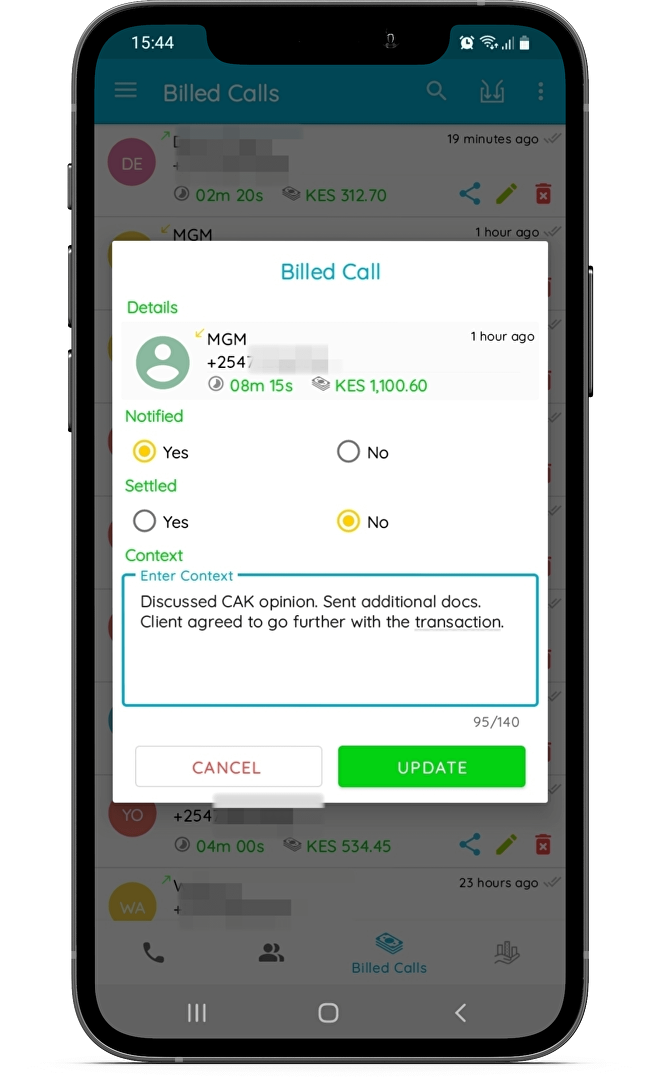


Technical details
Devices Supported
- Android
Deployment
- Cloud Hosted
- On Premise
- Open API
Language Support
- English
Pricing Model
- Free
- Monthly payment
Customer Types
- Small Business
- Large Enterprises
- Medium Business
- Freelancers
What Support Does This Vendor Offer?
- phone
- live support
- training
- tickets
What integrations are available for CallPesa?
CallPesa integrates with WakiliCMS, EliteLaw and LegalPoint Services.
CallPesa User Reviews
CallPesa average rating:
4/5
Overall impression
5/5
Customer Support
4/5
Value for Money
4/5
Ease of Use
Write your own review of this product
ADD A REVIEWThe most favorable review

PROS: I like that I can see a meter running during a call, which can be paused or put back on depending on the call. I enjoy the user interface. It really keeps one glued to the app The contact manager is simplistic enough to help me schedule, copy or directly message a contact I never knew I needed call analytics until I saw how much I spend my time. It turns out, the longer the call, the less likely I was to bill. That surely changed after seeing the stats. I also like Call Notes. That way, when sending a bill, the client can also recall what the call was about by reading the short notes.
CONS: The prepayments feature is a great idea in that I can literally paywall my number - talk of call blocking on steriods :-) The challenge is the caller info takes long to load or doesn't load at all when using phone data. When on Wi-fi it works fine. If they could fix that, it would be great!
The least favorable review

PROS: The Well done user interface and enhanced User Experience.All round the app is well developed in that it has captured all the necessary scenarios that are in line with problem its trying to solve.Integration of the different billing processes is also well done.
CONS: At the moment none
More reviews from 3 actual users:
Sort by:
Latest
- Latest
- Most useful
- Most positive
- Most negative
Review of Call Pesa 7 day trial period
Read full review >
4/5
Overall impression
4/5
Customer Support
4/5
Value for Money
4/5
Ease of Use
Published on: 08.09.2021
Company Size: 1-10 Employees
Industry: Law Practice
PROS: Tracking call minutes to the very second. Proper management of phone calls
CONS: Currently satisfied with the ease of use
CallPesa Review
Read full review >
4/5
Overall impression
4/5
Customer Support
4/5
Value for Money
4/5
Ease of Use
Published on: 02.09.2021
Company Size: N/A
Industry: N/A
PROS: The Well done user interface and enhanced User Experience.All round the app is well developed in that it has captured all the necessary scenarios that are in line with problem its trying to solve.Integration of the different billing processes is also well done.
CONS: At the moment none
A must have for any knowledge business
Read full review >
5/5
Overall impression
5/5
Customer Support
5/5
Value for Money
5/5
Ease of Use
Published on: 01.09.2021
Company Size: 1-10 Employees
Industry: Legal Services
PROS: I like that I can see a meter running during a call, which can be paused or put back on depending on the call. I enjoy the user interface. It really keeps one glued to the app The contact manager is simplistic enough to help me schedule, copy or directly message a contact I never knew I needed call analytics until I saw how much I spend my time. It turns out, the longer the call, the less likely I was to bill. That surely changed after seeing the stats. I also like Call Notes. That way, when sending a bill, the client can also recall what the call was about by reading the short notes.
CONS: The prepayments feature is a great idea in that I can literally paywall my number - talk of call blocking on steriods :-) The challenge is the caller info takes long to load or doesn't load at all when using phone data. When on Wi-fi it works fine. If they could fix that, it would be great!


Join a community of 7,369 SaaS experts
Thank you for the time you take to leave a quick review of this software. Our community and review base is constantly developing because of experts like you, who are willing to share their experience and knowledge with others to help them make more informed buying decisions.
Sign in with LinkedIn
Why we require LinkedIn?
- Show the community that you're an actual user.
- We will only show your name and profile image in your review.
- You can still post your review anonymously.
OR
Sign in with company emailSign in with company email
Popular CallPesa Alternatives




Top Competitors To CallPesa By Price
Product name:
Price:



Trending Call Center Software Reviews


CallPesa Comparisons
Product name:






CallPesa user reviews
Review of Call Pesa 7 day trial period
Read full review >
4/5
Overall impression
4/5
Customer Support
4/5
Value for Money
4/5
Ease of Use
Published on: 08.09.2021
Company Size: 1-10 Employees
Industry: Law Practice
CallPesa Review
Read full review >
4/5
Overall impression
4/5
Customer Support
4/5
Value for Money
4/5
Ease of Use
Published on: 02.09.2021
Company Size: N/A
Industry: N/A
A must have for any knowledge business
Read full review >
5/5
Overall impression
5/5
Customer Support
5/5
Value for Money
5/5
Ease of Use
Published on: 01.09.2021
Company Size: 1-10 Employees
Industry: Legal Services

Page last modified



Did you find this review useful?
Yes
No
Thank you for your feedback
How can we make this page better?
Unsure about this software?
FIND ALTERNATIVES
 Why is FinancesOnline free?