

GanttPRO Review


What is GanttPRO?
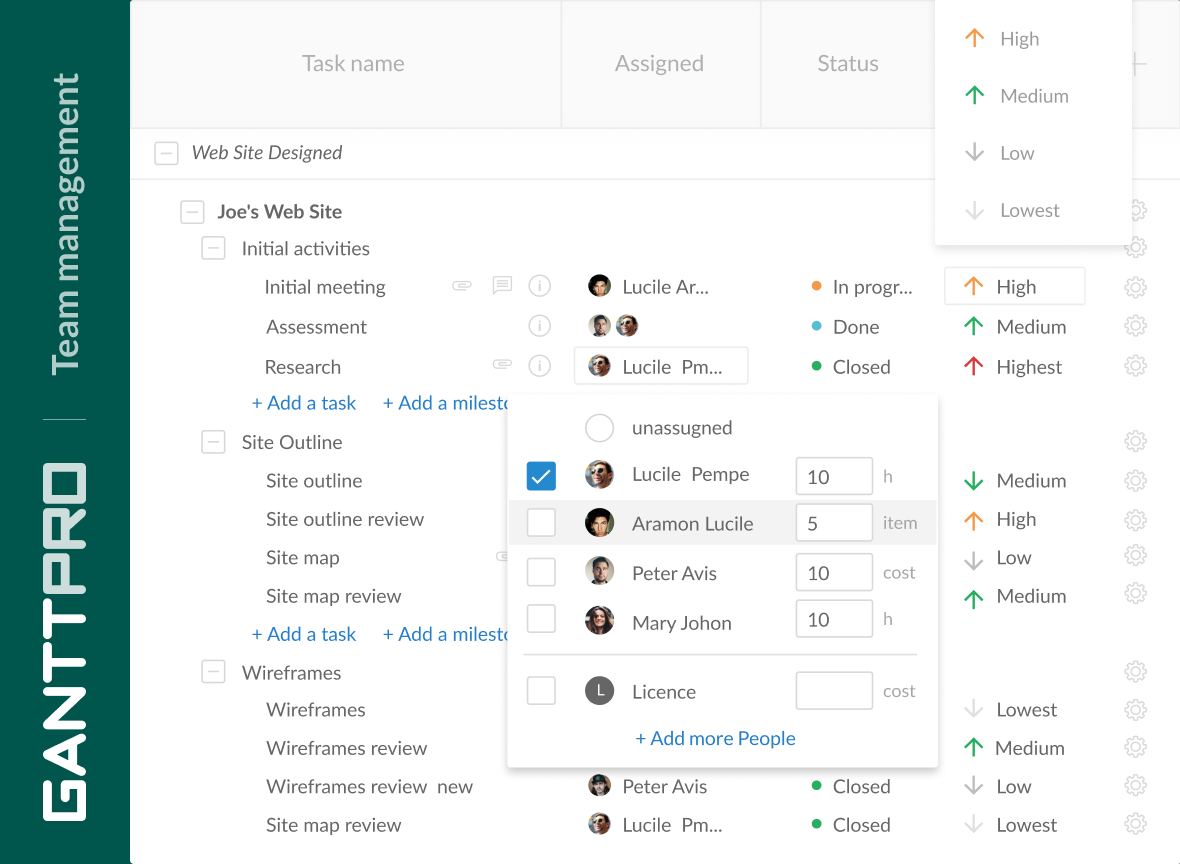
GanttPRO is an online project management solution that utilizes a Gantt Chart approach to help users become more efficient and productive in managing their projects, from the conceptualization phase all the way to the realization and delivery. The software is built upon the combined years of experience and top grade project management expertise that culminate into a powerful platform that integrates all essential project management tools as well as maximum ease-of-use.
GanttPro is created with the purpose of simplifying workflows, improving collaboration and communication, and delivering projects within accurate estimates. It makes tracking the progress of your projects a breeze and enables you to share your Gantt charts easily with your colleagues and clients during your presentations, reports or business plans.
Show MoreOverview of GanttPRO Benefits
GanttPRO provides you with a reliable and highly efficient platform that makes project management easier than ever, spurring you and your team to deliver projects on time, within your estimates, and easily meeting your clients’ expectations. It comes with a very intuitive, user-friendly interface that allows users to become very familiar with the product without going through steep learning curves.
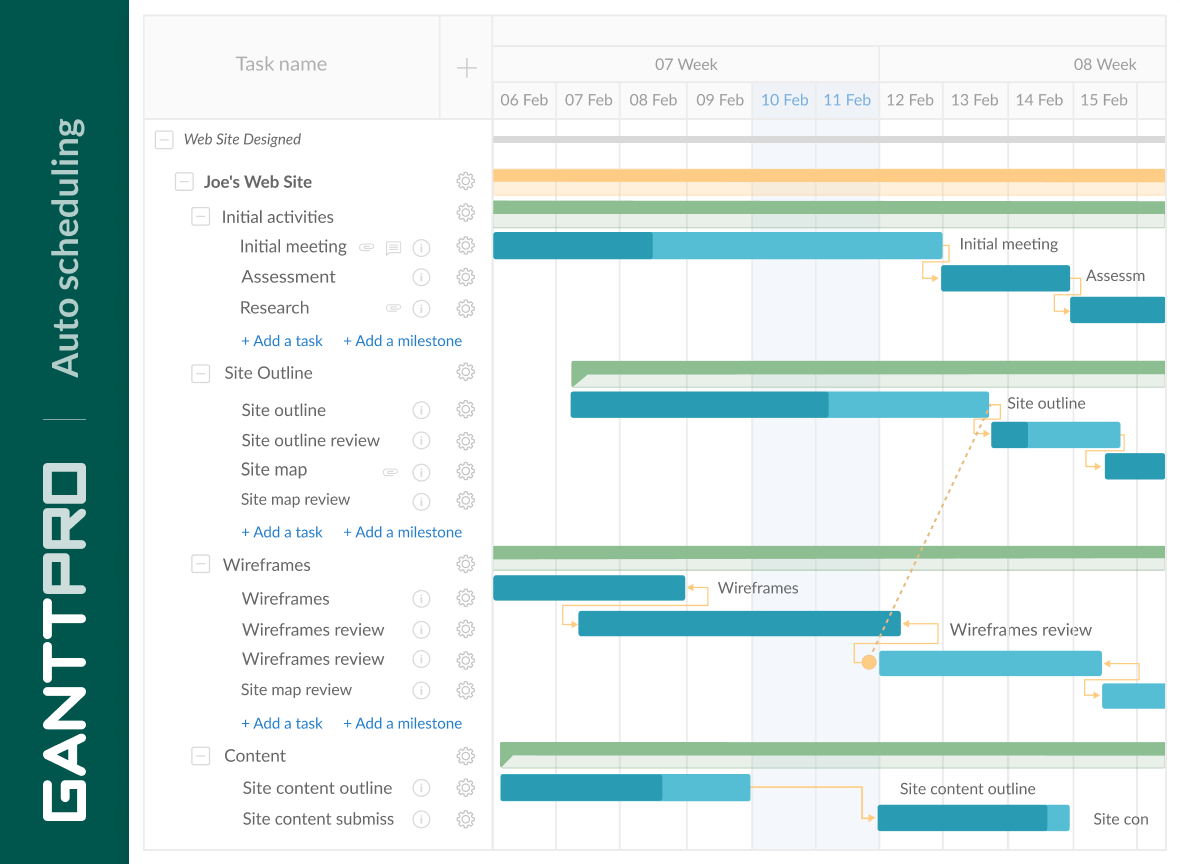
Visualization is one of GanttPRO’s biggest highlights. You can create visualizations of your project plans within minutes, giving you a big picture of your project and allowing you to map out your road on how to get things done. The visualization feature speeds up the process as it automatically schedules your tasks.
Are you a project manager in charge of multiple projects? GanttPRO makes your life easier by taking out the chaos and the mess off the table and gives you an online tool to help you plan and manage your projects wherever and whenever. As the software is online based, you can perform your functions such as assigning tasks, creating and splitting groups, organizing schedules, and more.
Working with multiple teams is also a breeze. GanttPRO lets you create different workspaces for different teams and projects and set permissions for each team member. Automated scheduling plus the drag and drop simplicity accelerate things so you won’t have to burden yourself with recurring tasks.
Overview of GanttPRO Features
- Project Visualization
- Drag and Drop Interface
- Automated Scheduling
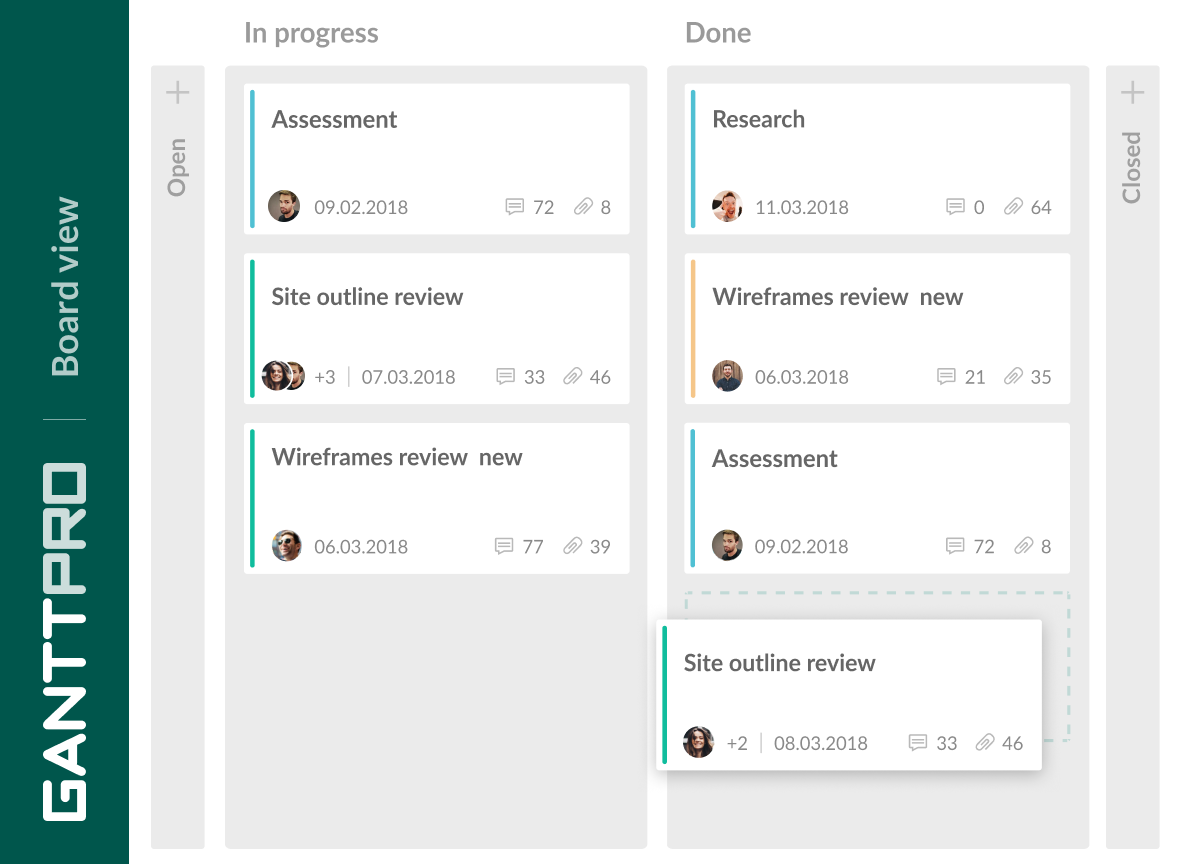
- Task Management
- Set Permissions
- Create Groups and Sub Groups
- Create Estimates
- Progress Tracking
- Expense Management
- Resource Management
- Custom working days and hours
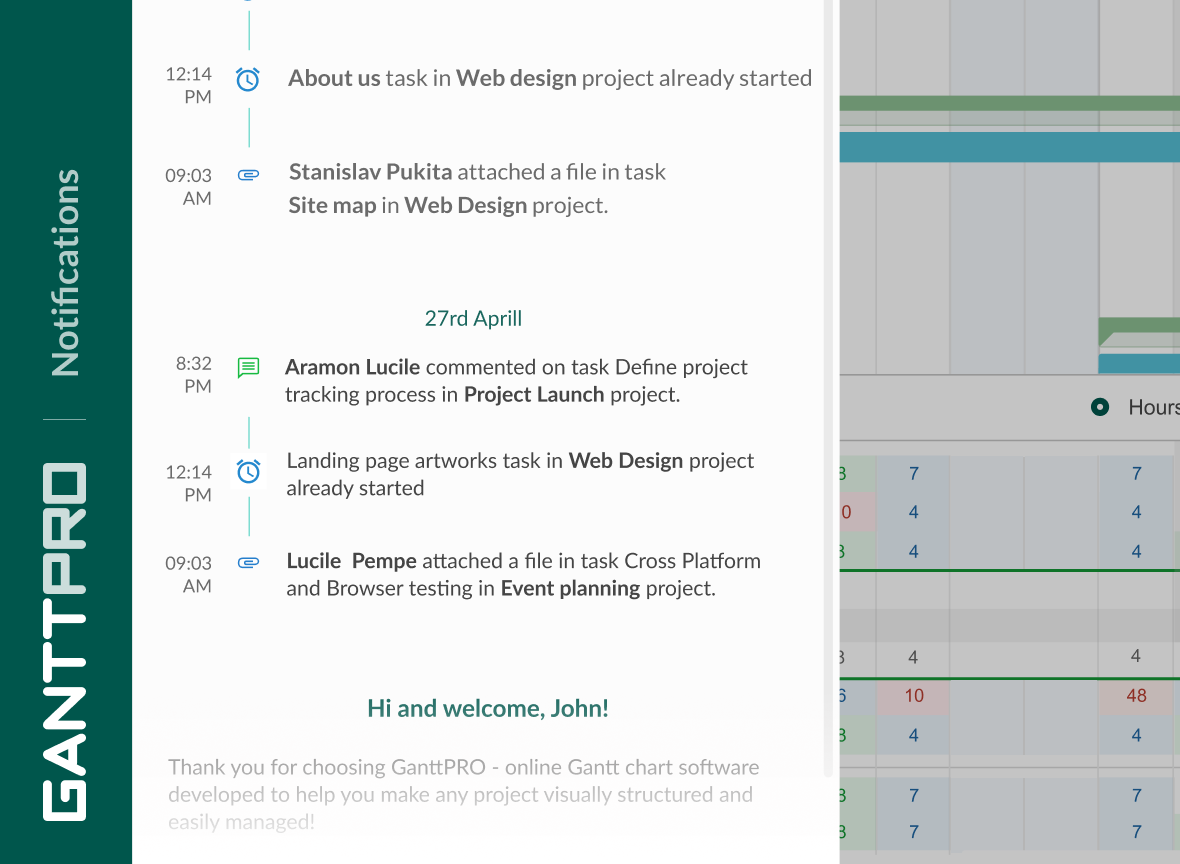
- Real-time notifications
- Critical path on Gantt chart
- Comments and attachments
- Export Gantt chart to popular formats
- Save projects as templates
- Gantt chart dependencies
- Gantt chart milestones
What Problems Will GanttPRO Solve?
1. You scheduled a project, created a lot of tasks with dependencies and were going to successfully manage it. But accidentally you dragged one task and saw that time project didn’t change.
GanttPRO offers auto-scheduling function. Thanks to it, you will never face such a problem. As soon as you change the time of a task, a project, etc., it will automatically recalculate everything.
2. All project plans are scheduled, but the thing is that your regular project management software counts all working days from 9 a.m., Monday to 6 p.m., Friday. There are no options.
GanttPRO’s custom days feature allows users to customize their working weeks and even months, marking all day offs, holidays and vacations as well as working hours beforehand. This allows managing all team members’ work much more efficiently.
3. You are a super busy manager with multiple projects. Every day you have to switch from project to project, from one tool to another. As a result, at the end of the day, you’ve got a mess in your head with all data mixed up into something complicated.
With GanttPRO each and every manager is able to manage multiple projects on one screen, not having to switch between different tools.
GanttPRO Position In Our Categories
Because businesses have particular business wants, it is sensible that they abstain from buying an all-in-one, ”best” software solution. However, it would be hard to try to pinpoint such an app even among sought-after software solutions. The logical step to undertake would be to note down the numerous major functions which merit analysis like essential features, price terms, skill levels of staff members, organizational size, etc. Next, you should do your product research to a full extent. Read some of these GanttPRO evaluations and scrutinize each of the solutions in your shortlist in detail. Such all-encompassing research ascertain you keep away from mismatched apps and buy the system that meets all the tools your business requires.
Position of GanttPRO in our main categories:
TOP
100
GanttPRO is one of the top 100 Project Management Software products
If you are interested in GanttPRO it could also be sensible to check out other subcategories of Project Management Software gathered in our database of SaaS software reviews.
Each company has different wants and needs an application that can be personalized for their size, kind of staff members and clients, and the specific industry they are in. For these reasons, no platform can provide perfect functionality out-of-the-box. When you look for a software system, first be sure what you require it for. Read some GanttPRO Project Management Software reviews and ask yourself do you want basic tools or do you want complex functionality? Are there any industry-specific functionalities that you are seeking? Get the answers to these queries to help your search. There are lots of aspects that you need to consider and these include your finances, specific business wants, your organization size, integration needs etc. Take your time, use a few free trials, and finally choose the platform that provides all that you want to boost your company competence and productivity.
How Much Does GanttPRO Cost?
GanttPRO Pricing Plans:
Free Trial
Individual
$15/month
Team of 5 Users
$8.90/user/month
Team of 10 Users
$8.90/user/month
Team of 15 Users
$8.90/user/month
Enterprise
Contact vendor
What are GanttPRO pricing details?
GanttPRO Pricing Plans:
Free Trial
Individual
$15/month
Team of 5 Users
$8.90/user/month
Team of 10 Users
$8.90/user/month
Team of 15 Users
$8.90/user/month
Enterprise
Contact vendor
GanttPRO offers packages for personal use, SMB, and enterprise pricing. Users are free to choose among the following pricing plans:
Individual – $15/month (annual billing)
- 1 user
- 1 GB file storage
- Unlimited projects
Team for 5 – 8.9$ per user/per month (annual billing)
- 5 users
- 5 GB file storage
- Unlimited projects
Team for 10 – 8.9$ per user/per month (annual billing)
- 10 users
- 10 GB file storage
- Unlimited projects
Team for 15 – 8.9$ per user/per month (annual billing)
- 15 users
- 15 GB file storage
- Unlimited projects
Enterprise – By quote
User Satisfaction
Positive Social Media Mentions
7
Negative Social Media Mentions
0
We are aware that when you choose to get a Project Management Software it’s vital not only to learn how professionals score it in their reviews, but also to discover whether the actual users and businesses that bought these solutions are indeed satisfied with the service. That’s why we’ve devised our behavior-based Customer Satisfaction Algorithm™ that collects customer reviews, comments and GanttPRO reviews across a vast range of social media sites. The information is then displayed in an easy to digest way revealing how many users had positive and negative experience with GanttPRO. With that information at your disposal you should be ready to make an informed business decision that you won’t regret.
Video
Screenshots


Technical details
Devices Supported
- Windows
- Linux
- Mac
- Web-based
Deployment
- Cloud Hosted
Language Support
- English
- German
- Spanish
- Russian
Pricing Model
- Monthly payment
- Annual Subscription
- Quote-based
Customer Types
- Small Business
- Large Enterprises
- Medium Business
- Freelancers
What Support Does This Vendor Offer?
- phone
- live support
- training
- tickets
What integrations are available for GanttPRO?
GanttPRO offers integration with the cloud version of JIRA Software, Google Drive
GanttPRO User Reviews
GanttPRO average rating:
5/5
Overall impression
5/5
Customer Support
5/5
Value for Money
5/5
Ease of Use
Write your own review of this product
ADD A REVIEWThe most favorable review

PROS: The site is extremely efficient and quick to use even for a beginner.
CONS: Everything seems fine except you need to subscribe to export a pdf.
The least favorable review

PROS: A nice looking Gantt chart tool where it is easy to work with your plan. The interface is intuitive so it requires just a few minutes to become an advanced user and simply go on with project management. All tasks are clearly visualized so I know all time frames of any task. Especially deadlines look cool with the sign of fire. When I assign tasks, I can comment them and even attach files. And also the History of changes and Undo functions are very helpful for me. Thus I can track all the changes and restore charts before any unnecessary actions were performed.
CONS: Initially, I was not able to determine why I couldn’t change end dates in my tasks. But then a customer care agent clarified the issue for me. As it turned out, dates of subtasks make dates of a main task. A small issue, but still: it would be great if I could close windows in the app with Esc key.
More reviews from 8 actual users:
Sort by:
Latest
- Latest
- Most useful
- Most positive
- Most negative
Project planning solution for Mac
Read full review >
4/5
Overall impression
4/5
Customer Support
4/5
Value for Money
4/5
Ease of Use
Published on: 26.10.2021
Company Size: N/A
Industry: N/A
PROS: Can use on any device. Simple to Create Gantt charts and happy with the results.
CONS: Trial would be more beneficial if you could test all aspects of the product.
Love this program
Read full review >
5/5
Overall impression
5/5
Customer Support
4/5
Value for Money
5/5
Ease of Use
Published on: 10.10.2021
Company Size: 1-10 Employees
Industry: Marketing and Advertising
PROS: The best thing about Ganttpro is that it's so easy to use. I'm completely new in making e.g. Gantt charts although i found it so easy using this program.
CONS: I don't have anything negative to say to be honest.
Best tool for product roadmap planning and project progress tracking
Read full review >
5/5
Overall impression
5/5
Customer Support
5/5
Value for Money
4/5
Ease of Use
Published on: 10.09.2021
Company Size: 1-10 Employees
Industry: Computer Software
PROS: I like that I can have high-level overview of my product roadmap and then quickly switch to details about time/people/resources. This way I can spend little time navigating and understanding product status. I used Trello before. And I needed to create different boards for marketing/developers. Boards became overloaded over time. My approach was to create new boards as soon as we need to focus on a specific milestone. Then it was hard to track time / people / old boards.
CONS: Well, it might first appear as a bit complicated. At least when you start using it. I was switching from a simpler product. But we needed to find more sophisticated solution.
This app is pain relief for managing project timelines
Read full review >
4/5
Overall impression
5/5
Customer Support
4/5
Value for Money
5/5
Ease of Use
Published on: 21.06.2021
Company Size: 11-50 Employees
Industry: Outsourcing/Offshoring
PROS: Modern, clean and intuitive UI Big range of different customizations Easy team and customer management Preconfigured templates for fast start Notifications of different events
CONS: Integration, they don't have enough of them, but their customer support said that they are working on this direction
Vendor reply
We appreciate your feedback, Valentine, and your suggestions. We know we have a lot of work ahead to improve our Gantt chart software. Stay tuned!
Gantt Pro is an efficient site for project management
Read full review >
5/5
Overall impression
5/5
Customer Support
4/5
Value for Money
5/5
Ease of Use
Published on: 07.06.2021
Company Size: 1-10 Employees
Industry: Architecture & Planning
PROS: The site is extremely efficient and quick to use even for a beginner.
CONS: Everything seems fine except you need to subscribe to export a pdf.
Easy to use. Nice graphical interface!
Read full review >
4/5
Overall impression
5/5
Customer Support
5/5
Value for Money
5/5
Ease of Use
Published on: 08.03.2021
Company Size: 51-100 Employees
Industry: Civil Engineering
PROS: The ability to add/delete/move items is natural and doesn't require any time in designing 'if/then" type of dependencies. It can all be quickly rearranged graphically using drag & drop. I knew instantly I was abandoning the excel-type products I had been using.
CONS: The only thing I didn't like was the longer than expected load time. Initial loading takes about 1 minute. Once loaded however, all changes are practically instantaneous, so it's not an ongoing issue. I've had zero issues in speed for manipulation, saving, etc. In all reality, the initial load time is not that significant and the advantages of this platform far outweigh this singular issue.
Great online project planner for small and large groups
Read full review >
5/5
Overall impression
4/5
Customer Support
5/5
Value for Money
5/5
Ease of Use
Published on: 09.01.2018
Company Size: 11-50 Employees
Industry: Non-Profit Organization Management
PROS: One of the nicer features compared to other online project planners, is a much more mature way of handling progress and assignments. With some online planners this is not possible, and in others, it’s handled in a rather cavalier fashion, allowing anyone to simply type in a resource name without accessing from a pre-loaded field, leading to problems in filtering resources, just due to incorrect typing - so I certainly like the more professional approach taken by GanttPro. Resources can be assigned costs, and the software will automatically calculate the cost for projects with this information.
CONS: Would like a greater ease to indent subtasks.
Vendor reply
Please, stay tuned! We have a lot of new great features coming!
The most convinient gantt chart tool I’ve tried. Great value for this kind of price
Read full review >
4/5
Overall impression
5/5
Customer Support
5/5
Value for Money
4/5
Ease of Use
Published on: 29.12.2017
Company Size: N/A
Industry: N/A
PROS: A nice looking Gantt chart tool where it is easy to work with your plan. The interface is intuitive so it requires just a few minutes to become an advanced user and simply go on with project management. All tasks are clearly visualized so I know all time frames of any task. Especially deadlines look cool with the sign of fire. When I assign tasks, I can comment them and even attach files. And also the History of changes and Undo functions are very helpful for me. Thus I can track all the changes and restore charts before any unnecessary actions were performed.
CONS: Initially, I was not able to determine why I couldn’t change end dates in my tasks. But then a customer care agent clarified the issue for me. As it turned out, dates of subtasks make dates of a main task. A small issue, but still: it would be great if I could close windows in the app with Esc key.
Vendor reply
Thank you, Elena. We are glad that you found GanttPRO useful for your projects.


Join a community of 7,369 SaaS experts
Thank you for the time you take to leave a quick review of this software. Our community and review base is constantly developing because of experts like you, who are willing to share their experience and knowledge with others to help them make more informed buying decisions.
Sign in with LinkedIn
Why we require LinkedIn?
- Show the community that you're an actual user.
- We will only show your name and profile image in your review.
- You can still post your review anonymously.
OR
Sign in with company emailSign in with company email
Popular GanttPRO Alternatives




Top Competitors To GanttPRO By Price
Product name:
Price:





Trending Project Management Software Reviews




GanttPRO Comparisons
Product name:






GanttPRO user reviews
Project planning solution for Mac
Read full review >
4/5
Overall impression
4/5
Customer Support
4/5
Value for Money
4/5
Ease of Use
Published on: 26.10.2021
Company Size: N/A
Industry: N/A
Love this program
Read full review >
5/5
Overall impression
5/5
Customer Support
4/5
Value for Money
5/5
Ease of Use
Published on: 10.10.2021
Company Size: 1-10 Employees
Industry: Marketing and Advertising
Best tool for product roadmap planning and project progress tracking
Read full review >
5/5
Overall impression
5/5
Customer Support
5/5
Value for Money
4/5
Ease of Use
Published on: 10.09.2021
Company Size: 1-10 Employees
Industry: Computer Software
This app is pain relief for managing project timelines
Read full review >
4/5
Overall impression
5/5
Customer Support
4/5
Value for Money
5/5
Ease of Use
Published on: 21.06.2021
Company Size: 11-50 Employees
Industry: Outsourcing/Offshoring
Gantt Pro is an efficient site for project management
Read full review >
5/5
Overall impression
5/5
Customer Support
4/5
Value for Money
5/5
Ease of Use
Published on: 07.06.2021
Company Size: 1-10 Employees
Industry: Architecture & Planning

Page last modified



Did you find this review useful?
Yes
No
Thank you for your feedback
How can we make this page better?
Unsure about this software?
FIND ALTERNATIVES
 Why is FinancesOnline free?