
- Home
- Project Management Software
- Pivotal Tracker

Pivotal Tracker Review



What is Pivotal Tracker?
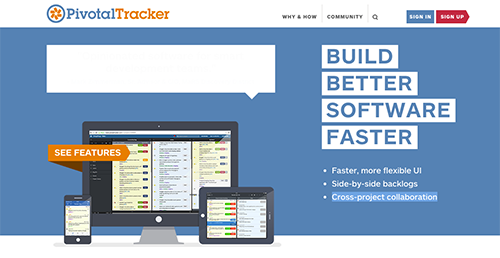
Pivotal Tracker is a user-friendly, story-based project management application that enables software development teams to work together and create real-time solutions to various feedback. It is built on proven agile methods that have stemmed from experience on hundreds of large-scale commercial software development projects.
With Pivotal Tracker, everyone has the same access to similar, real-time updates of their project and can easily determine on how to proceed. All intimate detail and information of their project is easily accessible and shareable, allowing developers to concentrate on their work rather than creating reports about the work.
Show MoreOverview of Pivotal Tracker Benefits
As its tagline suggests, Pivotal Tracker is designed to help companies develop better software faster by simplfiying the collaboration process and helping teams to easily identify priorities.
With Pivotal Tracker, software developers enjoy:
- Total control over their projects via absolute visibility.
- Clear and effective lines of communications that help team members share their concerns and documents of any type to other members, either specifically or generally.
- Streamlined workflows that are optimized for efficient, integrated story estimating, and adopting and implementing agile processes.
Overview of Pivotal Tracker Features
- Story Points
- Story Blockers
- Drag-and-Drop Functionality
- Automatic Planning
- Real-time Collaboration
- Multi-project Workspaces
- Multiple Teams
- Analytics & Reports
- Notifications
- Mentions & Following
- Labels
- Search
- Feedback
- File Sharing
- Task Management
- Project History
- Integrations
- API
Pivotal Tracker Position In Our Categories
Keeping in mind businesses have distinctive business wants, it is prudent they abstain from subscribing to an all-encompassing, ”best” software solution. However, it would be futile to discover such an app even among popular software systems. The right thing to do would be to make a list of the various vital aspects which entail research like important features, price terms, skill capability of staff, company size, etc. Then, you should double down on your research comprehensively. Go over these Pivotal Tracker evaluations and scrutinize the other software systems in your shortlist in detail. Such detailed research guarantee you steer clear of unfit apps and select the one that offers all the tools your company requires for success.
Position of Pivotal Tracker in our main categories:
TOP
20
Pivotal Tracker is one of the top 20 Computer Monitoring Software products
TOP
3
Pivotal Tracker Employee Monitoring Software products
TOP
100
Pivotal Tracker is one of the top 100 Project Management Software products
It is essential to keep in mind that virtually no software in the Project Management Software category is a perfect solution that can fulfill all the needs of various business types, sizes and industries. It may be a good idea to read a few Pivotal Tracker Project Management Software reviews first as specific services can perform well exclusively in a very narrow group of applications or be created with a very specific industry in mind. Others can operate with an idea of being easy and intuitive and therefore lack complex functionalities welcomed by more experienced users. You can also come across software that cater to a broad group of users and give you a complex feature set, but this frequently comes at a more expensive price of such a solution. Make sure you're aware of your needs so that you buy a service that offers all the features you look for.
How Much Does Pivotal Tracker Cost?
Pivotal Tracker Pricing Plans:
Free Trial
3 collaborators
Free
5 collaborators
$15
10 collaborators
$35
15 collaborators
$75
25 collaborators
$150
50 collaborators
$300
50+ collaborators
Contact vendor
What are Pivotal Tracker pricing details?
Pivotal Tracker Pricing Plans:
Free Trial
3 collaborators
Free
5 collaborators
$15
10 collaborators
$35
15 collaborators
$75
25 collaborators
$150
50 collaborators
$300
50+ collaborators
Contact vendor
Pivotal Tracker offers various pricing rates depending on the number of collaborators, the size of the file storage, and the number of private projects. A 30-day free trial period is also available. Figures represent monthly pricing rates.
Startup
Free
- 3 collaborators
- 2GB file storage
- 2 Private projects
$15
- 5 collaborators
- 5GB file storage
- 5 Private projects
$35
- 10 collaborators
- 25 GB file storage
- 10 Private projects
Pro
$75
- 15 collaborators
- Unlimited file storage
- Unlimited Private projects
$150
- 25 collaborators
- Unlimited file storage
- Unlimited Private projects
$300
- 50 collaborators
- Unlimited file storage
- Unlimited Private projects
- Enterprise
Designed for teams with 50+ collaborators. Contact Pivotal Tracker for pricing information.
User Satisfaction
Positive Social Media Mentions
19
Negative Social Media Mentions
3
We are aware that when you choose to get a Project Management Software it’s important not only to find out how professionals evaluate it in their reviews, but also to check if the actual people and businesses that bought it are actually satisfied with the product. That’s why we’ve created our behavior-based Customer Satisfaction Algorithm™ that gathers customer reviews, comments and Pivotal Tracker reviews across a broad array of social media sites. The information is then displayed in an easy to understand way indicating how many customers had positive and negative experience with Pivotal Tracker. With that information at hand you will be prepared to make an informed business choice that you won’t regret.
Video
Technical details
Devices Supported
- Windows
- Linux
- iPhone/iPad
- Mac
- Web-based
Deployment
- Cloud Hosted
Language Support
- English
Pricing Model
- Monthly payment
- Annual Subscription
- Quote-based
Customer Types
- Small Business
- Large Enterprises
- Medium Business
- Freelancers
What Support Does This Vendor Offer?
- phone
- live support
- training
- tickets
What integrations are available for Pivotal Tracker?
Pivotal Tracker supports integrations with dozens of third party apps and services. Below are some of the applications and systems it can work and connect with.
- GitHub
- Jira
- Zendesk
- Zapier
- Slack
- Clockify
- Saver
- Ybug
- Raygun
- Change Log
- Pivot Board
- Vim for Pivotal
- CloudApp
- Instabug
- Status Hero
- Roadmap
- Trello Zap
- Gmail Zap
- Google Sheets Zap
- Card-o-matic
- Zapier
- Tracker Colorblind
- Craft
- Alexa for Pivotal
- Scripts for Tracker
- Kanban Board
- Screenful
- TrackerSync
- ProdPad
- Kovair
- .NET Wrapper
- GoPivotalTracker
- Jell
- EasyQA
- Productboard
- Labels for Pivotal
- ProductPlan
- Timecamp
- Prolific
- Daycast
- IPT
- Ticket Poker
- Git Button
- TMetric
- Everhour
- Toggl
- Alfred
- Ex for Pivotal Tracker
- Story Linkify
- Teleport
- HiveApps
- Skarpline
- Kore
- DebugMe
- Scouter for Pivotal
- git_repo_changelog
- Lighthouse
- Zendesk
- Get Satisfaction
- Campfire
- Bugzilla
- Jira
- Taco
- Notion
- Prepare Commit
- Time Doctor
- PractiTest
- Charters for Pivotal
- Pivoboard
- Insight
- Yoke
- Test Collab
- Intellinote
- StoriesOnBoard
- Slack
- Red Labels
- StoryScrip
- Auto Prioritizer

Pivotal Tracker
is waiting for
your first review.

Write your own review of this product
ADD A REVIEWMore reviews from 0 actual users:


Join a community of 7,369 SaaS experts
Thank you for the time you take to leave a quick review of this software. Our community and review base is constantly developing because of experts like you, who are willing to share their experience and knowledge with others to help them make more informed buying decisions.
Sign in with LinkedIn
Why we require LinkedIn?
- Show the community that you're an actual user.
- We will only show your name and profile image in your review.
- You can still post your review anonymously.
OR
Sign in with company emailSign in with company email
Popular Pivotal Tracker Alternatives





Top Competitors To Pivotal Tracker By Price
Product name:
Price:



Trending Project Management Software Reviews




Pivotal Tracker Comparisons
Product name:





Page last modified



Did you find this review useful?
Yes
No
Thank you for your feedback
How can we make this page better?
Unsure about this software?
FIND ALTERNATIVES
 Why is FinancesOnline free?