

RingEX Review



What is RingEX?
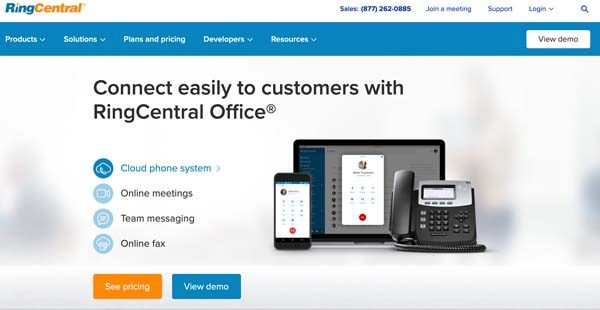
RingEX integrates your video, phone, and message channels in one cloud-hosted platform for seamless communication. It suits remote teams and small to mid-sized businesses looking for cost-effective, easy-to-use video meetings and team collaboration to accomplish work. Known for its inbound and outbound contact center solution, the vendor rolled out RingEX for workplace needs.
A robust solution. RingEX features more than 50 tools to help your teams collaborate and communicate, wherever they are. Setup is easy with intuitive features like one-click video meetings, off-the-shelf equipment for HD telepresence and cloud PBX.
A standout feature, the HD video conferencing with interactive screen sharing boosts face-to-face meetings. This allows for breakout meetings, which help you split teams into smaller groups for brainstorming or other sessions. Participants can comment, share files, use whiteboards, and record online meetings in small groups and join the main group anytime.
Likewise, participants can transfer remote control to other participants, which is useful for training exercises and other practical activities.
RingEX also comes with Glip, the vendor’s free team messaging and collaboration app. Glip lets you do group chats in real-time from any device, share files, manage tasks, coordinate schedules, and, essentially, sync and consolidate all team activities and information.
You can connect to the RingCentral cloud phone system either with your own phone via the free RingCentral apps (iOS and Android) or with vendor-issued phones and headsets. Either, RingEX integrates your phone and messaging infrastructure with Google, Microsoft, Salesforce, Box, ServiceNow, and Okta, among others.
Furthermore, companies with existing on-premise telepresence endpoints can simply integrate their infrastructure with RingCentral Room Connector to access RingCentral Meetings calls.
RingEX provides one flat monthly fee (starts at $19.99 per user) across four plans with an option to add extra toll-free, vanity, local, and international numbers.
Show MoreOverview of RingEX Benefits
Easy to set up and use
You can set up the phone system in minutes by connecting your own number to the RingEX cloud system. There is no need for costly and time-consuming PBX hardware to install. RingCentral provides you with off-the-shelf equipment like VoIP phones and headsets and the system is ready for you to tap into.
As for video-conferencing, it’s just a matter of clicking a button to join meetings from your laptop, smartphone, or tablet. You can also invite participants as a team to quickly onboard everyone.
Cloud systems like RingEX also helps you bypass the perennial issues with traditional conference meeting rooms of missing bridge cable and cumbersome dialing.
Rich video conferencing experience
RingEX features HD and interactive video conferencing, which boosts face-to-face meetings. It allows you to host up to 500 participants, one of the biggest in the web conferencing niche. Participants can share files, use whiteboards, make comments, and use annotation tools in the video conferencing platform. They can also record the session for posterity.
Moreover, you can conduct breakout sessions with the meeting platform. This allows you to split participants into smaller teams for brainstorming, focus sessions, and other activities. Smaller teams have access to the interactive tools as well and they can rejoin the main meeting room anytime. The breakout feature lets you conduct sub-training within a training session or group participants by department, team, or any other category.
A participant can also grant remote control of his computer or mobile device to another participant, while the rest of the group can annotate, share content, or send text messages. This setup is ideal for training exercises, group practices, and other practical activities.
Team communication made seamless
With your video, phone, and messaging communication in one platform, team collaboration is smooth, manageable, and scalable. Embedded in the office communication platform is RingCentral Glip, the team collaboration app for chat, task management, and file sharing. It comes free with a RingCentral account.
Your team can chat with each other anytime and anywhere from their device. As a manager, you can stay in touch with your teams or individual members or build relationships with customers. Glip makes RingEX an ideal remote work solution for unforeseen crises like a pandemic lockdown.
Integration with key apps
RingEX integrates with apps that are important to your meetings. For instance, you can schedule, start, and end meetings inside Outlook. Furthermore, you can schedule meetings with iCal and Google Calendar or send invites through email or text a link to your meeting room. Likewise, Glip integrates with Google Drive, Box, and Jira.
Cost-effective pricing
You get a single flat, predictable monthly fee whatever plan you get. This helps you budget your cloud phone system month to month or over a long-term period. There are no hidden fees, lock-in contracts, or huge capital outlay. You get an affordable, easy-to-set-up global phone system in an instant.
Show MoreOverview of RingEX Features
- Cloud phone system
- Online meetings
- Team messaging
- Online fax
- Security
- Analytics
- Mobile apps
Awards & Quality Certificates



RingEX Position In Our Categories
Since businesses have their own business-related demands, it is reasonable they abstain from settling on a one-size-fits-all, “perfect” software system. Still, it would be almost impossible to find such an app even among branded software products. The sensible step to do should be to shortlist the various important factors that entail consideration like important features, price terms, technical skill capability of staff, organizational size, etc. After which, you must perform your product research fully. Go over these RingEX review articles and scrutinize the other software options in your shortlist in detail. Such well-rounded product investigation ascertain you take out ill-fitting applications and subscribe to the system which offers all the tools your company requires.
Position of RingEX in our main categories:
TOP
20
RingEX is one of the top 20 Communications Software products
TOP
50
RingEX is one of the 50 Remote Work Software products
Every organization has different requirements and requires an application that can be personalized for their size, type of employees and buyers, and the specific industry they are in. For these reasons, no software can proffer perfect features off-the-shelf. When you try to find a software app, first be sure what you want it for. Read some RingEX Communications Software reviews and ask yourself do you need basic features or do you require advanced functionality? Are there any industry-specific features that you are looking for? Obtain the answers to these questions to aid your search. There are multiple elements that you need to consider and these include your finances, specific business needs, your company size, integration requirements etc. Take your time, check out a few free trials, and finally select the system that provides all that you need to enhance your company competence and productivity.
How Much Does RingEX Cost?
RingEX Pricing Plans:
Free Trial
Core
$20 per user/month
Advanced
$25 per user/month
Ultra
$35 per user/month
What are RingEX pricing details?
RingEX Pricing Plans:
Free Trial
Core
$20 per user/month
Advanced
$25 per user/month
Ultra
$35 per user/month
Core – $20 per user per month (billed annually)
- Unlimited domestic calling
- SMS and MMS
- IVR
- Google, Microsoft apps, and access to APIs
- Single sign-on
- Analytics for IT administrators
- HD video and audio conferencing
Advanced – $25 per user per month (billed annually)
- Everything in Core+
- Auto call recording
- Advanced call monitoring and handling
- Multi-site management
- Access to Salesforce, Zendesk, and 300+ apps
- Internet fax
- Essential business analytics
Ultra – $35 per user per month (billed annually)
- Everything in Advanced+
- Unlimited video, whiteboards, messaging
- Customizable business insights
- Unlimited file-sharing
- Unlimited storage for files and recordings
- Enhanced business analytics suite with expanded storage
Add-ons
- Additional toll-free or local numbers – $4.99 per user per month
- Additional vanity numbers – $30 one-time fee
- Additional international numbers – $5.99 starting at monthly per user
- Additional international toll-free – $14.99 per user per month; $25 one-time fee
User Satisfaction
Positive Social Media Mentions
112
Negative Social Media Mentions
2
We are aware that when you make a decision to buy a Communications Software it’s important not only to see how professionals evaluate it in their reviews, but also to check if the actual people and enterprises that use it are indeed content with the product. That’s why we’ve created our behavior-based Customer Satisfaction Algorithm™ that gathers customer reviews, comments and RingEX reviews across a vast range of social media sites. The information is then presented in a simple to digest format revealing how many people had positive and negative experience with RingEX. With that information at hand you will be prepared to make an informed purchasing choice that you won’t regret.
Technical details
Devices Supported
- Windows
- Android
- iPhone/iPad
- Mac
- Web-based
Deployment
- Cloud Hosted
- Open API
Language Support
- English
Pricing Model
- Monthly payment
- Annual Subscription
Customer Types
- Small Business
- Large Enterprises
- Medium Business
What Support Does This Vendor Offer?
- phone
- live support
- training
- tickets
What integrations are available for RingEX?
- Box
- Jira
- Microsoft
- Salesforce
- Servicenow
- Okta

RingEX
is waiting for
your first review.

Write your own review of this product
ADD A REVIEWMore reviews from 0 actual users:


Join a community of 7,369 SaaS experts
Thank you for the time you take to leave a quick review of this software. Our community and review base is constantly developing because of experts like you, who are willing to share their experience and knowledge with others to help them make more informed buying decisions.
Sign in with LinkedIn
Why we require LinkedIn?
- Show the community that you're an actual user.
- We will only show your name and profile image in your review.
- You can still post your review anonymously.
OR
Sign in with company emailSign in with company email
Popular RingEX Alternatives


Top Competitors To RingEX By Price
Product name:
Price:





Trending Communications Software Reviews


8.9
80%


8.0
100%
RingEX Comparisons
Product name:






Page last modified
Award Winner

Did you find this review useful?
Yes
No
Thank you for your feedback
How can we make this page better?
 Why is FinancesOnline free?