

SmartServ Review



What is SmartServ?
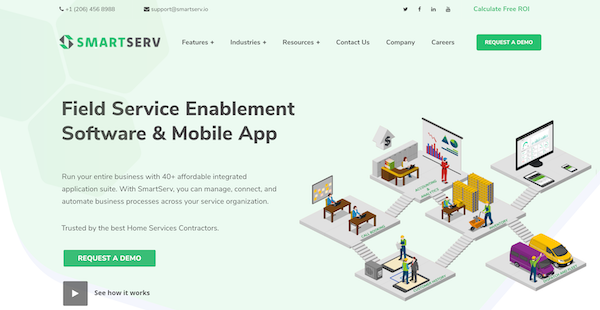
SmartServ is a field service management software that enables you to oversee your business processes, such as inventory and customer management, in one platform. It offers scheduling and dispatching tools to help you keep track of individual assignments and job statuses, among others.
SmartServ also offers a mobile interface that you can use for remote work. Through this app, your employees and technicians can access their checklists, requests, and customer information anytime and anywhere. The app also serves as a mobile time card for employees completing tasks out of the office.
To help you make better business decisions, SmartServ generates reports and analytics that you can use to understand and visualize your accounting, operation, and productivity progress. Additionally, this platform offers CRM tools to help you keep a regularly updated record of all your customer information.
Show MoreOverview of SmartServ Benefits
Scheduling and Dispatching
SmartServ offers scheduling and dispatching tools to help you manage your employees’ time and meet customer requests on time. This platform allows you to view your team’s availability to prevent overbooking. You can also view their schedules based on the job location and their history of completed, started, and rescheduled tasks. For dispatching, you can see the job status in real-time, track where your team members are, and assign new jobs based on proximity to their current job site and availability. Your technicians can also access the details of the job through the dashboard to ensure that they are meeting your customers’ requests.
Invoices and Quotes
SmartServ provides invoicing and quoting tools to give you control over your cash inflow. This platform detects assignments with open balances. You can add all the billing information on the invoice before sending it to the customer. Additionally, you can also upload your price books so you can update your prices for all your services efficiently. Importing your price books also allows you to easily create customer estimates, which you can then send and convert into job assignments.
Maintenance Agreements
SmartServ enables you to create and manage your maintenance programs. You can input the details of your maintenance agreements so that you can easily access the forms, policies, and procedures relevant to the contract. This easy access to the information can also help your technicians sell new contracts and renew memberships while on-site for their assignments. This platform also enables you to send out customer notifications for renewals and maintenance schedules.
Show MoreOverview of SmartServ Features
- Scheduling
- Dispatching
- Invoices and Quotes
- Customer Management
- Customizations
- Integrations
- Maintenance Agreements
- Reporting & Analytics
- Inventory Software
Awards & Quality Certificates


SmartServ Position In Our Categories
Bearing in mind businesses have special business wants, it is practical that they steer clear of picking an all-encompassing, ”best” business program. Nevertheless, it is futile to find such an app even among widely used software systems. The clever step to undertake should be to take note of the numerous important aspects that entail inspection including important features, plans, technical skill ability of the employees, organizational size, etc. Then, you should double down on your product research thoroughly. Have a look at some of these SmartServ evaluations and scrutinize the other software options in your list more closely. Such all-encompassing product investigation guarantees you avoid poorly fit apps and choose the system which includes all the aspects your business requires to be successful.
Position of SmartServ in our main categories:
There are well-liked and widely used applications in each software group. But are they necessarily the best fit for your company’s specific wants? A market-leading software solution may have thousands of subscribers, but does it present what you need? For this reason, do not blindly spend on popular systems. Read at least a few SmartServ Field Service Management Software - FSM reviews and think about the factors that you wish to have in the software such as the fees, main functionality, available integrations etc. Then, shortlist a few apps that fit your needs. Try out the free trials of these apps, read online reviews, get explanations from the maker, and do your research meticulously. This exhaustive homework is sure to help you choose the most excellent software platform for your firm’s unique requirements.
How Much Does SmartServ Cost?
SmartServ Pricing Plans:
Free Trial
Quote-Based Plan
Contact vendor
What are SmartServ pricing details?
SmartServ Pricing Plans:
Free Trial
Quote-Based Plan
Contact vendor
SmartServ offers a quote-based enterprise pricing package. Contact the vendor for more information.
User Satisfaction
Positive Social Media Mentions
18
Negative Social Media Mentions
0
We are aware that when you choose to buy a Field Service Management Software - FSM it’s crucial not only to find out how professionals evaluate it in their reviews, but also to discover if the real clients and businesses that purchased these solutions are genuinely content with the product. Because of that need we’ve devised our behavior-based Customer Satisfaction Algorithm™ that gathers customer reviews, comments and SmartServ reviews across a wide range of social media sites. The information is then featured in an easy to understand format indicating how many clients had positive and negative experience with SmartServ. With that information at your disposal you should be prepared to make an informed purchasing decision that you won’t regret.
Video
Technical details
Devices Supported
- Windows
- Android
- iPhone/iPad
- Mac
- Web-based
Deployment
- Cloud Hosted
Language Support
- English
Pricing Model
- Quote-based
Customer Types
- Small Business
- Large Enterprises
- Medium Business
What Support Does This Vendor Offer?
- phone
- live support
- training
- tickets
What integrations are available for SmartServ?
SmartServ integrates with the following software and applications:
- QuickBooks
- FattMerchant
- Gravity

SmartServ
is waiting for
your first review.

Write your own review of this product
ADD A REVIEWMore reviews from 0 actual users:


Join a community of 7,369 SaaS experts
Thank you for the time you take to leave a quick review of this software. Our community and review base is constantly developing because of experts like you, who are willing to share their experience and knowledge with others to help them make more informed buying decisions.
Sign in with LinkedIn
Why we require LinkedIn?
- Show the community that you're an actual user.
- We will only show your name and profile image in your review.
- You can still post your review anonymously.
OR
Sign in with company emailSign in with company email
Popular SmartServ Alternatives





Top Competitors To SmartServ By Price
Product name:
Price:

By quote

By quote



Trending Field Service Management Software - FSM Reviews


SmartServ Comparisons
Product name:







Page last modified



Did you find this review useful?
Yes
No
Thank you for your feedback
How can we make this page better?
Unsure about this software?
FIND ALTERNATIVES
 Why is FinancesOnline free?