

Workep Review



What is Workep?
Workep is a flexible project management software that fully integrates with G Suite. Built for cross-enterprise collaboration, the platform is highly easy to use for all types of users. It offers various methodologies that suit you and your team members – Kanban, Gantt Chart, and Agile. These enable you to effectively visualize your work, identify issues and improve your workflow.
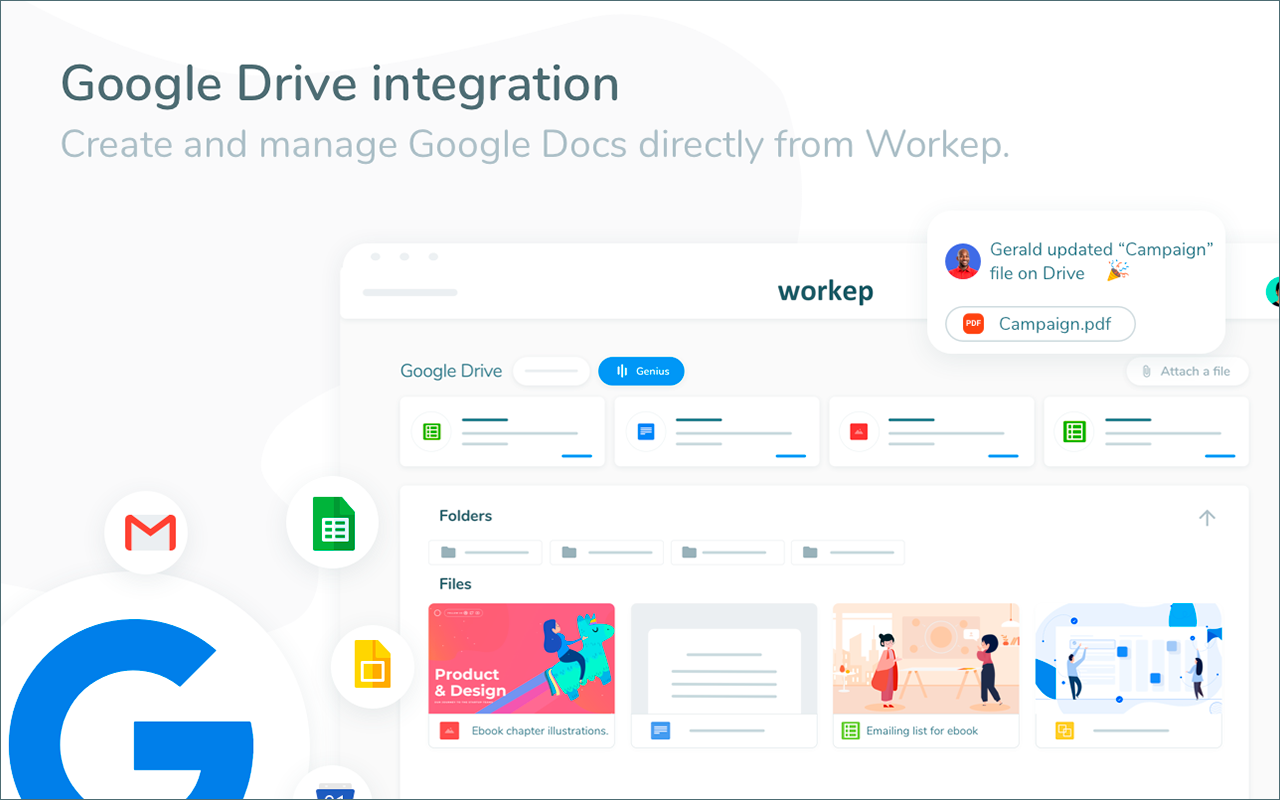
Workep is ideal for users who rely on Google for the majority of their projects. In a single, you can transform your G Suite into a collaboration platform. This way, you can leverage and maximize Gmail, Google Drive, Google Calendar, Hangouts and Google Chat, Google Contacts and Google Cloud. It centralizes and syncs data seamlessly to ensure information is consistent and up-to-date without moving from one application to another.
Show MoreOverview of Workep Benefits
Visualize Tasks
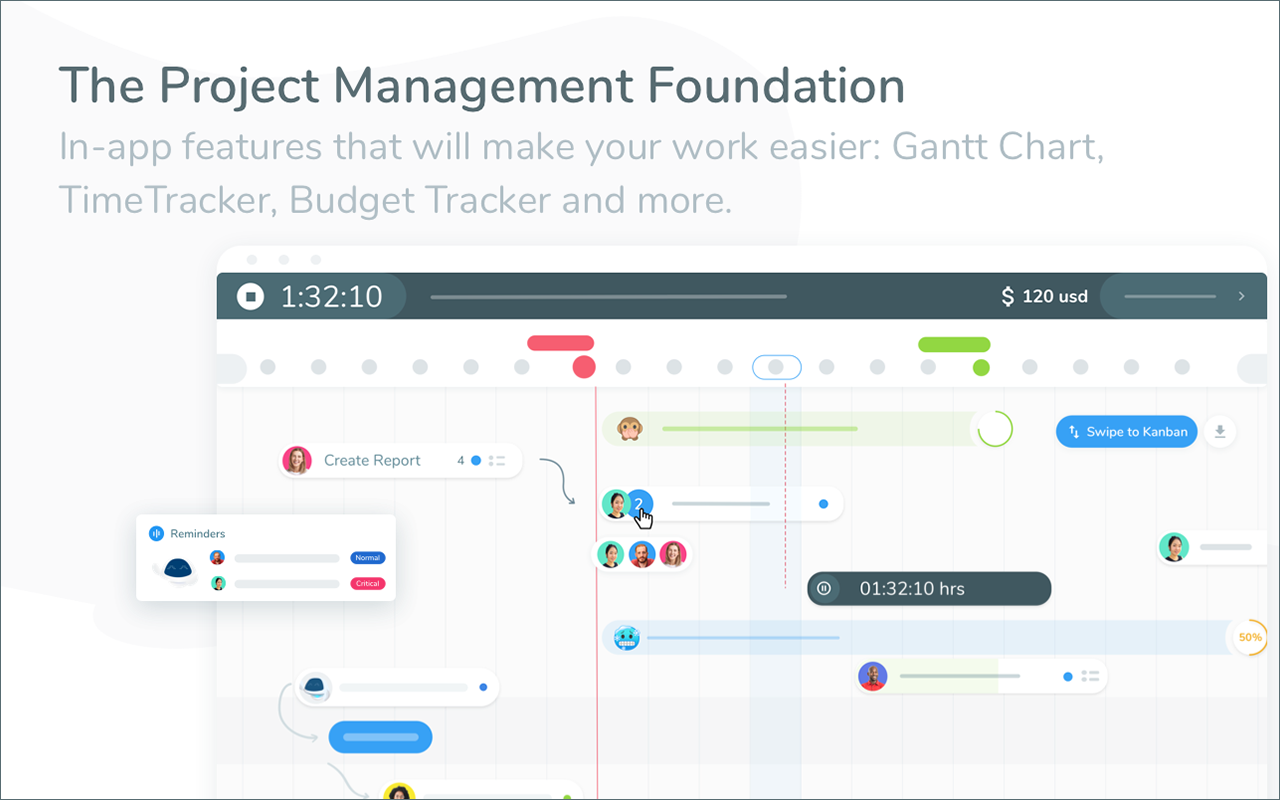
With Gantt chart, you can easily visualize your tasks. This way, you can view schedules and the project’s progress at a glance. There are also options for Kanban and Agile, depending on what suits your team’s workflow.
Track Time
Automate time tracking so you won’t have to manually record. It also streamlines generating time reports.
Standardize Workflows
By creating templates, you can save time from creating your project workflows from scratch. This also enables you to standardize and plan your projects effectively.
Assign Roles
Workep enables you to assign roles to your team members. Hence, everyone in your organization will know what to do based on what they’re good at to improve productivity.
Optimized Inbox
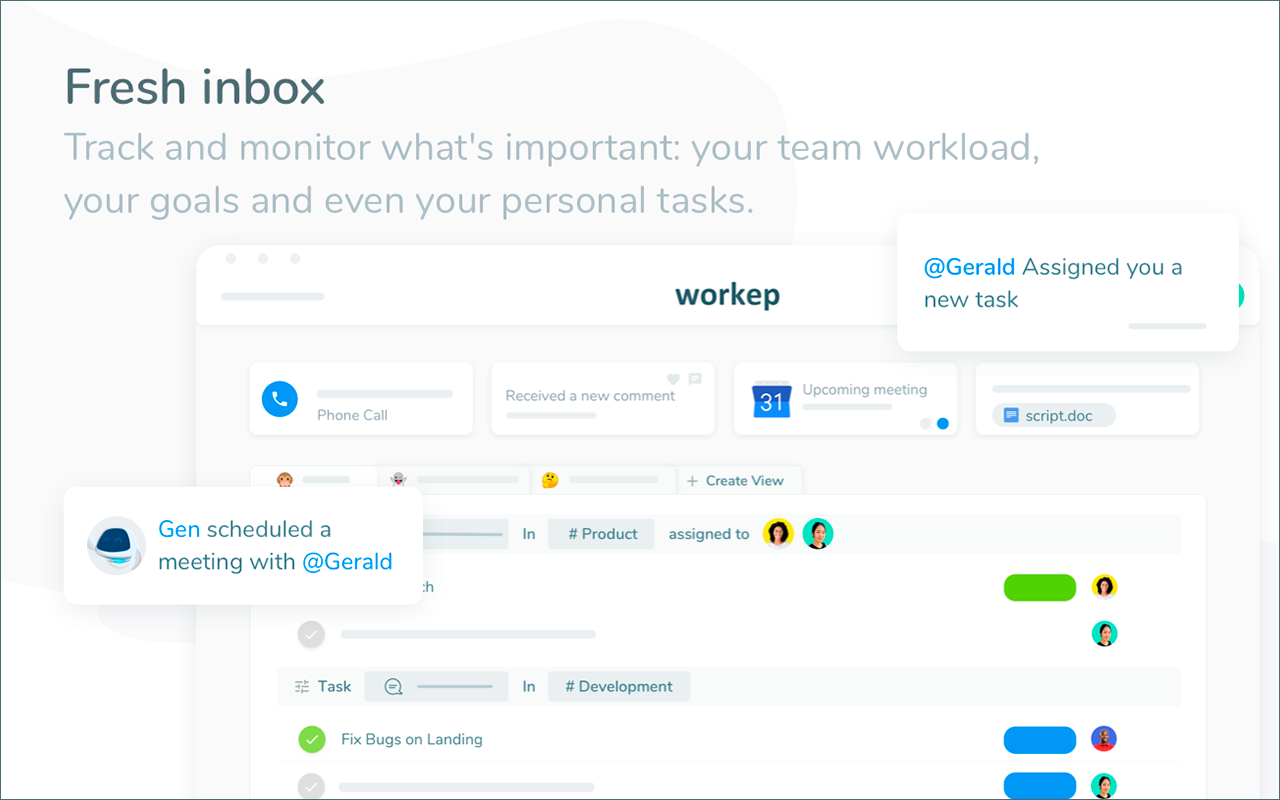
The platform ensures communication is up-to-date and relevant. Using dynamic filters, you can visualize, monitor and track important updates.
Generate Reports
When creating reports, you don’t have to worry about how you’ll present it. Workep lets you export your project reports into Google Spreadsheets. This can then be easily shared with your stakeholders.
Record Voice Notes
Workep lets you record voice notes. This can be attached to tasks to help deliver messages faster and more accurately.
Show MoreOverview of Workep Features
- Project Management
- Task Management
- Gantt Chart
- Time tracker
- Budget tracker
- Voice notes
- Templates
- Roles
- Integration with G Suite
- Inbox
- Search
- Sendable Task URLs
- Activity feed
- Add assignees, attachments, and due dates to tasks
- Automatic updates to email/inbox
- Create custom views (to-do list, Kanban or Gantt)
- Get notifications and reminders
- Android and iOS
- Project Sections and Milestones
- Real-time updates
- See team members’ tasks and priorities
- Project and task creation
- Comments on tasks
- Task dependencies
- Integrations: Slack, GitHub, Zapier
Awards & Quality Certificates
Workep Position In Our Categories
Because companies have their own business-related needs, it is reasonable that they steer clear of going for an all-encompassing, ”best” business program. Regardless, it is difficult to stumble on such an app even among well-known software products. The rational thing to do can be to spell out the numerous significant aspects that need examination like critical features, plans, technical skill ability of staff, organizational size, etc. Next, you should perform your research comprehensively. Read some of these Workep evaluations and scrutinize the other software options in your shortlist more closely. Such all-encompassing research ensure you avoid unfit apps and buy the system that provides all the tools your company requires.
Position of Workep in our main categories:
TOP
500
Workep is one of the top 500 Project Management Software products
Each organization has different wants and needs a software that can be customized for their size, type of employees and buyers, and the specific industry they are in. For these reasons, no software can offer perfect functionality off-the-shelf. When you search a software app, first be sure what you require it for. Read some Workep Project Management Software reviews and ask yourself do you need basic functionality or do you need sophisticated features? Are there any industry-specific functionalities that you are looking for? Get the answers to these questions to aid your search. There are plenty of factors that you need to reflect on and these include your finances, particular business needs, your organization size, integration needs etc. Take your time, check out a few free trials, and finally zero in on the app that presents all that you need to improve your organization competence and productivity.
How Much Does Workep Cost?
Workep Pricing Plans:
Free Trial
Lite
Free
Growth
$9.99/user per month
Enterprise
$19.99/user per month
What are Workep pricing details?
Workep Pricing Plans:
Free Trial
Lite
Free
Growth
$9.99/user per month
Enterprise
$19.99/user per month
Lite – Free
- Unlimited tasks, projects, and files
- Up to 10 team members
- Up to 1 Team
- G Suite Integrations
- Basic platform
Growth – $9.99/user per month
- All Lite features, plus:
- No team member limit
- Unlimited teams
- Admin controls (Roles)
- Advanced Gantt chart
- Time tracker
- Budget tracker
- Project Templates
- Voice notes
- External integrations: Slack, GitHub, Zapier
- Priority support
Enterprise – $19.99/user per month
- All Growth features, plus:
- API access
- Backups
- Fully personalized training
- Flexible and advanced reports
User Satisfaction
Positive Social Media Mentions
79
Negative Social Media Mentions
2
We know that when you decide to get a Project Management Software it’s crucial not only to learn how professionals evaluate it in their reviews, but also to check whether the actual people and businesses that use it are indeed happy with the service. That’s why we’ve devised our behavior-based Customer Satisfaction Algorithm™ that aggregates customer reviews, comments and Workep reviews across a wide array of social media sites. The information is then displayed in a simple to understand way indicating how many users had positive and negative experience with Workep. With that information at your disposal you should be prepared to make an informed buying decision that you won’t regret.
Video
Screenshots

Technical details
Devices Supported
- Android
- iPhone/iPad
- Web-based
Deployment
- Cloud Hosted
Language Support
- English
- Spanish
- French
- Italian
- Portugese
Pricing Model
- Free
- Monthly payment
Customer Types
- Small Business
- Large Enterprises
- Medium Business
- Freelancers
What Support Does This Vendor Offer?
- phone
- live support
- training
- tickets
What integrations are available for Workep?
Workep integrates with the following business systems and applications:
- Google Suite
- Google Drive
- Google Calendar
- Gmail
- Google Sheets
- Google Docs
- Google Slides
- Hangouts
- Google Chat
External:
- Slack
- GitHub
- Zapier

Workep
is waiting for
your first review.

Write your own review of this product
ADD A REVIEWMore reviews from 0 actual users:


Join a community of 7,369 SaaS experts
Thank you for the time you take to leave a quick review of this software. Our community and review base is constantly developing because of experts like you, who are willing to share their experience and knowledge with others to help them make more informed buying decisions.
Sign in with LinkedIn
Why we require LinkedIn?
- Show the community that you're an actual user.
- We will only show your name and profile image in your review.
- You can still post your review anonymously.
OR
Sign in with company emailSign in with company email
Popular Workep Alternatives




Top Competitors To Workep By Price
Product name:
Price:




Trending Project Management Software Reviews



Workep Comparisons
Product name:









Page last modified



Did you find this review useful?
Yes
No
Thank you for your feedback
How can we make this page better?
Unsure about this software?
FIND ALTERNATIVES
 Why is FinancesOnline free?