
- Home
- Collaboration Software
- Zoho Calendar

Zoho Calendar Review


What is Zoho Calendar?
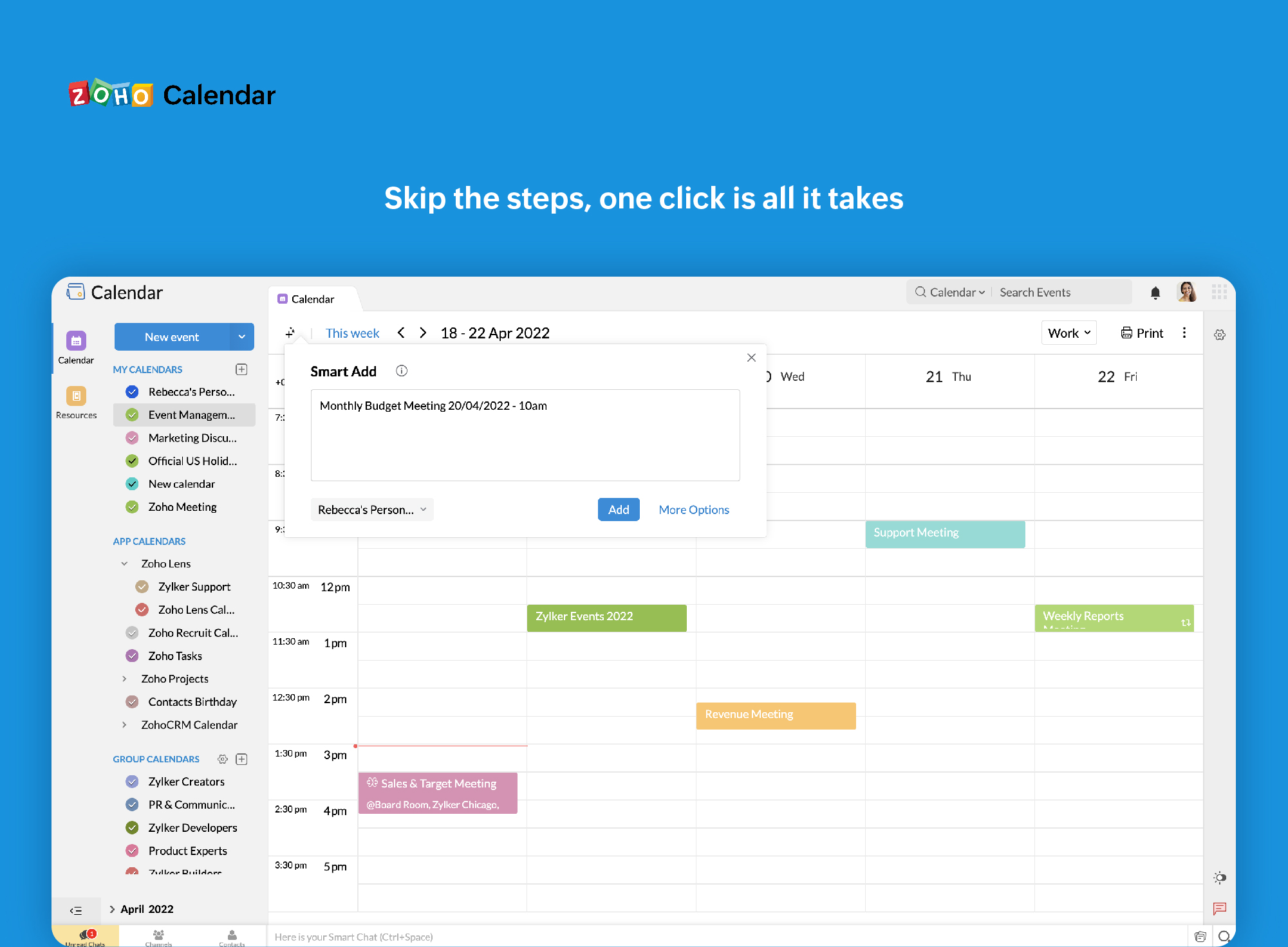
Zoho Calendar is a free online calendar tool that enables users to keep track of their schedule, be it for their meetings, appointments, birthdays, or other significant dates. The application is not just capable of reminding users of their events, but it can also be maximized as a collaboration application. With Zoho Calendar, users can share and collaborate with calendars of friends, relatives and colleagues too. As the calendar is a dynamic application, users can check for Free/Busy work status information of their friends and set meetings at a most opportune time.
As for other subscription options, Zoho Calendars lets users subscribe to friends calendars, holidays, other public calendars, and iCal feeds as well. For business purposes, Zoho Calendar supports subscription to your Zoho CRM calendars and Zoho Projects calendars. This functionality allows users to manage and stay on top of their personal as well as professional appointments with utmost ease.
Show MoreOverview of Zoho Calendar Benefits
Zoho Calendar is so much more than just a free scheduling and appointment application. This cost-free tool comes with a plethora of benefits that many individuals and even large corporations will find beneficial, and which can help them steer their enterprise towards success. For one, Zoho Calendar efficiently brings the team together and lands them all on the same page. Team members who are on common calendar are able to collaborate with each other by creating and modifying events.
Zoho Calendar makes its easy to send and even receive invitations from just about anyone. Users can easily invite people to events by sending the invitation straight to their email address. The best part is that is that the invitations can be delivers to any and every email service. For those who want to be reminded time and time again regarding events, milestones, dates, and appointments, Zoho Calendar can do just that. Get event reminders on email, as a pop-up or both. The system delivers notifications the way you want it, up to 90 days prior to the commencement of the event.
This calendar tool elevates collaboration further with its sharing and embedding functionality. It also allows you to access other Zoho applications, which are CRM, Meeting, Business and Planner. You can share your calendar with individuals or groups. In fact, you can even publish it on your website and set viewing permissions to public if you want to.
Show MoreOverview of Zoho Calendar Features
- CalDAV sync
- Zoho CRM – Zoho Calendar Sync
- Access your Google Calendar from Zoho Calendar
- Contacts Birthday Calendar
- Group Calendar
- Send / Receive invitations across calendars
- Create, View event in different Time zone
- Embed multiple calendar
- Unified calendar view
- Zoho Calendar Themes
- Invitee status notification
- Embedded event description
- Access Portal
- Convenient Scheduling
Zoho Calendar Position In Our Categories
Since companies have unique business wants, it is reasonable they steer clear of preferring an all-encompassing, “perfect” software. Nevertheless, it would be futile to try to stumble on such application even among sought-after software solutions. The correct thing to undertake should be to jot down the numerous key functions that need careful thought including key features, plans, skill levels of the employees, organizational size, etc. Then, you must double down on the research through and through. Read some Zoho Calendar reviews and check out the other software programs in your list in detail. Such well-rounded research ensure you drop unsuitable software solutions and select the system that has all the function your company requires to be successful.
Position of Zoho Calendar in our main categories:
TOP
200
Zoho Calendar is one of the top 200 Collaboration Software products
If you are interested in Zoho Calendar it may also be a good idea to examine other subcategories of Best Collaboration Software gathered in our base of B2B software reviews.
It is essential to keep in mind that almost no service in the Best Collaboration Software category is a perfect solution able to match all the goals of various business types, sizes and industries. It may be a good idea to read a few Zoho Calendar Best Collaboration Software reviews first as specific software can dominate just in a very narrow group of applications or be created with a really specific industry in mind. Others may function with an intention of being simple and intuitive and consequently lack complex functions needed by more experienced users. You can also find software that cater to a broad group of users and give you a rich feature set, however that frequently comes at a more significant cost of such a software. Be certain that you're aware of your requirements so that you choose a solution that has specifically the features you search for.
How Much Does Zoho Calendar Cost?
Zoho Calendar Pricing Plans:
Free Trial
FREE
$0
What are Zoho Calendar pricing details?
Zoho Calendar Pricing Plans:
Free Trial
FREE
$0
Zoho Calendar is a free calendar application that comes with the Zoho Workplace Suite.
User Satisfaction
Positive Social Media Mentions
46
Negative Social Media Mentions
1
We realize that when you make a decision to get a Collaboration Software it’s vital not only to learn how experts rank it in their reviews, but also to find out if the real clients and businesses that bought this software are actually satisfied with the service. Because of that need we’ve created our behavior-based Customer Satisfaction Algorithm™ that collects customer reviews, comments and Zoho Calendar reviews across a broad array of social media sites. The data is then featured in an easy to understand form revealing how many people had positive and negative experience with Zoho Calendar. With that information at hand you should be equipped to make an informed business choice that you won’t regret.
Video
Screenshots


Technical details
Devices Supported
- Windows
- Android
- iPhone/iPad
- Mac
- Web-based
Deployment
Language Support
- English
Pricing Model
- Free
Customer Types
- Small Business
- Large Enterprises
- Medium Business
- Freelancers
What Support Does This Vendor Offer?
- phone
- live support
- training
- tickets
What integrations are available for Zoho Calendar?
Zoho Calendar integrates with the following business systems and applications:
- Zoho Apps
- iCal
- Microsoft Outlook
- Google Calendar

Zoho Calendar
is waiting for
your first review.

Write your own review of this product
ADD A REVIEWMore reviews from 0 actual users:


Join a community of 7,369 SaaS experts
Thank you for the time you take to leave a quick review of this software. Our community and review base is constantly developing because of experts like you, who are willing to share their experience and knowledge with others to help them make more informed buying decisions.
Sign in with LinkedIn
Why we require LinkedIn?
- Show the community that you're an actual user.
- We will only show your name and profile image in your review.
- You can still post your review anonymously.
OR
Sign in with company emailSign in with company email
Popular Zoho Calendar Alternatives


Top Competitors To Zoho Calendar By Price
Product name:
Price:



Trending Collaboration Software Reviews


8.0
94%


Zoho Calendar Comparisons
Product name:



Page last modified



Did you find this review useful?
Yes
No
Thank you for your feedback
How can we make this page better?
Unsure about this software?
FIND ALTERNATIVES
 Why is FinancesOnline free?