

OnBoard Review


What is OnBoard?
OnBoard is a board intelligence platform that transforms complicated, outdated and time-consuming board meeting workflows. It is built to help boards focus on realizing their vision for the organization. Its board portal makes decision-making easier by creating a system of record for directors, executives, and administrators with intuitive data and analytics on any device, in any place, at any time.
OnBoard board management creates unified and secure communications so boards can thrive with meetings that are more collaborative, productive, and effective. You can take advantage of Onboard’s no-strings-attached free trial to test before you invest.
At this time, OnBoard is only available in the United States, Canada, and the UK.
Show MoreOverview of OnBoard Benefits
OnBoard Board Management Software is touted as one of the leaders in board management systems. It is regarded as such thanks to its highly flexible, easily understood and secure platform that provides users with the ease of having everything they need to conduct their business at their fingertips.
Easy-to-Use Dashboard
OnBoard Board Management Software was created with the help of board members from various companies. As such, OnBoard Board Management Software’s developers were keen on designing various functionalities within their dashboard that typical board members would often use. For instance, a user’s dashboard includes a calendar where they can arrange a meeting with their constituents. It also has an Actions and Notifications tab where any urgent and important business or company matters are placed, tracked and updated according to which action a user has taken.
Users can also have multiple Agenda and Board Books to ensure that they can organize their day, week or month accordingly. This, along with the standard member directory, is especially useful for directors or administrators that interface with multiple departments within their company.
Versatile Collaboration Software
Collaboration is one of the key terms for OnBoard Board Management Software, and it provides users with this by letting them utilize a complete document and file support system that covers the majority of file types that are sent online, such as PDFs, TIFFs and such; these files are then stored in a centralized resource center.
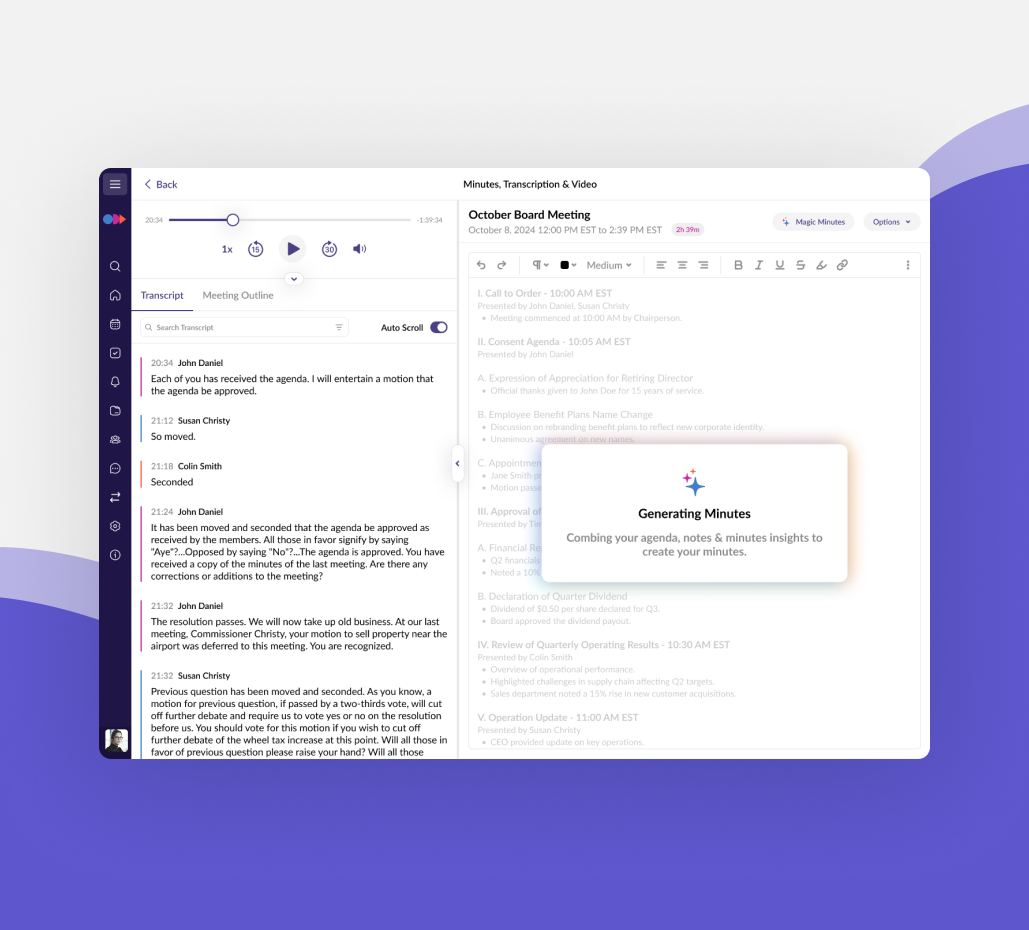
Apart from that, during meetings, OnBoard Board Management Software has a Meeting and Minutes Management system that enables participants to take notes and make annotations that can then be cross-referenced with the platform’s documentation.
Another notable feature of OnBoard Board Management Software is its live integration with various Microsoft applications such as Outlook, Office 365, and Azure. This integration allows users who have Microsoft Office or Outlook to sync into Passageway OnBoard’s platform and have seamless interfacing with other members.
Mobile Access and Syncing
Passageway OnBoard can also be accessed on various mobile devices such as Apple, Android, PC, Mac, Kindle Fire, and Windows Mobile. The information is then synced between devices to ensure that the user can access the latest data and pick up the work or task where he or she left off without a hitch.
Comprehensive Security Measures
OnBoard Board Management Software provides users with various failsafe protocols such as two-factor authentication as well as FaceID and TouchID technology that are programmed to ensure sensitive business information will not be breached. Furthermore, OnBoard Board Management Software also has its security systems built on Microsoft Azure which enables them to have various safety measures in place such as full disaster recovery, active geo-replication, as well as data encryption according to international standards.
When it comes to having a board management system that is easy to understand and easier to use, OnBoard Board Management Software’s collaboration software provides that platform. From an instinctive dashboard, collaborative software that can be accessed and synced in various devices to its industry-standard security and data integrity measures, users are given quality board management experience.
Enhanced Task Management and Collaboration
OnBoard lets you manage, track, and organize the meeting cycle’s most important action-items with its task management feature. Its Messenger also provides a safe and secure portal for directors, administrators, and executives to communicate. When needed, they can even include the entire board into the discussion. With Engagement Analytics, you can be aware when board books are read and where the annotations are. Finally, its direct Zoom integration provides a singular meeting experience for CEOs and directors to meet face-to-face right in the platform without having to switch between apps.
Show MoreOverview of OnBoard Features
- Meeting Minutes Builder
- Integration with Microsoft Office 365
- Integration with Zoom
- Up-to-Date Device Syncing
- Mobile Access and Syncing
- Complete Document and File Support
- Centralized Resource Center
- Agenda and Board Book Creation
- Presenter Mode
- In-sync Annotations and Notes
- Meeting and Minutes Management
- Approval Process Management
- Voting and Polls
- Surveys and Questionnaires
- Microsoft Azure Security
- Biometrics Login Security
- Engagement & Analytics Tracking
- Electronic Signature
- Offline Access
- Autosave Functionality
- Multi-Board Support
- Remote Data Wipe
- Private & Group Messaging
- Task Management
- Secure Messenger
- Zoom for OnBoard
- Engagement Analytics
Awards & Quality Certificates

OnBoard Position In Our Categories
Knowing that companies have specific business needs, it is only logical they steer clear of going for an all-in-one, “perfect” business program. Be that as it may, it would be difficult to try to find such application even among sought-after software solutions. The better step to do should be to spell out the numerous critical functions that call for a analysis like important features, costing, skill levels of staff members, company size, etc. Then, you must perform your product research systematically. Read some OnBoard evaluations and explore the other applications in your shortlist more closely. Such comprehensive research ensure you drop poorly fit apps and subscribe to the system which includes all the aspects your company requires.
Position of OnBoard in our main categories:
TOP
100
OnBoard is one of the top 100 Collaboration Software products
TOP
50
OnBoard is one of the 50 Remote Work Software products
Each company has different requirements and requires a software that can be personalized for their size, type of workers and clients, and the specific industry they are in. For these reasons, no software can provide perfect features off-the-shelf. When you look for a software product, first be sure what you need it for. Read some OnBoard Collaboration Software reviews and ask yourself do you desire basic functionality or do you need sophisticated functionality? Are there any industry-specific functionalities that you are looking for? Find the answers to these queries to help your search. There are multiple elements that you need to reflect on and these include your budget, particular business requirements, your company size, integration needs etc. Take your time, try out a few free trials, and finally choose the platform that offers all that you need to boost your company competence and productivity.
How Much Does OnBoard Cost?
OnBoard Pricing Plans:
Free Trial
Quote-based Plan
Contact vendor
What are OnBoard pricing details?
OnBoard Pricing Plans:
Free Trial
Quote-based Plan
Contact vendor
Pricing details vary based on what the user needs to conduct his or her business. OnBoard Board Management Software’s experts can be contacted to provide the necessary assistance regarding the appropriate features that would best help the user’s setup.
User Satisfaction
Positive Social Media Mentions
42
Negative Social Media Mentions
1
We are aware that when you make a decision to purchase a Collaboration Software it’s important not only to find out how professionals rank it in their reviews, but also to discover whether the actual people and enterprises that purchased these solutions are genuinely content with the service. That’s why we’ve designer our behavior-based Customer Satisfaction Algorithm™ that aggregates customer reviews, comments and OnBoard reviews across a wide range of social media sites. The information is then displayed in a simple to digest way indicating how many customers had positive and negative experience with OnBoard. With that information available you will be equipped to make an informed business decision that you won’t regret.
Video
Screenshots
Technical details
Devices Supported
- Windows
- Linux
- Android
- iPhone/iPad
- Mac
- Web-based
- Windows Mobile
Deployment
- Cloud Hosted
- On Premise
Language Support
- English
Pricing Model
- Monthly payment
- Quote-based
Customer Types
- Small Business
- Large Enterprises
- Medium Business
What Support Does This Vendor Offer?
- phone
- live support
- training
- tickets
What integrations are available for OnBoard?
OnBoard integrates with the following:
- Microsoft Office 365
- Microsoft Outlook
- Microsoft Silver
- Microsoft Azure
- Zoom

OnBoard
is waiting for
your first review.

Write your own review of this product
ADD A REVIEWMore reviews from 0 actual users:


Join a community of 7,369 SaaS experts
Thank you for the time you take to leave a quick review of this software. Our community and review base is constantly developing because of experts like you, who are willing to share their experience and knowledge with others to help them make more informed buying decisions.
Sign in with LinkedIn
Why we require LinkedIn?
- Show the community that you're an actual user.
- We will only show your name and profile image in your review.
- You can still post your review anonymously.
OR
Sign in with company emailSign in with company email
Popular OnBoard Alternatives



Top Competitors To OnBoard By Price
Product name:
Price:



Trending Collaboration Software Reviews


OnBoard Comparisons
Product name:








Page last modified



Did you find this review useful?
Yes
No
Thank you for your feedback
How can we make this page better?
Unsure about this software?
FIND ALTERNATIVES
 Why is FinancesOnline free?