

Bigin Review



What is Bigin?
Bigin by Zoho CRM is a simple yet feature-rich customer relationship management (CRM) software that helps businesses focus on their pipelines. Within Bigin, sales reps can see their pipeline, manage deals, store prospect contact information, and automate workflows all in one platform.
Bigin was built for small or micro businesses that struggle with the complexity of a full-blown CRM tool. With it, they get a tool that provides them with more functionality than what’s available in old-fashioned spreadsheets.
With Bigin, sales reps can easily visualize and manage their pipeline. It gives them a 360-degree view of customer information to better engage with prospects. They can also nurture contacts by completing various activities that get logged into the system.
Bigin features two views of your pipeline to help you prioritize which opportunities to pursue. Workflow automation lets you do away with repetitive, manual tasks. Features like built-in telephony and the activity module help you accomplish prospect-related tasks without juggling multiple tools.
Bigin integrates with other Zoho products like Zoho Desk, Zoho Meeting, Zoho Campaigns, Zoho Flow, and Zoho Card Scanner. It also works with Gmail, Office 365, and Zapier.
Bigin offers a mobile app where users can track deals, update prospect information, and more.
Bigin pricing starts at $9 on a monthly subscription per user. A free trial is available.
Show MoreOverview of Bigin Benefits
Take control of your pipeline
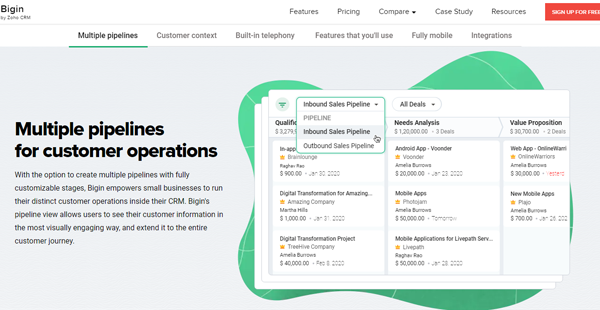
With Bigin, you can gain visibility into your sales process by configuring one or multiple pipelines. You can see your pipeline in either the list or pipeline view with key information about their status, close dates, contact person, and their monetary value. This way, you can focus your time and effort on high-value opportunities.
Managing opportunities is a breeze with drag-and-drop actions for updating the deal status. Find opportunities faster by using various filters. Save time with pipeline maintenance by applying bulk actions to multiple records.
Gain visibility into sales performance
Know how your business is doing with just a glance from the dashboard module of Bigin. You can view business performance in terms of key performance indicators (KPIs) or view data through different types of charts. You can choose from five KPI styles, from basic ones to a ranking-based approach listing top-performing team members.
Bigin provides you with three sharing options for dashboards. You can restrict a dashboard to be viewable by yourself only. However, you can also share with all users or certain users in your organization. This ensures that recipients get the information they need as appropriate to their role.
Eliminate repetitive tasks
You can use Bigin to set up automated workflows that perform instant actions once certain triggers are set. For example, automated workflows help you to automatically assign tasks, send email notifications, update files, or add or remove tags, saving you lots of valuable time and thus shortening the sales cycle.
In addition, you can automatically create contacts by creating sign-up web forms on your website. The Bigin form builder features a what-you-see-is-what-you-get (WYSIWYG) editor which makes it easy to add fields to your form. Once a prospect fills out the form, Bigin captures the information, freeing you from having to manually type it into your CRM system.
Show MoreOverview of Bigin Features
- Manage contacts
- Custom contact fields
- Import records
- View deals
- Manage deals
- Filter deals
- Bulk actions
- Workflow automation
- Dashboards
- Customizable webforms
- Manage products
- Tasks
- Events
- Built-in telephony
- Log-a-Call
- Send emails
- Mass emails
- Email templates
- Twitter channel
- Data backup
- Audit logging
Bigin Position In Our Categories
Because businesses have particular business-related requirements, it is only practical that they abstain from adopting an all-encompassing, ideal system. Nevertheless, it is difficult to stumble on such a software product even among well-known software products. The reasonable thing to undertake would be to write down the numerous vital functions which call for a investigation like key features, packages, skill competence of the employees, company size, etc. Then, you must perform your research fully. Read these Bigin review articles and check out each of the solutions in your list in detail. Such detailed research ascertains you avoid ill-fitting applications and buy the system which meets all the aspects your business requires to achieve growth.
Position of Bigin in our main categories:
TOP
100
Bigin is one of the top 100 CRM Software products
Each enterprise has its own characteristics, and can call for a particular type of CRM Software solution that will be designed for their business size, type of clients and staff and even specific niche they cater to. We advise you don't count on getting an ideal services that will work for every company no matter what their background is. It may be a good idea to read a few Bigin CRM Software reviews first and even then you should keep in mind what the solution is supposed to do for your business and your staff. Do you require an easy and straightforward service with just elementary functions? Will you really make use of the advanced functionalities needed by pros and large enterprises? Are there any particular tools that are especially practical for the industry you work in? If you ask yourself these questions it is going to be much easier to locate a reliable app that will match your budget.
How Much Does Bigin Cost?
Bigin Pricing Plans:
Free Trial
Free Plan
$0
Express Plan
$9
What are Bigin pricing details?
Bigin Pricing Plans:
Free Trial
Free Plan
$0
Express Plan
$9
Available pricing plans:
Free – $0
- One Pipeline
- One User
- 500 Records
- Import 250 records per batch
- 50 List View records
- Three Workflow Rules
- One Webform
Express – $9/user/month ($7 if billed annually)
- Five Pipelines
- Multiple Users
- 50,000 Records
- Import 10,000 records per batch
- 100 List View records
- 25 Workflow Rules
- Five Webforms
- 10 Custom Dashboards
- Two data backups per month
- Audit Logging
User Satisfaction
Positive Social Media Mentions
57
Negative Social Media Mentions
2
We realize that when you decide to purchase a CRM Software it’s important not only to see how experts evaluate it in their reviews, but also to find out if the real clients and companies that use these solutions are indeed content with the product. Because of that need we’ve designer our behavior-based Customer Satisfaction Algorithm™ that aggregates customer reviews, comments and Bigin reviews across a vast array of social media sites. The data is then presented in an easy to understand format revealing how many users had positive and negative experience with Bigin. With that information available you will be prepared to make an informed purchasing decision that you won’t regret.
Video
Technical details
Devices Supported
- Android
- iPhone/iPad
- Web-based
Deployment
- Cloud Hosted
Language Support
- English
Pricing Model
- Free
- Monthly payment
- Annual Subscription
Customer Types
- Small Business
What Support Does This Vendor Offer?
- phone
- live support
- training
- tickets
What integrations are available for Bigin?
- Zoho Desk
- Zoho Meeting
- Zoho Campaigns
- Zoho Card Scanner
- Office 365
- Zapier
- Gmail
- Zoho Flow

Bigin
is waiting for
your first review.

Write your own review of this product
ADD A REVIEWMore reviews from 0 actual users:


Join a community of 7,369 SaaS experts
Thank you for the time you take to leave a quick review of this software. Our community and review base is constantly developing because of experts like you, who are willing to share their experience and knowledge with others to help them make more informed buying decisions.
Sign in with LinkedIn
Why we require LinkedIn?
- Show the community that you're an actual user.
- We will only show your name and profile image in your review.
- You can still post your review anonymously.
OR
Sign in with company emailSign in with company email
Popular Bigin Alternatives





Top Competitors To Bigin By Price
Product name:
Price:


Trending CRM Software Reviews


Bigin Comparisons
Product name:






Page last modified
 Why is FinancesOnline free?