

Hibox Review



What is Hibox?
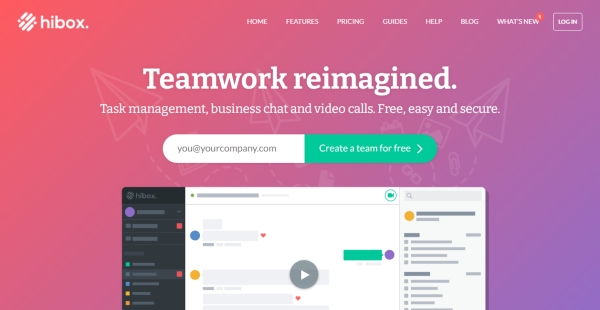
Hibox is a collaboration app that gives project, sales, marketing, and HR teams a secure way to handle their work and interact. It enhances team communication and coordination so users can achieve greater connectivity, engagement, and productivity. Hibox allows you to plan, track, and manage projects and tasks comprehensively and efficiently. You can create recurring tasks using task templates, prioritize and assign tasks and subtasks with schedules and reminders, and view projects and tasks in a calendar.
Hibox also permits you and your co-workers to communicate and collaborate in real-time through one-on-one or group video conferencing and chatting. You’ll be able to chat with colleagues and share screens and files during video conferences. Its company chat capabilities include GIF and emoji sharing, @mentioning, and drag-and-drop message quoting.
Moreover, the app makes it easy for users to share files with each other. It lets them locate files in single or multiple streams, preview and comment in documents and files, and share files on the go using Hibox’s mobile app. Hibox can be integrated with Google Drive, Dropbox, and Box as well.
Show MoreOverview of Hibox Benefits
Team Communication & Collaboration
Hibox is loaded with chatting and video conferencing features that enable teams to efficiently communicate and collaborate in real-time without logging into separate applications. Users can launch video conference calls with their co-workers individually or as a group by just clicking the video icon. They can also monitor and manage tasks, send chat messages, and share documents and files while having a video conference meeting.
Using Hibox’s Android and iOS app, they’ll be able to engage in private or group chat conversations and work on their projects and tasks wherever they are. Additionally, Hibox uses an AI virtual assistant that automatically tracks and analyzes chat conversations and messages It recommends specific actions users need to do based on their past chat interactions, such as converting documents or files to tasks and assigning them to the right teammates.
Project & Task Management
The collaboration app aids users to stay on top of their projects and tasks. They can divide complicated or long-term projects into subtasks, set deadlines, and assign tasks to different individuals. They’re also provided with the capability to create team or personal to-do lists and change the order of tasks based on priority by simply dragging and dropping them on the lists.
Hibox has a built-in calendar where they can conveniently view and track projects and tasks along with their set timelines and deadlines. Plus, they’ll see notifications and reminders when the project or tasks’ due dates and times are near or have passed. As they work on their projects and tasks, they can also click the play or pause button to record and monitor the number of hours they spent on them.
File Management
With Hibox’s file sharing features, users can quickly, conveniently, and securely share, access, and handle all important documents and files they need. For instance, you can integrate various cloud file storage systems, like Box, Dropbox, and Google Drive with Hibox, and use them to store, share, and manage different types of files. These include images, videos, spreadsheets, PDF documents, recordings, and reports.
Furthermore, Hibox allows you and your colleagues to check and access all documents and files shared in single or multiple chat streams. You can even search for specific files using keywords or dates directly within streams. You’ll also be able to add attachments and comments to different versions of documents and files.
Show MoreOverview of Hibox Features
- Video Conferencing
- Private/Group Chats
- AI Virtual Assistant
- Task Management
- Project Calendar View
- Reminders
- Personal To-Dos
- File Sharing
- External App Integrations
What Problems Will Hibox Solve?
Inbox overload: When team members can communicate and share needed files in a real-time chat environment, it greatly reduces the need for one-to-one or group email strings. Files are easy to access so you don’t need to search past emails to find them.
Improper or missing project communication: Assigning tasks to the appropriate people lets them know what needs to be done and lets the assigner know whether or not that task has been completed without having to ask. Customers can create complex tasks by adding sub-tasks, adding help documentation, guidance notes, and more.
In-time voice communication: Zoom and Google Meet make it difficult to make a quick call on an as-needed basis to clear something up. Hibox allows you to make those calls when needed with one click.
Awards & Quality Certificates


Hibox Position In Our Categories
Knowing that companies have unique business-related demands, it is only reasonable that they avoid seeking a one-size-fits-all, “perfect” software. Regardless, it is futile to pinpoint such application even among popular software solutions. The reasonable thing to undertake would be to jot down the numerous essential functions which need investigation including major features, packages, skill competence of staff members, organizational size, etc. Next, you should double down on the product research exhaustively. Browse over these Hibox reviews and look over the other software products in your list more closely. Such detailed research can make sure you take out unsuitable apps and subscribe to the system which includes all the benefits your company requires in sustaining growth.
Position of Hibox in our main categories:
TOP
50
Hibox is one of the top 50 Collaboration Software products
Companies have unique needs and requirements and no software solution can be just right in such a scenario. It is pointless to try to find an ideal off-the-shelf software product that fulfills all your business needs. The smart thing to do would be to adapt the application for your specific wants, staff member skill levels, finances, and other elements. For these reasons, do not hurry and subscribe to well-publicized leading systems. Though these may be widely used, they may not be the perfect fit for your specific needs. Do your homework, look into each short-listed application in detail, read a few Hibox Collaboration Software reviews, speak to the maker for explanations, and finally choose the product that presents what you need.
How Much Does Hibox Cost?
Hibox Pricing Plans:
Free Trial
Free
Free
Pro
$6/user/month
Enterprise
$8/user/month
What are Hibox pricing details?
Hibox Pricing Plans:
Free Trial
Free
Free
Pro
$6/user/month
Enterprise
$8/user/month
Hibox offers two plans for users to choose from, including an enterprise pricing plan that allows you to store and share unlimited files, apply advanced security features, and access complete message history. Here are the details:
Free – $0/user/month
Pro – $6/user/month
- Encrypted chat
- Task management
- File sharing
- Video conferences
- Unlimited search
- Online support
- 5 GB file storage/users
Enterprise – $8/user/month
- Everything in Pro, plus…
- Unlimited file storage
- Advanced security features
- Priority support
- Activity logs
- Custom URL (with 20+ users)
- Integrations with external systems
User Satisfaction
Positive Social Media Mentions
111
Negative Social Media Mentions
4
We are aware that when you make a decision to get a Collaboration Software it’s vital not only to find out how experts score it in their reviews, but also to find out if the actual clients and businesses that bought these solutions are genuinely satisfied with the service. Because of that need we’ve created our behavior-based Customer Satisfaction Algorithm™ that aggregates customer reviews, comments and Hibox reviews across a wide array of social media sites. The information is then displayed in a simple to digest form indicating how many clients had positive and negative experience with Hibox. With that information available you should be prepared to make an informed business decision that you won’t regret.
Video
Technical details
Devices Supported
- Windows
- Android
- iPhone/iPad
- Mac
- Web-based
Deployment
- Cloud Hosted
Language Support
- English
- German
- Spanish
- French
- Italian
- Portugese
Pricing Model
- Free
- Monthly payment
Customer Types
- Small Business
- Large Enterprises
- Medium Business
- Freelancers
What Support Does This Vendor Offer?
- phone
- live support
- training
- tickets
What integrations are available for Hibox?
Hibox integrates with any email service, such as:
- Google Drive
- Dropbox
- Box
Hibox User Reviews
Hibox average rating:
5/5
Overall impression
5/5
Customer Support
5/5
Value for Money
5/5
Ease of Use
Write your own review of this product
ADD A REVIEWMore reviews from 1 actual users:
Sort by:
Latest
- Latest
- Most useful
- Most positive
- Most negative
Excellent for team collaboration & project management
Read full review >
5/5
Overall impression
5/5
Customer Support
5/5
Value for Money
5/5
Ease of Use
Published on: 19.07.2021
Company Size: 1-10 Employees
Industry: Information Technology and Services
PROS: Hibox really helped me with project management with great UI. Their features like steam chat, personal chat, task management, group video chat, file sharing are excellent. Moreover, features like search, calendar, audit logs, history are great additions. People in my company really enjoy using emojis & GIF's. Google drive & Dropbox integrations work flawlessly. Its all in one package!
CONS: No issues so far.


Join a community of 7,369 SaaS experts
Thank you for the time you take to leave a quick review of this software. Our community and review base is constantly developing because of experts like you, who are willing to share their experience and knowledge with others to help them make more informed buying decisions.
Sign in with LinkedIn
Why we require LinkedIn?
- Show the community that you're an actual user.
- We will only show your name and profile image in your review.
- You can still post your review anonymously.
OR
Sign in with company emailSign in with company email
Popular Hibox Alternatives


Top Competitors To Hibox By Price
Product name:
Price:


by quote


Trending Collaboration Software Reviews

8.0
100%


7.1
100%

Hibox Comparisons
Product name:





Hibox user reviews
Excellent for team collaboration & project management
Read full review >
5/5
Overall impression
5/5
Customer Support
5/5
Value for Money
5/5
Ease of Use
Published on: 19.07.2021
Company Size: 1-10 Employees
Industry: Information Technology and Services

Page last modified



Did you find this review useful?
Yes
No
Thank you for your feedback
How can we make this page better?
Unsure about this software?
FIND ALTERNATIVES
 Why is FinancesOnline free?