

Pingboard Review



What is Pingboard?
Pingboard is an HR software that enables you to promote employee networking and team connections by allowing them to learn more about each other. It provides an org chart that can help new employees determine who they will be working with and what their role will be.
It is also a useful tool that helps employees share who they are, what they do, responsibilities, hobbies, interests, skills, background, contact info, and more. The interactive org chart also serves as a searchable photo directory to help employees work more efficiently and increase their collaboration.
Through the employee profiles, Pingboard allows you to get to know each team member according to their skills and interests, which helps in promoting team cohesion. This platform also provides an employee directory so that you can identify relevant coworkers for your process.
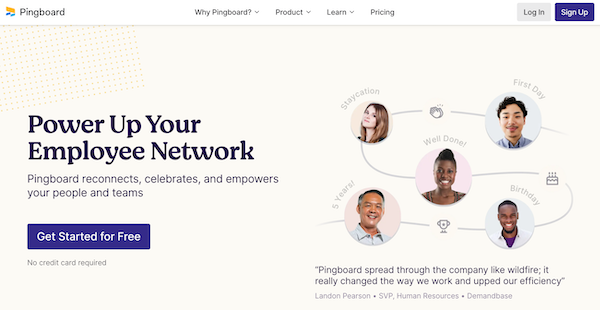
Pingboard enables you to build better team relationships by providing tools that you can use to celebrate your members. You can invite them to take part in peer recognition to promote a positive work environment. Additionally, you can also celebrate employee milestones, such as birthdays and work anniversaries.
Pingboard also offers peer-to-peer recognition tools that let employees call out coworkers for a job well done. This helps managers see what type of work other employees are up to and prepare accurate performance reports.
Show MoreOverview of Pingboard Benefits
Onboarding Tools
Pingboard offers onboarding tools that you can use to help your new employees learn more about your company at a glance. The org chart assists them in identifying their role within your company, their teams, and the overall function of their department. This platform also enables you to customize their onboarding documents to show first-day info to help lessen their anxiety about joining the company.
Employee Profiles
Pingboard enables you to get to know your employees and team members through profiles that offer information like their skills and interests. These profiles can then be used to play the Who’s Who game, which helps your coworkers get to know their teammates. You can also add fun facts to your profile to further facilitate the networking process.
Team Connection
Pingboard helps you improve team connection by inviting you to take part in a workplace culture that is built on positive recognition and employee celebration. Through the peer recognition tool, your team can leave genuine feedback to each other so that they can improve and build self-confidence in their skills. This platform also enables you to celebrate birthdays, work anniversaries, and first-days.
In addition, Pingboard offers a Who’s Who game for your company, enabling employees to learn names, roles, and faces of their colleagues.
Integrations
Pingboard provides integrations to help you achieve efficiency in your workflow. Integrations with ADP, Okta, and G Suite helps in data management. Meanwhile, slack integration helps in providing real-time team updates and distributing peer recognition. For security, you can take advantage of this platform’s integrations with Okta, OneLogin, and other security software.
Shareable calendar
Pingboard also offers a shareable calendar that lets you keep track if yourcoworkers are working from home, out sick, or out of the office. Employees can also use this tool to request time off. This way, managers can easily pull reports on total PTO.
Show MoreOverview of Pingboard Features
- Employee Profiles
- Org Chart
- Employee Directory
- Away Message
- Peer Recognition
- Who’s Who Quiz
- Employee Milestones
- Integrations
What Problems Will Pingboard Solve?
Problem #1: Being part of a large team
If you’re walking into a meeting and you need to know everyone’s name, role, and a little about them, you can quickly search and browse Pingboard for those answers.
Problem #2: The work from home setting makes it hard for team members
When you are onboarding someone, especially now when a lot of people are working from home, it’s hard for them to understand who works for who, who does what, even simply the name of their coworkers. If you give someone access to an org chart made by Pingboard before they start it’s easy for them see the hierarchy of their new company. They can see the various teams across the company, they can search for roles that they’ll most likely work with so they know more about future coworkers. This helps speed up employees’ onboarding experience and helps them feel more welcome.
Problem #3: Creating and sustaining a work culture that is inclusive can be challenging for remote teams.
When people are working from home, it’s hard for them to stay connected to coworkers and the company direction. With Pingboard employees can see projects that people are excelling in with peer to peer recognition. They can see what roles are being hired for with Pingboard’s hiring flag in the interactive org chart. They can see birthdays, promotions, upcoming coworkers vacations. Employees can also feel more connected to coworkers by going to their profile and hitting the Connections button. This brings up all of the coworkers who share skills, interests, hobbies, and past experience with
Awards & Quality Certificates


Pingboard Position In Our Categories
Because businesses have distinct business-related demands, it is sensible they avoid adopting a one-size-fits-all, ideal solution. Nevertheless, it would be difficult to try to pinpoint such a software solution even among well-known software systems. The best step to do would be to write down the different major aspects which merit scrutiny like major features, pricing, technical skill competence of the employees, company size, etc. Next, you should conduct the product research thoroughly. Go over these Pingboard analyses and check out the other software solutions in your shortlist in detail. Such comprehensive research guarantee you keep away from unfit applications and choose the system that has all the benefits your company requires.
Position of Pingboard in our main categories:
TOP
200
Pingboard is one of the top 200 HR Management Software products
If you are interested in Pingboard it could also be sensible to analyze other subcategories of HR Management Software collected in our database of SaaS software reviews.
There are popular and widely used applications in each software category. But are they automatically the best fit for your enterprise’s unique requirements? A trendy software application may have thousands of users, but does it provide what you need? For this reason, do not blindly spend on popular systems. Read at least a few Pingboard HR Management Software reviews and think about the elements that you want in the software such as the cost, main tools, available integrations etc. Then, choose a few apps that fit your wants. Try out the free trials of these platforms, read online opinions, get clarifications from the seller, and do your investigation systematically. This profound homework is certain to assist you choose the best software application for your organization’s unique wants.
How Much Does Pingboard Cost?
Pingboard Pricing Plans:
Free Trial
Team
$123.75/month
Company
$248.75/month
What are Pingboard pricing details?
Pingboard Pricing Plans:
Free Trial
Team
$123.75/month
Company
$248.75/month
Pingboard offers two enterprise pricing packages to choose from:
Team – $123.75/month
- Up to 50 users
- Directory and profiles
- Org charts
- Plan and collaborate
- Peer recognition
- Who’s who quiz
- Who’s out
- Calendar
- Mobile apps
- Sync employee data
- Share the org chart
- Reports
- Integrate with Slack
Company – $248.75/month
- Up to 100 users (add more for $1.25/ea.)
- All of Team plan features
- Invite your whole company
- Advanced syncing
- API
User Satisfaction
Positive Social Media Mentions
26
Negative Social Media Mentions
1
We are aware that when you choose to get a HR Management Software it’s important not only to see how professionals evaluate it in their reviews, but also to find out if the real people and enterprises that bought it are indeed happy with the product. That’s why we’ve designer our behavior-based Customer Satisfaction Algorithm™ that gathers customer reviews, comments and Pingboard reviews across a broad range of social media sites. The data is then featured in an easy to digest form indicating how many users had positive and negative experience with Pingboard. With that information available you will be ready to make an informed business decision that you won’t regret.
Video
Technical details
Devices Supported
- Web-based
Deployment
- Cloud Hosted
Language Support
- English
Pricing Model
- Free
- Monthly payment
- Annual Subscription
Customer Types
- Small Business
- Large Enterprises
- Medium Business
- Freelancers
What Support Does This Vendor Offer?
- phone
- live support
- training
- tickets
What integrations are available for Pingboard?
Pingboard supports integration with the following applications:
- Microsoft Azure Active Directory
- ADP
- BambooHR
- G Suite / Google Apps
- Namely
- Okta
- OneLogin
- Slack
- Automatic File Imports (SFTP)
- Justworks
- Gusto
- TriNet
- Zenefits

Pingboard
is waiting for
your first review.

Write your own review of this product
ADD A REVIEWMore reviews from 0 actual users:


Join a community of 7,369 SaaS experts
Thank you for the time you take to leave a quick review of this software. Our community and review base is constantly developing because of experts like you, who are willing to share their experience and knowledge with others to help them make more informed buying decisions.
Sign in with LinkedIn
Why we require LinkedIn?
- Show the community that you're an actual user.
- We will only show your name and profile image in your review.
- You can still post your review anonymously.
OR
Sign in with company emailSign in with company email
Popular Pingboard Alternatives





Top Competitors To Pingboard By Price
Product name:
Price:




Trending HR Management Software Reviews


Pingboard Comparisons
Product name:





Page last modified



 Why is FinancesOnline free?