

Zoapi Review



What is Zoapi?
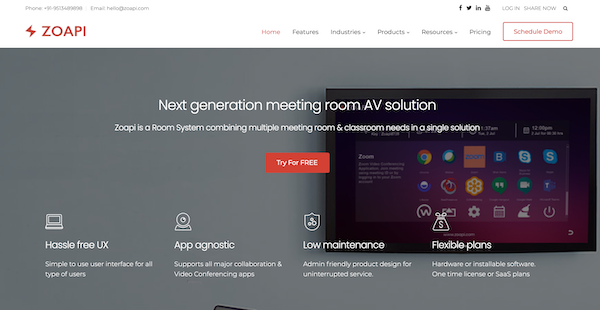
Zoapi is a meeting room solution that enables you to hold video conferencing events and conduct presentations on a single platform. The dashboard provides you with real-time information to monitor your meetings, manage your devices, and export statistics and analytics to help you make better business decisions.
Through the calendar integrations, Zoapi allows you to book meeting rooms, schedule your events, and view your calendar on any device so you can ensure attendance. You can also use this platform to create customizable digital signage to emphasize and advertise your brand.
For presentations, Zoapi allows you to share your screen through wireless or HDMI cables. You can also use the annotation features to create on-screen notes and unlock whiteboarding capabilities for better collaboration. Additionally, this platform has Bluetooth support so you can connect your presentation devices quickly and efficiently.
Show MoreOverview of Zoapi Benefits
Meetings and Video Conferences
Zoapi provides meeting tools that you can use to conduct better presentations. In your meeting rooms, you can share your screen wirelessly. You can also connect devices, such as screen pointers or mouses, through the Bluetooth function. Additionally, this solution supports all major video conferencing apps so you can connect with your guests from various platforms. Outside of your meeting rooms, you can create and display digital signages to promote your brand or post digital announcements.
Booking and Scheduling
Zoapi offers booking and scheduling tools to match schedules with your attendees and coordinate everyone’s availability with ease. This platform integrates with major calendar applications, such as Google Calendar and Microsoft Exchange, which enables you to click-to-join, receive meeting reminders, and view next meeting details. Meanwhile, it also provides meeting room status. Through the tablet support, you can mount your device on the meeting room door so you can view each room’s availability and schedule before booking.
Online Dashboard
Zoapi offers an online dashboard that generates real-time statistics and analytics to keep you informed at all times. You can view meeting room usage on a monthly or weekly basis. You can also use the admin dashboard and remote device management so that you can ensure the security of your business meetings.
Show MoreOverview of Zoapi Features
- Screen Sharing
- Video Conferencing
- Digital Signage
- Calendar Integration
- Room Scheduling
- Online Dashboard
What Problems Will Zoapi Solve?
- When multiple users want to present in a meeting room, the conventional approach of using cables does not work. Zoapi can help multiple users present and collaborate seamlessly.
- Video conferencing market is fragmented and you need your meeting room equipment to support all major video conferencing platforms not just Zoom or MS Teams. Zoapi supports all major 3rd party video conferencing and collaboration applications
- Meeting room displays are idle most of the time which can be used for various corporate announcements and as an advertising space. Zoapi enables you to use your displays better.
Awards & Quality Certificates


Zoapi Position In Our Categories
Knowing that companies have unique business-related demands, it is prudent they steer clear of paying for a one-size-fits-all, ideal business application. Be that as it may, it is hard to try to pinpoint such a software solution even among popular software solutions. The practical step to do should be to make a list of the various key functions that entail consideration including major features, packages, technical skill ability of staff members, company size, etc. After which, you should double down on your research fully. Go over some Zoapi evaluations and scrutinize the other software solutions in your list in detail. Such all-encompassing research ascertains you take out unfit applications and pay for the one that delivers all the tools your business requires for optimal results.
Position of Zoapi in our main categories:
TOP
500
Zoapi is one of the top 500 Collaboration Software products
If you are considering Zoapi it might also be a good idea to check out other subcategories of Collaboration Software listed in our database of SaaS software reviews.
There are well-liked and widely used applications in each software group. But are they automatically the best fit for your company’s special needs? A market-leading software product may have thousands of subscribers, but does it offer what you need? For this reason, do not blindly invest in popular systems. Read at least a few Zoapi Collaboration Software reviews and mull over the aspects that you want in the software such as the cost, main tools, available integrations etc. Then, choose a few solutions that fit your requirements. Try out the free trials of these products, read online reviews, get information from the seller, and do your homework meticulously. This exhaustive research is certain to help you find the best software application for your company’s unique requirements.
How Much Does Zoapi Cost?
Zoapi Pricing Plans:
Free Trial
Zoapi Room Scheduler App
$4/month
Zoapi Lite
$10/month
Zoapi Premium
$15/month
Zoapi Enterprise
Contact vendor
Zoapi Hub Basic
Contact vendor
Zoapi Hub Pro
Contact vendor
What are Zoapi pricing details?
Zoapi Pricing Plans:
Free Trial
Zoapi Room Scheduler App
$4/month
Zoapi Lite
$10/month
Zoapi Premium
$15/month
Zoapi Enterprise
Contact vendor
Zoapi Hub Basic
Contact vendor
Zoapi Hub Pro
Contact vendor
Zoapi offers six enterprise pricing packages that you can choose from:
Zoapi Room Scheduler App – $4/month
- Billed annually
- On door tablet application to manage meeting room availability
- Displays current meeting room status and meetings scheduled for the day
- View entire meeting room calendar
- Book Ad-hoc meetings
- Check-in feature
Zoapi Lite – $10/month
- Billed annually
- Windows 10
- 16 simultaneous screen sharing
- Full suite in video conferencing
- Online dashboard account
- Room status in dashboard
- Room management in dashboard
- Room utilization summary in dashboard
- 1MB per license drive space in dashboard
- 1 image/license for digital signage
- Bluetooth support
- Performance and security OTA upgrades
- Wi-fi access point
- Optional upgrade to premium plan at $99/year
Zoapi Premium – $15/month
- All of Zoapi Lite plan features
- Bulk room management in dashboard
- Detailed room utilization status in dashboard
- 3MB per license drive space in dashboard
- Unlimited images for digital signage
- Bulk deploy app in App Store
- Full feature OTA upgrades
- Calendar integration
- One Room Scheduler App key
- Export stats and analytics reports
- Email alerts for room status and reports
- Camera analytics for the room
Zoapi Enterprise – By quote
- All of Zoapi Premium plan features
- Bulk pricing
- Unlimited drive space in dashboard
- Extended support
- Customization requests
Zoapi Hub Basic – By quote
- Pre-installed on Intel Celeron Mini-PC
- Windows 10 IOT license
- One-time license for Lite Plan
- 4 simultaneous screen sharing
- Single display support
- HD display
- 720p camera support
- Optional upgrade to Premium plan at $99/year
- Preferred for wireless sharing or video conferencing
- Suitable for small huddle rooms
Zoapi Hub Pro – By quote
- All of Zoapi Hub Basic plan features
- Pre-installed on Intel i3 Mini-PC
- 16 simultaneous screen sharing
- Dual display support
- 4K display
- Full HD camera support
- Preferred for wireless sharing and video conferencing
- Suitable for medium and large meeting rooms
User Satisfaction
Positive Social Media Mentions
25
Negative Social Media Mentions
0
We are aware that when you make a decision to purchase a Collaboration Software it’s important not only to see how professionals evaluate it in their reviews, but also to check whether the real clients and companies that purchased this software are indeed satisfied with the product. That’s why we’ve designer our behavior-based Customer Satisfaction Algorithm™ that gathers customer reviews, comments and Zoapi reviews across a broad range of social media sites. The information is then displayed in a simple to understand format showing how many users had positive and negative experience with Zoapi. With that information at your disposal you will be ready to make an informed purchasing decision that you won’t regret.
Video
Technical details
Devices Supported
- Windows
- Linux
- Android
- iPhone/iPad
- Mac
Deployment
- Cloud Hosted
- On Premise
Language Support
- English
Pricing Model
- Annual Subscription
- Quote-based
Customer Types
- Small Business
- Large Enterprises
- Medium Business
What Support Does This Vendor Offer?
- phone
- live support
- training
- tickets
What integrations are available for Zoapi?
Zoapi integrates with VC platforms Zoom and Microsoft Teams. Integrations for the following calendar services are also available:
- Google Calendar,
- Office 365,
- MS Exchange, and more.

Zoapi
is waiting for
your first review.

Write your own review of this product
ADD A REVIEWMore reviews from 0 actual users:


Join a community of 7,369 SaaS experts
Thank you for the time you take to leave a quick review of this software. Our community and review base is constantly developing because of experts like you, who are willing to share their experience and knowledge with others to help them make more informed buying decisions.
Sign in with LinkedIn
Why we require LinkedIn?
- Show the community that you're an actual user.
- We will only show your name and profile image in your review.
- You can still post your review anonymously.
OR
Sign in with company emailSign in with company email
Popular Zoapi Alternatives




Top Competitors To Zoapi By Price
Product name:
Price:


Trending Collaboration Software Reviews


9.1
93%

8.0
100%

8.0
94%

Zoapi Comparisons
Product name:







Page last modified



Did you find this review useful?
Yes
No
Thank you for your feedback
How can we make this page better?
Unsure about this software?
FIND ALTERNATIVES
 Why is FinancesOnline free?