

Hibox Review



What is Hibox?
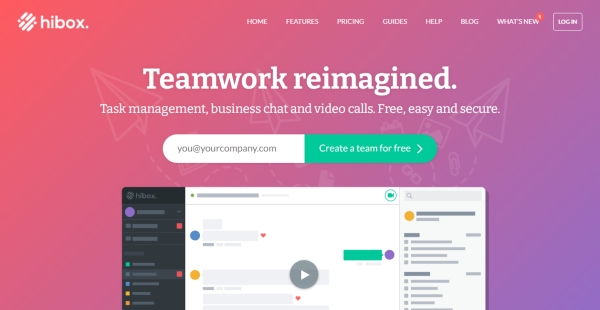
Hibox is a collaboration app that gives project, sales, marketing, and HR teams a secure way to handle their work and interact. It enhances team communication and coordination so users can achieve greater connectivity, engagement, and productivity. Hibox allows you to plan, track, and manage projects and tasks comprehensively and efficiently. You can create recurring tasks using task templates, prioritize and assign tasks and subtasks with schedules and reminders, and view projects and tasks in a calendar.
Hibox also permits you and your co-workers to communicate and collaborate in real-time through one-on-one or group video conferencing and chatting. You’ll be able to chat with colleagues and share screens and files during video conferences. Its company chat capabilities include GIF and emoji sharing, @mentioning, and drag-and-drop message quoting.
Moreover, the app makes it easy for users to share files with each other. It lets them locate files in single or multiple streams, preview and comment in documents and files, and share files on the go using Hibox’s mobile app. Hibox can be integrated with Google Drive, Dropbox, and Box as well.
Show MoreOverview of Hibox Benefits
Team Communication & Collaboration
Hibox is loaded with chatting and video conferencing features that enable teams to efficiently communicate and collaborate in real-time without logging into separate applications. Users can launch video conference calls with their co-workers individually or as a group by just clicking the video icon. They can also monitor and manage tasks, send chat messages, and share documents and files while having a video conference meeting.
Using Hibox’s Android and iOS app, they’ll be able to engage in private or group chat conversations and work on their projects and tasks wherever they are. Additionally, Hibox uses an AI virtual assistant that automatically tracks and analyzes chat conversations and messages It recommends specific actions users need to do based on their past chat interactions, such as converting documents or files to tasks and assigning them to the right teammates.
Project & Task Management
The collaboration app aids users to stay on top of their projects and tasks. They can divide complicated or long-term projects into subtasks, set deadlines, and assign tasks to different individuals. They’re also provided with the capability to create team or personal to-do lists and change the order of tasks based on priority by simply dragging and dropping them on the lists.
Hibox has a built-in calendar where they can conveniently view and track projects and tasks along with their set timelines and deadlines. Plus, they’ll see notifications and reminders when the project or tasks’ due dates and times are near or have passed. As they work on their projects and tasks, they can also click the play or pause button to record and monitor the number of hours they spent on them.
File Management
With Hibox’s file sharing features, users can quickly, conveniently, and securely share, access, and handle all important documents and files they need. For instance, you can integrate various cloud file storage systems, like Box, Dropbox, and Google Drive with Hibox, and use them to store, share, and manage different types of files. These include images, videos, spreadsheets, PDF documents, recordings, and reports.
Furthermore, Hibox allows you and your colleagues to check and access all documents and files shared in single or multiple chat streams. You can even search for specific files using keywords or dates directly within streams. You’ll also be able to add attachments and comments to different versions of documents and files.
Show MoreOverview of Hibox Features
- Video Conferencing
- Private/Group Chats
- AI Virtual Assistant
- Task Management
- Project Calendar View
- Reminders
- Personal To-Dos
- File Sharing
- External App Integrations
What Problems Will Hibox Solve?
Inbox overload: When team members can communicate and share needed files in a real-time chat environment, it greatly reduces the need for one-to-one or group email strings. Files are easy to access so you don’t need to search past emails to find them.
Improper or missing project communication: Assigning tasks to the appropriate people lets them know what needs to be done and lets the assigner know whether or not that task has been completed without having to ask. Customers can create complex tasks by adding sub-tasks, adding help documentation, guidance notes, and more.
In-time voice communication: Zoom and Google Meet make it difficult to make a quick call on an as-needed basis to clear something up. Hibox allows you to make those calls when needed with one click.
Awards & Quality Certificates


Hibox Position In Our Categories
Since companies have distinct business wants, it is rational that they avoid deciding on a one-size-fits-all, ideal software product. Be that as it may, it would be difficult to try to find such application even among well-known software products. The efficient thing to do would be to jot down the various critical factors which need research such as critical features, packages, technical skill aptitude of the employees, business size, etc. The second step is, you should perform your product research thoroughly. Go over some of these Hibox review articles and explore the other software programs in your shortlist more closely. Such all-encompassing product research guarantees you stay away from unsuitable software solutions and pay for the system which includes all the function your business requires in growing the business.
Position of Hibox in our main categories:
TOP
50
Hibox is one of the top 50 Collaboration Software products
It is crucial to note that hardly any service in the Collaboration Software category will be a perfect solution that can meet all the goals of various business types, sizes and industries. It may be a good idea to read a few Hibox Collaboration Software reviews first as some solutions can excel just in a really narrow set of applications or be prepared with a very specific industry in mind. Others can function with an intention of being easy and intuitive and therefore lack complex functionalities needed by more experienced users. There are also software that focus on a wide group of customers and provide a rich feature base, however this in most cases comes at a higher cost of such a solution. Ensure you're aware of your requirements so that you pick a service that offers all the functionalities you search for.
How Much Does Hibox Cost?
Hibox Pricing Plans:
Free Trial
Free
Free
Pro
$6/user/month
Enterprise
$8/user/month
What are Hibox pricing details?
Hibox Pricing Plans:
Free Trial
Free
Free
Pro
$6/user/month
Enterprise
$8/user/month
Hibox offers two plans for users to choose from, including an enterprise pricing plan that allows you to store and share unlimited files, apply advanced security features, and access complete message history. Here are the details:
Free – $0/user/month
Pro – $6/user/month
- Encrypted chat
- Task management
- File sharing
- Video conferences
- Unlimited search
- Online support
- 5 GB file storage/users
Enterprise – $8/user/month
- Everything in Pro, plus…
- Unlimited file storage
- Advanced security features
- Priority support
- Activity logs
- Custom URL (with 20+ users)
- Integrations with external systems
User Satisfaction
Positive Social Media Mentions
111
Negative Social Media Mentions
4
We are aware that when you choose to get a Collaboration Software it’s crucial not only to find out how professionals score it in their reviews, but also to check if the real clients and enterprises that purchased this software are indeed satisfied with the service. Because of that need we’ve devised our behavior-based Customer Satisfaction Algorithm™ that collects customer reviews, comments and Hibox reviews across a vast range of social media sites. The data is then presented in a simple to digest way indicating how many customers had positive and negative experience with Hibox. With that information at your disposal you will be equipped to make an informed business decision that you won’t regret.
Video
Technical details
Devices Supported
- Windows
- Android
- iPhone/iPad
- Mac
- Web-based
Deployment
- Cloud Hosted
Language Support
- English
- German
- Spanish
- French
- Italian
- Portugese
Pricing Model
- Free
- Monthly payment
Customer Types
- Small Business
- Large Enterprises
- Medium Business
- Freelancers
What Support Does This Vendor Offer?
- phone
- live support
- training
- tickets
What integrations are available for Hibox?
Hibox integrates with any email service, such as:
- Google Drive
- Dropbox
- Box
Hibox User Reviews
Hibox average rating:
5/5
Overall impression
5/5
Customer Support
5/5
Value for Money
5/5
Ease of Use
Write your own review of this product
ADD A REVIEWMore reviews from 1 actual users:
Sort by:
Latest
- Latest
- Most useful
- Most positive
- Most negative
Excellent for team collaboration & project management
Read full review >
5/5
Overall impression
5/5
Customer Support
5/5
Value for Money
5/5
Ease of Use
Published on: 19.07.2021
Company Size: 1-10 Employees
Industry: Information Technology and Services
PROS: Hibox really helped me with project management with great UI. Their features like steam chat, personal chat, task management, group video chat, file sharing are excellent. Moreover, features like search, calendar, audit logs, history are great additions. People in my company really enjoy using emojis & GIF's. Google drive & Dropbox integrations work flawlessly. Its all in one package!
CONS: No issues so far.


Join a community of 7,369 SaaS experts
Thank you for the time you take to leave a quick review of this software. Our community and review base is constantly developing because of experts like you, who are willing to share their experience and knowledge with others to help them make more informed buying decisions.
Sign in with LinkedIn
Why we require LinkedIn?
- Show the community that you're an actual user.
- We will only show your name and profile image in your review.
- You can still post your review anonymously.
OR
Sign in with company emailSign in with company email
Popular Hibox Alternatives





Top Competitors To Hibox By Price
Product name:
Price:




Trending Collaboration Software Reviews


Hibox Comparisons
Product name:



Hibox user reviews
Excellent for team collaboration & project management
Read full review >
5/5
Overall impression
5/5
Customer Support
5/5
Value for Money
5/5
Ease of Use
Published on: 19.07.2021
Company Size: 1-10 Employees
Industry: Information Technology and Services

Page last modified



Did you find this review useful?
Yes
No
Thank you for your feedback
How can we make this page better?
Unsure about this software?
FIND ALTERNATIVES
 Why is FinancesOnline free?